
1. Introduction
Thank you for choosing the NAVIFORCE NF8051T Multifunction Chronograph Watch. This manual provides essential information to help you understand and operate your watch effectively. Please read these instructions carefully to ensure proper use and to maintain the watch's performance and longevity.
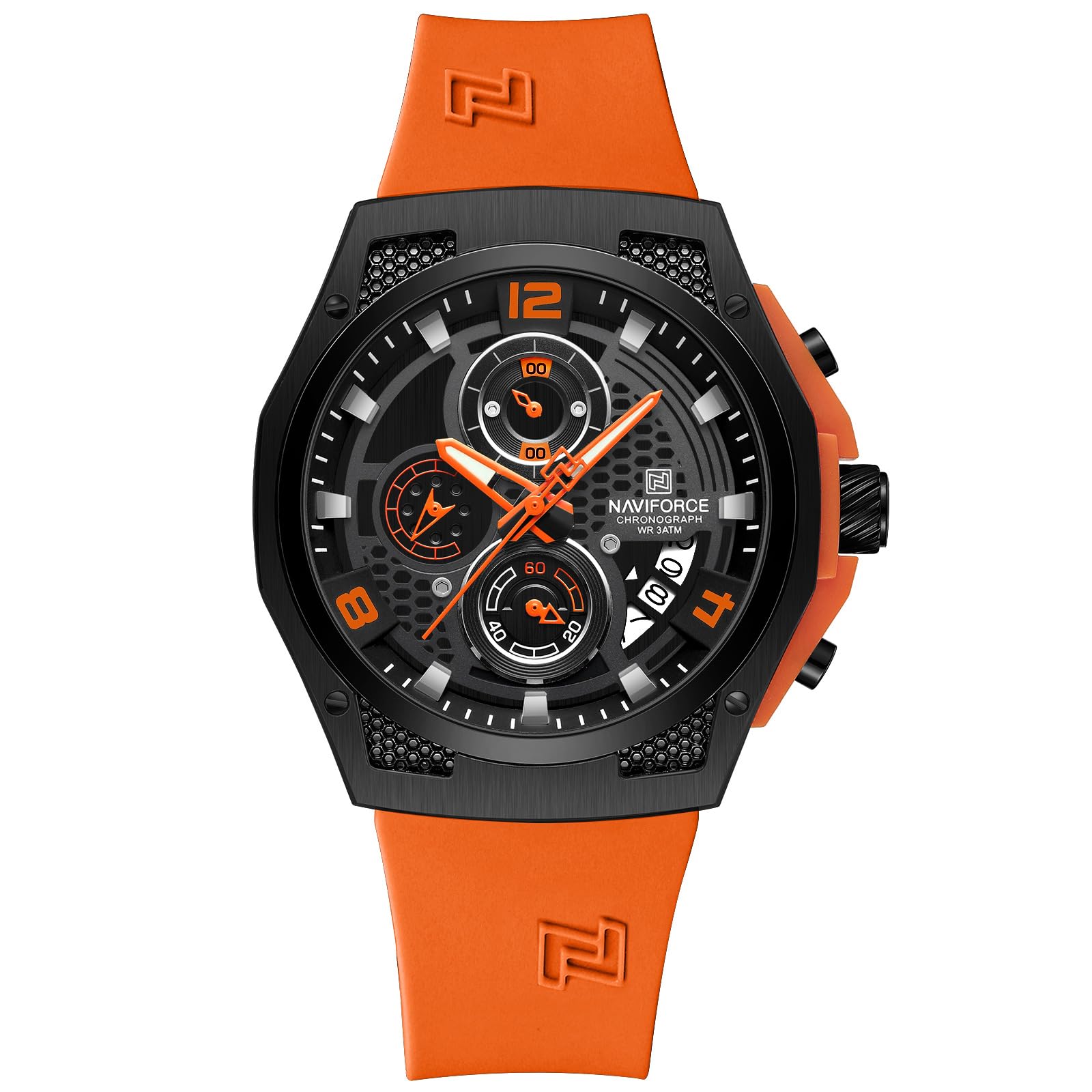
Image 1.1: Front view of the NAVIFORCE NF8051T watch, showcasing its black dial, orange accents, and silicone strap.
2. Product Overview
The NAVIFORCE NF8051T is an analog quartz watch featuring a chronograph function, date display, and a durable silicone strap. Its robust design is suitable for daily wear.
2.1 Watch Components
- Crown (A): Used for setting time and date.
- Pusher (B): Activates and stops the chronograph.
- Pusher (C): Resets the chronograph.
- Hour Hand: Indicates the hour.
- Minute Hand: Indicates the minute.
- Second Hand: Indicates the second.
- Chronograph Second Hand: Large second hand used for chronograph timing.
- Chronograph Minute Sub-dial: Measures elapsed minutes for the chronograph.
- 24-Hour Sub-dial: Displays time in a 24-hour format.
- Date Window: Displays the current date.

Image 2.1: Angled view of the NAVIFORCE NF8051T watch, highlighting the textured case and silicone strap.
3. Setup and Initial Adjustment
3.1 Setting the Time
- Pull the crown (A) out to position 2.
- Rotate the crown (A) to move the hour and minute hands to the desired time. Ensure the 24-hour sub-dial also aligns correctly (e.g., if it's 3 PM, the 24-hour sub-dial should point to 15).
- Push the crown (A) back into position 0 to start the watch.
3.2 Setting the Date
- Pull the crown (A) out to position 1.
- Rotate the crown (A) clockwise or counter-clockwise to adjust the date in the date window.
- Once the correct date is set, push the crown (A) back into position 0.
Note: Avoid setting the date between 9:00 PM and 3:00 AM, as this may interfere with the automatic date change mechanism.
4. Operating the Chronograph
The chronograph function allows you to measure elapsed time.
4.1 Starting and Stopping the Chronograph
- Press pusher (B) to start the chronograph. The chronograph second hand and minute sub-dial will begin to move.
- Press pusher (B) again to stop the chronograph. The elapsed time will be indicated by the chronograph second hand and the chronograph minute sub-dial.
4.2 Resetting the Chronograph
- After stopping the chronograph (using pusher B), press pusher (C) to reset all chronograph hands to their zero positions.
4.3 Chronograph Hand Adjustment (If Misaligned)
If the chronograph hands do not reset to the zero position, they can be manually adjusted:
- Pull the crown (A) out to position 2.
- Press pusher (B) repeatedly to advance the chronograph second hand until it aligns with the 12 o'clock (zero) position.
- Press pusher (C) repeatedly to advance the chronograph minute sub-dial hand until it aligns with its zero position.
- Once all chronograph hands are aligned, push the crown (A) back into position 0.
5. Maintenance and Care
5.1 Cleaning Your Watch
- Wipe the watch case and crystal with a soft, dry cloth.
- For the silicone strap, use a mild soap solution and a soft brush, then rinse thoroughly with clean water and dry completely.
- Avoid using harsh chemicals or abrasive materials, as these can damage the watch's finish.
5.2 Water Resistance (3ATM / 30 Meters)
Your NAVIFORCE NF8051T watch is water-resistant to 3 ATM (30 meters). This means it is suitable for daily use, splashes, and rain. It is not suitable for showering, bathing, swimming, diving, or any water sports.
- Do not operate the crown or pushers while the watch is wet or submerged in water.
- Ensure the crown is fully pushed in to maintain water resistance.
- If the watch is exposed to saltwater, rinse it with fresh water and dry it thoroughly.

Image 5.1: The NAVIFORCE NF8051T watch demonstrating its 3ATM water resistance against splashes.
5.3 Battery Replacement
The watch is powered by a quartz battery. When the watch stops or the second hand begins to skip, it indicates a low battery. Battery replacement should be performed by a qualified watch technician to ensure proper sealing and water resistance.
6. Troubleshooting
- Watch not running: Check if the crown is fully pushed in. If the watch still does not run, the battery may need replacement.
- Chronograph hands not resetting to zero: Refer to section 4.3 for manual chronograph hand adjustment.
- Date not changing: Ensure the time is set correctly, especially the AM/PM cycle. Avoid setting the date between 9:00 PM and 3:00 AM.
- Condensation inside the watch: This may indicate a loss of water resistance. Avoid further contact with water and seek professional service immediately.
7. Specifications
Detailed technical specifications for the NAVIFORCE NF8051T watch:

Image 7.1: Diagram illustrating key dimensions and features of the NAVIFORCE NF8051T watch.
| Feature | Specification |
|---|---|
| Model Number | NF8051T |
| Movement Type | Quartz |
| Display Type | Analog |
| Case Diameter | 44 Millimetres |
| Case Thickness | 13 Millimetres |
| Band Material | Silicone |
| Band Width | 26 Millimetres |
| Band Length | 255 Millimetres |
| Water Resistance Depth | 30 Metres (3ATM) |
| Crystal Material | Mineral |
| Clasp Type | Buckle |
| Special Features | Chronograph, Calendar, Luminous Display |
| Item Weight | 290 g |
| Manufacturer | PRAMUKH_ENTERPRISE |

Image 7.2: Size comparison of the NAVIFORCE NF8051T watch with a standard credit card, indicating its dimensions.
8. Warranty Information
Your NAVIFORCE NF8051T watch comes with a 1-year manufacturing warranty from the date of purchase.
8.1 Warranty Coverage
This warranty covers manufacturing defects in materials and workmanship under normal use. It includes defects in the watch movement, hands, and dial.
8.2 Exclusions
The warranty does not cover:
- Damage resulting from improper handling, lack of care, accidents, or normal wear and tear.
- Damage caused by unauthorized repairs or modifications.
- Battery, crystal, strap, or case damage.
- Water damage if the watch was used beyond its specified water resistance limits or if the crown/pushers were operated underwater.
To claim warranty service, please retain your proof of purchase and contact the seller or manufacturer.
9. Customer Support
For any questions, technical assistance, or warranty claims regarding your NAVIFORCE NF8051T watch, please contact your retailer or the manufacturer directly. Please have your model number (NF8051T) and proof of purchase available when contacting support.
Manufacturer: PRAMUKH_ENTERPRISE, Delhi India


