
Introduction
This manual provides detailed instructions for the installation, operation, and maintenance of your Wefomey COB LED Strip Light. This 32.8ft (10m) flexible LED tape light features high-density COB LEDs, offering tunable white light from 2700K (warm white) to 6500K (cool white) and 0-100% dimmability. Control is available via an RF remote and a dedicated mobile application. The strip is designed for various indoor lighting applications, including under cabinets, bedrooms, and kitchens.

Image: Comparison of COB LED strip (left) and SMD LED strip (right), illustrating the uniform, continuous light of COB technology versus the diffuse, discontinuous light of SMD. COB strips offer a Color Rendering Index (CRI) greater than 90, indicating strong color restoration.

Image: A hand holding a section of the COB LED strip light, emphasizing its flicker-free operation. This feature is designed to reduce visual fatigue and protect eye comfort.
What's in the Box
Verify that all components are present in your package:
- 1 x 32.8ft (10m) 24V COB LED strip light (2700K-6500K tunable white)
- 1 x RF remote control
- 1 x Controller
- 1 x FCC Listed DC 24V 48W power supply
- COB LED strip connectors (2Pin 8mm)
- Mounting brackets

Image: A diagram illustrating the main components of the Wefomey COB LED Strip Light kit, including the 32.8ft LED strip, the controller, and the 24V 48W power supply. Key specifications like CRI, CCT, length, width, and cutting size are also listed.
Setup and Installation
Follow these steps for proper installation:
- Prepare the Surface: Ensure the installation surface is clean, dry, and smooth for optimal adhesive performance.
- Connect Components: Connect the COB LED strip to the controller, and then connect the controller to the 24V 48W DC power supply. Ensure all connections are secure.
- Adhere the Strip: The flexible COB light strip features strong adhesive tape on the back. Peel off the protective backing and firmly press the strip onto the desired surface. For added security, use the included mounting brackets.
- Power Connection: Plug the power supply into a standard electrical outlet.
Important Tips:
- The red and black wires at the end of the strip are for connecting a DC connector, allowing you to power longer strips from both ends if needed.
- The included 48W power supply is sufficient for the 32.8ft strip. If you extend the total length beyond 32.8ft, you must replace it with a higher output 24V power supply to prevent damage and ensure proper function.
Operating Instructions
Your Wefomey COB LED Strip Light can be controlled using the included RF remote or the 'LotusLamp X' mobile application.
App Control (LotusLamp X)
Download the 'LotusLamp X' app from your device's app store. Once installed, connect to the LED strip via Bluetooth. The app allows you to:
- Adjust color temperature from 2700K (warm white) to 6500K (cool white).
- Adjust brightness from 0% to 100%.
- Set timers for automatic on/off scheduling.
- Group multiple Wefomey lights for synchronized control.
The app also features a power-on memory function, retaining your last lighting mode, color, and brightness settings.

Image: A smartphone displaying the 'LotusLamp X' app interface, showing controls for adjusting color temperature from warm white (2700K) to cool white (6500K) and brightness from 1-100%.
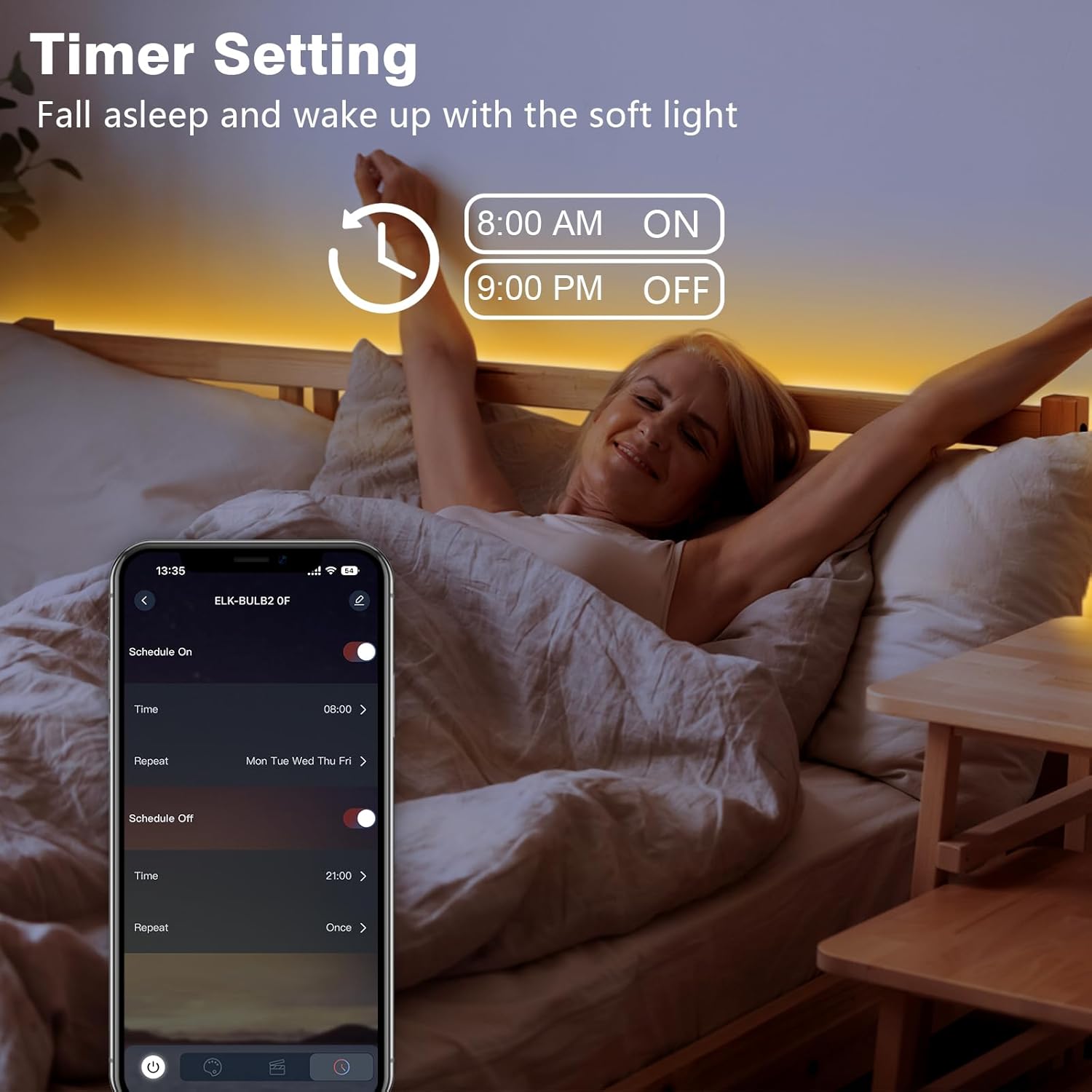
Image: A smartphone screen showing the timer setting feature within the 'LotusLamp X' app. Users can schedule the lights to turn on and off at specific times, such as 8:00 AM on and 9:00 PM off, for a gentle wake-up or sleep routine.

Image: An interior space demonstrating the tunable white feature of the LED strip lights, with indicators for 2700K (Warm White), 3500K (Warm White), 4000K (Natural White), 5000K (Daylight White), and 6500K (Cool White) settings.

Image: A kitchen setting illustrating the 0-100% dimmable capability of the LED strip lights, with a gradient bar showing various brightness levels from 10% to 100%.
RF Remote Control
The included RF remote control provides convenient access to essential functions:
- On/Off: Power the lights on or off.
- Brightness Adjustment: Cycle through 10 levels of brightness.
- Color Temperature: Select from 5 preset color temperatures (2700K, 3500K, 4000K, 5000K, 6500K).
- Timer Function: Activate a 30-minute timer to automatically turn off the lights.
- Group Control: Control multiple compatible Wefomey lights simultaneously.
The remote has a range of 49-66ft (15-20m) in open spaces and features a power-on memory function.

Image: A hand holding the RF Wireless Remote Control, with icons indicating its functions: On/Off, 10 Levels Brightness, 5 Color Temperature settings, 30 Minutes Timer Off, and Group Control. The image also shows the LED strip installed in a kitchen, highlighting tunable white light from 2700K to 6500K.
DIY and Cutting Instructions
The Wefomey COB LED Strip Light is designed for flexibility and customization:
- Flexibility: The strip can be bent at various angles to adapt to different installation requirements.
- Cutting: The strip can be cut to your desired length. Look for the metal point marking the cutting unit (approximately every 42mm / 16.5 inches). Only cut at these designated marks.
- Reconnection: Cut sections of the strip can be reconnected using the provided 2-pin 8mm COB LED strip connectors.

Image: A hand holding the flexible COB LED strip light, demonstrating its bendability. The image also shows various applications of the strip in a bedroom and around a mirror, highlighting its 'Flexible & DIY' nature.
Using Connectors
To reconnect cut sections or create L/T-shaped connections:
- Open the Cap: Gently open the cap of the 2-pin 8mm COB LED strip connector.
- Insert Strip: Insert the COB light strip into the clip, ensuring the positive (+) and negative (-) poles of the strip align with the corresponding markings on the connector.
- Check Orientation: Double-check the orientation. If incorrect, adjust and reinsert.
- Close the Clip: Close the cap firmly to secure the connection. For L/T-shaped connections, use the appropriate connector type and ensure all poles are correctly aligned.
Note: Use a tool to press the metal piece down for a secure connection if needed.
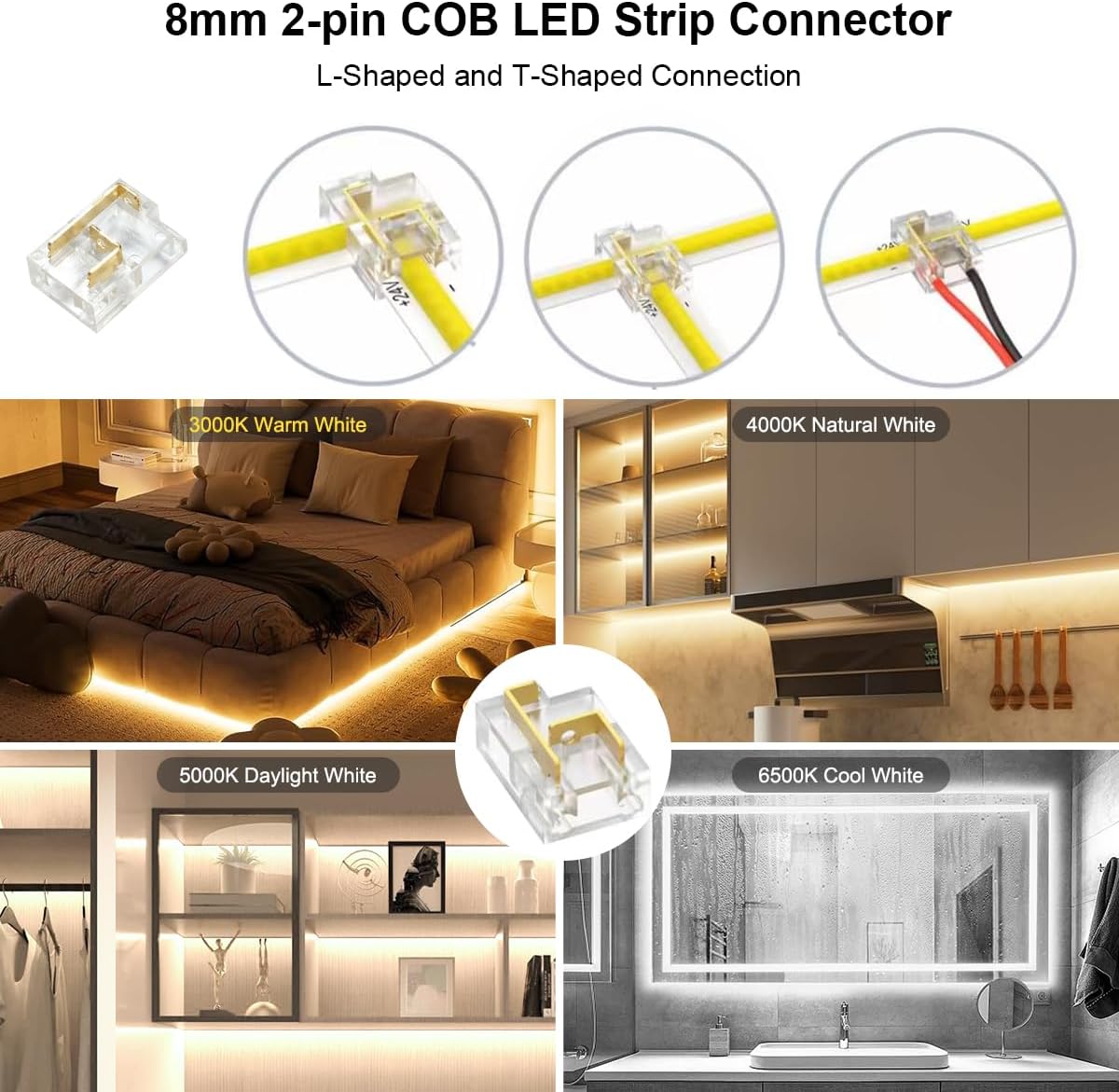
Image: A detailed diagram illustrating the steps to use 8mm 2-pin COB LED strip connectors. It shows how to open the cap, insert the COB light strip, check orientation, and close the clip. Various connection types, including L-shaped and T-shaped, are also depicted.
Maintenance
To ensure the longevity and optimal performance of your Wefomey COB LED Strip Light, follow these simple maintenance guidelines:
- Cleaning: Gently wipe the surface of the LED strip with a soft, dry cloth to remove dust. Avoid using abrasive cleaners or excessive moisture, as this can damage the electrical components.
- Adhesive Check: Periodically check the adhesive tape to ensure the strip remains securely attached. If the adhesive weakens, use the included mounting brackets or a suitable alternative adhesive for reinforcement.
- Connection Check: Ensure all electrical connections (strip to controller, controller to power supply) remain tight and free from corrosion.
- Storage: If storing the LED strip, ensure it is rolled loosely and kept in a dry, cool environment away from direct sunlight.
Troubleshooting
If you encounter issues with your Wefomey COB LED Strip Light, refer to the following common problems and solutions:
| Problem | Possible Cause | Solution |
|---|---|---|
| Lights do not turn on. | No power, loose connection, faulty power supply/controller. | Check power outlet. Ensure all connections are secure. Test with a different power supply if available. Verify the controller is functioning. |
| Lights are flickering or dim. | Insufficient power, loose connection, damaged strip section. | Ensure the power supply wattage is adequate for the strip length. Check all connections. Inspect the strip for physical damage, especially at cut points. |
| Remote control not working. | Dead battery, out of range, interference. | Replace the CR2025 battery in the remote. Ensure you are within the 49-66ft range. Reduce potential signal interference. |
| App control not connecting. | Bluetooth off, app not paired, interference. | Ensure Bluetooth is enabled on your device. Restart the app and try pairing again. Move closer to the LED strip. |
| Adhesive not holding. | Improper surface preparation, heavy load, environmental factors. | Clean the surface thoroughly before application. Use the included mounting brackets or additional adhesive for reinforcement. Avoid installing in high-humidity or extreme temperature areas. |
Specifications
| Feature | Detail |
|---|---|
| Model Number | WF-TWCOB-10M |
| Brand | Wefomey |
| Light Source Type | COB LED |
| Number of LEDs | 6080 (608 LEDs/meter) |
| Color Temperature | 2700K-6500K Tunable White |
| Dimmability | 0-100% |
| Color Rendering Index (CRI) | >90 |
| Length | 32.8ft (10 meters) |
| Width | 8mm (0.31 inches) |
| Cutting Unit | 42mm (1.65 inches) |
| Voltage | 24 Volts DC |
| Wattage | 48 Watts |
| Control Method | RF Remote, Bluetooth App (LotusLamp X) |
| Connectivity Technology | Bluetooth |
| Indoor/Outdoor Usage | Indoor |
| Water Resistance Level | Not Water Resistant (IP22) |
| Material Type | Plastic |
Warranty and Support
Manufacturer Warranty: This Wefomey COB LED Strip Light is covered by a 2-year manufacturer's warranty from the date of purchase. This warranty covers defects in materials and workmanship under normal use.
What is Not Covered: The warranty does not cover damage caused by improper installation, misuse, unauthorized modifications, accidents, or natural disasters. It also does not cover normal wear and tear.
Claiming Warranty: To make a warranty claim, please retain your proof of purchase and contact Wefomey customer support through the retailer where the product was purchased or via the official Wefomey website for assistance.
Customer Support: For technical assistance, troubleshooting, or any questions regarding your product, please refer to the contact information provided by your retailer or visit the Wefomey official support channels. Please have your model number (WF-TWCOB-10M) and purchase details ready when contacting support.