
1. Introduction
This manual provides essential information for the safe and effective operation of your TCQQ 150W Moving Head Light. Please read it thoroughly before installation and use, and retain it for future reference.
The TCQQ 150W Moving Head Light is a versatile stage lighting fixture designed for various events such as DJ performances, parties, clubs, and shows. It features a powerful 120W LED and 6x30W 5050 RGBW LEDs, offering a range of dynamic effects including gobos, colors, prisms, and strobe functions.

Figure 1.1: Application examples of the moving head light.
2. Safety Information
WARNING: To prevent fire and electric shock, do not expose this fixture to rain or moisture. Ensure proper grounding.
- Always connect to a grounded power outlet.
- Ensure the voltage of the power source matches the fixture's requirements.
- Do not open the housing; there are no user-serviceable parts inside. Refer all servicing to qualified personnel.
- Avoid direct eye exposure to the light source.
- Ensure adequate ventilation around the fixture to prevent overheating.
- Mount the fixture securely using appropriate hardware.
- Disconnect power before cleaning or servicing.
3. Package Contents
Verify that all items are present and in good condition upon unpacking:
- TCQQ 150W Moving Head Light (1 unit)
- Power Cord (1 unit)
- Instruction Manual (1 unit)
- Mounting Handle (1 unit)
- Hexagon Screws (2 units)

Figure 3.1: Contents of the product package.
4. Product Features
- Light Source: Equipped with a 120W LED and 6x30W 5050 RGBW LEDs.
- Effects: Projects 7 distinct gobos plus 1 white light gobo, 7 colors plus 1 white light, and 3 prisms. Features a 1-25Hz strobe effect.
- Bee Eye Effect: The bee eye LED rotates 360°, creating converging and diverging light patterns.
- Key Optical Parameters: Beam Angle: 3.4°; Illumination: 1000Lux @ 10m; CRI: ≥90 Ra at 8000K; Color Temperature: 8000K.
- Movement: Pan: 540°, Tilt: 180°.
- Control Modes: DMX512, Master/Slave, Auto, and Sound-activated.
- User Interface: LCD display screen with intelligent reset function for easy operation.
- Cooling System: Integrated forced cooling fan to prevent overheating and ensure longevity.
- Lifespan: Average LED lifespan of 50,000 hours.
- Construction: Durable aluminum material.
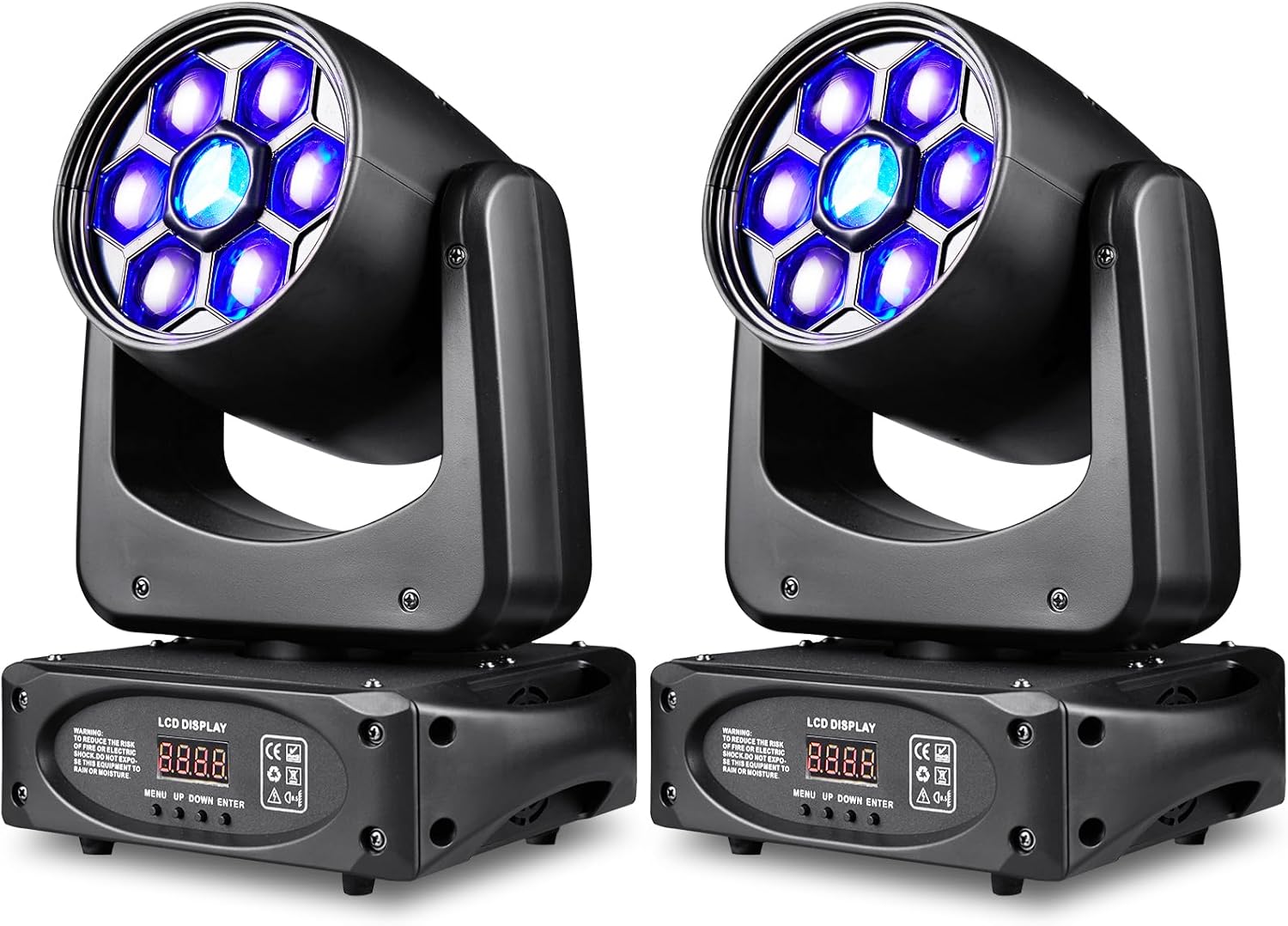
Figure 4.1: TCQQ 150W Moving Head Lights.

Figure 4.2: Examples of gobo and color effects.

Figure 4.3: Pan and Tilt movement ranges.
5. Setup and Installation
5.1 Mounting Options
The TCQQ 150W Moving Head Light is designed for flexible installation. It can be placed on a flat surface or mounted to a truss or ceiling.
- Surface Placement: Ensure the surface is stable and level to prevent the fixture from tipping.
- Truss/Ceiling Mounting: Use the provided mounting handle and hexagon screws to securely attach the fixture. Always use a safety cable (not included) as an additional precaution. Ensure the mounting structure can support the weight of the fixture.
5.2 Power Connection
Connect the provided power cord to the "POWER IN" port on the rear of the fixture and then to a suitable grounded power outlet. Ensure the power supply voltage matches the fixture's requirements (AC100-240V, 50/60Hz).
5.3 DMX Connection (Optional)
For DMX control, connect a DMX cable from your DMX controller's output to the "DMX IN" port of the first fixture. For multiple fixtures, daisy-chain them by connecting the "DMX OUT" of the first fixture to the "DMX IN" of the next, and so on.

Figure 5.1: Rear panel connections and controls.
6. Operating Instructions
The fixture can be operated in four different modes: DMX512, Master/Slave, Auto, and Sound-activated. Use the LCD display and control buttons (MENU, UP, DOWN, ENTER) to navigate and select modes and settings.
6.1 LCD Display and Control Buttons
The LCD display shows the current mode and settings. The buttons allow you to:
- MENU: Access the main menu or go back to the previous menu.
- UP: Scroll up through menu options or increase values.
- DOWN: Scroll down through menu options or decrease values.
- ENTER: Confirm selection or enter a sub-menu.
6.2 DMX512 Mode
This mode allows precise control over all functions of the fixture using a DMX controller. The TCQQ 150W Moving Head Light utilizes 15 DMX channels. Refer to the DMX channel chart (typically found in the full instruction manual) for specific channel assignments and values.
- Connect the DMX controller to the fixture as described in Section 5.3.
- Use the LCD display to set the DMX address for each fixture. Ensure each fixture has a unique address if controlled individually, or the same address for synchronized control.
- Operate the fixture using your DMX controller.
6.3 Master/Slave Mode
In Master/Slave mode, one fixture acts as the master, controlling other linked fixtures (slaves) to perform synchronized light shows without a DMX controller.
- Connect the fixtures in a daisy-chain using DMX cables (DMX OUT to DMX IN).
- Set the first fixture in the chain to "Master" mode via the LCD display.
- Set all subsequent fixtures in the chain to "Slave" mode via their LCD displays.
- The master fixture will now control all slave fixtures.
6.4 Auto Mode
Auto mode runs pre-programmed light sequences automatically. This mode is ideal for quick setup without external control.
- Select "Auto" mode from the LCD display menu.
- You may be able to select different auto programs or adjust speed settings depending on the fixture's firmware.
6.5 Sound-Activated Mode
In Sound-activated mode, the fixture's effects respond to ambient sound or music detected by its built-in microphone.
- Select "Sound" mode from the LCD display menu.
- Adjust the sound sensitivity if available, to fine-tune its response to music.
7. Maintenance
Regular maintenance ensures optimal performance and extends the lifespan of your TCQQ 150W Moving Head Light.
7.1 Cleaning
- Disconnect the power before cleaning.
- Use a soft, lint-free cloth to wipe the exterior of the fixture.
- For optical components (lenses, gobos), use a specialized lens cleaning solution and a soft cloth to avoid scratches.
- Periodically clean the cooling fan vents to ensure proper airflow.
7.2 Cooling System
The fixture is equipped with a forced cooling fan. Ensure that the fan intake and exhaust vents are not obstructed during operation. Proper ventilation is crucial to prevent overheating and damage to the LEDs.
7.3 Storage
When not in use, store the fixture in a dry, dust-free environment, preferably in its original packaging or a protective case.
8. Troubleshooting
If you encounter issues with your TCQQ 150W Moving Head Light, refer to the following common problems and solutions:
| Problem | Possible Cause | Solution |
|---|---|---|
| Fixture does not power on. | No power supply; faulty power cord; internal fuse blown. | Check power connection and outlet. Try a different power cord. If fuse is suspected, contact support. |
| No light output. | Fixture in blackout mode; LED failure; DMX signal issue. | Check display for blackout status. Verify DMX connection and address. Try Auto or Sound mode. |
| Movement (Pan/Tilt) is erratic or non-responsive. | DMX signal issue; motor calibration error; obstruction. | Check DMX connection and channel values. Perform an intelligent reset via the LCD menu. Ensure no physical obstructions. |
| Fixture overheats. | Blocked ventilation; fan malfunction. | Ensure vents are clear. Operate in a well-ventilated area. If fan is not working, contact support. |
| DMX control not working. | Incorrect DMX address; faulty DMX cable; DMX controller issue. | Verify DMX address setting. Check DMX cable connections. Test with a different DMX cable or controller. |
If the problem persists after attempting these solutions, please contact customer support.
9. Specifications
| Model Number | ZQ02304 |
| Brand | TCQQ |
| Light Source Type | Light Emitting Diode (LED) |
| LED Power | 120W LED + 6x30W 5050 RGBW LEDs |
| Power Source | Corded Electric (AC100-240V, 50/60Hz) |
| Material | Aluminum |
| Color | Black |
| Pan Movement | 540° |
| Tilt Movement | 180° |
| Beam Angle | 3.4° |
| Illumination | 1000Lux @ 10m |
| CRI | ≥90 Ra at 8000K |
| Color Temperature | 8000K |
| Control Modes | DMX512, Master/Slave, Auto, Sound-activated |
| DMX Channels | 15CH |
| Product Dimensions (L x W x H) | 11" x 10" x 14" (27.94cm x 25.4cm x 35.56cm) |
| Item Weight | 9 pounds (4.08 kg) |
| Manufacturer | Dongguan Tong Global Industrial Co., Ltd. |
10. Warranty and Support
TCQQ provides the following support for your product:
- Return Policy: 30 days from the date of purchase.
- Repair Service: 90 days from the date of purchase.
- Customer Support: For any questions or issues, please contact us. We aim to respond within 24 hours to assist you.
Please retain your proof of purchase for warranty claims.