
1. Introduction
Thank you for choosing the Takywep Portable Countertop Dishwasher. This appliance is designed for convenience and efficiency, offering powerful cleaning in a compact form factor. Please read this manual thoroughly before operating the dishwasher to ensure safe and optimal performance. Keep this manual for future reference.
2. Important Safety Instructions
To reduce the risk of fire, electric shock, or injury when using your dishwasher, follow these basic precautions:
- Read all instructions before using the appliance.
- This appliance must be grounded. Connect only to a properly grounded outlet.
- Do not operate the dishwasher if it has a damaged power cord or plug, or if it is not working properly.
- Keep children away from detergents and rinse aids.
- Do not allow children to play in or on the dishwasher.
- Use only detergents and rinse aids recommended for automatic dishwashers.
- Do not wash plastic items unless they are marked "dishwasher safe" or equivalent.
- Load sharp items so they are not likely to damage the door seal or interior.
- Do not tamper with controls.
- Always disconnect the appliance from the power supply before cleaning or performing maintenance.
- Residual water in the unit is normal due to manufacturer quality tests.
3. Product Overview and Components
The Takywep Portable Countertop Dishwasher is designed for compact spaces, offering efficient cleaning and drying capabilities.
Key Features:
- Compact Size, Large Capacity: Measures 16.93 x 17.72 x 18.11 inches, capable of cleaning over 30 dishes, including plates up to 10.25 inches.
- Dual-Mode Water Inlet: Supports both direct faucet connection and self-priming water intake for installation-free use.
- Efficient Cleaning: Features 360° spiral spray from upper and lower arms, high water temperature up to 167°F (75°C), and high water pressure for stubborn stains.
- 3-in-1 Functionality: Operates as a dishwasher, dryer, and storage cabinet.
- Hot Air Drying: Automatically starts after the wash cycle to ensure dry, odorless dishes.
- Touch Panel Controls: Intuitive touch buttons for easy program selection and operation.
Product Accessories:

Figure 3.1: Included Product Accessories
Your Takywep Portable Countertop Dishwasher package includes:
- Dishwasher Unit x 1
- Lower Bowl Basket x 1
- Cutlery Basket x 1
- Water Inlet Pipe x 1
- Drain Hose x 1
- Filling Kettle x 1
- Instruction Manual x 1
4. Setup and Installation
This dishwasher offers flexible installation options. Before first use, it is recommended to run the dishwasher for 5 minutes without dishes to clear any dust or odor from transportation.
Placement:
- Place the dishwasher on a stable, level countertop near a power outlet and a water source/drain.
- Ensure adequate clearance around the unit for ventilation and door opening.
Water Inlet Modes:
The dishwasher supports two water inlet methods:
- Faucet Direct Mode:
- Connect the provided water inlet hose to your kitchen faucet.
- Connect the other end of the hose to the designated water inlet port on the dishwasher.
- Ensure all connections are secure to prevent leaks.
- Self-Priming Water Inlet (No-Water Tank Model):
- This model does not include an internal water tank. Water must be supplied externally.
- Use the provided filling kettle to manually pour water into the designated water filling port on the top of the dishwasher.
- The dishwasher will automatically detect the water level and draw water as needed during the cycle.

Figure 4.1: Automatic Water Intake and Hot Air Drying
Drainage:
- Connect the drain hose to the dishwasher's drain outlet.
- Direct the other end of the drain hose into a sink or a suitable drain. Ensure the hose is securely positioned to prevent dislodging during operation.
5. Operating Instructions
Loading the Dishwasher:

Figure 5.1: Properly Loaded Dishwasher Interior
- Scrape off large food particles from dishes before loading.
- Place larger items in the lower basket, ensuring they do not block the spray arms.
- Load cups, glasses, and smaller items in the upper basket (if applicable) or securely in the lower basket.
- Place cutlery in the cutlery basket with handles down for better cleaning, or as recommended for safety.
- Ensure dishes are not overlapping to allow water to reach all surfaces.
Adding Detergent:
- Add the recommended amount of dishwasher detergent to the dispenser. Refer to the detergent manufacturer's instructions.
- Do not use hand dish soap, as it can cause excessive suds.
Control Panel and Wash Cycles:

Figure 5.2: Touch Control Panel
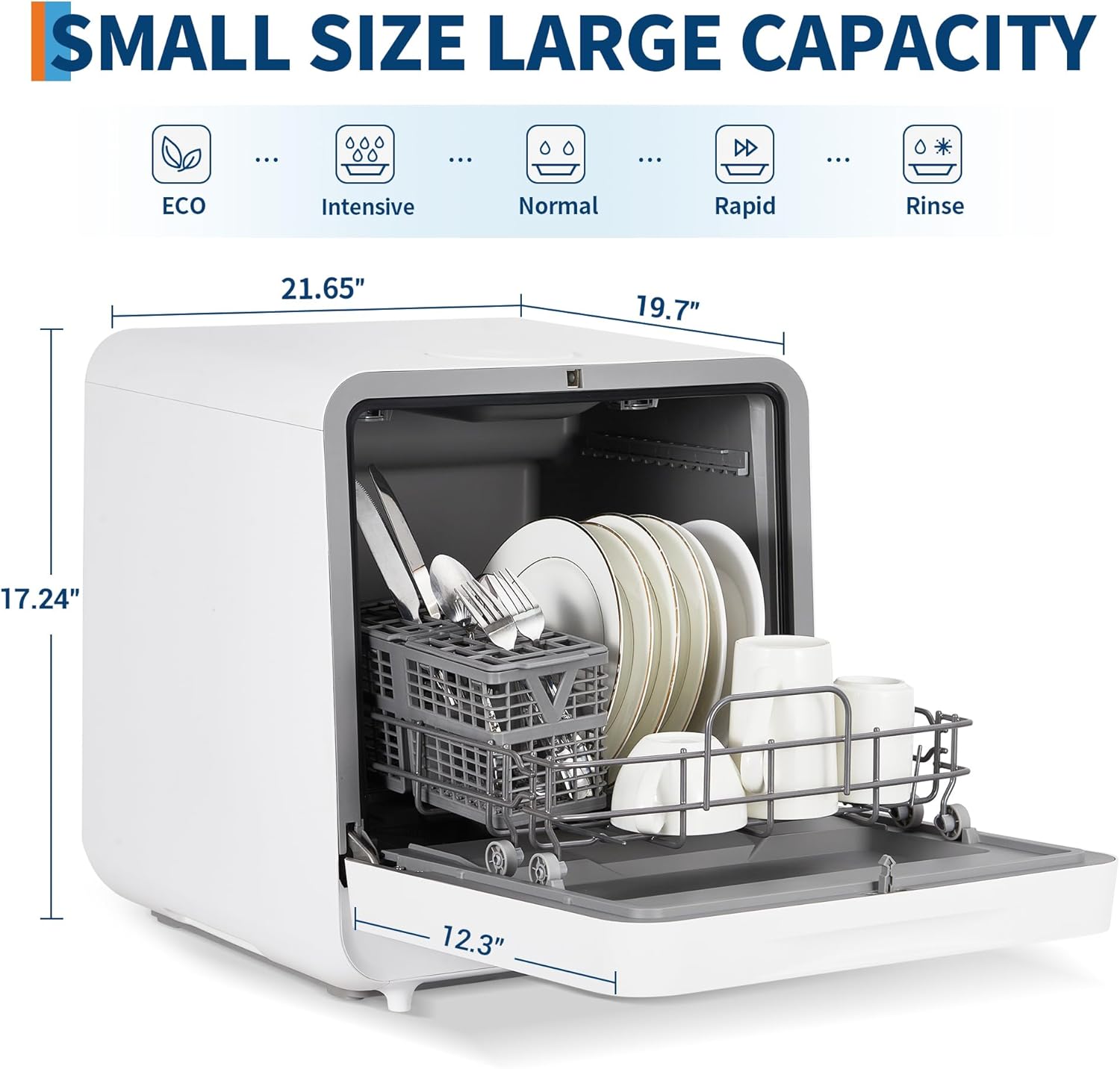
Figure 5.3: Available Wash Cycles
The dishwasher features a touch control panel with various wash cycles to suit different cleaning needs:
- ECO: Energy-saving cycle for lightly soiled dishes.
- Intensive: For heavily soiled dishes and pots with baked-on food.
- Normal: Standard cycle for everyday dishware.
- Rapid: Quick wash for lightly soiled items that need to be cleaned fast.
- Rinse: A pre-rinse cycle to remove loose food particles if you're not running a full wash immediately.
Starting a Wash Cycle:
- Ensure the dishwasher door is securely closed.
- Press the Power button to turn on the appliance.
- Press the Program button repeatedly to select your desired wash cycle. The selected program indicator will light up.
- Press the Play/Pause button to start the cycle.
- To activate Air Dry, press the Air Dry button before or during the cycle.
- To set a Delay start, press the Delay button and then the Play/Pause button.
Hot Air Drying:
After the wash cycle is complete, the hot air drying function will automatically activate, ensuring your dishes are dry and ready for storage. This also helps prevent odors and keeps tableware sanitary.
6. Maintenance and Cleaning
Regular maintenance ensures the longevity and optimal performance of your dishwasher.
Cleaning the Exterior:
- Wipe the exterior surfaces with a soft, damp cloth.
- Do not use abrasive cleaners or solvents.
Cleaning the Interior:
- Periodically clean the filter system at the bottom of the dishwasher to remove food debris.
- Inspect and clean the spray arms to ensure nozzles are not clogged.
- Run a dishwasher cleaning cycle with a specialized dishwasher cleaner every few months to remove mineral buildup and odors.
Winterizing (if applicable):
- If the dishwasher is stored in an unheated area, drain all water from the unit and hoses to prevent freezing damage.
7. Troubleshooting
Before contacting customer service, please refer to the following common issues and solutions:
| Problem | Possible Cause | Solution |
|---|---|---|
| Dishwasher does not start | Power cord not plugged in; Door not closed properly; No water supply. | Check power connection; Ensure door is latched; Check water inlet connection or manually add water. |
| Dishes are not clean | Improper loading; Clogged spray arms; Insufficient detergent; Incorrect wash cycle. | Reload dishes correctly; Clean spray arm nozzles; Use appropriate detergent amount; Select a more intensive cycle. |
| Water not draining | Drain hose kinked or clogged; Filter clogged. | Check and clear drain hose; Clean the filter system. |
| Excessive suds | Used hand dish soap; Too much detergent. | Only use automatic dishwasher detergent; Reduce detergent amount. |
| Dishwasher leaks | Loose hose connections; Damaged door seal. | Tighten all hose connections; Inspect and clean door seal. |
8. Product Specifications
| Feature | Detail |
|---|---|
| Brand | Takywep |
| Model Name | QWNI14I47EX |
| Style | No-Water Tank |
| Product Dimensions (D x W x H) | 20.16 x 19.96 x 20.79 inches (51.2 x 50.7 x 52.8 cm) |
| Item Weight | 15 pounds (6.8 kg) |
| Voltage | 120V |
| Annual Energy Consumption | 1 Watt Hours (Note: This value is provided by the manufacturer and may vary based on usage.) |
| Special Feature | Touch Panel, Hot Air Drying, Dual Water Inlet |
| Controls Type | Touch |
| Color | White |
| Noise Level | 1 Decibels (Note: This value is provided by the manufacturer and may vary.) |
9. Warranty and Customer Support
For warranty information, please refer to the warranty card included with your purchase or contact Takywep customer support. Keep your proof of purchase for any warranty claims.
Customer Support:
If you encounter any issues not covered in this manual or require further assistance, please contact Takywep customer support through the retailer where you purchased the product or visit the official Takywep website for contact details.