
Introduction
This manual provides essential instructions for the safe and efficient installation, operation, and maintenance of your ZHRCLY Donper R600a-A120CY1QD75Y AC115V compressor. Please read this manual thoroughly before using the product and retain it for future reference.
Safety Information
Always observe the following safety precautions to prevent injury or damage to the product:
- Ensure the power supply matches the compressor's requirements (AC115V).
- Disconnect power before performing any maintenance or installation.
- Handle refrigerants with care and in accordance with local regulations.
- Installation and repairs should only be performed by qualified personnel.
- Keep children and unauthorized persons away from the operating unit.
Setup
Before installation, verify that you have received the correct model: R600a-A120CY1QD75Y AC115V. If you require a different model, please contact your supplier.
- Unpacking: Carefully remove the compressor from its packaging. Inspect for any shipping damage.
- Mounting: Securely mount the compressor in a well-ventilated area, ensuring proper clearance for airflow.
- Electrical Connection: Connect the compressor to a dedicated AC115V power supply. Ensure all wiring is done according to local electrical codes and the compressor's wiring diagram (not provided in this manual, refer to product labeling).
- Refrigerant Lines: Connect the refrigerant lines to the compressor's suction and discharge ports. Ensure all connections are leak-free.
- System Evacuation: Evacuate the refrigeration system to remove air and moisture before charging with R600a refrigerant.
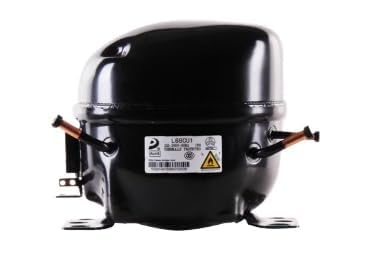
Image showing the ZHRCLY Donper R600a-A120CY1QD75Y AC115V compressor unit. This image illustrates the general appearance of the compressor.
Operating Instructions
Once the compressor is properly installed and the refrigeration system is charged, it is ready for operation.
- Initial Start-up: Apply power to the system. The compressor should start and begin circulating refrigerant.
- Monitoring: Monitor system pressures and temperatures to ensure proper operation. Refer to the specifications for expected operating ranges.
- Normal Operation: The compressor will cycle on and off as required to maintain the desired temperature in the refrigeration system.
Maintenance
Regular maintenance ensures the longevity and efficiency of your compressor.
- Cleanliness: Keep the compressor and surrounding area clean and free of dust and debris to ensure proper heat dissipation.
- Inspections: Periodically inspect electrical connections for tightness and signs of wear. Check refrigerant lines for leaks.
- Professional Service: For complex maintenance or repairs, always consult a qualified refrigeration technician.
Troubleshooting
If you encounter issues with your compressor, refer to the following common problems and solutions. For persistent issues or if your specific model is not functioning as expected, please contact the merchant for assistance.
| Problem | Possible Cause | Solution |
|---|---|---|
| Compressor does not start | No power, faulty wiring, thermal overload tripped. | Check power supply, inspect wiring, allow compressor to cool. |
| Insufficient cooling | Low refrigerant charge, dirty condenser, faulty fan. | Check for leaks and recharge refrigerant, clean condenser, inspect fan. |
| Unusual noise | Loose mounting, internal mechanical issue. | Check mounting bolts, contact a qualified technician for internal issues. |
Specifications
| Feature | Detail |
|---|---|
| Brand | ZHRCLY |
| Model Number | R600a-A120CY1QD75Y AC115V |
| Power Source | AC |
| Voltage | 115V (as per model number) |
| Special Feature | AC & DC Adaptable |
| Manufacturer | Original factory |
| Unit Count | 1 Count |
| ASIN | B0F5GVL2FY |
Warranty Information
Specific warranty details for this ZHRCLY compressor are not provided in this manual. Please refer to the product packaging, purchase documentation, or contact the seller directly for information regarding warranty coverage and terms.
Support
For technical support, inquiries about specific models, or any other assistance, please contact the merchant from whom you purchased this product. They can provide guidance and support tailored to your specific needs.
Note: After the goods arrive, they may be subject to taxation. Please cooperate in handling any customs or import procedures.