
1. Introduction
Thank you for choosing the Urageuxy WS0818 Wireless Weather Station. This device provides real-time indoor and outdoor temperature and humidity, barometric pressure, weather forecasts, moon phase, and an atomic clock with adjustable backlight. This manual will guide you through the setup, operation, and maintenance of your new weather station.
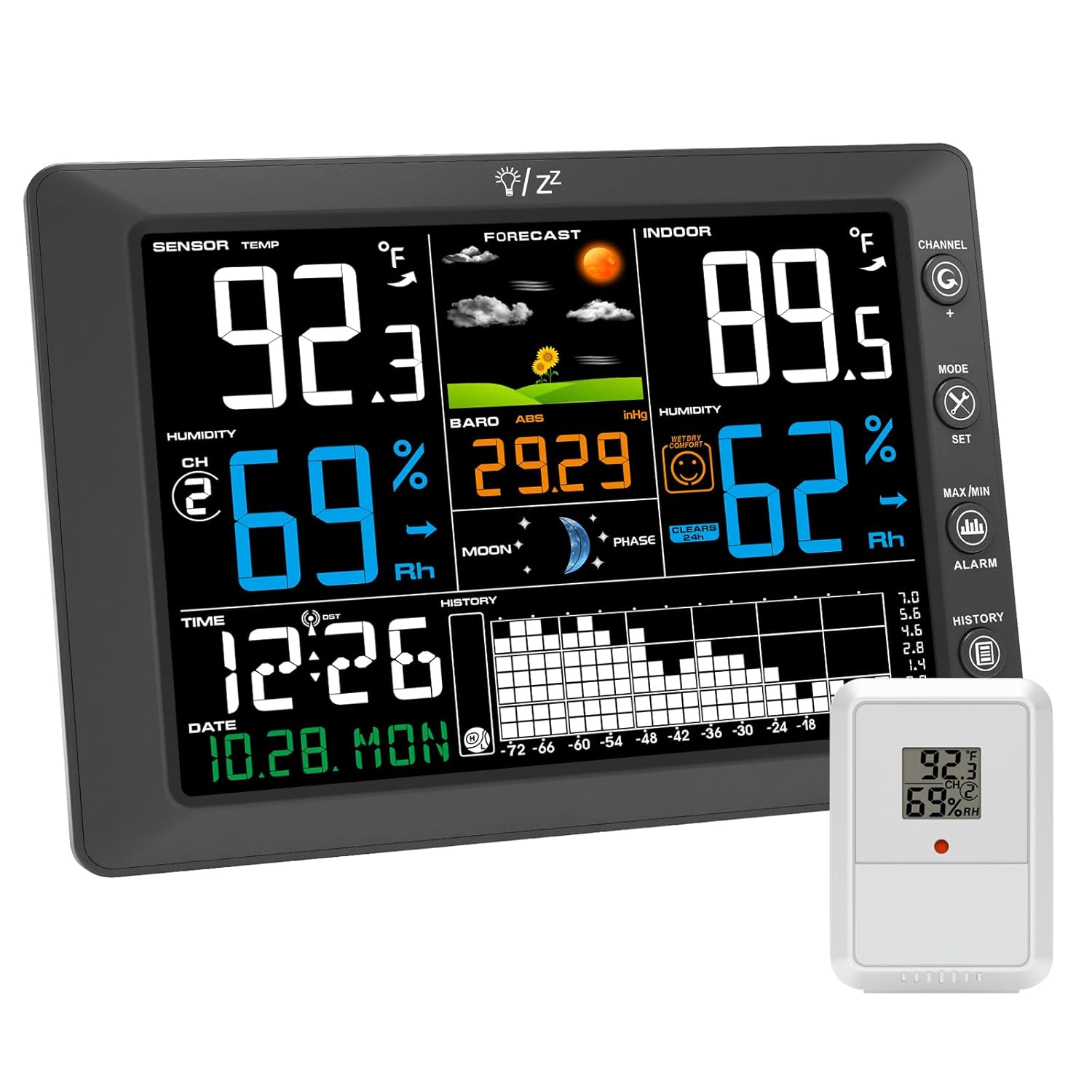
The main display console and the accompanying wireless outdoor sensor.
2. What's in the Box
- 1x Remote Sensor
- 1x Indoor Console
- 1x Instruction Manual
- 1x Power Adapter
3. Product Features
- 8.3'' Large Screen Display: Vivid color display for indoor/outdoor temperature, humidity, barometric pressure, weather forecast, moon phase, min/max records, and 24-hour history.
- Wireless Atomic Clock with Auto-DST: Ensures precise timekeeping via automatic atomic signal calibration. Features 4 adjustable backlight levels.
- Personalized Weather Alerts: Customize alerts for temperature, humidity, and pressure changes. Functions as an alarm clock with programmable notifications.
- Multi-Channel Support: Connects up to 8 sensors (one included) for expanded monitoring in various locations.
- Long-Range Wireless Transmission: Stable connectivity up to 328 ft in open areas.
- Dual Mounting Options: Can be easily installed on a wall or placed on a desk.
4. Setup
4.1 Powering the Device
The main console can be powered by the included power adapter or 3x AAA batteries (not included). It is recommended to keep the power adapter plugged in for continuous operation and optimal display brightness. The remote sensor requires batteries (not included).

The weather station console showing its 8.5-inch width and 6.2-inch height, highlighting the 8.3-inch display area.
4.2 Initial Sensor Pairing
- Insert batteries into the remote sensor first.
- Plug in the main console's power adapter or insert batteries.
- The console will automatically search for the sensor. Ensure the sensor is within range (up to 328 ft in open areas).
- Once connected, the outdoor temperature and humidity will display on the console.
4.3 Atomic Clock Synchronization
The weather station features an atomic clock with WWVB function. It will automatically scan the WWVB signal to calibrate and ensure accuracy. This process may take some time, especially during initial setup or in areas with weak signals. The DST function will take effect after the next full hour has passed once activated.

The weather station console illustrating the WWVB icon, indicating atomic clock synchronization for accurate timekeeping.
4.4 Mounting Options
The console can be placed on a flat surface using its integrated stand or mounted on a wall using the keyhole slots on the back.

Illustrates the versatile mounting options for the weather station: either placed on a tabletop using its integrated stand or securely mounted on a wall.
5. Operating the Weather Station
5.1 Display Overview
The large color display shows various data points:
- Sensor Temp/Humidity: Outdoor readings from the remote sensor.
- Indoor Temp/Humidity: Readings from the main console.
- Forecast: Graphical representation of predicted weather conditions.
- Barometric Pressure: Current atmospheric pressure.
- Moon Phase: Current lunar phase.
- Time & Date: Synchronized by the atomic clock.
- History Graph: 24-hour or 72-hour records of temperature, humidity, and pressure.
5.2 Adjustable Backlight
The display features 4 adjustable backlight levels (0%, 30%, 50%, 100%) to suit different lighting conditions and preferences. Adjust the brightness by touching the designated sensor on the console frame.

The weather station display demonstrating its four adjustable backlight settings: 30%, 50%, 100%, and 0% (off).
5.3 Customizable Alerts and Alarm Clock
Set personalized high/low alerts for temperature, humidity, and pressure. The device also functions as an alarm clock with a snooze feature.

The weather station console functioning as an alarm clock with snooze, suitable for a bedside table.
5.4 Multi-Channel Monitoring
The weather station supports up to 8 remote sensors (additional sensors sold separately). This allows you to monitor conditions in various locations around your home or property.

The weather station console demonstrating its capability to connect with up to 8 remote sensors, allowing monitoring in different areas like bedrooms, kitchens, greenhouses, and outdoors.
6. Maintenance
- Clean the display and sensor with a soft, dry cloth. Avoid abrasive cleaners or solvents.
- Replace batteries in the remote sensor and console (if used as primary power) when the low battery indicator appears.
- Ensure the remote sensor is placed in a location protected from direct sunlight and heavy precipitation for accurate readings and longevity.
7. Troubleshooting
| Problem | Possible Cause | Solution |
|---|---|---|
| No outdoor temperature/humidity reading | Sensor not paired or out of range; low sensor battery. | Ensure sensor batteries are fresh. Re-pair the sensor by pressing the 'Channel' button on the console and the 'TX' button on the sensor. Move sensor closer to the console. |
| Time is incorrect or not syncing | Weak WWVB signal; incorrect time zone setting; DST not activated correctly. | Ensure the console is placed away from electronic interference. Manually set the time zone. If DST is on, wait for the next full hour for it to take effect. |
| Inaccurate temperature/humidity readings | Sensor exposed to direct sunlight or moisture; console near heat/cold source. | Relocate the sensor to a shaded, dry area. Ensure the console is not near vents or appliances that affect temperature. Calibration options may be available in advanced settings. |
| Display is dim or blank | Power adapter disconnected; low console battery; backlight set to 0%. | Check power adapter connection. Replace console batteries. Adjust backlight brightness using the touch sensor. |
8. Specifications
- Model Number: WS0818
- Product Dimensions: 0.78"D x 8.5"W x 6.2"H
- Material: Acrylonitrile Butadiene Styrene (ABS)
- Color: Black
- Power Source: Power Adapter/Battery Powered
- Connectivity Technology: Wireless
- Special Features: Adjustable Brightness, Atomic Clock with DST, Customizable Alert, Large Display, Min/Max record, Indoor Outdoor Temperature and Humidity/Barometric Pressure History Graph, Portable
- Recommended Uses: Home
9. Official Product Video
Watch this video for a visual overview of the Urageuxy Wireless Weather Station and its features.
This video provides an overview of the Urageuxy Wireless Weather Station, showcasing its features and display in action.
10. Warranty and Support
For warranty information or technical support, please refer to the contact details provided with your purchase or visit the official Urageuxy website. Keep your purchase receipt for warranty claims.