
Introduction
This manual provides essential instructions for the safe and efficient use of your ZHRCLY Donper R134a-L65CZ1 (QD65H) compressor. Please read this manual thoroughly before installation, operation, or maintenance to ensure proper function and longevity of the unit. Keep this manual for future reference.
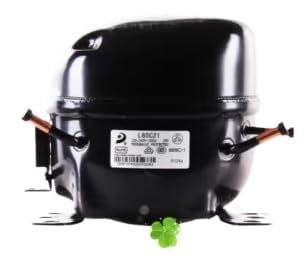
An image showing the ZHRCLY Donper R134a-L65CZ1 (QD65H) compressor unit.
Setup
Proper setup is crucial for the performance and safety of your compressor. Follow these steps carefully:
- Unpacking and Inspection: Carefully remove the compressor from its packaging. Inspect the unit for any signs of damage during transit. Report any damage to the supplier immediately.
- Mounting: Securely mount the compressor on a stable, level surface. Ensure adequate ventilation around the unit to prevent overheating. Refer to your system's design for specific mounting requirements.
- Refrigerant Line Connection: Connect the refrigerant lines according to standard refrigeration practices. Ensure all connections are tight and leak-free. Use appropriate tools and sealants.
- Electrical Connection: Connect the compressor to a suitable power supply. This unit is AC and DC adaptable. Ensure the voltage and frequency match the compressor's requirements. Consult a qualified electrician if unsure.
- Initial Checks: Before powering on, verify all connections are secure, and there are no obstructions around the unit.
Operating Instructions
Once the compressor is properly installed, follow these guidelines for operation:
- Power On: Apply power to the compressor. The unit should start operating.
- Monitoring: Observe the system's performance. Check for unusual noises, vibrations, or temperature fluctuations.
- Normal Operation: The compressor will cycle on and off as required by the system's thermostat or control unit to maintain the desired temperature or pressure.
- Power Off: To shut down the compressor, disconnect its power supply.
Maintenance
Regular maintenance ensures optimal performance and extends the lifespan of your compressor:
- Cleaning: Keep the exterior of the compressor clean and free from dust and debris. Ensure cooling fins (if applicable) are not obstructed.
- Inspection: Periodically inspect all electrical connections for tightness and signs of wear. Check refrigerant lines for leaks or damage.
- Vibration Check: Monitor for excessive vibration, which could indicate loose mounting or internal issues.
- Professional Service: For internal components or refrigerant-related maintenance, always consult a qualified refrigeration technician.
Troubleshooting
If you encounter issues with your compressor, refer to the following common problems and solutions:
| Problem | Possible Cause | Solution |
|---|---|---|
| Compressor does not start | No power supply; Loose electrical connection; Faulty control unit | Check power source; Secure connections; Consult technician |
| Compressor runs continuously | Low refrigerant charge; System overload; Faulty thermostat | Check for leaks and recharge; Reduce load; Replace thermostat |
| Unusual noise or vibration | Loose mounting; Internal mechanical issue; Refrigerant slugging | Tighten mounting bolts; Consult technician; Check refrigerant charge |
| Poor cooling performance | Low refrigerant; Blocked condenser/evaporator; Compressor inefficiency | Check refrigerant; Clean coils; Consult technician |
If the problem persists after attempting these solutions, contact a qualified service technician or the manufacturer for assistance.
Specifications
Key technical specifications for the ZHRCLY Donper R134a-L65CZ1 (QD65H) Compressor:
- Model: R134a-L65CZ1 (QD65H)
- Brand: ZHRCLY
- Refrigerant Type: R134a
- Power Source: AC (AC & DC Adaptable)
- Item Weight: 6.6 pounds
- Package Dimensions: 1 x 1 x 1 inches
- Manufacturer: Original factory
- Compatible/Related Models: R134a-S43Z1, R134a-S50CZ1 (QD52H), R134a-L72CZ1 (QD75H), R134a-L76CZ1 (QD91H)
Warranty Information
Specific warranty details for this product are typically provided at the point of purchase or by the manufacturer. Please retain your proof of purchase. For warranty claims or inquiries, contact your seller or the manufacturer directly.
Customer Support
For technical assistance, spare parts, or any questions not covered in this manual, please contact the seller or the manufacturer. When contacting support, please have your product model number (R134a-L65CZ1 (QD65H)) and purchase date readily available.