1. Introduction
The Generic MC7RE V2 is a 7-channel receiver designed for use with MICROZONE S-FHSS system transmitters. This receiver is suitable for various remote-controlled applications, including boats, providing reliable signal reception and control.
Key Features:
- 7 Channels for comprehensive control
- Power supply: 4.8-6V DC
- Decoding way: 1024 PPM
- Compatible with S-FHSS system transmitters
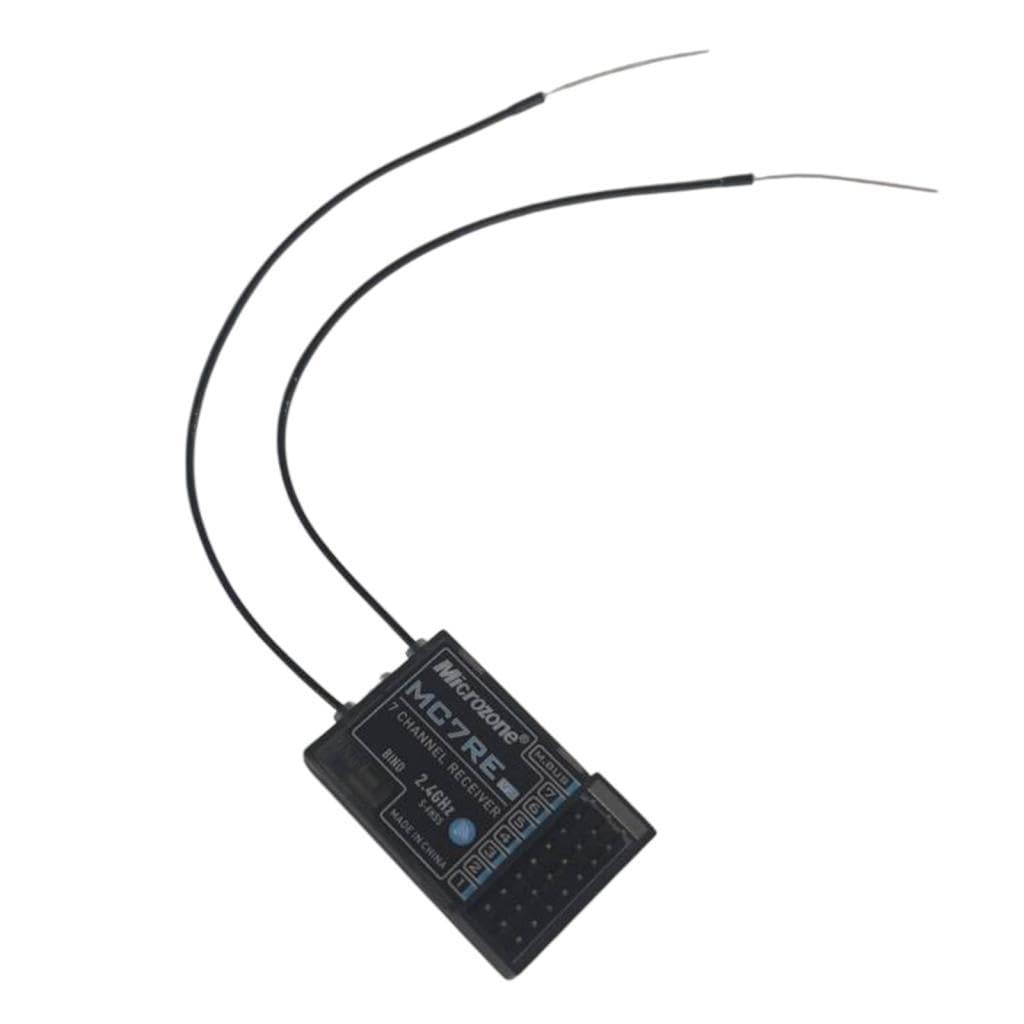
Image 1.1: Overview of the Generic MC7RE V2 7-Channel S-FHSS Receiver, showing its compact design and dual antennas.
2. Setup
2.1 Unpacking
Carefully remove the MC7RE V2 receiver from its packaging. Inspect the receiver for any visible damage. Ensure all components are present as listed in the package contents.
2.2 Binding Procedure
To establish communication between the receiver and your S-FHSS compatible transmitter, follow these binding steps:
- Ensure your transmitter is powered off.
- Connect a bind plug (not included, typically supplied with your transmitter or available separately) to the BIND port on the MC7RE V2 receiver.
- Connect the receiver to a power source (4.8-6V). The LED on the receiver should start flashing rapidly, indicating it is in binding mode.
- While holding the bind button on your S-FHSS transmitter (refer to your transmitter's manual for exact location), power on the transmitter.
- Release the bind button on the transmitter after a few seconds.
- The LED on the receiver should turn solid, indicating a successful bind.
- Disconnect the bind plug from the receiver.
- Power off both the receiver and the transmitter, then power them back on to confirm the bind.

Image 2.1: Close-up view of the MC7RE V2 receiver, highlighting the 'BIND' button and channel ports 1-7, along with the M.BUS port.
2.3 Connection Diagram
Connect your servos, ESC, and other components to the corresponding channel ports on the receiver. The MC7RE V2 features 7 standard PWM channels. Ensure correct polarity when connecting components.
- Channel 1: Aileron / Steering
- Channel 2: Elevator / Throttle
- Channel 3: Throttle / Motor
- Channel 4: Rudder / Auxiliary
- Channels 5-7: Auxiliary functions

Image 2.2: Top-down view of the MC7RE V2 receiver, clearly showing the labels for channels 1 through 7 and the BIND port.
3. Operating Instructions
3.1 Powering On/Off
After successful binding and connection of all components, power on your transmitter first, then connect the power source to the receiver. To power off, disconnect the receiver's power source first, then power off the transmitter.
3.2 Channel Assignment
The 7 channels on the receiver correspond to the control inputs from your transmitter. Refer to your transmitter's manual for specific channel assignments and configuration options for your model.
4. Maintenance
4.1 Cleaning
Keep the receiver clean and free from dust, dirt, and moisture. Use a soft, dry cloth to wipe the exterior. Avoid using solvents or harsh chemicals.
4.2 Storage
When not in use, store the receiver in a dry, cool environment, away from direct sunlight and extreme temperatures. Protect it from physical impact.
5. Troubleshooting
Common Issues and Solutions:
- No Power to Receiver:
- Check power source connection and voltage (4.8-6V).
- Ensure correct polarity of power connection.
- No Signal / Receiver LED Flashing Rapidly:
- Receiver is not bound to the transmitter. Repeat the binding procedure (Section 2.2).
- Ensure transmitter is powered on and operating in S-FHSS mode.
- Check distance between transmitter and receiver; avoid excessive range.
- Erratic Servo Movement:
- Check for interference from other electronic devices.
- Ensure all connections are secure and free from damage.
- Verify power supply is stable and sufficient for all connected components.
6. Specifications
| Feature | Detail |
|---|---|
| Channels | 7 |
| Power Supply | 4.8-6V DC |
| Decoding Way | 1024 PPM |
| System Compatibility | MICROZONE S-FHSS |
| Dimensions (LxWxH) | 45 x 45 x 10 mm (1.77 x 1.77 x 0.39 inches) |
7. Warranty and Support
This product is covered by a standard manufacturer's warranty against defects in materials and workmanship. Please refer to your retailer or the product packaging for specific warranty terms and duration. Keep your proof of purchase for warranty claims.
For technical support or inquiries, please contact your point of purchase or the manufacturer's customer service channels.


