
WATERCUBE WC-10 IoT
WaterCube WC-10 IoT User Manual
Your Guide to Clean, Drinkable Water from Air
1. Introduction to WaterCube WC-10 IoT
The WaterCube WC-10 IoT is a compact atmospheric water generator designed to produce clean, potable water directly from the air. This device offers water independence without the need for traditional plumbing or grid connections, making it suitable for off-grid living, mobile applications, and emergency preparedness. It is engineered for reliability and features multi-stage filtration and UV sterilization to ensure high water quality.

Figure 1.1: Front view of the WaterCube WC-10 IoT unit. This image displays the compact, black casing of the device with the WaterCube logo and air intake vent visible.
2. Key Features
- Water Production: Generates up to 12 gallons of clean drinking water per day from ambient air.
- Power Versatility: Operates using solar, conventional wall power, generator, battery, or vehicle power sources.
- Portability & Durability: Designed for travel, boats, RVs, tiny homes, and remote setups. Built to military specifications for continuous 24/7 operation.
- Integrated Storage: Features a 6-gallon internal water tank for stable storage, with options for external jug or plumbing connections.
- Advanced Filtration: UL and NSF-certified multi-stage filtration system combined with UV sterilization for chemical-free water purification.
- Smart Connectivity: IoT capabilities allow remote monitoring and management via the WaterCube mobile application, with manual operation available offline.

Figure 2.1: The WaterCube WC-10 IoT, highlighting its robust construction and recognition. This image shows the unit alongside text emphasizing its American manufacturing and military-grade reliability, also displaying the 2024 CES Innovation Awards logo.
3. Setup Guide
Follow these steps for the initial setup of your WaterCube WC-10 IoT unit:
- Unpacking: Carefully remove the WaterCube WC-10 IoT from its packaging. Inspect the unit for any visible damage.
- Placement: Place the unit on a stable, level surface in a well-ventilated area. Ensure there is adequate space around the unit for air circulation (at least 6 inches from walls or other obstructions).
- Power Connection: Connect the appropriate power source to the unit. The WC-10 IoT supports various power inputs including standard wall outlets, solar power systems, generators, and vehicle power. Ensure the power source matches the unit's voltage requirements.
- Initial Water Collection: For first-time use, allow the unit to operate for several hours to fill the internal 6-gallon tank. The first cycle of water produced should be discarded to flush the system.
- App Connection (Optional): Download the WaterCube app from your device's app store. Follow the in-app instructions to connect your WC-10 IoT unit for remote monitoring and control.

Figure 3.1: Side view of the WaterCube WC-10 IoT. This image provides a perspective of the unit's compact design, suitable for various placements.
4. Operating Instructions
The WaterCube WC-10 IoT can be operated manually or via the dedicated mobile application.
4.1. Manual Operation
- Power On/Off: Locate the main power switch on the unit. Flip the switch to the 'ON' position to begin water production. Flip to 'OFF' to stop.
- Water Dispensing: Use the integrated spigot or connect external plumbing/jugs as desired to dispense water from the internal tank.
- Indicator Lights: Observe the indicator lights on the unit for status updates (e.g., power, water production, tank full). Refer to the unit's labeling for specific light meanings.
4.2. App-Controlled Operation
The WaterCube app provides enhanced control and monitoring capabilities:
- Remote Monitoring: View real-time data such as tank level, ambient temperature, humidity, current water production rate, and total daily production.
- Production Control: Start or stop water production remotely.
- Notifications: Receive alerts for low tank levels, maintenance reminders, or system errors.
- Settings: Adjust operational settings and preferences through the app interface.

Figure 4.1: Screenshot of the WaterCube mobile application. This image illustrates the user interface of the app, displaying key metrics like tank level, temperature, humidity, and water production data, along with a "Make Water" button.
5. Maintenance
Regular maintenance ensures the longevity and optimal performance of your WaterCube WC-10 IoT and the purity of your water.
- Filter Replacement: The multi-stage filtration system requires periodic filter replacement. Consult the app or the unit's manual for recommended replacement intervals, typically every 6-12 months depending on usage and air quality.
- UV Lamp Check: The UV sterilization lamp should be checked annually and replaced as needed to ensure effective disinfection.
- Tank Cleaning: Periodically drain and clean the internal 6-gallon water tank to prevent mineral buildup or microbial growth. Use a mild, food-grade cleaning solution if necessary, followed by thorough rinsing.
- Exterior Cleaning: Wipe down the exterior of the unit with a soft, damp cloth. Do not use abrasive cleaners or solvents.
- Air Intake Vents: Ensure the air intake vents are clear of dust and debris to maintain efficient air circulation.
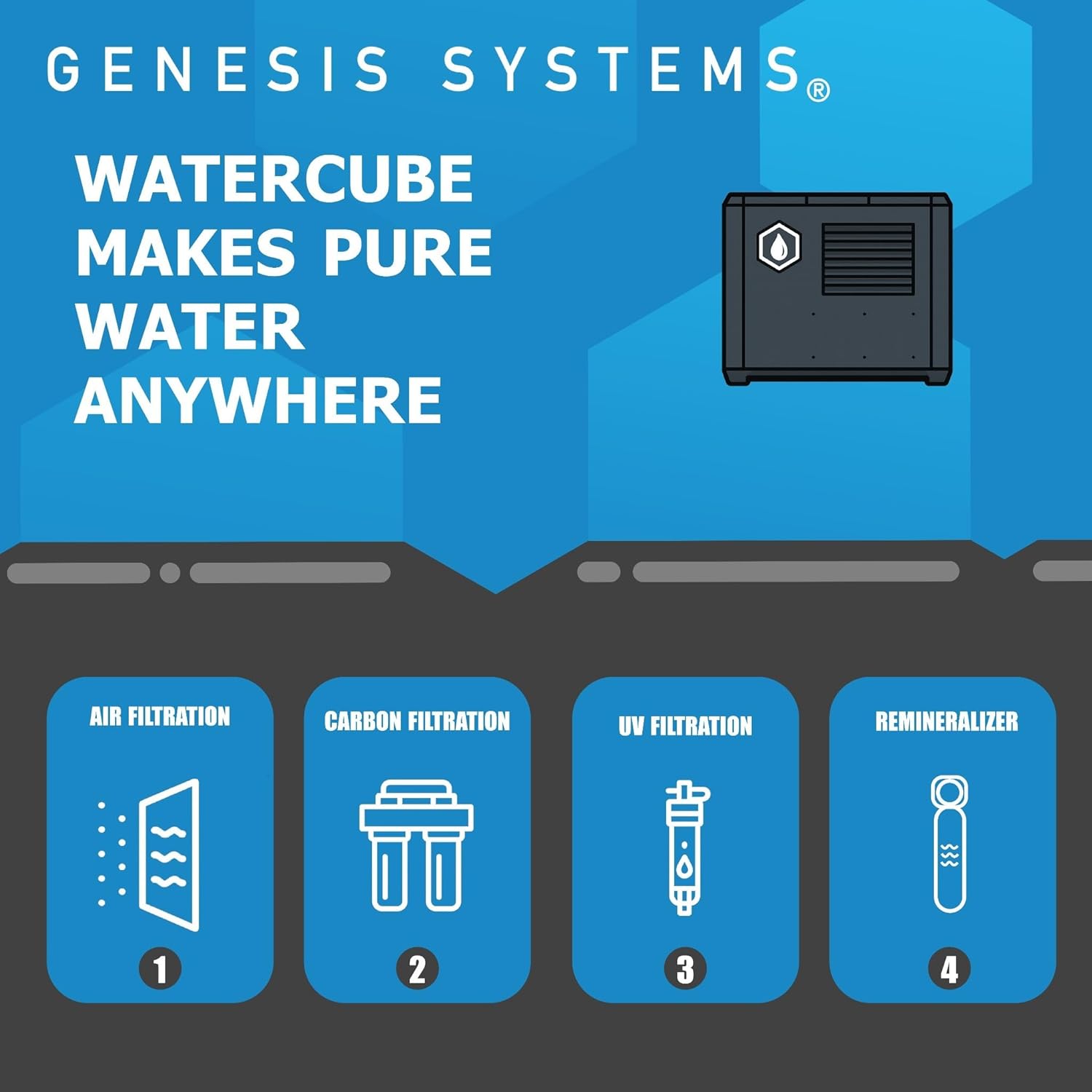
Figure 5.1: Diagram of the WaterCube's purification process. This image visually explains the four stages of water treatment: Air Filtration, Carbon Filtration, UV Filtration, and Remineralization, emphasizing the comprehensive purification system.
6. Troubleshooting
This section provides solutions to common issues you might encounter with your WaterCube WC-10 IoT.
| Problem | Possible Cause | Solution |
|---|---|---|
| No water production |
|
|
| Low water production |
|
|
| Unusual noise |
|
|
| Water tastes unusual |
|
|
7. Specifications
| Attribute | Detail |
|---|---|
| Model Name | WC-10 IoT |
| Brand | WATERCUBE |
| Manufacturer | Genesis Systems |
| Product Dimensions (L x W x H) | 29" x 18" x 28" |
| Internal Tank Capacity | 6 Gallons |
| Water Production Rate | Up to 12 Gallons per Day |
| Power Source Options | Battery, Solar, Wind, Power Cord, Vehicle |
| Operating Temperature Range | 35°F to 110°F (1.6°C to 43.3°C) |
| Supported Water TDS Level Maximum | 500 PPM |
| Filtration System | Multi-stage (Air, Carbon, UV, Remineralizer) |
| Certifications | UL, NSF |
| Country of Origin | USA |
8. Warranty and Support
The WaterCube WC-10 IoT is built for durability and comes with comprehensive support.
- Standard Warranty: Your WaterCube WC-10 IoT is covered by a 1-year standard warranty from the date of purchase. This warranty covers defects in materials and workmanship under normal use.
- Service Life: The unit is engineered for a service life of 10 to 15 years with proper maintenance.
- Customer Support: For technical assistance, troubleshooting, warranty claims, or general inquiries, please contact WaterCube customer service. Support is available 24/7.
- Manufacturer: Genesis Systems
- Online Resources: Visit the official WaterCube Store on Amazon for additional product information, FAQs, and accessories.
Ask a question about this manual
Ask about setup, troubleshooting, compatibility, parts, safety, or missing instructions. Manuals+ will review the question and use this page’s manual context to help answer it.