
Gaiatop AF-03
Gaiatop AF-03 Portable Desk Fan User Manual
Model: AF-03
1. Introduction
Thank you for choosing the Gaiatop AF-03 Portable Desk Fan. This device combines powerful airflow with a convenient power bank function and an aesthetic RGB light. Please read this manual carefully before use to ensure proper operation and maintenance.
2. Product Features
- Long-lasting Battery: Equipped with a 6000mAh rechargeable battery, providing 6 to 18 hours of cooling depending on speed setting.
- Power Bank Function: Features a USB output (5V/1A) to charge small electronic devices.
- Powerful & Quiet: Offers 5 adjustable speed levels (3.2–5.0 m/s) with low noise operation (as low as 35dB).
- Adjustable Airflow: 90° tilt head for directing airflow.
- LED Display & RGB Light: Digital screen shows current fan speed and battery level. Soft RGB ring light cycles through 7 colors.
- Durable Design: Crafted from high-quality materials with a sturdy base.
3. Package Contents
Please check the package for the following items:
- Gaiatop AF-03 Portable Desk Fan
- USB-A to USB-C Charging Cable
- User Manual
4. Setup
4.1 Initial Charge
Before first use, fully charge the fan. Connect the provided USB-C cable to the fan's charging port and the USB-A end to a compatible power adapter (not included) or a computer's USB port. The LED display will show the battery percentage during charging.
4.2 Placement
Place the fan on a stable, flat surface. Ensure there are no obstructions to the fan's intake or exhaust vents for optimal performance.

Figure 1: Fan placed on a desk for personal cooling.
5. Operating Instructions
5.1 Power On/Off & Speed Control
- To Power On: Press the power button once. The fan will start at speed level 1.
- To Adjust Speed: Press the power button repeatedly to cycle through the 5 speed levels (01, 25, 50, 75, 100). The LED display will show the current speed setting.
- To Power Off: Press and hold the power button for 2 seconds.
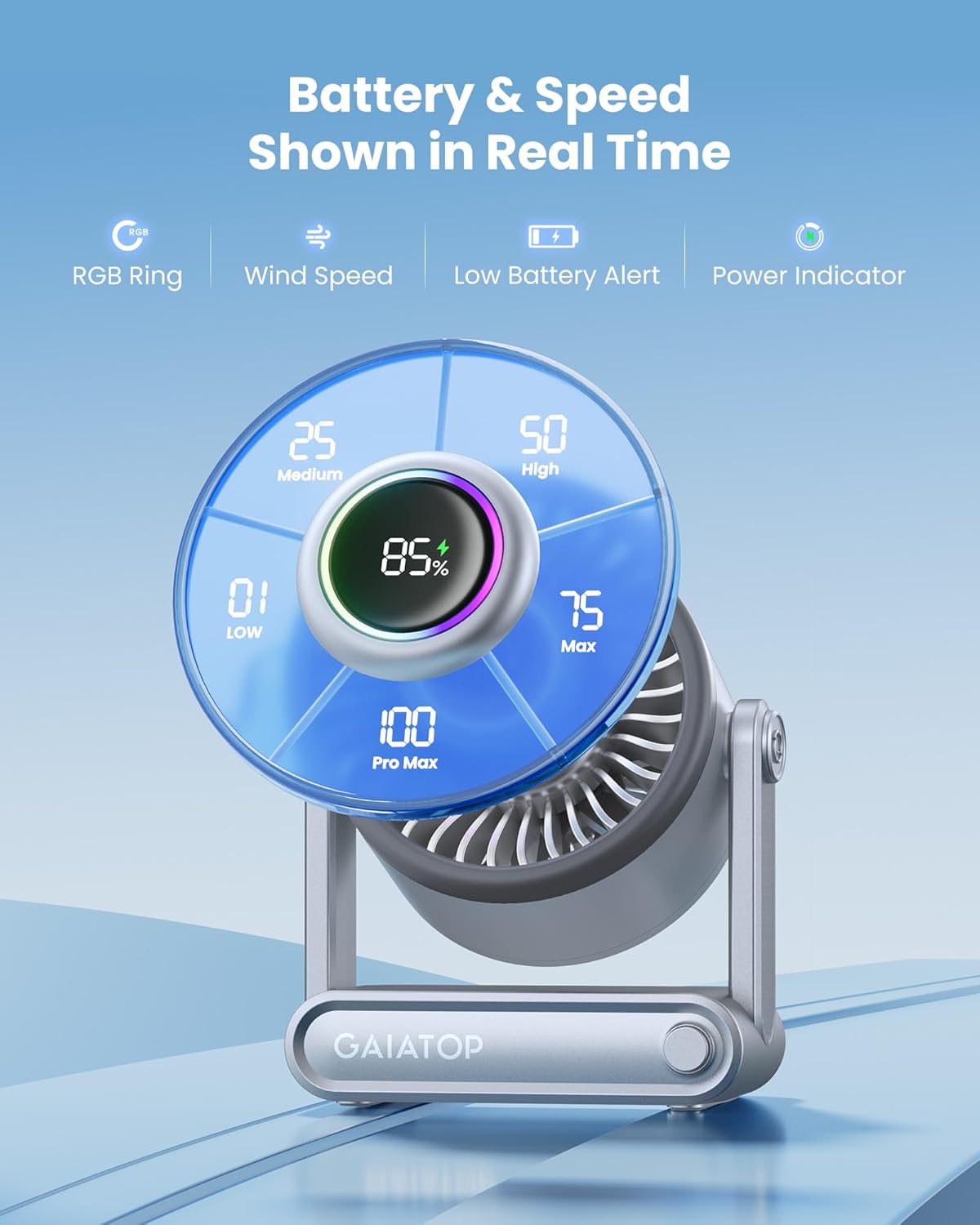
Figure 2: LED display indicating fan speed and battery level.
5.2 RGB Mood Light Control
The fan features an RGB ring light that cycles through 7 colors.
- To Turn On/Off Light: Double-press the power button.

Figure 3: Fan with RGB mood light in a bedroom setting.
5.3 Power Bank Function
The fan can be used to charge other devices via its USB output port.
- Connect your device's charging cable to the USB-A output port on the fan.
- The fan will automatically begin charging your device.

Figure 4: Fan acting as a power bank for a smartphone.
5.4 Tilt Adjustment
The fan head can be manually tilted up to 90 degrees to direct airflow as needed.

Figure 5: Adjusting the fan's tilt for targeted cooling.
6. Maintenance
6.1 Cleaning
- Ensure the fan is turned off and unplugged before cleaning.
- Use a soft, dry cloth to wipe the exterior surfaces.
- For the fan blades, use a soft brush or compressed air to remove dust. Do not use water or harsh chemicals.
6.2 Storage
When not in use for extended periods, store the fan in a cool, dry place away from direct sunlight and extreme temperatures. It is recommended to charge the battery every 3 months to maintain its lifespan.
7. Troubleshooting
| Problem | Possible Cause | Solution |
|---|---|---|
| Fan does not turn on. | Low battery. | Charge the fan using the provided USB-C cable. |
| Weak airflow. | Fan speed is too low. | Increase the fan speed by pressing the power button. |
| RGB light not working. | Light is off. | Double-press the power button to turn on the RGB light. |
| Device not charging via power bank function. | Cable issue or low fan battery. | Ensure the cable is properly connected. Charge the fan if its battery is low. |
8. Specifications
- Model Name: AF-03
- Brand: Gaiatop
- Power Source: Battery Powered
- Battery Capacity: 6000mAh
- Runtime: Up to 18 hours (depending on speed)
- Speed Levels: 5
- Max Wind Speed: 5.0 m/s
- Noise Level: As low as 35dB
- Tilt Adjustment: 90°
- USB Output: 5V/1A
- Product Dimensions: 2.8"D x 5.6"W x 6.3"H
- Item Weight: 14.4 ounces
- Included Components: Charging Cable
9. Warranty and Support
For warranty information or technical support, please refer to the contact details provided on the product packaging or visit the official Gaiatop website. Keep your purchase receipt for warranty claims.
10. Video Demonstration
Video 1: Official product video demonstrating the Gaiatop Portable Desk Fan with Power Bank features.