
Introduction
Thank you for choosing the Philips 32V 720P Google TV. This tunerless smart television is designed to provide a seamless entertainment experience by integrating various streaming services and smart features directly. This manual will guide you through the setup, operation, and maintenance of your new television, ensuring you get the most out of its capabilities.
Note: This television does not include a built-in tuner for terrestrial or satellite broadcasts (BS/110°CS). An external tuner is required to view these types of programs.
1. Setup
1.1 Unpacking and Contents
Carefully remove all components from the packaging. Ensure all listed accessories are present:
- Philips 32V 720P Google TV Unit
- Stand x 2 (including 4 screws)
- Remote Control x 1
- Power Cable
- User Manual (this document)
- VESA Screws x 2 (ST4 x 7.5-8.5mm - for bottom side)

Image: The Philips 32V 720P Google TV, showcasing its sleek design and included accessories.
1.2 Attaching the Stand
- Place the TV screen-down on a soft, flat surface to prevent scratches.
- Align each stand leg with the corresponding slots on the bottom of the TV.
- Secure each stand leg using the provided screws.

Image: The Philips TV with its two stand legs securely attached, ready for placement.
1.3 Wall Mounting (Optional)
This TV supports VESA 200x200 wall mounts. Ensure you use appropriate wall mounting hardware (not included) and follow the instructions provided with your wall mount kit. The VESA screws (ST4 x 7.5-8.5mm) for the bottom side are included.
1.4 Connecting Power and Initial Setup
- Connect the power cable to the TV's power input and then to a wall outlet.
- Press the power button on the remote control or TV to turn it on.
- Follow the on-screen instructions to complete the initial setup, including language selection, network connection (Wi-Fi or Ethernet), and Google account sign-in. An internet connection is required to use Google TV features.

Image: Rear view of the Philips TV, highlighting the various input and output ports for connectivity.
2. Operating Your Philips Google TV
2.1 Google TV Interface and Features
Google TV brings together movies, shows, and more from all your subscriptions and organizes them for you. The home screen provides personalized recommendations based on your viewing habits.
- Content Aggregation: Access content from various streaming services like YouTube, Netflix, Prime Video, Hulu, ABEMA, and more directly from the home screen.
- Personalized Profiles: Create individual profiles for each family member to receive customized recommendations.
- Watchlist: Save content you want to watch later, accessible from any device.
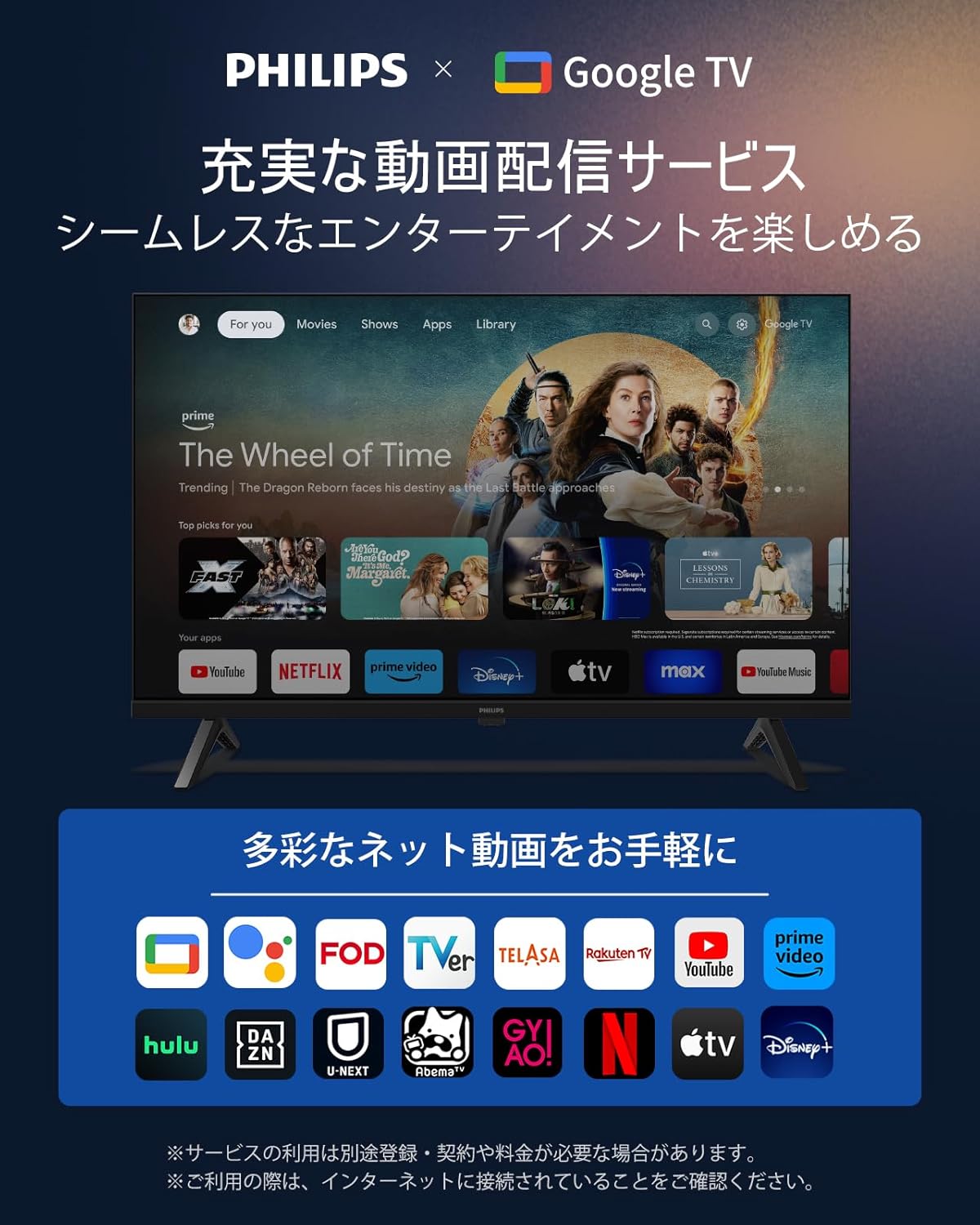
Image: The Google TV home screen, showing a wide array of streaming services and personalized content suggestions.

Image: A visual representation of the rich video distribution services available through Google TV.

Image: Illustrates the multi-account support feature, allowing personalized experiences for different users.

Image: Demonstrates the Watchlist feature, allowing users to save content for later viewing both at home and on the go.
2.2 Remote Control and Voice Search
The included remote control features direct access buttons for popular streaming services (ABEMA, YouTube, Netflix, Hulu) and integrated Google Assistant for voice commands.
- Direct Access: Quickly launch your favorite apps with dedicated buttons.
- Google Assistant: Press the Google Assistant button and speak into the remote to search for movies, shows, apps, or control smart home devices. (Remote pairing required for voice search).

Image: The Philips remote control, illustrating its voice search capability and direct access buttons for popular streaming services.

Image: Highlights the user-friendly remote control with one-touch access to apps and voice search functionality.
2.3 Chromecast Built-in
Easily cast content from your smartphone or tablet directly to your TV using the built-in Chromecast feature. This allows you to enjoy videos, photos, and games on the large screen.

Image: Demonstrates the Chromecast built-in feature, enabling seamless mirroring of content from mobile devices to the TV.
2.4 Bluetooth Connectivity
Connect Bluetooth 5.0 compatible devices such as headphones, soundbars, or stereo speakers wirelessly to your TV for enhanced audio experiences without disturbing others.

Image: A user enjoying TV audio privately through Bluetooth headphones connected to the Philips TV.

Image: Highlights Bluetooth 5.0 compatibility, showing various audio devices that can be connected wirelessly.
2.5 Picture and Sound Settings
Your Philips TV offers various settings to optimize your viewing and listening experience.
- HD Resolution (720P): Enjoy sharp and clear images with 1366x768 resolution.
- HDR 10/HLG Support: Experience enhanced contrast and vibrant colors with High Dynamic Range content.
- Dolby Audio: Immerse yourself in rich, clear sound with Dolby Audio technology.
- LED Direct-Lit Backlight: Provides precise color management for bright and clear images.
- Diverse Image Modes: Select from various preset modes (Standard, Eco, Movie, Gentle, Game, Vivid) to suit your content and environment.

Image: Illustrates the advanced chip for high image and sound quality, featuring HDR 10, HD, LED, and Dolby Audio.

Image: A visual comparison demonstrating the enhanced detail and expression provided by HDR 10/HLG technology.

Image: Shows the sharp and vivid image quality achieved with high-definition display technology.

Image: Explains the LED direct-lit backlight system, which provides precise color management for clear images.

Image: Highlights the immersive surround sound experience provided by Dolby Audio.

Image: Displays the diverse image modes available, allowing users to select the optimal viewing experience for different scenes.
2.6 Optimal Viewing Distance and Placement
For the best viewing experience, it is recommended to place the 32V TV at an optimal viewing distance of approximately 1.2 meters. The recommended room size is about 4 to 6 tatami mats.

Image: A diagram illustrating the recommended optimal viewing distance of 1.2 meters for the 32V television.
3. Maintenance
To ensure the longevity and optimal performance of your Philips TV, follow these simple maintenance guidelines:
- Cleaning the Screen: Gently wipe the screen with a soft, lint-free cloth. For stubborn marks, slightly dampen the cloth with water or a screen-cleaning solution. Avoid harsh chemicals or abrasive materials.
- Cleaning the Cabinet: Use a soft, dry cloth to clean the TV cabinet.
- Ventilation: Ensure the ventilation openings on the TV are not blocked to prevent overheating.
- Power Off: When not in use for extended periods, unplug the TV from the power outlet.
4. Troubleshooting
This section addresses common questions and issues you might encounter with your Philips Google TV.
- Q: Is an internet connection required to use Google TV?
- A: Yes, an internet connection is required. After connecting to the internet, please restart the TV.
- Q: What languages does OK Google support?
- A: OK Google supports over 40 languages. After logging into your Google account, you can set the language with the voice assistant.
- Q: Do I need to connect to the same network as my smartphone or tablet to use the Chromecast function?
- A: Yes, you need to be connected to the same network.
- Q: How should I use the Chromecast function?
- A: Android users can utilize the Chromecast function by downloading the Google Home app. For Apple users, you can use the Chromecast function by downloading the Videocast app or Airscreen app from the App Store.

Image: A visual representation of the Q&A section, indicating support for common user queries.
5. Specifications
| Feature | Specification |
|---|---|
| Brand | Philips |
| Model Number | 32PHH6569 |
| Screen Size | 32 inches |
| Display Type | VA LCD |
| Resolution | 1366 x 768 (HD) |
| Aspect Ratio | 16:9 |
| Refresh Rate | 60 Hz |
| Max Speaker Output | 6W + 6W |
| Bluetooth Version | 5.0 |
| Wireless LAN | 2.4GHz/5GHz |
| Wall Mount (VESA) | 200 x 200 mm |
| Dimensions (without stand) | 717 x 424 x 82 mm |
| Dimensions (with stand) | 717 x 476 x 223 mm |
| Weight (without stand) | 3.9 kg |
| Weight (with stand) | 4 kg |
| HDMI Ports | 2 |
| USB Ports | 2 |
| Audio Features | Dolby Audio |
| Connectivity | Bluetooth, HDMI, USB, Wi-Fi |

Image: A comprehensive table detailing the product specifications and a diagram illustrating the TV's various ports.
6. Warranty and Support
Philips offers a 365-day warranty period for this product. All Philips products sold by authorized retailers are genuine and new. In case of product defects under normal use, a free product exchange will be provided. This warranty does not cover malfunctions caused by customer intent or negligence.
If you encounter any damage or scratches during delivery, please contact us immediately for a free exchange.
Support Hours: Monday - Friday, 10:00 - 12:00 / 13:00 - 17:00 (Excluding Saturdays, Sundays, public holidays, summer holidays, and New Year holidays).

Image: Depicts a customer support scenario, emphasizing prompt and courteous service and the 1-year warranty period.