
Introduction
This manual provides detailed instructions for the setup, operation, and maintenance of your ATOTOMOVE CB6C Wireless CarPlay Magic AI Box. Please read this guide thoroughly to ensure optimal performance and a seamless in-car experience. The CB6C transforms your wired CarPlay/Android Auto system into a wireless smart hub, powered by Android 13, offering enhanced entertainment, navigation, and connectivity features.
Video: Overview of ATOTOMOVE CB6C features and benefits. This video demonstrates the device's capabilities in a vehicle setting.
Video: ATOTOMOVE Wireless CarPlay Android demonstration. This video showcases the device's functionality and user interface.
What's in the Box
- CB6C Wireless Carplay Android Auto 4G LTE Ai Box
- USB C-to-C Cable
- USB A-to-C Cable
- Y-shaped Cable (for additional power if needed)
- USB C-to-A Adapter
- Online Resources Quick Guide
- Product Care Online Support Information

Image: The ATOTOMOVE CB6C package contents, showing the main AI Box unit, USB-C to USB-C cable, USB-A to USB-C cable, Y-shaped power cable, and a USB-C to USB-A adapter.

Image: A visual representation of the CB6C's dimensions (88mm x 95mm x 20mm) and the various cables and adapters included in the package, along with mentions of online resources and product care.
Setup & Installation
- Vehicle Compatibility: Ensure your car stereo supports wired CarPlay or wired Android Auto. The CB6C converts this wired connection to wireless. Note that some car models (e.g., 2016-2020 Nissan, Isuzu, Camry, Toyota Crown 2023, Lexus NX 2023, some Volkswagen models) may require a USB power cable for stable operation. The device is not compatible with BMW Series or car stereos with only wireless CarPlay/Android Auto.
- Connect the AI Box: Use the appropriate USB cable (USB C-to-C or USB A-to-C with adapter) to connect the CB6C to your car's USB port. If additional power is needed, use the Y-shaped cable.
- Power On: Once connected, the AI Box will power on and display its interface on your car's screen.
- Bluetooth & Wi-Fi Pairing: On your car's screen, navigate to the Bluetooth settings of the CB6C. Enable Bluetooth and Wi-Fi on your smartphone. Connect your phone to the CB6C's Bluetooth. The Wi-Fi connection will typically establish automatically after Bluetooth pairing.
- Access CarPlay/Android Auto: Once connected, you can quickly make a wireless connection to the CB6C's CarPlay or Android Auto interface.
Video: Demonstration of opening Android and installing apps on the CB6C. This video shows the user interface for app management.
Video: AI Box for Wireless CarPlay/Android Auto Wireless setup. This video illustrates the process of connecting the AI Box and establishing wireless connectivity.
Video: Plug & Play Smart AI Box installation. This video demonstrates the simple plug-and-play nature of the device.
Key Features & Operation
Wireless CarPlay/Android Auto
The CB6C converts your car's existing wired CarPlay or Android Auto connection into a seamless wireless experience. Enjoy navigation, music, calls, and messages without the need for cables.

Image: The ATOTOMOVE CB6C interface displaying options for Wireless CarPlay, Wireless Android Auto, and the integrated Android 13 System, enhancing the car's multimedia capabilities.
Android 13 System & App Access
The AI Box integrates a full Android 13 system with a Qualcomm QCM6115 octa-core processor, 4GB RAM, and 64GB storage. This allows for smooth app launches, quick multitasking, and ample space for your favorite applications. Download mainstream apps from Google Play Store or use the pre-installed 'FindApps' for streaming services like Netflix, Disney+, YouTube, and TikTok.
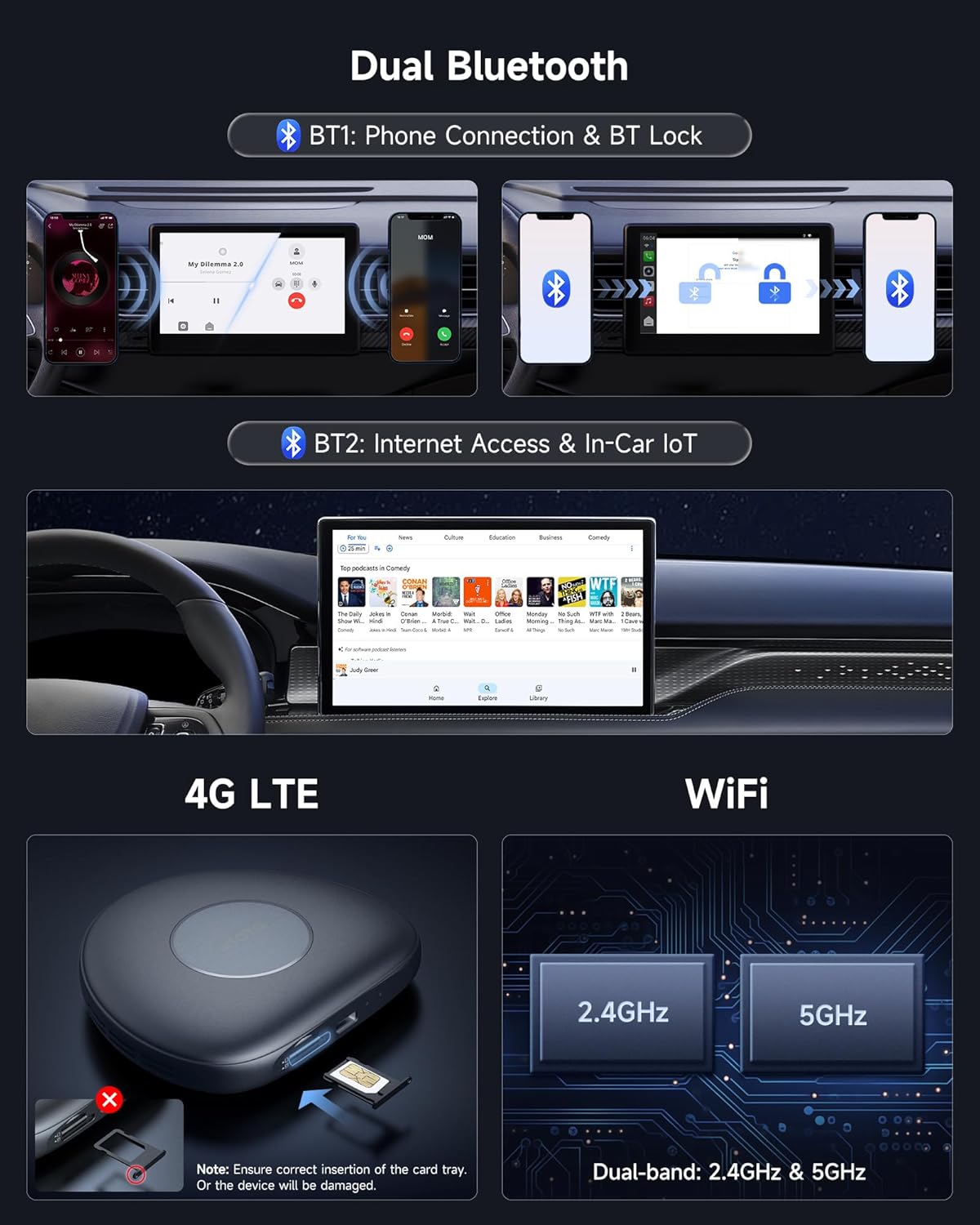
Image: A car's infotainment screen displaying the Google Play Store and FindApps icons, indicating the ability to download and use various applications directly on the device.

Image: A screenshot of the 'FindApps' interface on the car's display, showcasing a selection of applications like iHeart, YouTube Kids, Google TV, Hulu, and Pandora available for installation.

Image: Three distinct premium layouts of the Android 13 system interface are shown on a car's display, offering customizable visual experiences for maps, music, and other applications.
DriveChat AI Voice Assistant
Utilize the featured Gen AI assistant, DriveChat, powered by ChatGPT, for natural voice commands and queries. Manage functions and engage in AI conversations hands-free, enhancing safety and convenience while driving.

Image: A driver in a car interacting with the DriveChat AI assistant, which provides advice on driving in snowy conditions, demonstrating its conversational capabilities.

Image: A car's infotainment screen illustrating evolving AI features such as fuel level alerts with gas station recommendations, OBD fault diagnostics, and GeoSense for context-aware information.

Image: The DriveChat ChatGPT GenAI Featured Voice Assistant interface on a car's display, showing a driver interacting with the AI for a mock interview practice, highlighting its advanced conversational abilities.
Connectivity (4G LTE, Wi-Fi, Bluetooth)
Stay connected anywhere with built-in 4G LTE, Wi-Fi, or Bluetooth tethering. Enjoy high-speed internet for browsing, streaming, and navigation on the road. Note: Wi-Fi is not supported during wireless CarPlay or Android Auto use.

Image: A diagram illustrating the CB6C's connectivity options: Dual Bluetooth (BT1 for phone, BT2 for Internet/IoT), a 4G LTE SIM card slot with proper insertion instructions, and Dual-band Wi-Fi (2.4GHz & 5GHz) for stable internet connection.

Image: A diagram detailing Bluetooth 1 for phone connection (with auto lock/unlock) and Bluetooth 2 for Internet & In-Car IoT, showing examples of compatible add-ons like interior footwell lights and an OBD II diagnostic scanner.
Split Screen Functionality
The system supports split-screen mode, allowing you to use two applications simultaneously. For example, you can run your navigation app while streaming music or videos.

Image: A car's infotainment screen demonstrating split-screen functionality, with a navigation map on one side and a video playing on the other, allowing for simultaneous use of two applications.

Image: A car's infotainment screen demonstrating split-screen functionality, with a navigation map on one side and a video playing on the other, allowing for simultaneous use of two applications.
TrackHU GPS Tracking
The CB6C features the TrackHU GPS Tracking App, eliminating the need for external GPS trackers. Benefit from real-time tracking with 5-second refresh rates, 4-satellite positioning, track playback with speed management, and instant online/offline status with geofence alerts.
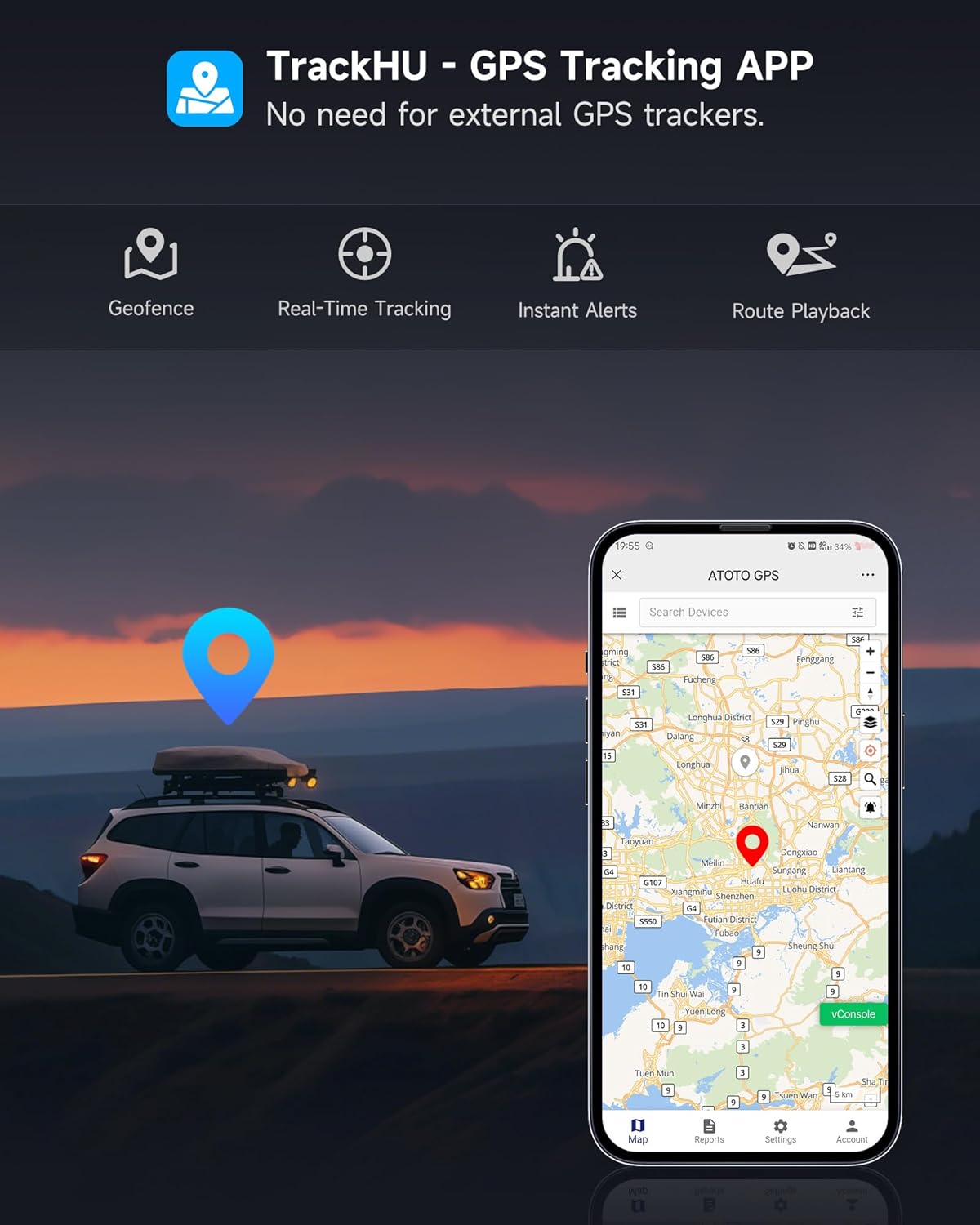
Image: A smartphone screen showing the TrackHU GPS Tracking App interface, with a map displaying a vehicle's location and various tracking features like geofence, real-time tracking, instant alerts, and route playback.

Image: The TrackHU GPS app interface displayed on both a car's screen and a smartphone, highlighting features like 5-second refresh rates, 4-satellite positioning, track playback with speed management, and instant online/offline status with geofence alerts.
OBD II Integration
The CB6C supports OBD II integration (accessory not included). By connecting an OBD adapter, you can view car diagnostics directly on the head unit, monitor vehicle information, and receive alerts like overspeed warnings.
DIY LED Light Colors
Personalize the LED light colors of your CB6C to match your car's interior style or your mood. Get creative with various DIY light effects.
Online System Updates (OTA)
The CB6C supports continuous Over-The-Air (OTA) firmware updates. Receive regular updates automatically to add new features, improve performance, and keep your system optimized without manual hassle. No need for computers or SD cards for updates.

Image: A car's infotainment screen displaying the 'System Update' interface, showing the current firmware version and a 'Check Version' button for FOTA (Firmware Over-The-Air) updates.

Image: A car's infotainment screen displaying the 'System Update' interface, showing the current firmware version and a 'Check Version' button for FOTA (Firmware Over-The-Air) updates.
Product Care & Support
ATOTOMOVE provides 12 months of warranty by default from the date of purchase, with an extra 6 months available. Our product experts are available to assist with any issues. Refer to the details in the package for online manual access and support contact information.

Image: Icons representing key aspects of product care: an online manual, 12+6 months of product care, and expert support, emphasizing comprehensive customer service.

Image: A graphic detailing support resources including FindApps, TrackHU, 12+6 months of product care, OTA updates via FindApps, and a QR code for accessing support via order center or eproductcare.com.
For additional support, visit: eproductcare.com
Specifications
- Model: CB6C
- Operating System: Android 13
- Processor: Qualcomm QCM6115 (SD662/SM6115), Octa-core
- RAM: 4GB
- Storage: 64GB
- Connectivity: 4G LTE, Dual-band Wi-Fi (2.4GHz & 5GHz), Bluetooth
- Dimensions: 6.26 x 6.1 x 1.14 inches
- Item Weight: 9.9 ounces
- Ports: 1 USB port (Type C)
- Power Plug Type: Type A - 2 pin (North American)
- Expandable Storage: Supports up to 256G TF Card (not included)
Image: A visual representation of the CB6C's dimensions (88mm x 95mm x 20mm) and the various cables and adapters included in the package, along with mentions of online resources and product care.

Image: Diagrams illustrating the CB6C's smart heat dissipation design, support for up to 256GB TF cards (not included), and instructions for prioritizing the Android Auto channel by pressing and holding the Reset button.
Compatibility Notes
- Compatible with: iOS 9.0+ (iPhone 5 or newer); Android 11.0+; Google/Samsung phones with Android 10.0+; Samsung Galaxy S8/S8+/Note 8 with Android 9.0+.
- Car Stereos: Compatible with car stereos that come with wired CarPlay / wired Android Auto (at least one wired connection).
- Not Compatible with: BMW Series.
- Not Compatible with: Car Stereos with Only Wireless CarPlay or Only Wireless Android Auto.
- Power Requirement: Some car models may need a USB power cable for power supply (e.g., 2016-2020 Nissan models & Isuzu & Camry & Toyota Crown 2023 & Lexus NX 2023 & Some Volkswagen models).
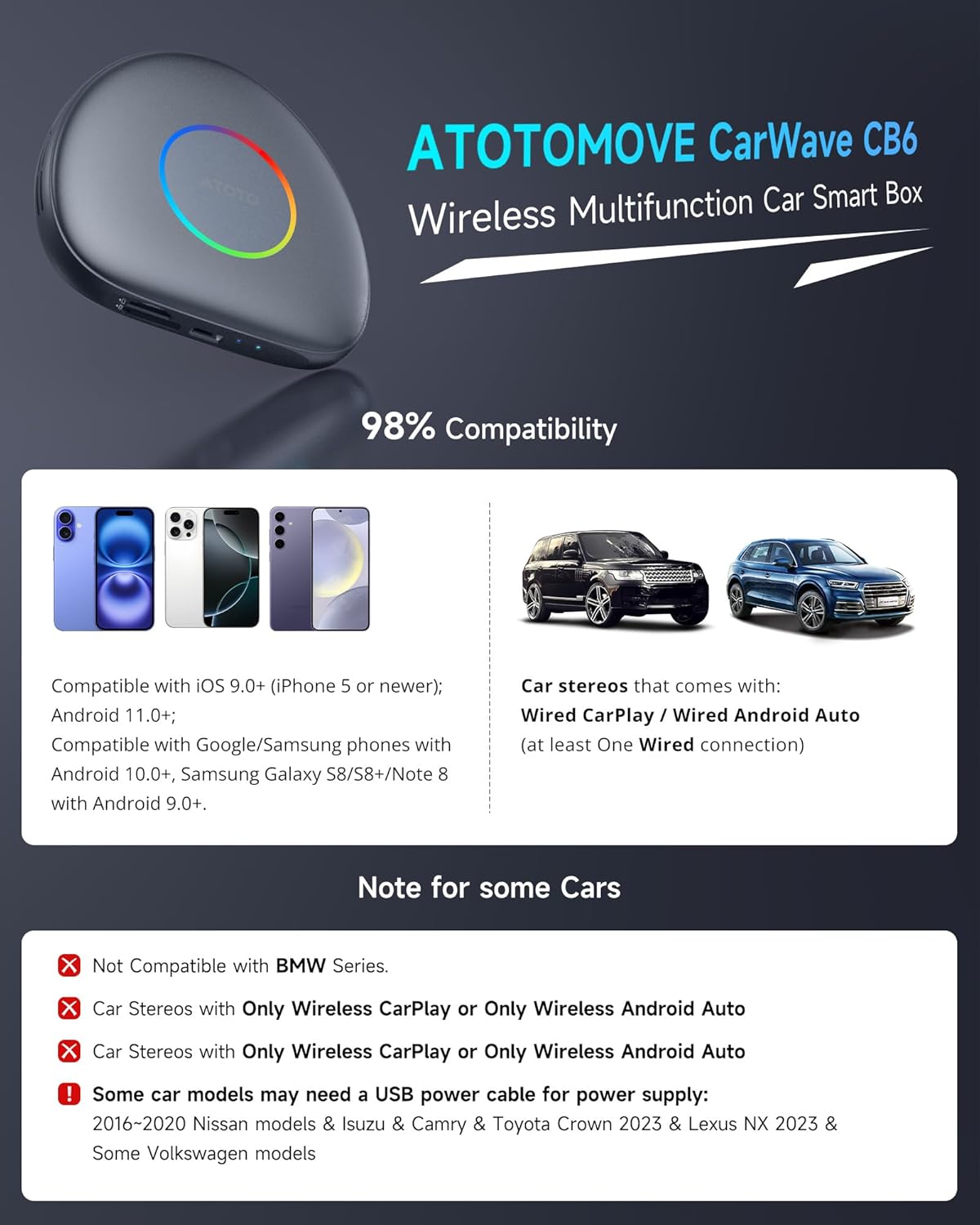
Image: A compatibility chart for the ATOTOMOVE CarWave CB6, detailing supported iOS and Android phone versions, compatible car stereos with wired CarPlay/Android Auto, and specific car models that are not compatible or may require additional power.

Image: A compatibility chart for the ATOTOMOVE CarWave CB6, detailing supported iOS and Android phone versions, compatible car stereos with wired CarPlay/Android Auto, and specific car models that are not compatible or may require additional power.