
1. Introduction
Thank you for choosing Yilaie Solar Fence Lights. These solar-powered lights are designed to provide efficient and customizable outdoor illumination for various applications, including fences, walls, steps, patios, and railings. Featuring durable construction and intelligent light-sensitive control, they offer a sustainable and convenient lighting solution.
2. Product Features
- Adjustable Lighting Modes: Offers three distinct color temperatures (Warm White, Cool White, Neutral White) to suit different ambiance preferences.
- Automatic Operation: Equipped with light sensors for automatic dusk-to-dawn functionality, ensuring energy-efficient lighting without manual intervention.
- Durable & Waterproof Design: Constructed from reinforced UV-resistant PC material, providing excellent resistance to weather, high temperatures, and impacts. Ultrasonic welding ensures an IP67 dust and waterproof rating for reliable year-round outdoor performance.
- Extended Runtime: Features a built-in 2000mAh battery, providing 16-25 hours of continuous light in energy-saving mode after 6-10 hours of direct sunlight charging.
- Bright & Wide Illumination: Upgraded with 3 high-brightness LEDs and a high-transmittance lens, casting light 40% wider than standard models, illuminating 30-45 sq ft per light.
- Easy Installation: Designed for quick and straightforward installation on various surfaces without the need for wiring.
3. Package Contents
Upon opening the package, please verify that all components are present:
- Yilaie Solar Fence Lights (4 units)
- Mounting Hardware (screws and wall anchors)
- Screw Hole Positioning Ruler (template for drilling)
- User Manual
Video: Unboxing the Yilaie Solar Fence Lights, showing the contents of the package including the lights, mounting hardware, and positioning ruler.
4. Installation Guide
The Yilaie Solar Fence Lights are designed for easy, wire-free installation. Follow these steps for optimal placement and performance:
- Choose Location: Select a location that receives 6-10 hours of direct sunlight daily to ensure the solar panel charges sufficiently. Avoid shaded areas or locations near other strong light sources that might interfere with the automatic dusk-to-dawn sensor.
- Mark Drill Holes: Use the provided Screw Hole Positioning Ruler. Stick the ruler to the desired installation surface (fence, wall, etc.) at the intended height. Mark the two screw points indicated on the ruler.
- Drill Holes: Using an appropriate drill bit for your surface, drill holes at the marked points.
- Insert Anchors & Screws: Insert the wall anchors into the drilled holes (if installing on masonry or drywall). Then, screw in the mounting screws, leaving a small gap for the light to hang.
- Mount the Light: Align the mounting slots on the back of the solar light with the screws. Slide the light down to secure it firmly in place.
- Remove Protective Film: Gently peel off any protective film from the solar panel to ensure maximum sunlight absorption.

Image: Visual guide demonstrating the four simple steps for installing the solar fence lights on a wall.

Image: Detailed diagram illustrating the use of the positioning ruler and the process of drilling and securing the lights.
5. Operating Instructions
The Yilaie Solar Fence Lights feature intelligent light-sensitive control and multiple lighting modes.
5.1 Automatic On/Off Function
The lights are equipped with a light sensor. They will automatically turn on at dusk and turn off at dawn, provided they are sufficiently charged and the power switch is activated.

Image: Visual representation of the solar lights charging during the day and automatically turning on at night.
5.2 Switching Lighting Modes
Each light has a small button located on the underside, near the LEDs. This button allows you to cycle through the three available lighting modes:
- Press once for Warm White.
- Press twice for Cool White.
- Press three times for Neutral White.
- Press four times to turn the light Off.
The light mode can only be changed when the light is active (i.e., in a dark environment or with the solar panel covered).
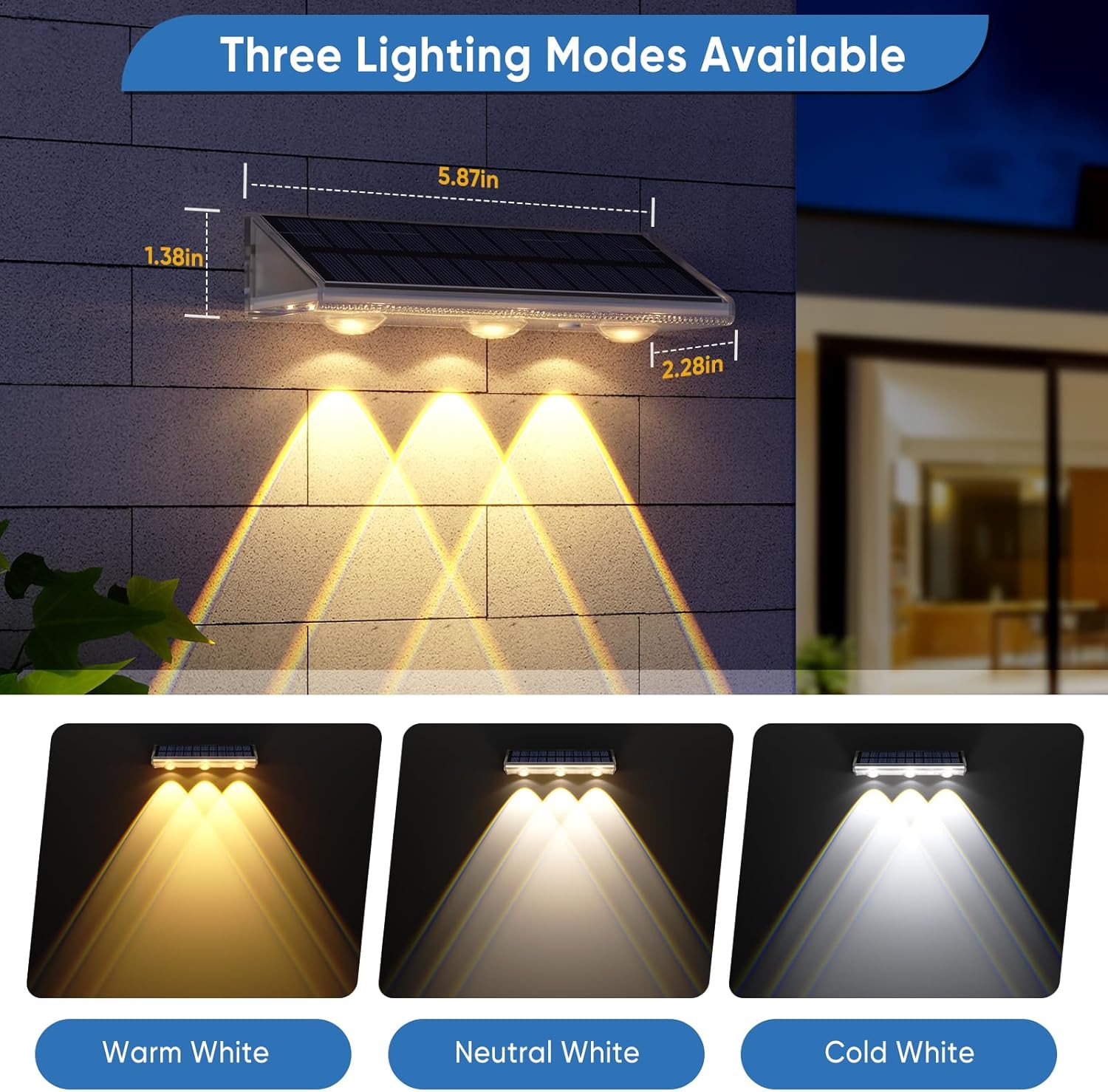
Image: Depiction of the three adjustable lighting modes (Warm White, Neutral White, Cold White) and product dimensions.
Video: Demonstration of the IP67 waterproof rating and the different lighting modes (Warm White, Cool White, Neutral White) of the Yilaie solar fence lights.
6. Maintenance
To ensure the longevity and optimal performance of your Yilaie Solar Fence Lights, consider the following maintenance tips:
- Clean Solar Panel: Regularly wipe the solar panel with a soft, damp cloth to remove dust, dirt, and debris. A clean panel ensures maximum sunlight absorption and efficient charging.
- Optimal Placement: Ensure the lights remain in a location that receives ample direct sunlight. Trim any overhanging branches or foliage that may begin to shade the solar panel over time.
- Battery Care: If the lights are stored for an extended period, it is recommended to fully charge them every 3 months to maintain battery health.
7. Troubleshooting
If your solar fence lights are not performing as expected, consider these common issues and solutions:
- Light does not turn on at night:
- Ensure the power switch is in the 'ON' position.
- Verify the solar panel receives 6-10 hours of direct sunlight daily. Relocate if necessary.
- Check if the solar panel is dirty; clean it as per maintenance instructions.
- Ensure there are no strong artificial light sources nearby that might trick the light sensor into thinking it's daytime.
- Light runtime is shorter than expected:
- Insufficient charging due to cloudy weather or partial shading. Allow for more direct sunlight exposure.
- The battery may not be fully charged. Ensure the light is exposed to direct sunlight for a full day before first use.
- Light is dim:
- Similar to short runtime, this often indicates insufficient charging.
- Ensure the solar panel is clean.

Image: Visual guide on proper placement for solar lights, emphasizing direct sunlight and avoiding external light interference.
8. Specifications
| Feature | Specification |
|---|---|
| Brand | YiLaie |
| Model Name | Solar fence lights (EL-SJW) |
| Color Temperature | 3000K (Warm White), 4500K (Neutral White), 6500K (Cool White) |
| Material | Polycarbonate |
| Water Resistance Level | IP67 Waterproof |
| Power Source | Solar Powered |
| Battery Capacity | 2000mAh (included) |
| Light Source Type | LED (3 per unit) |
| Brightness | 45 Lumen |
| Voltage | 5.5 Volts (DC) |
| Product Dimensions | 5.8"L x 2.3"W x 1.6"H |
| Item Weight | 0.79 Kilograms (for 4 units) |
| Installation Type | Wall Mount, Direct Mount |
9. Warranty and Support
Yilaie stands behind the quality of its products. Your Yilaie Solar Fence Lights are backed by:
- 365-Day Warranty: Free replacement for non-human failure.
- 30-Day Free Return & Exchange: For your peace of mind.
- 24/7 Support: Dedicated customer service available to assist with any inquiries or issues.
For any product problems or questions, please contact us first. We are committed to providing you with satisfactory after-sales service.

Image: Summary of Yilaie's after-sales service, highlighting warranty and support.