
1. Introduction
This manual provides essential information for the safe and efficient installation, operation, and maintenance of your ZHRCLY DAIKIN Compressor, model JT95BCBY1L. Please read this manual thoroughly before using the product and retain it for future reference. Proper understanding and adherence to these instructions will ensure optimal performance and longevity of your compressor.
2. Safety Information
Always observe the following safety precautions to prevent injury and damage to the equipment:
- Electrical Safety: Ensure all electrical connections are made by a qualified electrician and comply with local codes. Disconnect power before performing any maintenance or service.
- Pressure Safety: Compressors operate under high pressure. Never tamper with pressure relief valves or operate the unit beyond its rated pressure.
- Temperature: The compressor can become hot during operation. Avoid direct contact with hot surfaces.
- Ventilation: Operate the compressor in a well-ventilated area to prevent overheating and accumulation of hazardous fumes.
- Personal Protective Equipment (PPE): Always wear appropriate PPE, including safety glasses and gloves, when working with the compressor.
- Authorized Personnel: Only trained and authorized personnel should install, operate, or service this equipment.
3. Product Overview
The ZHRCLY DAIKIN Compressor JT95BCBY1L is a robust industrial component designed for reliable performance in various applications. This section provides a visual and descriptive overview of the unit.
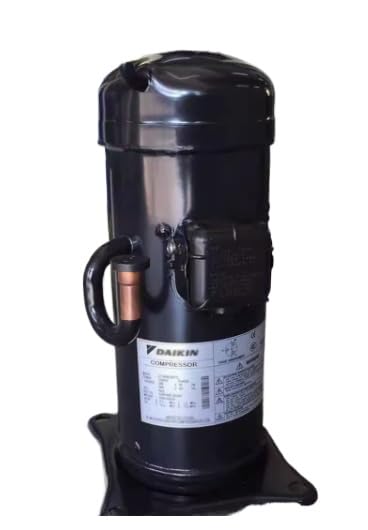
Image Description: A black industrial compressor unit, cylindrical in shape with a flat base. It features a label on its side displaying 'DAIKIN COMPRESSOR' and various technical specifications. A copper pipe connection is visible on the side, indicating its role in a refrigeration or air conditioning system. The unit appears sturdy and designed for heavy-duty use.
The compressor is a critical component responsible for circulating refrigerant or compressing air within a system. Its design emphasizes durability and efficiency for demanding industrial environments.
4. Installation
Proper installation is crucial for the safe and efficient operation of the compressor. Consult a qualified technician for installation if you are not experienced with industrial equipment.
- Unpacking and Inspection: Carefully unpack the compressor and inspect it for any shipping damage. Report any damage to the carrier immediately.
- Mounting: Securely mount the compressor on a stable, level surface capable of supporting its weight and absorbing vibrations. Use appropriate mounting hardware.
- Piping Connections: Connect all refrigerant or air lines according to system diagrams. Ensure all connections are tight and leak-free. Use appropriate tools and techniques to avoid damaging pipes or fittings.
- Electrical Wiring: Connect the compressor to the power supply as per the wiring diagram provided with your system and local electrical codes. Ensure correct voltage and phase.
- System Evacuation and Charging (for refrigeration systems): Evacuate the system to remove non-condensable gases and moisture. Charge the system with the correct type and amount of refrigerant as specified by the system manufacturer.
- Pre-Start Checks: Before starting, verify all connections, check oil levels (if applicable), and ensure all safety devices are correctly installed and functioning.
5. Operating Instructions
Follow these general guidelines for operating your compressor:
- Initial Startup: After installation and pre-start checks, energize the power supply to the compressor. Monitor the system for unusual noises, vibrations, or leaks.
- Normal Operation: The compressor should operate smoothly within its specified parameters. Regularly check system pressures and temperatures.
- Shutdown: To shut down the compressor, follow the system's specific shutdown procedure. For emergency shutdown, immediately cut off the power supply.
- Monitoring: Pay attention to any changes in the compressor's sound, vibration, or performance, as these can indicate potential issues.
6. Maintenance
Regular maintenance is essential to ensure the longevity and efficiency of your compressor. Adhere to a scheduled maintenance program.
- Daily Checks: Visually inspect the compressor for any leaks, unusual noises, or vibrations. Check system pressure gauges.
- Weekly/Monthly Checks: Clean the exterior of the compressor. Check electrical connections for tightness. Inspect piping and fittings for wear or damage.
- Annual Service: A qualified technician should perform a comprehensive annual service, including checking refrigerant/oil levels, inspecting internal components, and verifying safety controls.
- Filter Replacement: Replace any system filters according to the manufacturer's recommendations to maintain system cleanliness and efficiency.
- Lubrication: Ensure proper lubrication if the compressor requires it. Refer to the system's specific requirements for oil type and change intervals.
7. Troubleshooting
This section outlines common issues and basic troubleshooting steps. For complex problems, contact a qualified service technician.
| Problem | Possible Cause | Solution |
|---|---|---|
| Compressor does not start | No power, tripped breaker, faulty wiring, control issue | Check power supply, reset breaker, inspect wiring, consult technician |
| Compressor runs but no cooling/pressure | Low refrigerant/air, system leak, faulty valve | Check for leaks, recharge system, inspect valves, consult technician |
| Unusual noise or vibration | Loose mounting, internal component wear, foreign object | Check mounting, inspect for obstructions, consult technician |
| Overheating | Poor ventilation, dirty coils, low refrigerant/oil | Ensure adequate ventilation, clean coils, check levels, consult technician |
8. Specifications
The following are the technical specifications for the ZHRCLY DAIKIN Compressor Model JT95BCBY1L:
- Manufacturer: Original factory
- Part Number: JT95BCBY1L
- Item Weight: 6.6 pounds
- Package Dimensions: 1 x 1 x 1 inches
- Item Model Number: JT95BCBY1L
- Included Components: new
- Batteries Required?: No
- ASIN: B0F5B1QX6F
- Date First Available: April 17, 2025
- Brand: ZHRCLY
9. Warranty and Support
For warranty information, please refer to the documentation provided at the time of purchase or contact your vendor. ZHRCLY stands behind the quality of its products.
If you encounter any issues that cannot be resolved using the troubleshooting guide, or require technical assistance, please contact the merchant or manufacturer directly. When contacting support, please have your model number (JT95BCBY1L) and purchase details readily available.