1. Introduction
This manual provides essential information for the installation, operation, and maintenance of your FENSAJRD LED backlight strip replacement kit. This kit is designed to restore the backlight functionality of compatible Grundig television models, ensuring uniform brightness and stable operation. Please read these instructions carefully before proceeding with installation.
The LED strips feature a low-power design with advanced heat dissipation technology, promoting long-lasting and stable performance without flickering. Their strong compatibility and flexible design allow for installation without compromising the TV's aesthetics.
2. Safety Information
WARNING: Television repair involves working with high voltage components. Improper handling can result in electric shock, injury, or damage to the television. It is recommended that installation be performed by a qualified technician.
- Always disconnect the television from the main power supply before beginning any repair or installation work.
- Wear appropriate personal protective equipment, including anti-static gloves, to prevent electrostatic discharge (ESD) damage to sensitive electronic components.
- Handle LED strips by their edges to avoid damaging the LEDs or circuit board.
- Ensure the work area is clean, dry, and well-lit.
- Do not bend or twist the LED strips excessively, as this can cause damage.
3. Package Contents
Verify that all components are present and undamaged before proceeding with installation.
- 8 x LED Backlight Strips (4 'R' type, 4 'L' type)

Figure 3.1: Complete set of 8 LED backlight strips.
4. Setup and Installation
This section outlines the general steps for replacing the LED backlight strips. Specific disassembly procedures for your Grundig TV model may vary. Refer to your TV's service manual for detailed disassembly instructions.
- Prepare the Work Area: Ensure a clean, flat, and static-free surface large enough to accommodate the television. Disconnect the TV from all power sources and external devices.
- Disassemble the Television: Carefully remove the TV's back cover, stand, and any internal components (e.g., main board, power supply board, speakers) necessary to access the display panel. Document each step and keep screws organized.
- Remove the Display Panel: With extreme care, detach and lift the LCD panel and diffuser layers to expose the existing LED backlight strips. The LCD panel is fragile and susceptible to damage.
- Remove Old LED Strips: Disconnect the power connectors from the old LED strips. Gently peel off or unclip the old strips from the TV chassis. Note their orientation and placement.
- Install New LED Strips:
- Align the new FENSAJRD LED strips with the designated mounting points on the TV chassis. Ensure the 'R' and 'L' strips are placed correctly according to the original layout.
- Press firmly to secure the strips if they have adhesive backing, or clip them into place.
- Connect the power cables to the new LED strips. Ensure all connections are secure.
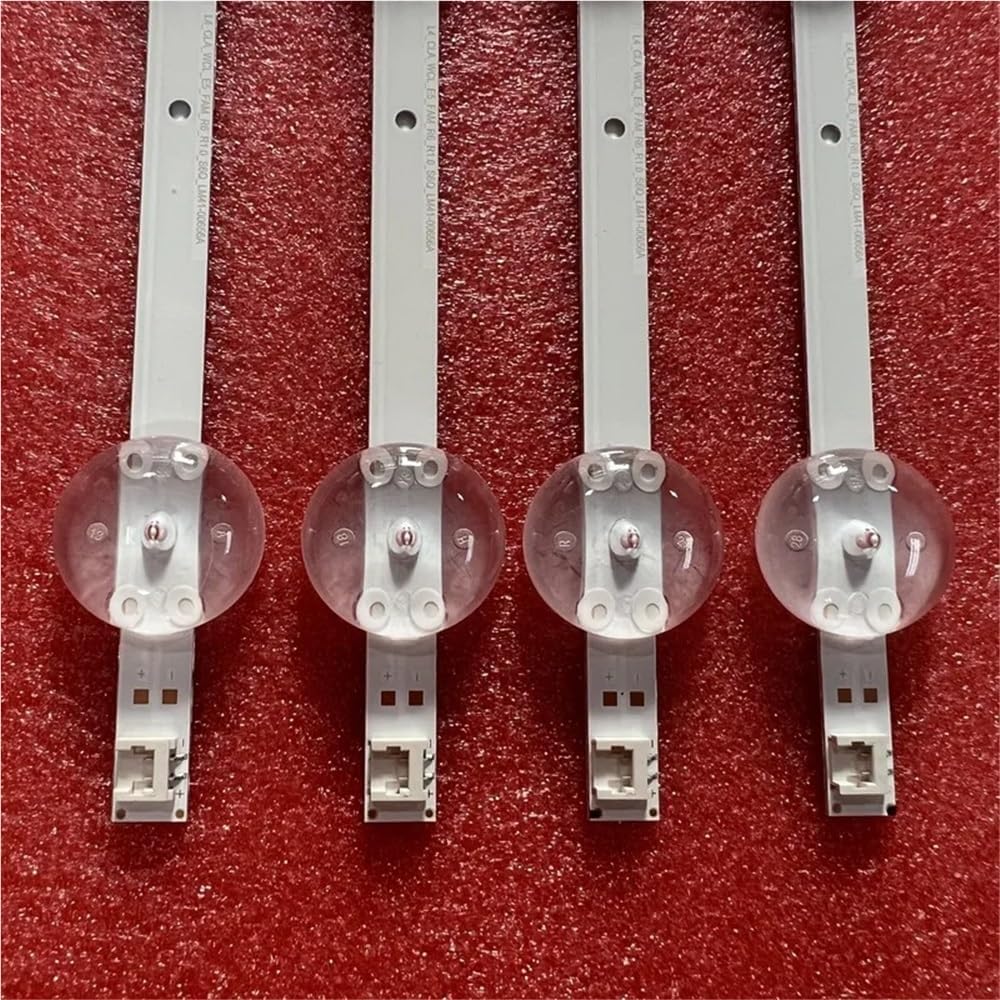
Figure 4.1: Detail of LED strip connectors.

Figure 4.2: Interconnection points of LED strips.
- Test the Backlight: Before reassembling the entire TV, temporarily connect the power cable and turn on the TV to verify that the new LED strips illuminate correctly and uniformly. Immediately disconnect power after testing.
- Reassemble the Television: Carefully re-install the diffuser layers, LCD panel, and all other components in reverse order of disassembly. Ensure all cables are properly routed and secured, and all screws are tightened appropriately.
5. Operating Instructions
Once properly installed, the FENSAJRD LED backlight strips operate automatically with your television. There are no specific user-adjustable settings for the backlight strips themselves. The TV's existing brightness and picture settings will control the illumination provided by these strips.
The design ensures energy-efficient and stable operation, contributing to the overall picture quality of your television.
6. Maintenance
The FENSAJRD LED backlight strips are designed for long-term, maintenance-free operation. However, general care for your television will help prolong the life of all components, including the backlight.
- Keep the television in a clean, dust-free environment.
- Ensure adequate ventilation around the TV to prevent overheating.
- Avoid exposing the TV to extreme temperatures or humidity.
- Do not attempt to clean the LED strips directly once installed, as this requires disassembling the TV.
7. Troubleshooting
If you encounter issues after installing the LED backlight strips, consider the following:
| Problem | Possible Cause | Solution |
|---|---|---|
| No backlight / Dark screen |
|
|
| Uneven brightness / Dark spots |
|
|
| Flickering backlight |
|
|
If troubleshooting steps do not resolve the issue, contact a qualified television repair professional.
8. Specifications
- Brand: FENSAJRD
- Model Number: huzihao
- Compatibility: Grundig 55VLX800BP, 55GDU7810, 55GDU7900, 5GCU7800, 55GDU7500B, 55GDU7905, 55VLX7850, 55GUB8962, 55GCU7900, 55GCU7855 (and other compatible models)
- Material: Aluminum
- Length (R+L combined): Approximately 1122mm
- LED Count: 11 LEDs per strip (3V per LED)
- Package Includes: 8 pieces (4 'R' type, 4 'L' type)
- Item Weight: 1.76 ounces (approx. 50g)
- Package Dimensions: 1.18 x 0.79 x 0.39 inches (approx. 3 x 2 x 1 cm)

Figure 8.1: Detail of LED components on the strip.
9. Warranty and Support
For warranty information and technical support regarding your FENSAJRD LED backlight strips, please refer to the seller's policies on the platform where the product was purchased. Keep your proof of purchase for any warranty claims.
For issues related to the television itself, consult the original manufacturer's documentation or a qualified TV repair service.