
CAR710-4BC
CAR710-4BC Double DIN 7” Touchscreen Digital Multimedia Receiver
Model: CAR710-4BC | Brand: Generic
Introduction
This manual provides detailed instructions for the installation, operation, and maintenance of your CAR710-4BC Double DIN 7” Touchscreen Digital Multimedia Receiver. This unit is designed to enhance your in-car entertainment and connectivity with features such as Apple CarPlay, Android Auto, Bluetooth, and a backup camera. Please read this manual thoroughly before using the product to ensure proper operation and to prevent damage.
What's in the Box
Verify that all components are present before beginning installation:
- CAR710-4BC digital multimedia receiver
- CMOS color backup camera with license plate mount
- Wiring harnesses and mounting hardware
- User manual (this document)

Image: The CAR710-4BC digital multimedia receiver, the included backup camera with its license plate mount, and the associated wiring harnesses.
Setup and Installation
Professional installation is recommended for this product. Incorrect wiring can cause damage to the unit or your vehicle's electrical system. Always disconnect the vehicle's negative battery terminal before beginning any electrical work.
Wiring Connections
The unit comes with specific wiring harnesses for power, speakers, and auxiliary inputs/outputs. Refer to the wiring diagram provided with the physical product for detailed connections.
- Power: Connect the yellow wire to constant 12V, red wire to accessory 12V, and black wire to ground.
- Speakers: Connect speaker wires to the corresponding vehicle speaker wires, ensuring correct polarity.
- Backup Camera: Connect the camera's video output to the unit's "CAM IN" RCA input. The camera's power should be connected to the vehicle's reverse light circuit for automatic activation.
- USB: The rear USB port supports wired Apple CarPlay and Android Auto, as well as media playback.
- Preamp Outputs: Use the 5-channel preamp outputs (Front L/R, Rear L/R, Subwoofer) for connecting external amplifiers.

Image: Various wiring harnesses and small mounting hardware included with the receiver.
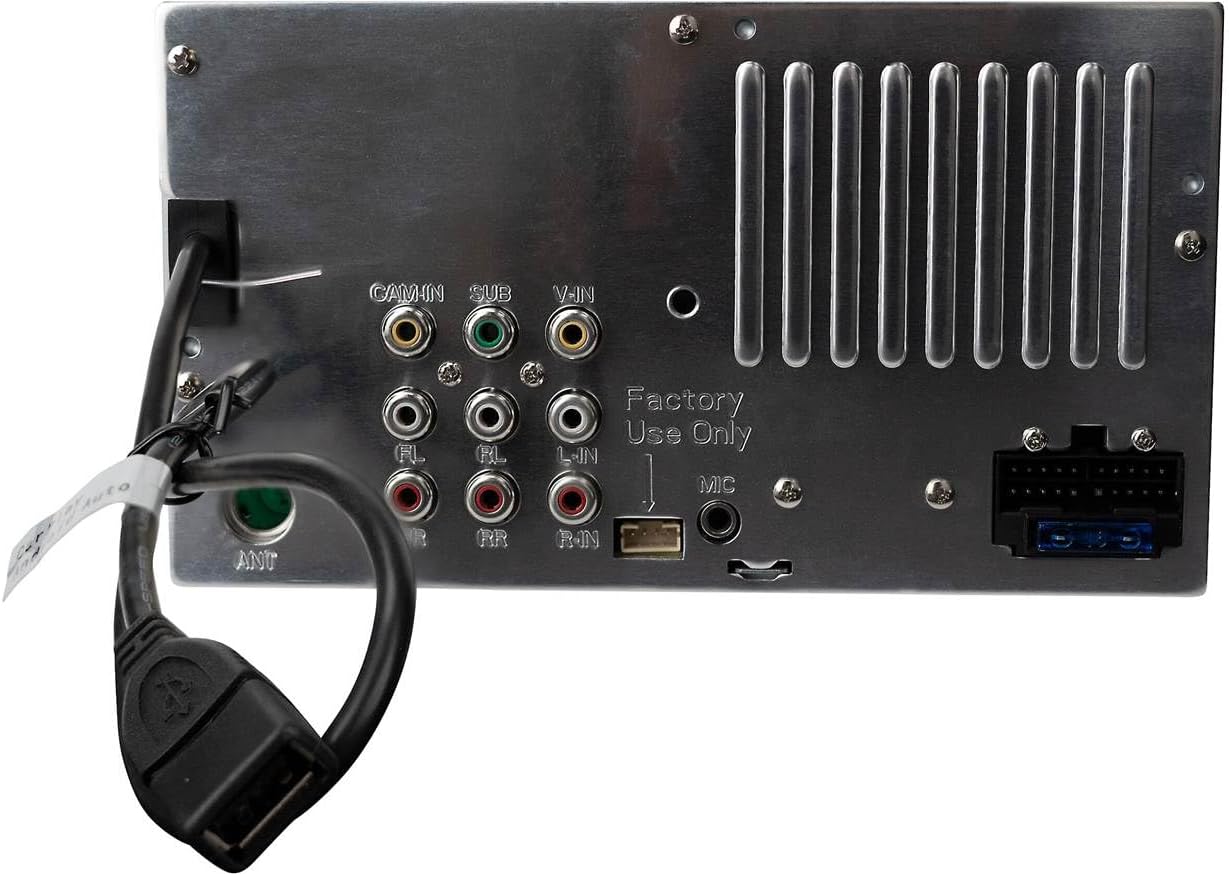
Image: The rear panel of the CAR710-4BC unit, displaying RCA inputs for camera and A/V, preamp outputs, antenna input, and the rear USB port.
Operating Instructions
7” Capacitive Touchscreen Display
The unit features a responsive 7-inch capacitive touchscreen. Navigate through menus, select sources, and control functions by touching the icons and options displayed on the screen.

Image: The main "SOURCES" screen of the CAR710-4BC, displaying options for Radio, USB, Bluetooth Phone, Bluetooth Audio, Android Auto, and Apple CarPlay.
Apple CarPlay & Android Auto (Wired)
Connect your compatible iPhone or Android smartphone to the rear USB port to activate Apple CarPlay or Android Auto. This allows you to access navigation, make calls, send messages, and play music directly from the receiver's display.
- Apple CarPlay: For iPhones, ensure CarPlay is enabled in your phone's settings. Connect via USB. Learn more about Apple CarPlay
- Android Auto: For Android phones, download the Android Auto app if not pre-installed. Connect via USB. Learn more about Android Auto

Image: The Apple CarPlay interface as seen on the CAR710-4BC display, featuring various application icons.
Bluetooth Connectivity
Pair your smartphone or other Bluetooth-enabled device for hands-free calling and wireless audio streaming.
- Go to the Bluetooth menu on the receiver.
- Enable Bluetooth on your mobile device and search for available devices.
- Select "CAR710-4BC" from the list on your device.
- Confirm the pairing code if prompted.
Once paired, you can make and receive calls directly through the receiver and stream audio from your device.
Backup Camera Operation
The included CMOS backup camera automatically displays the rear view on the receiver's screen when the vehicle is shifted into reverse. This feature enhances safety during parking and maneuvering.

Image: The compact CMOS backup camera attached to a universal license plate mounting bracket, with its video and power cables.
Audio Features
- Equalizer: Adjust audio output using the 8-band equalizer or select from 8 preset EQ curves to customize your sound.
- Media Playback: Play MP3, FLAC, Xvid, and MP4 files via the rear USB port.
- AM/FM Tuner: Access local radio stations with the built-in tuner, featuring 30 station presets.
Maintenance
- Cleaning the Screen: Use a soft, lint-free cloth to gently wipe the touchscreen. For stubborn smudges, slightly dampen the cloth with water or a screen-cleaning solution designed for electronics. Do not use abrasive cleaners or solvents.
- General Care: Keep the unit free from dust and debris. Avoid exposing the unit to extreme temperatures or direct sunlight for prolonged periods.
- Software Updates: Check the manufacturer's website periodically for any available firmware updates to ensure optimal performance and compatibility.
Troubleshooting
| Problem | Possible Cause | Solution |
|---|---|---|
| No power | Incorrect wiring; Blown fuse; Vehicle battery issue. | Check power and ground connections. Inspect vehicle's fuse box and the unit's inline fuse. Verify battery voltage. |
| No sound | Speaker wires disconnected; Volume too low; Mute function active; Incorrect audio source. | Check speaker connections. Increase volume. Deactivate mute. Select correct audio source. |
| Bluetooth not connecting | Device not in pairing mode; Unit not discoverable; Interference. | Ensure both devices are in pairing mode. Delete previous pairings and try again. Move closer to the unit. |
| CarPlay/Android Auto not launching | Incorrect USB cable; Phone not compatible; App not installed/updated; USB port issue. | Use a high-quality data USB cable. Ensure phone OS and apps are updated. Try a different USB port if available. Restart phone and unit. |
| Backup camera not displaying | Camera power issue; Video cable disconnected; Reverse trigger wire not connected. | Check camera power supply. Verify video cable connection to "CAM IN". Ensure reverse trigger wire is correctly connected to vehicle's reverse signal. |
Specifications
| Feature | Detail |
|---|---|
| Product Dimensions | 5.1 x 7.01 x 3.95 inches (5.1"D x 7.01"W x 3.95"H) |
| Item Weight | 3.5 pounds |
| Model Number | CAR710-4BC |
| Brand | Generic |
| Connectivity Technology | Bluetooth, RCA, USB |
| Controller Type | Android, iOS |
| Special Feature | Apple CarPlay |
| Compatible Devices | Smartphone |
| Connector Type | USB Type A |
| Audio Output Mode | Stereo |
| Output Power | 50 Watts (Max) |
Warranty and Support
This product typically comes with a manufacturer's warranty. Please refer to the warranty card included with your purchase or visit the manufacturer's official website for detailed warranty terms and conditions. For technical support, troubleshooting assistance, or service inquiries, please contact the retailer or the manufacturer directly.
Note: Unauthorized modifications or improper installation may void the product warranty.