Important Safety Instructions
Please read all instructions carefully before using this appliance. Keep this manual for future reference.
- Electrical Safety: Ensure the voltage matches your power supply. Do not immerse the cord, plug, or oven in water or other liquids. Unplug from outlet when not in use and before cleaning.
- Heat Safety: The oven surfaces become very hot during and after operation. Always use oven mitts or gloves when handling hot items or surfaces. Do not touch hot surfaces directly.
- Ventilation: Ensure adequate space around the oven for proper ventilation. Do not block any ventilation openings.
- Child Safety: This appliance is not intended for use by persons (including children) with reduced physical, sensory or mental capabilities, or lack of experience and knowledge, unless they have been given supervision or instruction concerning use of the appliance by a person responsible for their safety. Children should be supervised to ensure that they do not play with the appliance.
- Proper Use: Do not use the oven for purposes other than its intended use. Do not place paper, cardboard, plastic, or similar materials inside the oven.
- Maintenance: Do not attempt to repair the appliance yourself. Contact qualified service personnel for any repairs.
Product Overview
The EuropAce EEO5451DGY is a 45-liter convection oven designed for versatile cooking. It features dual heating elements, a convection fan, and a rotisserie function.
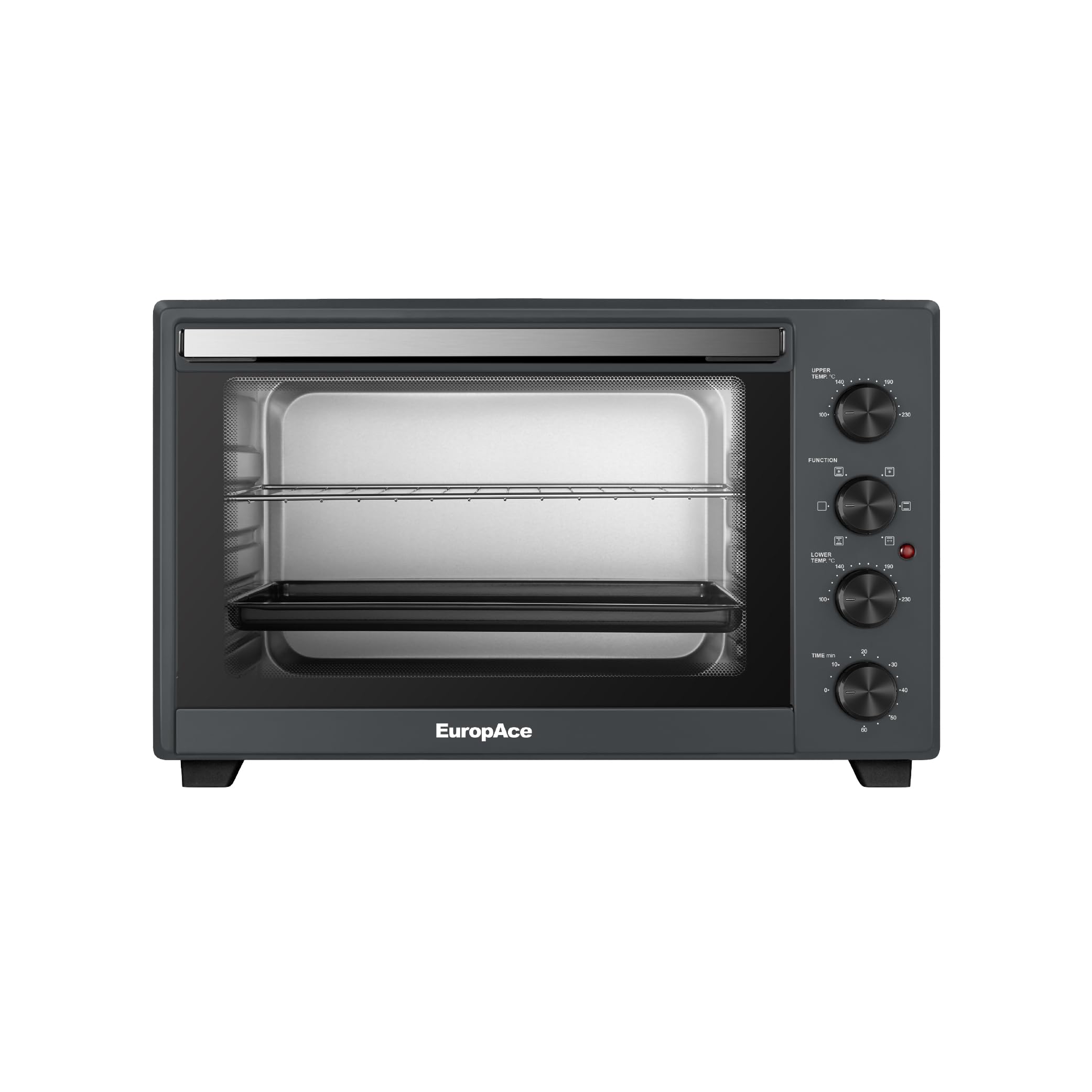
Figure 1: Front view of the EuropAce EEO5451DGY Convection Oven. This image displays the oven's exterior, including the dual tempered glass door and control panel on the right side.
Components:
- Oven Unit: The main body of the convection oven.
- Baking Pan: Used for baking, roasting, and collecting drips.
- Grill Rack: For grilling, toasting, and supporting baking dishes.
- Rotisserie Spit: A metal rod with forks for roasting whole chickens or other meats.
- Rotisserie Handle: For safely inserting and removing the hot rotisserie spit.
- Crumb Tray: Located at the bottom, removable for easy cleaning of food debris.
Key Features:
- 45L Capacity: Spacious interior suitable for various cooking needs.
- Convection Fan: Circulates hot air for even and faster cooking.
- Rotisserie Function: Allows for 360° rotation for perfectly roasted meats.
- Dual Tempered Glass Door: Enhances heat insulation and safety, allowing clear viewing of food.
- Dual Heating Elements: Independent upper (1000W) and lower (1000W) heating elements for precise temperature control.
- Digital Controls: Intuitive interface for setting temperature, time, and cooking modes.
Setup
Unpacking:
- Carefully remove the oven and all accessories from the packaging.
- Remove any protective films, stickers, or packaging materials from the oven and accessories.
- Wash the baking pan, grill rack, rotisserie spit, and handle in warm, soapy water. Rinse thoroughly and dry.
Placement:
- Place the oven on a stable, heat-resistant, and level surface.
- Ensure there is at least 10-15 cm (4-6 inches) of clearance on all sides (back, top, and sides) for proper ventilation.
- Do not place the oven near flammable materials, curtains, or under wall cabinets.
- Plug the power cord into a grounded electrical outlet.
First Use (Burn-in):
Before cooking food, it is recommended to run the oven empty to burn off any manufacturing residues and odors.
- Set the temperature to 230°C (450°F).
- Set the timer for 15-20 minutes.
- Operate the oven in a well-ventilated area. A slight odor or smoke may be present; this is normal.
- After the cycle, turn off the oven and allow it to cool completely.
Operating Instructions
Control Panel Overview:
The oven features digital controls for precise adjustments. The control panel typically includes a display, temperature knob/buttons, timer knob/buttons, and function selection buttons (e.g., Bake, Grill, Convection, Rotisserie).
General Operation:
- Power On: Plug the oven into a suitable power outlet. The display will illuminate.
- Select Function: Use the function selector to choose your desired cooking mode (e.g., Bake, Grill, Convection).
- Set Temperature: Adjust the temperature knob or buttons to the desired cooking temperature.
- Set Time: Adjust the timer knob or buttons to the desired cooking duration. The oven will automatically turn off when the timer expires.
- Start Cooking: Press the Start/On button to begin the cooking process.
Specific Cooking Modes:
- Bake: Ideal for cakes, cookies, casseroles. Use the baking pan or an oven-safe dish on the grill rack. Select "Bake" function, set temperature and time.
- Grill: Perfect for toasting, browning, or cooking thin cuts of meat. Place food directly on the grill rack or in a shallow pan. Select "Grill" function, set temperature and time.
- Convection: Activates the internal fan for even heat distribution, reducing cooking time and ensuring consistent results. Can be used with Bake or Roast functions. Select "Convection" along with your primary cooking mode.
- Rotisserie: For roasting whole poultry or large cuts of meat.
- Assemble the rotisserie spit: Secure the meat onto the spit using the forks. Ensure the meat is centered and balanced.
- Insert the rotisserie spit: Place one end of the spit into the rotisserie drive socket on the oven wall, then rest the other end on the support bracket.
- Select "Rotisserie" function, set temperature and time. The spit will rotate automatically.
- Use the rotisserie handle to safely remove the hot spit after cooking.
Cleaning and Maintenance
Regular cleaning ensures optimal performance and extends the life of your oven. Always unplug the oven and allow it to cool completely before cleaning.
- Exterior: Wipe the exterior surfaces with a damp cloth and mild detergent. Do not use abrasive cleaners or scouring pads.
- Interior: Wipe the interior walls with a damp cloth and mild detergent. For stubborn stains, a non-abrasive oven cleaner designed for convection ovens can be used, following the product instructions carefully. Ensure all cleaner residue is removed.
- Glass Door: Clean the dual tempered glass door with a glass cleaner or a damp cloth.
- Accessories: The baking pan, grill rack, rotisserie spit, and crumb tray can be washed in warm, soapy water. Rinse and dry thoroughly. The crumb tray should be cleaned regularly to prevent grease buildup.
- Do Not Immerse: Never immerse the oven unit, power cord, or plug in water or any other liquid.
Troubleshooting
If you encounter issues with your oven, refer to the following common problems and solutions:
| Problem | Possible Cause | Solution |
|---|---|---|
| Oven does not turn on. | Not plugged in; power outage; faulty outlet. | Ensure plug is securely in outlet. Check household circuit breaker. Try a different outlet. |
| Food not cooking evenly. | Improper rack position; overcrowding; convection fan off. | Adjust rack position. Do not overcrowd the oven. Ensure convection fan is active for even cooking. |
| Rotisserie spit not rotating. | Spit not properly seated; meat too heavy/unbalanced; rotisserie function not selected. | Ensure spit is correctly inserted into drive socket and support. Balance the meat. Select the rotisserie function. |
| Smoke or unusual odor during first use. | Manufacturing residues burning off. | This is normal for first use. Ensure good ventilation. It should dissipate after initial use. |
Specifications
| Feature | Detail |
|---|---|
| Model | EEO5451DGY |
| Brand | EuropAce |
| Capacity | 45 Liters |
| Wattage | 2000 watts (Upper 1000W, Lower 1000W) |
| Product Dimensions (D x W x H) | 41.7D x 56W x 35H centimetres |
| Material | Stainless Steel |
| Control Type | Digital |
| Special Features | Convection, Rotisserie, Dual Tempered Glass Door |
| Included Components | Baking Pan, Grill Rack, Rotisserie Spit, Rotisserie Handle, Crumb Tray |
Warranty and Support
This EuropAce EEO5451DGY Convection Oven comes with a standard manufacturer's warranty. Please refer to the warranty card included with your purchase for specific terms, conditions, and duration.
For technical support, service, or warranty claims, please contact EuropAce customer service. Contact details can typically be found on the EuropAce official website or on your warranty documentation.
Note: Keep your proof of purchase for warranty validation.


