
Honeywell H6+H4
Honeywell H6+H4 Desk Lamp User Manual
Model: H6+H4
Introduction
Thank you for choosing the Honeywell H6+H4 Desk Lamp. This manual provides essential information for the safe and efficient operation of your new desk lamp. Please read it thoroughly before use and retain it for future reference.
The Honeywell H6+H4 desk lamp is designed to provide high-quality, eye-friendly illumination for various tasks, including home office work, studying, and video conferencing. It features advanced LED technology with a high Color Rendering Index (CRI) for accurate color representation and adjustable lighting modes to suit your needs.
Product Overview and Components
The Honeywell H6+H4 series includes two distinct desk lamp designs, both featuring adjustable arms and heads for optimal lighting positioning. Both models are built with durable materials for long-lasting performance.

Image: The Honeywell H6+H4 series offers two distinct designs: a sleek rectangular lamp head and a modern circular lamp head, both featuring adjustable arms and stable bases.
Key Features:
- High Color Rendering Index (CRI ≥97): Ensures accurate and vivid color display, surpassing standard desk lamps.
- Eye-Friendly Light: Equipped with 108 Sunturalux full-spectrum LED beads, RG0 certified (no blue light hazard), and double anti-glare design for maximum eye comfort.
- Adjustable Design: Foldable design with 180° vertical and horizontal movement for precise light positioning.
- Durable Construction: Made from high-quality aluminum, zinc alloy, and other premium materials for longevity.
- Long LED Lifespan: Over 30,000 hours of consistent performance.
- Versatile Use: Suitable for home office, studying, video conferencing, makeup application, and general ambient lighting.

Image: This diagram illustrates the multi-angle adjustment capabilities of the rectangular lamp, showing 0-180° wide angle adjustment and a 300° rotating lamp head, along with key dimensions.

Image: The round Honeywell H6+H4 desk lamp features an adjustable metal swingarm, allowing users to position the light at various angles (e.g., 90°, 135°, 190°) for optimal illumination during tasks like studying.
Advanced Lighting Technology:

Image: This image details the internal components of the lamp head, including the cooling ring, LED module, electroplated diffuser, and light guide plate, which contribute to its soft yet bright illumination. A before-and-after comparison highlights the improved lighting quality.

Image: The Sunturalux Optik Processor, featuring 108 full-spectrum LED beads, is central to the lamp's eye-caring design, ensuring natural light, high CRI, and absence of blue light, glare, and flicker.
Setup
- Unpack: Carefully remove all components from the packaging. Ensure all parts are present: lamp base, lamp arm, lamp head, and power adapter.
- Assemble (if required): Some models may require attaching the lamp arm to the base. Follow any specific assembly instructions provided in the box. Ensure all connections are secure.
- Position: Place the lamp on a stable, flat surface. Adjust the lamp arm and head to your desired initial position.
- Connect Power: Plug the power adapter into the lamp's power input port, then plug the adapter into a standard electrical outlet.

Image: The rectangular Honeywell H6+H4 desk lamp is shown fully assembled and positioned on a desk, ready for use, providing illumination for a computer workstation.
Operating Instructions
The Honeywell H6+H4 desk lamp offers intuitive controls for adjusting light modes and brightness levels.

Image: This image displays the control interface on the lamp's base, featuring touch buttons to switch between 2700K, 4000K, and 5000K color temperatures, and a slide control for adjusting brightness across 7 levels (15% to 100%).
Power On/Off:
- Locate the power button on the lamp base.
- Press once to turn the lamp on.
- Press again to turn the lamp off.
Adjusting Color Temperature:
The lamp offers multiple color temperature settings to suit different activities and preferences.
- Locate the color temperature control buttons (often labeled with icons or temperature values like 2700K, 4000K, 5000K).
- Short touch to cycle through the available color temperatures:
- Warm Light (approx. 3000K): Ideal for relaxation or a cozy ambiance.
- Natural Light (approx. 4000K): Suitable for general tasks and reading.
- Cool Light (approx. 5000K): Best for focused work and tasks requiring high concentration.
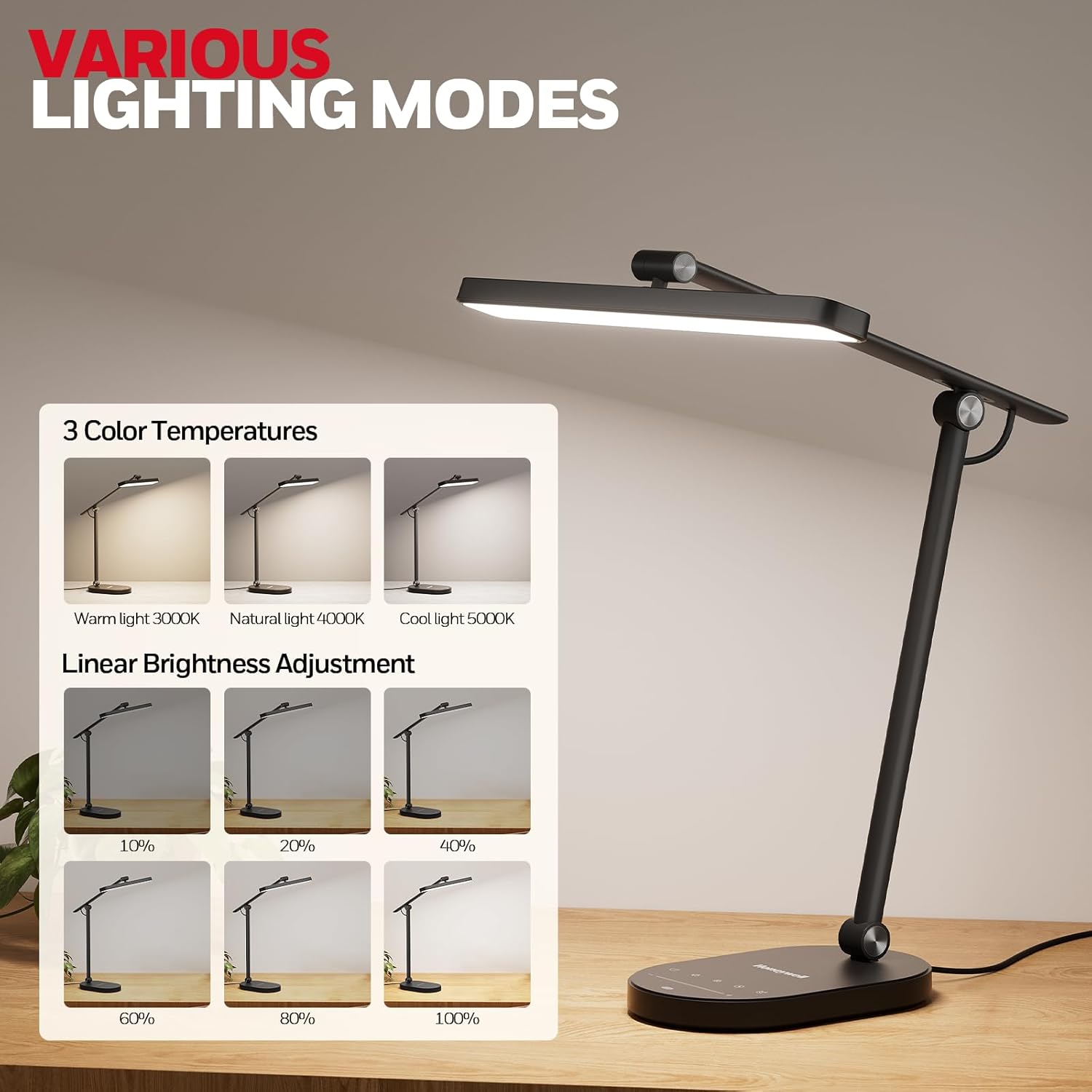
Image: This visual guide demonstrates the three available color temperatures (Warm 3000K, Natural 4000K, Cool 5000K) and the linear brightness adjustment feature, allowing users to set the light intensity from 10% to 100%.
Adjusting Brightness:
The lamp features a linear brightness adjustment for precise control over light intensity.
- Locate the slide control or dedicated brightness buttons on the lamp base.
- Slide your finger along the control or press the buttons to increase or decrease brightness.
- Brightness can typically be adjusted from 10% to 100%.
Adjusting Lamp Position:
- Gently hold the lamp arm or head.
- Adjust the arm vertically and horizontally (up to 180° movement).
- Rotate the lamp head as needed (up to 300° rotation on some models) to direct light precisely.
- Ensure adjustments are made smoothly to avoid damage.

Image: The round Honeywell H6+H4 desk lamp is shown providing optimal lighting for a video conference, demonstrating its utility for professional and personal communication.
Maintenance
Proper maintenance ensures the longevity and optimal performance of your Honeywell H6+H4 Desk Lamp.
- Cleaning:
- Always unplug the lamp before cleaning.
- Use a soft, dry cloth to wipe down the lamp's surfaces.
- For stubborn marks, a slightly damp cloth with mild soap can be used, followed by a dry cloth.
- Avoid abrasive cleaners, solvents, or harsh chemicals, as these can damage the finish.
- Storage:
- If storing the lamp for an extended period, ensure it is clean and dry.
- Fold the lamp into its most compact form to protect movable parts.
- Store in a cool, dry place away from direct sunlight and extreme temperatures.
- LED Lifespan: The integrated LED light source has a lifespan exceeding 30,000 hours and is not user-replaceable.
Troubleshooting
If you encounter issues with your Honeywell H6+H4 Desk Lamp, refer to the following common problems and solutions:
| Problem | Possible Cause | Solution |
|---|---|---|
| Lamp does not turn on. |
|
|
| Light flickers or is dim. |
|
|
| Controls are unresponsive. |
|
|
If the problem persists after trying these solutions, please contact Honeywell customer support for further assistance.
Specifications
| Feature | Detail |
|---|---|
| Model | H6+H4 |
| Brand | Honeywell |
| Light Source | 108 Sunturalux Full-Spectrum LED Beads |
| Color Rendering Index (CRI) | ≥97 |
| Color Temperature | Adjustable (e.g., 3000K, 4000K, 5000K) |
| Brightness Adjustment | Linear (e.g., 10% - 100%) |
| LED Lifespan | >30,000 hours |
| Material | Aluminum, Zinc Alloy, other premium materials |
| Certifications | FCC, CE, RoHS, RG0 (no blue light hazard) |
| ASIN | B0F53XNY6C |
Warranty and Support
Honeywell table lamps are backed by a comprehensive warranty and dedicated customer support.
- Warranty Period: 24-month after-sales service.
- Contact Support: If you have any questions or concerns regarding your Honeywell H6+H4 Desk Lamp, please contact us through Amazon. Our service team aims to provide a satisfactory solution within 24 hours.
- Online Resources: For additional information and support, visit the official Honeywell store on Amazon: Honeywell Store.
Ask a question about this manual
Ask about setup, troubleshooting, compatibility, parts, safety, or missing instructions. Manuals+ will review the question and use this page’s manual context to help answer it.