
1. Introduction and Overview
The MUCAR 892BT+Drivescan is an advanced automotive diagnostic tool designed for comprehensive vehicle system analysis and maintenance. This device offers a wide range of functions, including full system diagnostics, bidirectional control, ECU coding, and various special service functions. It is built to provide accurate and efficient troubleshooting for a vast array of vehicle makes and models.

Figure 1: MUCAR 892BT+Drivescan device and its protective carrying case.
2. What's Included
Upon unboxing your MUCAR 892BT+Drivescan, please verify that all the following components are present:
- MUCAR 892BT+Drivescan Tablet
- Protective Carrying Case
- Charging Brick
- USB Cable
- DOIP Connections
- Ethernet Cable
- User Manual (this document)

Figure 2: Contents of the MUCAR 892BT+Drivescan kit, including the tablet, cables, and charger.
3. Key Features
The MUCAR 892BT+Drivescan offers a robust set of features for professional and enthusiast use:
- OE Full System Diagnostics: Comprehensive scanning of all vehicle systems.
- Bidirectional Control: Perform active tests to control vehicle components.
- ECU Coding: Advanced functionality for vehicle customization and module replacement.
- 34+ Service Functions: Includes Oil Reset, ETS, Gear Learning, SAS, Injector Coding, BMS, Brake Reset, EPB, Power Balance, Fuel Trim Reset, Turbo Reset, Crankshaft Relearn, Gearbox Matching, Clutch Reset, Ad.blue Reset, Seat Calibration, Transport Mode, and more.
- CANFD & DOIP Support: Compatible with newer vehicle communication protocols.
- Extensive Vehicle Coverage: Supports over 140 car brands and 10,000+ car models.
- Wireless Diagnostics: Bluetooth 5.0 connectivity for flexible operation.
- Multi-Language Support: Operates in 28+ languages.
- FCA Autoauth Compatibility: Allows access to secure gateway modules on 2018 and newer Dodge, Fiat, and Chrysler vehicles.
- Lifetime Free Updates: Ensures the tool remains current with the latest vehicle data and software enhancements.
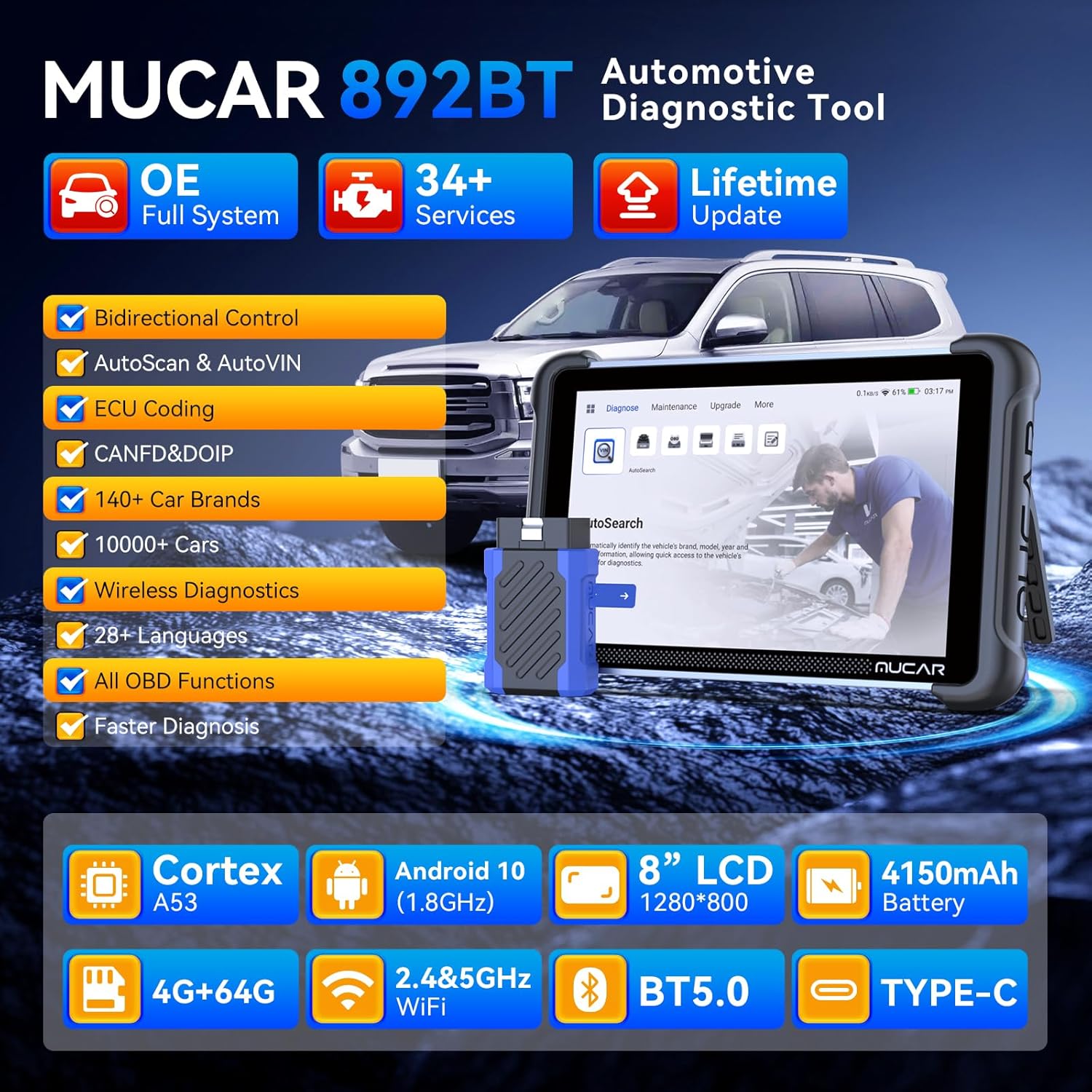
Figure 3: Visual representation of the MUCAR 892BT's core features.
4. Technical Specifications
- Processor: Cortex A53
- Operating System: Android 10 (1.8GHz)
- Display: 8-inch LCD (1280x800 resolution)
- Battery: 4150mAh
- Storage: 4GB RAM + 64GB ROM
- Connectivity: 2.4 & 5GHz WiFi, Bluetooth 5.0, Type-C USB
5. Setup and Initial Use
5.1 Powering On and Initial Configuration
- Ensure the device is fully charged using the provided charging brick and USB cable.
- Press and hold the power button to turn on the tablet.
- Follow the on-screen prompts to select your preferred language, connect to a Wi-Fi network, and complete the initial setup.
5.2 Connecting to a Vehicle
The MUCAR 892BT+Drivescan connects to your vehicle's OBD-II port, typically located under the dashboard on the driver's side.
- Locate the vehicle's OBD-II port.
- Plug the diagnostic connector into the OBD-II port.
- Turn the vehicle's ignition to the ON position (engine off).
- On the MUCAR 892BT+Drivescan tablet, select 'AutoSearch' to automatically identify the vehicle's brand, model, and year, or select 'Diagnose' to manually choose vehicle information.

Figure 4: The MUCAR Bluetooth OBD2 Scanner connected to a vehicle's OBD-II port, with the tablet displaying diagnostic information.
6. Operating Instructions
6.1 Diagnostic Functions
The 'Diagnose' menu provides access to core diagnostic capabilities:
- Read/Clear DTCs: Read and clear diagnostic trouble codes from all available systems.
- Live Data Stream: View real-time data parameters from various sensors and modules.
- Freeze Frame Data: Capture a snapshot of vehicle conditions when a fault code is set.
- ECU Information: Retrieve detailed information about the Electronic Control Units.
- OBD Functions: Supports all 10 modes of OBD-II testing.

Figure 5: The All System Diagnostic screen, showing various vehicle systems that can be scanned.
6.2 Maintenance Functions (34+ Services)
Access the 'Maintenance' menu for a wide array of special functions and resets. These functions allow for specific component adjustments and system resets after repairs or replacements.

Figure 6: A selection of the 34+ service functions available on the MUCAR 892BT.
6.3 Bidirectional Control and ECU Coding
The tool supports full bidirectional controls, allowing you to send commands to vehicle systems and monitor their responses. Advanced ECU coding capabilities enable reflash special functions, reflash vehicle control modules, customize OE settings, and match component control modules.

Figure 7: Illustration of bidirectional control, showing the ability to send commands to vehicle actuators.

Figure 8: Examples of advanced ECU coding functions, including reflash and customization.
7. Advanced Features
7.1 Dollarfix Community
The Dollarfix Community is a social media platform integrated into the device, suitable for car enthusiasts. Users can participate in discussions, post and browse interesting and useful content, and create or join communities related to automotive topics. This feature allows users to ask questions, research solutions, and share knowledge on various aspects of automotive care and diagnostics.
7.2 MUAI Intelligent Assistant
The MUAI (MUCAR AI) Intelligent Assistant is a powerful feature capable of answering various automotive questions. It provides knowledge about automobiles, maintenance, and care, acting as a personal AI assistant. Users can input questions, such as