
1. Introduction
Thank you for choosing the NUPLEA AI Translation Earbuds YYK-Q39. These innovative 3-in-1 earbuds are designed to provide seamless real-time translation in 144 languages and accents, high-quality music playback, and clear call functionality. Featuring an open-ear design for comfort and situational awareness, advanced Bluetooth 5.4 connectivity, and intuitive touch controls, the YYK-Q39 is your ideal companion for global communication, work, and leisure. This manual provides detailed instructions on how to set up, operate, maintain, and troubleshoot your earbuds to ensure optimal performance.

Image 1.1: The NUPLEA AI Translation Earbuds YYK-Q39, shown resting within their sleek charging case. The earbuds feature a black and silver design with an ergonomic ear hook.
2. Product Overview
2.1 Key Features
- High-Precision Multilingual Translation: Supports real-time two-way translation in 144 languages and accents, including Chinese, English, Japanese, Korean, Russian, German, French, and Spanish.
- Multi-Scenario Translation Modes: Includes Live Recording, Simultaneous Interpretation, Face-to-Face, Video Call, Voice Call, Touch Mode, Free-speech Mode, Speaker Mode, and Offline Mode.
- 3-in-1 Functionality: Seamlessly combines translation, music playback, and call capabilities.
- HD Audio Quality: Equipped with a 14.2mm diaphragm speaker and 4 high-precision microphones for clear sound and calls.
- Open-Ear Design: Lightweight PC material (8g per earbud) and soft silicone ear hooks provide comfort and allow situational awareness. IPX7 waterproof rating.
- Extended Battery Life: Up to 10 hours of playtime per charge, with an additional 50 hours from the charging case, totaling 60 hours. Features rapid charging.
- Advanced Connectivity: Utilizes Bluetooth 5.4 technology for fast data transfer, stable connection up to 33 feet, and low-latency audio.
- Smart Touch Controls: Intuitive controls for music, calls, and voice assistant.
- AI Integration: Includes AI Assistant, AI Chat, and AI Image Generation features.

Image 2.1: Visual representation of the NUPLEA earbuds' capability to break language barriers, supporting real-time translation in 144 languages, with flags of several languages like English, German, Spanish, French, Chinese, Russian, Japanese, and Arabic displayed.
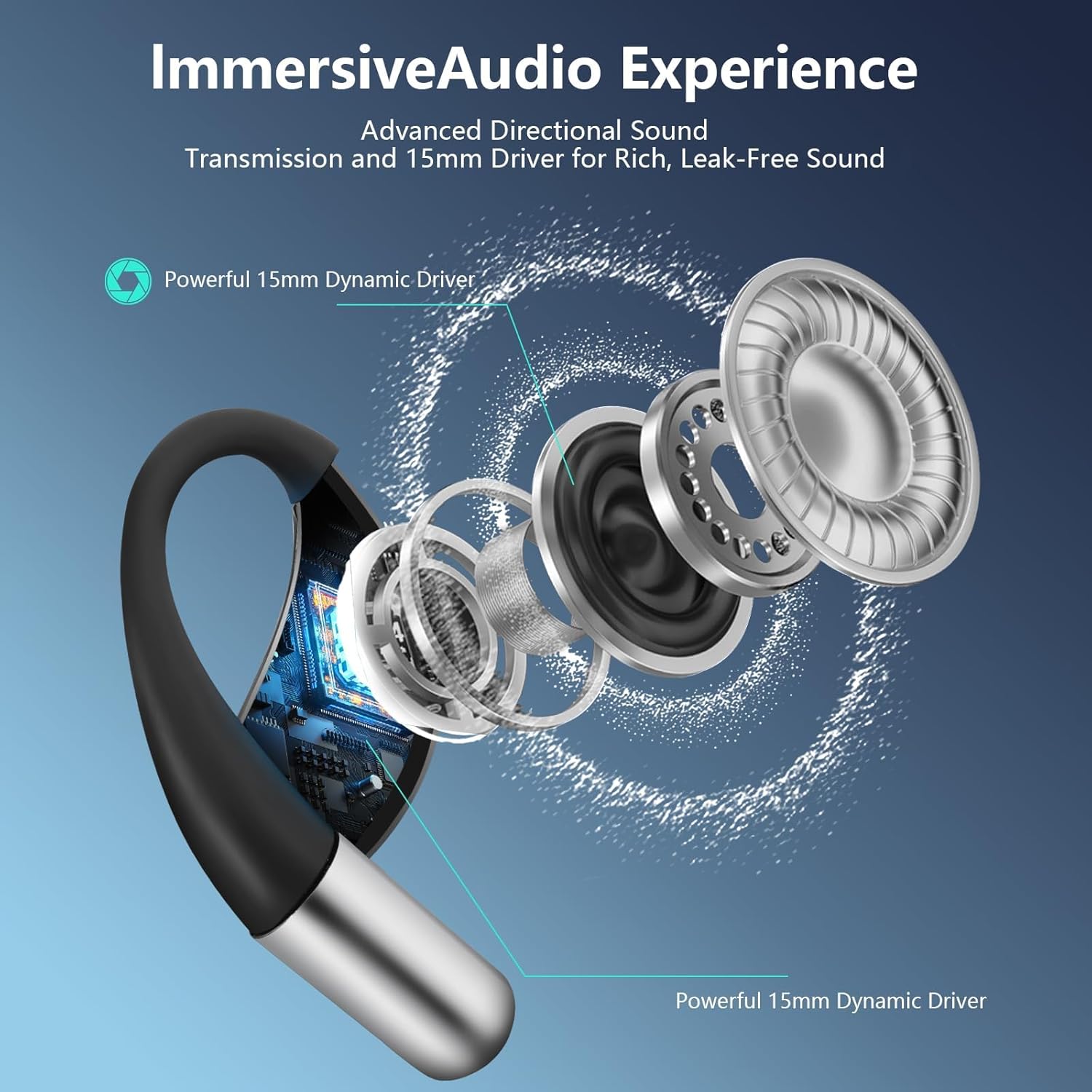
Image 2.2: An exploded diagram illustrating the internal components of the earbud, highlighting the powerful 15mm dynamic driver responsible for the immersive audio experience and rich, leak-free sound.
2.2 What's in the Box
- NUPLEA AI Translation Earbuds (Left and Right)
- Charging Case
- USB-C Charging Cable
- User Manual (This Document)
3. Setup
3.1 Initial Charging
Before first use, fully charge the earbuds and the charging case. Connect the provided USB-C cable to the charging port on the case and a compatible USB power source. The LED display on the case will indicate the charging status. A full charge takes approximately 1.5 hours.
3.2 Pairing with Your Device
- Ensure the earbuds are in the charging case and the case has power.
- Open the charging case. The earbuds will automatically enter pairing mode, indicated by a flashing LED light on the earbuds.
- On your smartphone or device, go to Bluetooth settings and enable Bluetooth.
- Search for new devices. Select "YYK-Q39" from the list of available devices.
- Once connected, the earbud LED light will stop flashing. You will hear an audible confirmation.
The earbuds feature Bluetooth 5.4 for a stable and fast connection. They will automatically reconnect to the last paired device when removed from the case.

Image 3.1: A visual representation of the upgraded Bluetooth 5.4 technology integrated into the earbuds, emphasizing its role in creating an unbreakable dual-channel connection, improving stability, and lowering power consumption.
3.3 App Installation
To utilize the full translation and AI features, download the dedicated NUPLEA app from your device's app store (iOS App Store or Android Google Play Store). Follow the in-app instructions to complete the setup and link your earbuds.
4. Operating Instructions
4.1 Translation Modes
The NUPLEA earbuds offer various translation modes to suit different communication scenarios:
- Live Recording: Converts spoken language into text for meeting notes or transcription.
- Simultaneous Interpretation: Provides real-time voice translation for international conferences or multi-lingual discussions.
- Face-to-Face Translation (Earphones + Mobile Phone): Two-way translation for direct conversations, ideal for global negotiations or travel.
- Face-to-Face Translation (Dual-Ear Mode): Share one earbud with another person for simultaneous two-way conversation.
- Video Call & Voice Call Translation: Integrates real-time translation into calls via the app, generating an invitation link for seamless communication.
- Touch Mode: Tap the earbud to activate translation.
- Free-speech Mode: Continuous translation without manual activation.
- Speaker Mode: Translation output through your phone's speaker.
- Offline Mode: Supports translation without an internet connection in most parts of the world (requires prior download of language packs).

Image 4.1: Illustrations of the earbuds' diverse translation capabilities, including Face-to-Face translation for direct conversations, Live Recording for transcribing audio, and Simultaneous Interpretation for real-time translation in group settings.

Image 4.2: A visual guide to the four primary translation instruction modes: Touch Mode, Free-speech Mode, Speaker Mode, and Offline Mode, indicating support for offline translation in many regions.
4.2 Smart Touch Controls
The earbuds feature intuitive touch controls on the outer surface. Refer to the diagram below for specific functions:

Image 4.3: A detailed diagram illustrating the fingerprint touch control functions on the earbud, including Play/Pause, Switch Song, Adjust Volume, Reject Call/End Call, Answer Call, and activating Siri/Voice Assistant.
- Play/Pause: Single tap.
- Switch Song: Double tap (left for previous, right for next).
- Adjust Volume: Triple tap (left for volume down, right for volume up).
- Answer Call: Single tap during an incoming call.
- Reject Call/End Call: Long press during an incoming call or during a call.
- Voice Assistant (Siri/Google Assistant): Long press (specific duration may vary, refer to app settings).
4.3 AI Features
The NUPLEA app integrates advanced AI features:
- AI Assistant: Provides intelligent assistance for various tasks.
- AI Chat: Engage in text-based conversations with the AI for information or assistance.
- AI Image Generation: Utilize AI to generate images based on your input (feature availability may vary by app version).
5. Charging
The NUPLEA earbuds and charging case are designed for extended use and convenient charging.
- Earbud Playtime: Up to 10 hours of uninterrupted playtime on a single charge.
- Total Playtime with Case: The charging case provides an additional 50 hours of power, extending total playtime to a remarkable 60 hours.
- Rapid Charging: A quick 5-minute charge can provide approximately 1 hour of auditory delight.
- Charging Interface: The charging case uses a Type-C port for fast and efficient charging.

Image 5.1: The charging case and earbuds, highlighting the 1.5-hour fast charging with Type-C, and indicating a total of 60 hours of playtime with the case and 8 hours for the earbuds alone. The image also shows the power display for both the case and the earbuds.
6. Comfort and Fit
The YYK-Q39 earbuds are designed for comfort and a secure fit, even during active use.
- Lightweight Design: Each earbud weighs only 8g, made from lightweight PC material.
- Open-Ear Design: Allows you to enjoy audio while remaining aware of your surroundings.
- Secure Fit: Soft silicone ear hooks ensure the earbuds stay securely in place, ideal for sports and workouts.
- Waterproof: IPX7 waterproof rating provides protection against sweat and splashes.
6.1 How to Wear Your Earbuds
- Take out the earbuds from the charging case.
- Hang the end of the earphone on the ear bone.
- Turn the earphones and slide it behind the ear.
- Adjust the ear hook for a secure and comfortable fit.

Image 6.1: A step-by-step visual guide demonstrating the correct way to wear the NUPLEA AI Translation Earbuds, ensuring a secure and comfortable fit by hanging them on the ear bone, turning them behind the ear, and adjusting the ear hook.
7. Maintenance
Proper maintenance ensures the longevity and optimal performance of your earbuds.
- Cleaning: Regularly wipe the earbuds and charging case with a soft, dry, lint-free cloth. Do not use abrasive cleaners or solvents.
- Storage: When not in use, store the earbuds in their charging case to protect them from dust and damage. Store in a cool, dry place away from direct sunlight and extreme temperatures.
- Water Exposure: While IPX7 rated, avoid submerging the earbuds in water for extended periods. Dry them thoroughly if they get wet.
- Charging Port: Keep the USB-C charging port free of dust and debris.
8. Troubleshooting
If you encounter issues with your NUPLEA AI Translation Earbuds, refer to the following common solutions:
| Problem | Possible Cause | Solution |
|---|---|---|
| Earbuds won't turn on | Low battery | Place earbuds in the charging case and ensure the case is charged. Charge the case if necessary. |
| Cannot pair with device | Bluetooth is off; Earbuds not in pairing mode; Device too far | Ensure Bluetooth is enabled on your device. Place earbuds in case, close, then open to re-enter pairing mode. Keep device within 33 feet (10 meters). |
| No sound or poor audio quality | Earbuds not properly seated; Volume too low; Interference | Adjust earbuds for a secure fit. Increase volume on your device and earbuds. Move away from sources of strong electromagnetic interference. |
| Translation not working or inaccurate | App not connected; Internet connection issues (for online modes); Language settings incorrect | Ensure the NUPLEA app is open and connected to the earbuds. Check your internet connection. Verify that the correct source and target languages are selected in the app. For offline mode, ensure language packs are downloaded. |
| Touch controls unresponsive | Earbuds dirty; Temporary software glitch | Clean the touch sensor area. Place earbuds back in the case, close, then reopen to reset. |
If the problem persists after trying these solutions, please contact NUPLEA customer support for further assistance.
9. Specifications
| Feature | Detail |
|---|---|
| Model Number | YYK-Q39 |
| Brand | NUPLEA |
| Translation Languages | 144 Languages & Accents |
| Bluetooth Version | 5.4 |
| Earbud Weight | 8g (each) |
| Waterproof Rating | IPX7 |
| Playtime (Earbuds) | Up to 10 hours |
| Total Playtime (with Case) | Up to 60 hours |
| Charging Port | USB Type-C |
| Package Dimensions | 4.8 x 4.09 x 1.34 inches |
| Item Weight | 4.6 ounces |
| Manufacturer | NUPLEA |
| First Available Date | April 16, 2025 |
10. Warranty and Support
NUPLEA products are manufactured to the highest quality standards. For warranty information, product registration, or technical support, please refer to the contact details provided on the product packaging or visit the official NUPLEA website. Please retain your proof of purchase for warranty claims.