1. Introduction
Thank you for choosing the RONEAIR Cordless Vacuum Cleaner. This manual provides essential information for the safe and efficient operation, maintenance, and troubleshooting of your new vacuum cleaner. Please read this manual thoroughly before first use and retain it for future reference.
Product Overview
The RONEAIR Cordless Vacuum Cleaner is designed for versatile cleaning across various surfaces, including hard floors and carpets. It features a powerful 39KPa suction, a unique back-saving bendable wand, and a convenient self-standing design. The anti-tangle technology minimizes hair wrapping around the brush roll, while the multi-stage HEPA filtration system ensures cleaner expelled air. Its lightweight design and included attachments make it suitable for comprehensive home and car cleaning.
2. Safety Information
To reduce the risk of fire, electric shock, or injury, always follow basic safety precautions when using an electrical appliance.
- Do not use outdoors or on wet surfaces.
- Do not allow to be used as a toy. Close attention is necessary when used by or near children.
- Use only as described in this manual. Use only manufacturer's recommended attachments.
- Do not use with damaged cord or plug. If appliance is not working as it should, has been dropped, damaged, left outdoors, or dropped into water, return it to a service center.
- Do not pull or carry by cord, use cord as a handle, close a door on cord, or pull cord around sharp edges or corners. Do not run appliance over cord. Keep cord away from heated surfaces.
- Do not unplug by pulling on cord. To unplug, grasp the plug, not the cord.
- Do not handle plug or appliance with wet hands.
- Do not put any object into openings. Do not use with any opening blocked; keep free of dust, lint, hair, and anything that may reduce air flow.
- Keep hair, loose clothing, fingers, and all parts of body away from openings and moving parts.
- Do not pick up anything that is burning or smoking, such as cigarettes, matches, or hot ashes.
- Do not use to pick up flammable or combustible liquids, such as gasoline, or use in areas where they may be present.
- Do not pick up toxic material (e.g., chlorine bleach, ammonia, drain cleaner).
- Do not use without dust cup and/or filters in place.
- Turn off all controls before unplugging.
- Use extra care when cleaning on stairs.
- Do not charge the unit outdoors.
- Recharge only with the charger specified by the manufacturer.
3. Product Components
The RONEAIR Cordless Vacuum Cleaner comes with the following components:
- Main Motor Unit
- Extension Wand (with bendable joint)
- LED Roller Brush Head
- Adapter (Charger)
- Crevice Tool
- Dusting Brush
- Wall Mount Bracket (optional installation)
- HEPA Filters (pre-installed and spare)

Image: Overview of the RONEAIR Cordless Vacuum Cleaner with its main unit, extension wand, brush head, and various attachments including the crevice tool and dusting brush, along with spare filters.
4. Setup
4.1 Assembly
- Attach the Extension Wand: Align the electrical contacts on the extension wand with those on the main motor unit. Push firmly until it clicks into place.
- Attach the Brush Head: Connect the LED roller brush head to the bottom of the extension wand, ensuring it clicks securely.
- Attach Accessories: For handheld use, attach the crevice tool or dusting brush directly to the main motor unit. For extended reach, attach them to the end of the extension wand.


Image: Front and side views of the RONEAIR Cordless Vacuum Cleaner fully assembled, showing the main unit, extension wand, and brush head.
4.2 Initial Charging
Before first use, fully charge the vacuum cleaner. The battery indicator on the main unit will show the charging status.
- Connect the adapter to the charging port on the main motor unit.
- Plug the adapter into a wall outlet.
- A full charge takes approximately 4.5 hours. The LED power indicator will show 100% when fully charged.
5. Operating Instructions
5.1 Powering On/Off and Suction Modes
Press the power button on the main unit to turn the vacuum on. The vacuum operates in two suction modes:
- Standard Mode: Provides up to 30 minutes of cleaning time, suitable for general dirt and debris on hard floors.
- Turbo Boost Mode: Provides up to 15 minutes of high-power suction, ideal for deep cleaning carpets or stubborn dirt. Press the mode button to switch between standard and turbo modes.
5.2 Using the Bendable Wand
The flexible wand allows the vacuum to bend at a 180-degree angle, enabling easy cleaning under furniture, beds, and couches without excessive bending or kneeling. This feature helps reduce strain on your back and knees.
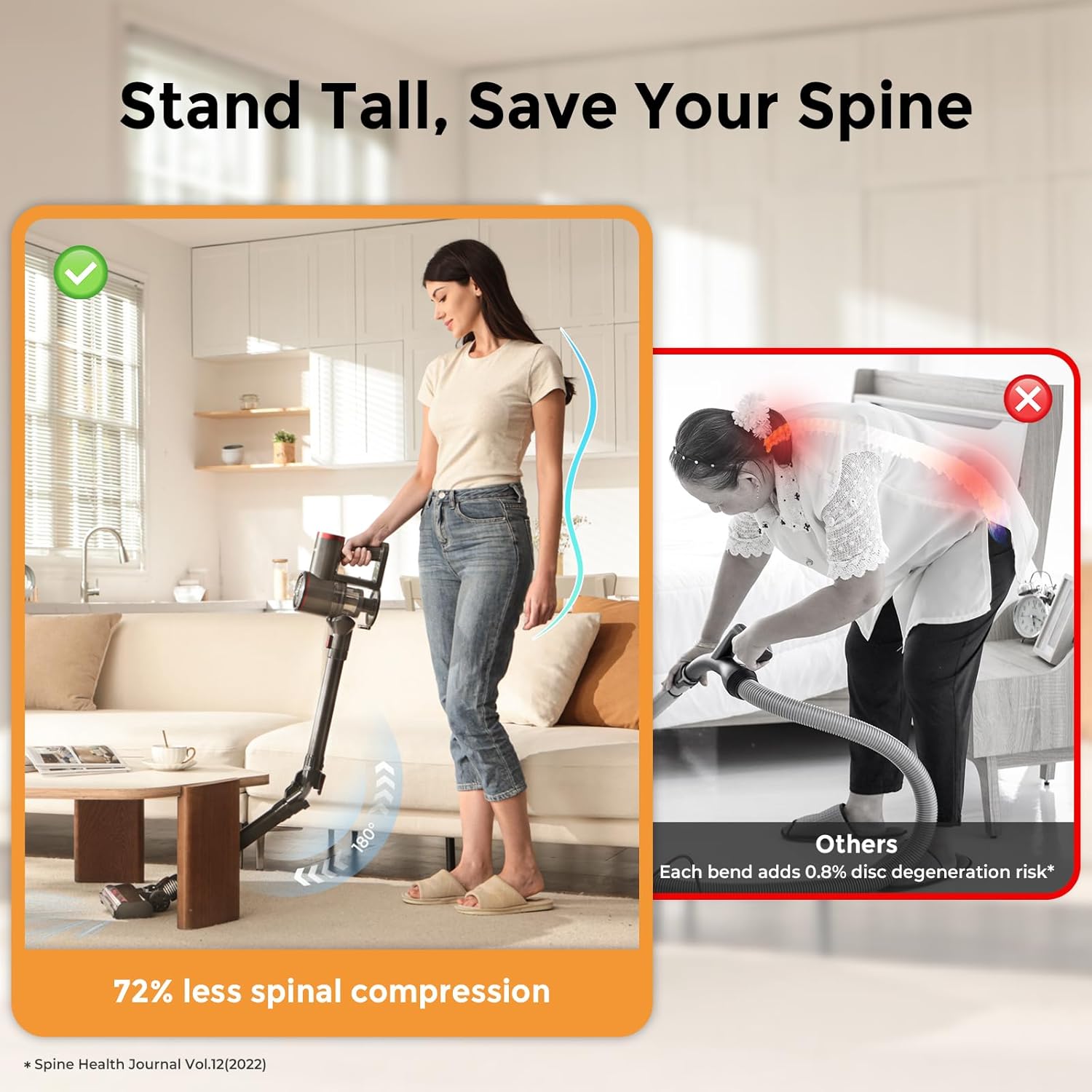
Image: A user demonstrating the bendable wand feature, allowing the vacuum to reach under low furniture without the user needing to bend significantly, promoting spinal comfort.
5.3 Self-Standing Feature
The vacuum cleaner is designed to stand upright on its own, allowing for convenient pauses during cleaning without needing to lean it against a wall or lay it down. This feature also simplifies storage and charging.

Image: The RONEAIR vacuum standing independently in a kitchen, showcasing its self-standing capability for convenient breaks during cleaning.
5.4 Using Attachments
- LED Roller Brush Head: Equipped with LED lights to illuminate dark areas, ensuring no dust or dirt is missed. Suitable for both hard floors and carpets. The brush head offers 90-degree up/down and 180-degree left/right rotation for enhanced maneuverability.
- Crevice Tool: Ideal for cleaning tight spaces, corners, and edges.
- Dusting Brush: Suitable for delicate surfaces, upholstery, and removing dust from furniture.

Image: Detailed view of the vacuum's brush head, highlighting its LED headlights for improved visibility and its ability to rotate 90 degrees vertically and 180 degrees horizontally for comprehensive cleaning.

Image: Demonstrations of the vacuum in handheld mode, effectively cleaning furniture surfaces, car interiors, and reaching challenging corners with the appropriate attachments.
5.5 Anti-Tangle Technology
The brush roll is designed with anti-tangle technology to prevent hair from wrapping around it, ensuring consistent performance and reducing the need for frequent manual cleaning of the brush roll.

Image: An internal view diagram of the brush head, showing how fins catch and line up hair, directing it into the dust bin to prevent tangling on the brush roll.
6. Maintenance
6.1 Emptying the Dust Cup
The 0.8L dust cup should be emptied regularly to maintain optimal suction performance. To empty:
- Ensure the vacuum is turned off.
- Locate the dust cup release button on the main motor unit.
- Press the button to open the dust cup flap and empty debris directly into a trash bin.

Image: A user demonstrating the one-button dust bin emptying process, allowing debris to be released cleanly without direct contact.
6.2 Cleaning the HEPA Filter
The HEPA filter traps dust and allergens and should be cleaned regularly to ensure efficient filtration and suction. It is washable and replaceable.
- Remove the dust cup from the main unit.
- Twist and pull out the HEPA filter assembly.
- Tap the filter gently to remove loose dust.
- Rinse the HEPA filter under running water until clean. Do not use detergent.
- Allow the filter to air dry completely for at least 24 hours before reinserting. Do not use the vacuum with a wet filter.
- Replace the filter if it shows signs of wear or damage, or if suction performance significantly decreases after cleaning.

Image: A user washing the removable HEPA filter under running water, demonstrating the ease of maintenance for the filtration system.
6.3 Cleaning the Brush Roll
Periodically check the brush roll for tangled hair or debris. While the anti-tangle tech reduces this, occasional cleaning may be necessary.
- Turn off the vacuum and detach the brush head.
- Locate the brush roll release mechanism (refer to the brush head diagram if available).
- Remove the brush roll and carefully cut away any tangled hair or fibers using scissors.
- Reinsert the brush roll, ensuring it clicks back into place securely.
7. Troubleshooting
If you encounter issues with your RONEAIR Cordless Vacuum Cleaner, refer to the following table for common problems and solutions.
| Problem | Possible Cause | Solution |
|---|---|---|
| Vacuum does not turn on. | Battery is depleted. | Charge the battery fully. |
| Power button not pressed correctly. | Ensure the power button is pressed firmly. | |
| Loss of suction. | Dust cup is full. | Empty the dust cup. |
| Filter is clogged. | Clean or replace the HEPA filter. | |
| Hose or brush head is blocked. | Check for and remove any blockages in the wand, brush head, or main unit. | |
| Brush roll not spinning. | Hair or debris tangled in brush roll. | Clean the brush roll. |
| Brush head not properly attached. | Ensure the brush head is securely connected to the wand. | |
| Battery not charging. | Adapter not properly connected. | Check connections of the adapter to the vacuum and wall outlet. |
| Faulty power outlet. | Try a different power outlet. |
If the problem persists after attempting these solutions, please contact RONEAIR customer support.
8. Specifications
| Feature | Detail |
|---|---|
| Brand | RONEAIR |
| Model Name | RA-V200-0416 |
| Special Features | Self-Standing, Strong Motor, Lightweight, Large Capacity Dustcup, Bendable Wand for Under Furniture Cleaning, HEPA Filter, LED Lights |
| Filter Type | HEPA Filter |
| Included Components | Adapter, Crevice Tool, Dusting Brush |
| Cordless | Yes |
| Dust Cup Capacity | 0.8 Liters |
| Maximum Suction Power | 39KPa |
| Recommended Uses | All Floor, Car, Carpet, Home, Pet Hair, Under Furniture |
| Form Factor | Stick |
| Color | Gray |
| Product Dimensions | 7.99"L x 4.33"W x 44.09"H |
| Battery Life | Up to 30 minutes (Standard Mode), 15 minutes (Turbo Mode) |
| Item Weight | 5.4 pounds |
| Number of Speeds | 2 |
9. Warranty and Support
9.1 Warranty Information
The RONEAIR Cordless Vacuum Cleaner comes with a 1-Year Guarantee from the date of purchase. This warranty covers defects in materials and workmanship under normal use. It does not cover damage caused by misuse, neglect, unauthorized modification, or natural wear and tear.
9.2 Customer Support
For any questions, concerns, or warranty claims, please contact RONEAIR customer support. You can find contact information on the official RONEAIR website or through your purchase platform. Please have your model number (RA-V200-0416) and proof of purchase ready when contacting support.
10. Important Note on Videos
While this product may have associated videos, specific video URLs with creator type information were not available in the provided data. Therefore, no videos could be embedded in this manual.