
1. Introduction
This manual provides essential information for the safe and effective installation, operation, and maintenance of your OATAO Replacement Power Supply, model PCK026 PA-5551-1H. This power supply is designed as a direct replacement for the Delta R510G7 600W TDPS-600CB B unit, ensuring compatibility and reliable performance for your Delta R510G7 system.
2. Safety Information
Please read and understand all safety instructions before attempting to install or operate this product. Failure to follow these instructions may result in electric shock, fire, or damage to the equipment.
- Always disconnect power from the system before installing or removing the power supply.
- Ensure proper grounding of the system.
- Do not open the power supply unit. There are no user-serviceable parts inside. High voltages are present.
- Avoid operating the power supply in environments with excessive moisture, dust, or extreme temperatures.
- Use only compatible cables and connectors.
3. Package Contents
Verify that all items are present and in good condition upon opening the package. If any items are missing or damaged, contact OATAO support immediately.
- 1 x OATAO Replacement Power Supply (Model PCK026 PA-5551-1H)
4. Setup and Installation
Follow these steps carefully to install the replacement power supply:
- Power Disconnection: Completely power down your Delta R510G7 system and disconnect all power cables from the wall outlet.
- Access System: Open the computer case to access the existing power supply unit. Refer to your Delta R510G7 system's manual for specific instructions on opening the chassis.
- Disconnect Cables: Carefully disconnect all power cables from the motherboard, graphics cards, drives, and any other components connected to the old power supply. Note the routing of these cables for easier re-installation.
- Remove Old Power Supply: Unscrew and remove the old power supply unit from its mounting bracket or chassis.
- Install New Power Supply: Position the OATAO replacement power supply into the vacant slot. Ensure it aligns correctly with the mounting holes. Secure the new power supply with the appropriate screws.
- Connect Cables: Connect the new power supply cables to all necessary components:
- 24-pin ATX motherboard power connector
- CPU power connector (e.g., 4-pin or 8-pin EPS12V)
- PCIe power connectors for graphics cards (if applicable)
- SATA power connectors for hard drives and SSDs
- Molex power connectors for other peripherals (if applicable)
- Cable Management: Route cables neatly to improve airflow and prevent interference with other components.
- Close System: Close the computer case and secure it.
- Power On: Reconnect the system's power cable to the wall outlet and power on your Delta R510G7 system.
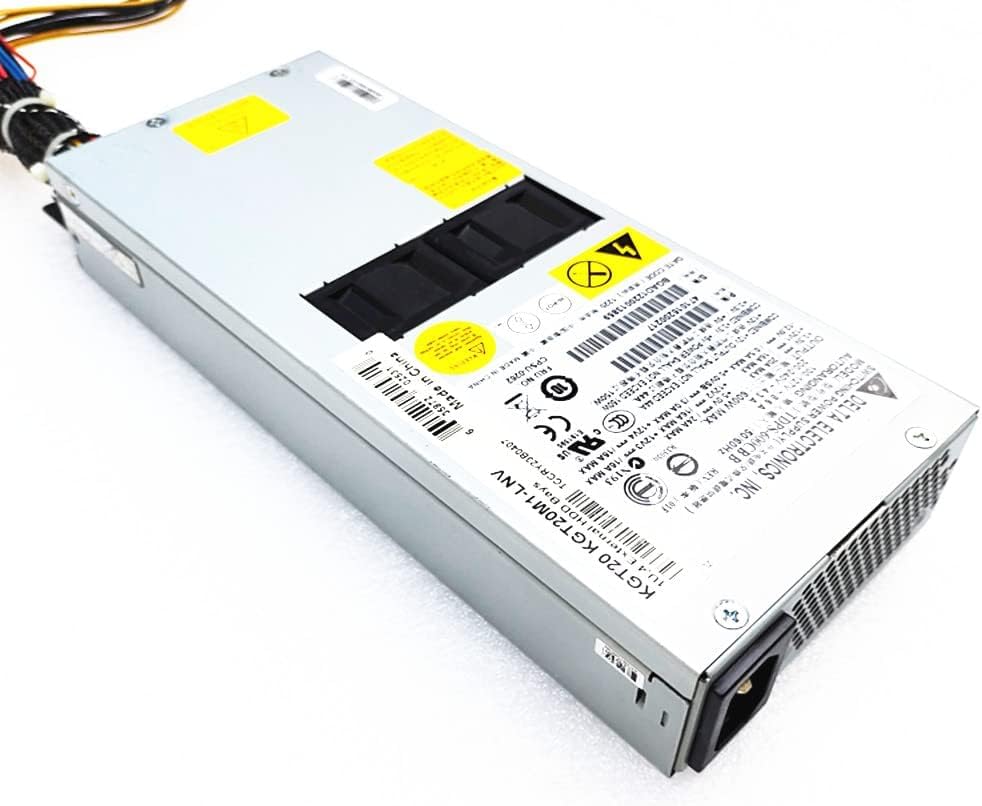
Figure 1: OATAO Replacement Power Supply Unit (Model PCK026 PA-5551-1H). This image shows the general appearance of the power supply, including its casing and some connectors.
5. Operating Instructions
Once correctly installed, the OATAO Replacement Power Supply operates automatically as an integral part of your Delta R510G7 system. It provides stable and consistent power to all connected components.
- Ensure the system's power button is pressed to initiate startup.
- Monitor system performance for any unusual behavior after installation.
- The power supply is designed for continuous operation within its specified wattage.
6. Maintenance
The OATAO Replacement Power Supply is designed for minimal maintenance. However, following these guidelines can help ensure its longevity and optimal performance:
- Keep Clean: Periodically clean the exterior of the power supply and the system's ventilation openings to prevent dust buildup, which can impede airflow and lead to overheating. Use compressed air for best results.
- Ensure Ventilation: Ensure that the system's chassis has adequate airflow and that the power supply's fan intake and exhaust are not obstructed.
- Avoid Overloading: Do not connect components that collectively exceed the power supply's rated wattage (600W).
7. Troubleshooting
If you encounter issues after installing the power supply, consider the following troubleshooting steps:
- No Power:
- Verify that the power cable is securely connected to both the power supply and the wall outlet.
- Check if the wall outlet is functional by plugging in another device.
- Ensure the power switch on the back of the power supply (if present) is in the 'ON' position.
- Double-check all internal power connections (24-pin, CPU, PCIe, SATA) to ensure they are firmly seated.
- Intermittent Power/System Instability:
- Ensure all power cables are properly connected and not loose.
- Check for any signs of overheating (e.g., loud fan noise, hot chassis).
- Verify that the total power draw of your components does not exceed the power supply's capacity.
- Unusual Noises:
- A slight fan noise is normal. However, if you hear grinding, buzzing, or excessively loud fan noise, it may indicate an issue. Ensure no cables are obstructing the fan.
If problems persist after performing these checks, contact OATAO customer support for further assistance.
8. Specifications
| Feature | Specification |
|---|---|
| Brand | OATAO |
| Model Number | PCK026 PA-5551-1H |
| Compatible Devices | Delta R510G7 systems |
| Output Wattage | 600W (as replacement for TDPS-600CB B) |
| Product Dimensions | 30.48 x 33.02 x 25.4 cm (12 x 13 x 10 inches) |
| Item Weight | 1.8 kg |
| Connector Type | 2-Pin (main input, specific to unit) |
| UPC | 761759090079 |
Note: Specifications are subject to change without notice.
9. Warranty and Support
OATAO stands by the quality of its products. This replacement power supply comes with the following assurances:
- One-Year Warranty: The product is covered by a one-year warranty from the date of purchase, protecting against manufacturing defects.
- 3-Month Return Protection: Customers may return the product for any reason within 3 months of purchase.
- Customer Support: For any questions, issues, or warranty claims, please contact OATAO customer support. Inquiries will typically receive a response within 24 hours.
For support, please visit the official OATAO website or contact your retailer.