Introduction
This manual provides essential information for the safe and efficient operation of your Lenovo ThinkPad T15 Gen 2 laptop. Please read this manual thoroughly before using your device to ensure proper setup, usage, and maintenance.
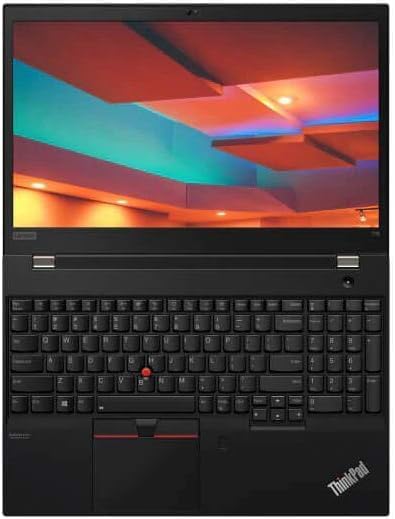
The Lenovo ThinkPad T15 Gen 2 is a powerful 15.6-inch laptop designed for productivity, featuring an Intel Core i7-1185G7 processor, 32GB RAM, and a 512GB SSD. It comes pre-installed with Windows 11 Pro.
Package Contents
Ensure all items are present in the package:
- Lenovo ThinkPad T15 Gen 2 Laptop
- 65W USB-C Adapter
- Documentation (this manual, warranty information)
Product Overview

Setup
1. Initial Power-On
- Connect Power: Plug the 65W USB-C adapter into the laptop's USB-C port and then into a power outlet.
- Power On: Open the laptop lid and press the power button, typically located on the top-right of the keyboard deck.
- Follow On-Screen Prompts: The laptop will guide you through the initial Windows 11 Pro setup, including language selection, network connection, and user account creation.
2. Connecting Peripherals
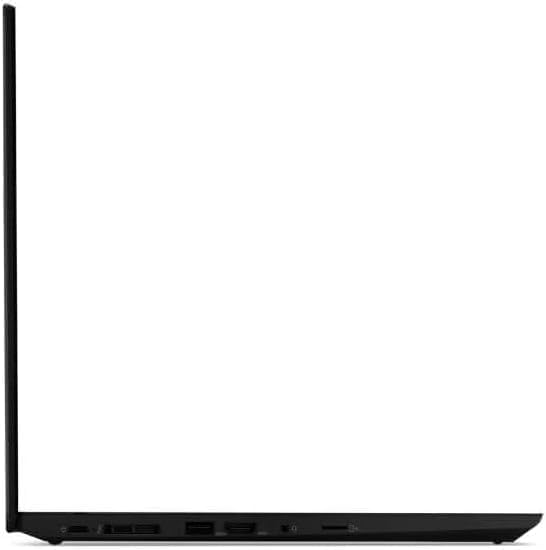
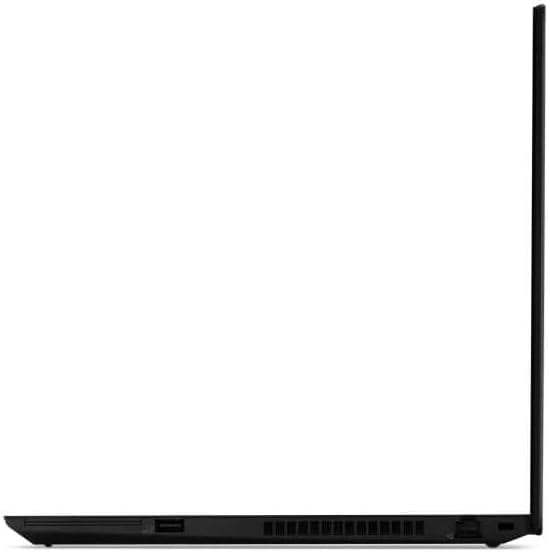
The ThinkPad T15 Gen 2 offers various ports for connecting external devices:
- USB-A 3.2 Gen 1: For standard USB devices like mice, keyboards, and external drives. (Two ports, one always-on)
- USB-C Thunderbolt 4: For high-speed data transfer, display output (DisplayPort), and power delivery. (Two ports)
- HDMI 2.0: For connecting to external monitors or projectors.
- MicroSD Card Reader: For reading data from MicroSD cards.
- Headphone / Mic Combo Jack: For audio input/output.
Operating Instructions
Using the Keyboard and TrackPoint/Trackpad
- The keyboard is spill-resistant and backlit for use in low-light conditions.
- The TrackPoint is a red pointing stick located in the center of the keyboard, offering precise cursor control. Use it with the three physical buttons below the spacebar.
- The Trackpad (touchpad) supports multi-touch gestures for navigation.
Display and Webcam
- The 15.6-inch FHD (1920 x 1080) IPS anti-glare display provides clear visuals.
- The integrated 720p HD Webcam includes a ThinkShutter for privacy. Slide the ThinkShutter to cover or uncover the camera lens.
Battery Management
The laptop is equipped with a 3-cell 57Whr battery. To optimize battery life:
- Adjust screen brightness.
- Close unused applications.
- Utilize Windows power saving modes.
- Charge the battery fully before first use and when the battery level is low.
Maintenance
Cleaning the Laptop
- Screen: Use a soft, lint-free cloth slightly dampened with water or a screen cleaner. Do not spray liquid directly onto the screen.
- Keyboard and Chassis: Use a soft, dry cloth. For stubborn dirt, a slightly damp cloth with mild soap solution can be used, ensuring no liquid enters openings.
- Ports: Use compressed air to remove dust from ports.
Software Updates
Regularly update your Windows operating system and drivers to ensure optimal performance and security. You can check for updates via Windows Update in the Settings menu.
Storage Management
Periodically review and delete unnecessary files to maintain sufficient free space on your 512GB PCIe SSD. Utilize disk cleanup tools provided by Windows.
Troubleshooting
| Problem | Possible Cause | Solution |
|---|---|---|
| Laptop does not power on. | Battery drained or power adapter not connected properly. | Ensure power adapter is securely connected and plugged into a working outlet. Allow battery to charge for a few minutes before attempting to power on again. |
| Screen is black after power on. | Display issue or system not booting correctly. | Try connecting an external monitor to check if it's a display issue. Perform a hard reset by holding the power button for 10-15 seconds. |
| Wi-Fi not connecting. | Wi-Fi adapter off, incorrect password, or router issue. | Check Wi-Fi settings in Windows to ensure it's enabled. Verify Wi-Fi password. Restart your router and laptop. |
| Slow performance. | Too many applications running, low storage, or outdated drivers. | Close unnecessary programs. Free up disk space. Update Windows and device drivers. |
Specifications
| Feature | Detail |
|---|---|
| Model | Lenovo ThinkPad T15 Gen 2 |
| Processor | 11th Generation Intel Core i7-1185G7 (1.80 GHz, up to 4.80 GHz with Turbo Boost, 4 Cores, 8 Threads, 8 MB Cache) |
| Operating System | Windows 11 Pro |
| Display | 15.6" FHD (1920 x 1080) IPS, anti-glare, 300 nits |
| RAM | 32GB DDR4 |
| Storage | 512GB PCIe SSD |
| Graphics | Intel Iris Xe Graphics (Integrated) |
| Ports | 2 x USB-A 3.2 Gen 1 (1 x always-on), 2 x USB-C Thunderbolt 4 (DisplayPort, Power Delivery, Data Transfer), MicroSD card reader, HDMI 2.0, Headphone / mic combo |
| Webcam | 720p HD with ThinkShutter |
| Keyboard | Spill Resistant Backlit Keyboard, 10-Key Numpad |
| Battery | 3-Cell 57Whr |
| Dimensions (LxWxH) | 14.4 x 9.7 x 0.75 inches |
| Color | Black |
Warranty and Support
This product is sold as a renewed item. Please refer to the specific warranty terms provided by the seller, USA Computers, or Amazon Renewed for details regarding coverage and duration.
For technical support or warranty claims, please contact the seller directly or refer to the Amazon Renewed program support page.
- Seller: USA Computers (Seller Profile)
- Amazon Renewed Program: Learn More
- Return Policy: 90-day refund/replacement policy from the date of purchase.


