
JOTTDSYL weige 66
JOTTDSYL TV Logic Board User Manual
Model: V430DJ1-Q01 4K (Compatible with V650DJ6-CK01, V500DJ7-QE1, T5 series)
1. Introduction
This user manual provides essential information for the installation, operation, and maintenance of your JOTTDSYL TV Logic Board. This component is a critical part of your television's display system, responsible for processing video signals and managing power distribution to various display elements. Please read this manual thoroughly before attempting any installation or repair.
2. Important Safety Information
WARNING: Risk of Electric Shock. Always disconnect power before servicing.
- Ensure the television is completely unplugged from the power outlet before beginning any work.
- Discharge any residual power by pressing the power button on the TV for several seconds after unplugging.
- Handle the logic board by its edges to avoid touching sensitive electronic components. Static electricity can damage the board.
- Wear anti-static gloves or use an anti-static wrist strap when handling electronic components.
- If you are not confident in your ability to perform the installation, seek assistance from a qualified technician.
- Keep small components away from children.
3. Product Overview and Components
The TV logic board, also known as the T-Con board (Timing Controller board), is responsible for receiving video signals from the main board and converting them into a format that the LCD or LED panel can display. It controls the timing and voltage signals required by the display panel's pixels.
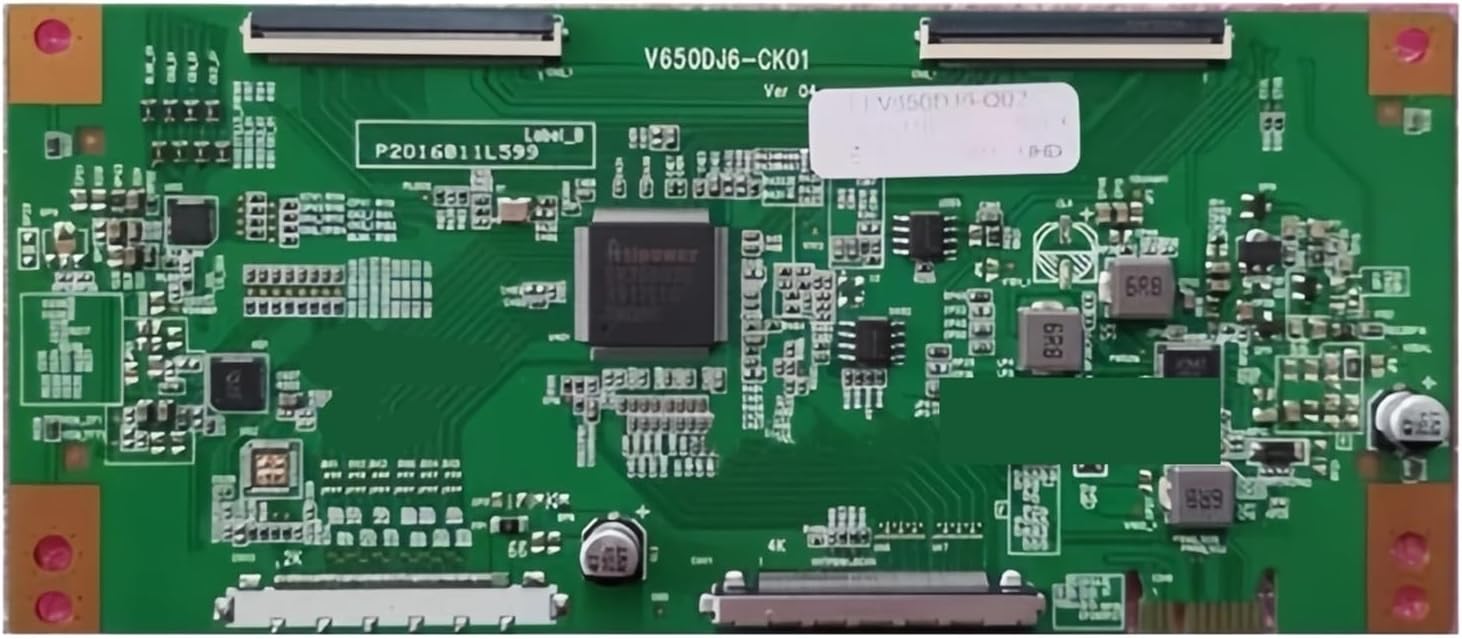
Figure 3.1: JOTTDSYL TV Logic Board (V650DJ6-CK01 variant shown).
This image displays the green circuit board of the TV logic board, featuring various integrated circuits, capacitors, and connectors. Key components include the central Atipower chipset and multiple ribbon cable connectors for display and input signals. The board is labeled 'V650DJ6-CK01 Ver 04', indicating a specific model variant.
Key Components:
- Timing Controller (T-Con) Chipset: The primary processor that converts digital video signals into timing and control signals for the display panel. (Visible as the large central chip, labeled "Atipower" in the image).
- LVDS (Low-Voltage Differential Signaling) Inputs: Connectors for receiving video data from the TV's main board. (Typically the long, flat connectors at the top and bottom of the board).
- Panel Connectors: Outputs that send signals directly to the display panel's row and column drivers. (Often located along the edges, connecting to the display's flex cables).
- Power Management Circuitry: Components like capacitors and inductors that regulate and stabilize power for the board and the display panel. (Various smaller components scattered across the board).
4. Installation Guide
This section outlines the general steps for replacing a TV logic board. Specific procedures may vary depending on your TV model. Always refer to your TV's service manual for detailed instructions.
- Prepare the TV:
- Unplug the TV from the power outlet.
- Place the TV face down on a soft, clean surface to protect the screen.
- Remove the back cover of the TV. This usually involves unscrewing multiple screws around the perimeter and sometimes in the center.
- Locate the Old Logic Board:
- The logic board is typically a rectangular circuit board located near the top or bottom edge of the display panel, often covered by a metal shield.
- It will have ribbon cables connecting it to the display panel and an LVDS cable connecting it to the main board.
- Disconnect Cables:
- Carefully disconnect all ribbon cables from the logic board. These usually have small locking tabs that need to be gently flipped up.
- Disconnect the LVDS cable from the logic board.
- Disconnect any other small wires or connectors attached to the board.
- Remove the Old Board:
- Unscrew any screws holding the logic board in place.
- Gently lift and remove the old logic board.
- Install the New Board:
- Align the new JOTTDSYL logic board with the screw holes and gently place it into position.
- Secure the board with the screws you removed earlier. Do not overtighten.
- Reconnect all ribbon cables, ensuring they are fully inserted and the locking tabs are secured.
- Reconnect the LVDS cable and any other wires.
- Test and Reassemble:
- Before replacing the back cover, temporarily plug in the TV and power it on to verify proper operation. Check for display, picture quality, and any error messages.
- If the TV functions correctly, unplug it again.
- Replace the back cover and secure all screws.
Note: Incorrect installation can lead to damage to the logic board or the TV. Professional installation is highly recommended.
5. Operating Principles
The JOTTDSYL TV Logic Board operates as a crucial intermediary between the TV's main processing unit and the display panel. Its primary functions include:
- Signal Processing: The integrated chipset decodes and processes various input signals (e.g., HDMI, component) received from the TV's main board. It converts these signals into precise timing and voltage signals required by the display panel's individual pixels.
- Timing Control: It precisely controls the timing of data transfer to the display panel, ensuring that each pixel receives the correct color and brightness information at the right moment, resulting in a stable and clear image.
- Power Management: The board contains a dedicated power management circuit. This circuit is responsible for converting the incoming power supply into the specific voltage levels required by the display panel and its associated components. It also stabilizes and protects the power supply to ensure the TV's stable operation.
- Interface Management: While the main board handles external device connections, the logic board manages the internal interface with the display panel, ensuring seamless communication and data flow for optimal picture display.
6. Care and Maintenance
The JOTTDSYL TV Logic Board is designed for durability and long-term performance. Proper care can help extend its lifespan and ensure continued optimal operation of your television. As this is an internal component, direct user maintenance is minimal.
- Environmental Conditions: Ensure your television is operated in a clean, dry environment, free from excessive dust, moisture, and extreme temperatures. These conditions can negatively impact electronic components.
- Ventilation: Ensure the TV's ventilation openings are not blocked. Proper airflow prevents overheating, which can stress internal components, including the logic board.
- Cleaning: If the TV's back cover is removed for any reason, gently clean any accumulated dust from the logic board and surrounding areas using compressed air or a soft, dry brush. Avoid using liquids or abrasive cleaners.
- Power Surges: Consider using a surge protector for your television to protect against sudden power fluctuations that could damage sensitive electronic components.
7. Troubleshooting
If you experience issues after installing the logic board, consult the following common troubleshooting steps. Always ensure the TV is unplugged before performing any internal checks.
| Problem | Possible Cause | Solution |
|---|---|---|
| No picture, but sound is present. | Faulty logic board, loose ribbon cables, or panel issue. |
|
| Distorted, flickering, or discolored picture. | Loose ribbon cables, faulty logic board, or panel issue. |
|
| No power to the TV after installation. | Incorrect installation, short circuit, or power supply issue. |
|
If these steps do not resolve the issue, it is recommended to contact JOTTDSYL customer support or a professional TV repair service.
8. Specifications
| Attribute | Detail |
|---|---|
| Brand | JOTTDSYL |
| Model Name (Current Variant) | V430DJ1-Q01 4K |
| Compatible Models | V650DJ6-CK01, V500DJ7-QE1, T5 series, V430DJ1-Q01 2K, V500DJ7-QE1 2K, V580DJ4-Q02 2K/4K, V650DJ6-Q02 2K/4K |
| Item Model Number (General) | weige 66 |
| Package Dimensions | 1.18 x 0.79 x 0.39 inches |
| Item Weight | 1.76 ounces |
| Manufacturer | weige 66 |
| Date First Available | April 15, 2025 |
| Core Functions | Controls and coordinates TV functions, signal processing, power management, interface management, supports upgrades. |
9. Warranty Information
JOTTDSYL products are manufactured to high-quality standards. For specific warranty terms and conditions, please refer to the product packaging or contact JOTTDSYL customer support directly. Warranty coverage typically applies to defects in materials and workmanship under normal use.
Please retain your proof of purchase for any warranty claims.
10. Customer Support
If you have any questions, require technical assistance, or need to report an issue with your JOTTDSYL TV Logic Board, please contact our customer support team.
Contact Information:
- Manufacturer: weige 66
- Brand: JOTTDSYL
- Please refer to the seller's contact information on the platform where the product was purchased for direct support channels.
- For general inquiries, visit the JOTTDSYL brand page on Amazon: JOTTDSYL Store
When contacting support, please have your product model number (V430DJ1-Q01 4K or weige 66) and purchase details ready.
Ask a question about this manual
Ask about setup, troubleshooting, compatibility, parts, safety, or missing instructions. Manuals+ will review the question and use this page’s manual context to help answer it.