
1. Introduction
Welcome to the user manual for your new RADLEY Smart Series 48 AMOLED Smart Watch. This guide provides essential information to help you set up, operate, and maintain your device, ensuring you get the most out of its advanced features. The Radley Series 48 AMOLED smart watch offers a vibrant 1.04-inch AMOLED display with high-definition dials, an innovative Always-On display, and a Dual-Time feature for seamless timekeeping across different zones. It also includes an SOS feature for emergencies, on-wrist calling, messages, and social notifications, keeping you connected without needing to reach for your phone. Explore a wide range of lifestyle and wellness features, including step counting, over 100 diverse sports modes, heart rate monitoring, blood oxygen level tracking, cycle tracking, and sleep analysis.

Figure 1.1: RADLEY Smart Series 48 AMOLED Smart Watch, showcasing its elegant design and display.
2. What's in the Box
Upon opening your RADLEY Smart Series 48 AMOLED Smart Watch package, please ensure all the following items are present:
- RADLEY Smart Series 48 AMOLED Smart Watch
- Charging Cable
- Instruction Manual (this document)
- 2-Year Guarantee Information

Figure 2.1: Packaging and included items for the RADLEY Smart Series 48 Smart Watch.
3. Key Features
The RADLEY Smart Series 48 AMOLED Smart Watch is equipped with a comprehensive set of features designed to enhance your daily life and wellness:
- 1.04" AMOLED Display: Bright, high-definition display for clear visuals.
- Always-On Display: Keeps your dial visible without interaction.
- Dual-Time Feature: Shows home and away times for travelers.
- Customizable Dials: Personalize with interchangeable dials or your own photos.
- SOS Feature: Quickly sound an alarm and notify emergency contacts.
- On-Wrist Communication: Make and receive calls, messages, and social notifications.
- Activity Tracking: Step counting, calories tracker, and over 100 diverse sports modes.
- Health Monitoring: Heart rate monitor, blood oxygen level tracking, cycle tracking, and sleep analysis.
- Additional Features: Music control, camera control, GPS connection, weather updates, voice assistant, breathing exercises, hydration reminders, and women's health tracking.
- Durability: IP68 water resistant.
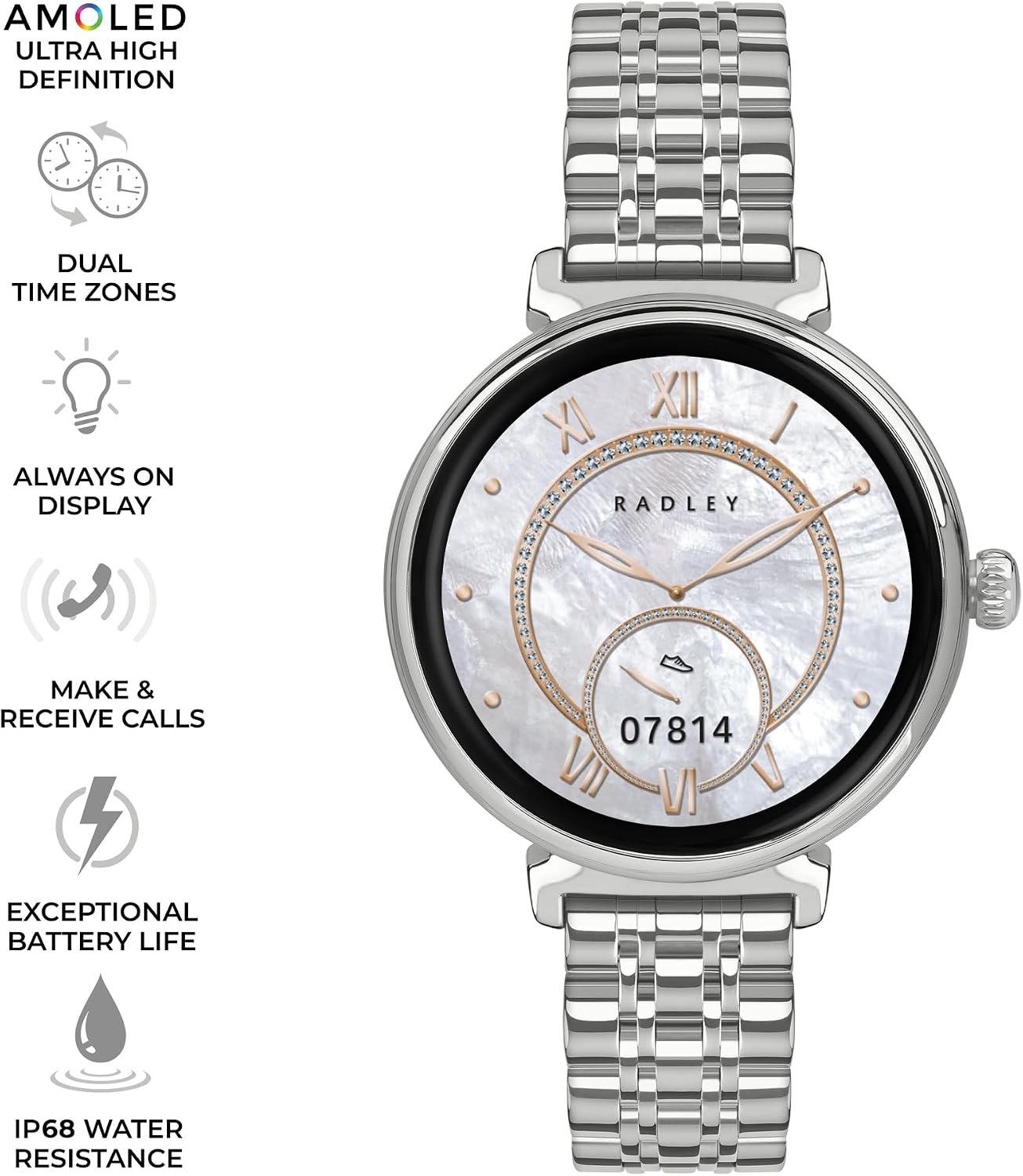
Figure 3.1: Visual representation of core features including AMOLED, Dual Time Zones, Always On Display, Call Functionality, Exceptional Battery Life, and IP68 Water Resistance.

Figure 3.2: Comprehensive list of features including communication, health, and lifestyle functionalities.
4. Setup Guide
4.1 Initial Charging
Before first use, fully charge your RADLEY Smart Series 48 Smart Watch. Connect the provided charging cable to the watch and a compatible USB power source. The watch display will indicate charging status. A full charge typically takes approximately 2 hours.
4.2 Downloading the Radley App
To unlock the full functionality of your smart watch, you must download the official Radley app. The app is compatible with Android 9.0+ and iOS 12+ devices.
- Scan the QR code in the quick start guide (if provided) or search for "Radley" in your device's app store (Google Play Store for Android, Apple App Store for iOS).
- Download and install the Radley app.
4.3 Pairing Your Watch
Once the app is installed and your watch is charged:
- Ensure Bluetooth is enabled on your smartphone.
- Open the Radley app and follow the on-screen instructions to create an account or log in.
- The app will guide you through the pairing process. Select your RADLEY Smart Series 48 from the list of available devices.
- Confirm the pairing request on both your watch and smartphone.
5. Operating Instructions
5.1 Basic Navigation
The RADLEY Smart Series 48 features a touch-sensitive AMOLED display and a side button for navigation:
- Swipe Up/Down: Scroll through menus and notifications.
- Swipe Left/Right: Access quick widgets or different watch faces.
- Tap: Select an item or open an application.
- Press Side Button: Return to the home screen or access the app menu.
5.2 Customizing Your Watch Face
Personalize your watch by changing the dial or using your own photos:
- On Watch: Long-press the current watch face to browse pre-installed options.
- Via App: Open the Radley app, navigate to the watch face section, and select from a wider range of designs or upload a custom photo.
5.3 Communication Features
Stay connected directly from your wrist:
- On-Wrist Calling: Answer or make calls directly from your watch when connected to your phone.
- Notifications: Receive alerts for messages, emails, and social media directly on your watch. Manage notification settings through the Radley app.
5.4 Health and Fitness Tracking
Utilize the watch's sensors to monitor your health and activity:
- Activity Tracking: The watch automatically tracks steps, distance, and calories burned. View daily summaries on the watch or detailed reports in the app.
- Sports Modes: Select from over 100 diverse sports modes to track specific workouts. Start a workout from the watch's sports menu.
- Heart Rate Monitor: The watch continuously monitors your heart rate. Access real-time data on the watch or historical data in the app.
- Blood Oxygen Tracking: Measure your blood oxygen levels on demand.
- Sleep Analysis: Wear your watch to bed for automatic sleep tracking. Review sleep stages and quality in the Radley app.
- Cycle Tracking: For female users, track menstrual cycles and receive predictions via the app.
5.5 SOS Feature
For your safety, the watch includes an SOS feature:
- Setup: Configure emergency contacts and messages within the Radley app.
- Activation: In an emergency, activate the SOS feature (refer to app for specific activation method, typically a long press of a button or specific gesture) to sound an alarm and notify your pre-set emergency contacts.
6. Maintenance
6.1 Cleaning Your Watch
To maintain the appearance and functionality of your watch:
- Wipe the watch and strap regularly with a soft, damp, lint-free cloth.
- Avoid using harsh chemicals, abrasive materials, or strong detergents.
- Ensure the charging contacts on the back of the watch are clean and dry before charging.
6.2 Water Resistance (IP68)
Your RADLEY Smart Series 48 Smart Watch is IP68 water resistant. This means it is protected against immersion in water up to 1.5 meters for up to 30 minutes. It is suitable for everyday use, including hand washing and light rain. However, it is not recommended for swimming, diving, or high-pressure water activities. Avoid exposing the watch to hot water, steam, or corrosive liquids.
6.3 Battery Care
To prolong battery life:
- Charge the watch fully before first use.
- Avoid extreme temperatures, which can degrade battery performance.
- If storing the watch for an extended period, charge it to about 50% and store in a cool, dry place.
7. Troubleshooting
If you encounter issues with your RADLEY Smart Series 48 Smart Watch, please refer to the following common solutions:
- Watch not turning on: Ensure the watch is fully charged. Connect it to the charger and wait a few minutes.
- Cannot pair with phone:
- Ensure Bluetooth is enabled on your phone and the watch is within range.
- Restart both your watch and smartphone.
- Clear Bluetooth cache on your phone (Android) or forget the device and re-pair (iOS).
- Ensure the Radley app is updated to the latest version.
- Notifications not appearing:
- Check notification settings within the Radley app.
- Ensure your phone's notification permissions are granted to the Radley app.
- Verify the watch is properly connected via Bluetooth.
- Inaccurate health data:
- Ensure the watch is worn snugly on your wrist, not too loose or too tight.
- Clean the sensors on the back of the watch.
- Ensure your personal information (height, weight, age) is accurate in the Radley app.
- Screen unresponsive: Try restarting the watch by holding down the side button until it powers off, then power it back on.
For more detailed troubleshooting or persistent issues, please refer to the help section within the Radley app or visit the official Radley support website.
8. Specifications
Detailed specifications for the RADLEY Smart Series 48 AMOLED Smart Watch (Model: RYS48-4027):
| Feature | Specification |
|---|---|
| Model Number | RYS48-4027 |
| Display Type | AMOLED |
| Display Size | 1.04 inches |
| Connectivity Technology | USB (for charging) |
| Water Resistance | IP68 |
| Battery Type | Nonstandard Battery (Lithium Ion) |
| Batteries Required | 1 (included) |
| Package Dimensions | 16.7 x 9.3 x 2.7 cm |
| Item Weight | 62 g |
| Shape | Round |
| Color | Blue (as per product listing, though main image is silver) |
| Target Audience | Women (as per product listing) |
| Manufacturer | RADLEY |
9. Warranty and Support
9.1 Product Warranty
Your RADLEY Smart Series 48 AMOLED Smart Watch comes with a 2-Year Guarantee from the date of purchase. This warranty covers manufacturing defects under normal use. Please retain your proof of purchase for warranty claims. For full terms and conditions of the guarantee, refer to the warranty information included in your product packaging.
9.2 Customer Support
For further assistance, technical support, or warranty claims, please contact RADLEY customer support. You can find contact information and frequently asked questions on the official RADLEY website. Additionally, the Radley app provides a dedicated support section with helpful resources and direct contact options.
We recommend regularly checking the Radley app for software updates to ensure optimal performance and access to new features.