
1. Introduction
This manual provides essential information for the installation, operation, and maintenance of the JOTTDSYL ZP.255E.818R02 Smart TV Motherboard. This motherboard is a core component designed for compatible Smart TVs, responsible for controlling and coordinating various television functions, signal processing, and power management. Please read this manual thoroughly before attempting any installation or operation.
2. Safety Information
Warning: Working with electronic components, especially inside a television, can be dangerous and may result in electric shock or damage to the device if not performed correctly. It is highly recommended that installation and replacement be performed by a qualified technician.
- Always disconnect the television from the power source before beginning any installation or maintenance.
- Discharge any residual power by pressing the power button on the TV after unplugging.
- Wear anti-static gloves and use an anti-static wrist strap to prevent electrostatic discharge (ESD) damage to sensitive electronic components.
- Handle the motherboard by its edges to avoid touching components directly.
- Ensure all connections are secure and correctly oriented before applying power.
- Do not expose the motherboard to moisture or extreme temperatures.
3. Product Overview
The JOTTDSYL ZP.255E.818R02 is a replacement motherboard for Smart TVs, designed to restore or upgrade the core functionality of your television. It integrates essential components for signal processing, power management, and connectivity.
Key Features:
- Core Functions: Controls and coordinates various TV functions, acting as the central processing unit for the television.
- Signal Processing: Decodes and processes various input signals (e.g., HDMI, AV) and converts them into displayable image and sound signals.
- Power Management: Features an integrated power management circuit to convert and stabilize power, ensuring stable TV operation.
- Versatile Interface: Provides multiple interface types to connect external devices, meeting diverse user needs.
- Upgradeable: Supports software upgrades to improve performance and add new functions as technology evolves.

Figure 3.1: Top-down view of the ZP.255E.818R02 Motherboard. This image displays the overall layout of the motherboard, highlighting the main processing unit, memory modules, and various electronic components.

Figure 3.2: Angled view of the ZP.255E.818R02 Motherboard. This perspective provides a clearer view of the component density and the placement of larger elements like capacitors and inductors.
4. Specifications
| Feature | Description |
|---|---|
| Model Number | ZP.255E.818R02 |
| RAM | 512MB |
| Storage | 4GB |
| Backlight Voltage | 36-62V |
| Backlight Current | Up to 600mA |
| Connectivity | HDMI, USB, AV, Ethernet, Antenna (DVB-T/C/T2/S2) |
| Origin | Chinese mainland |
| Item Weight | 50 Grams |
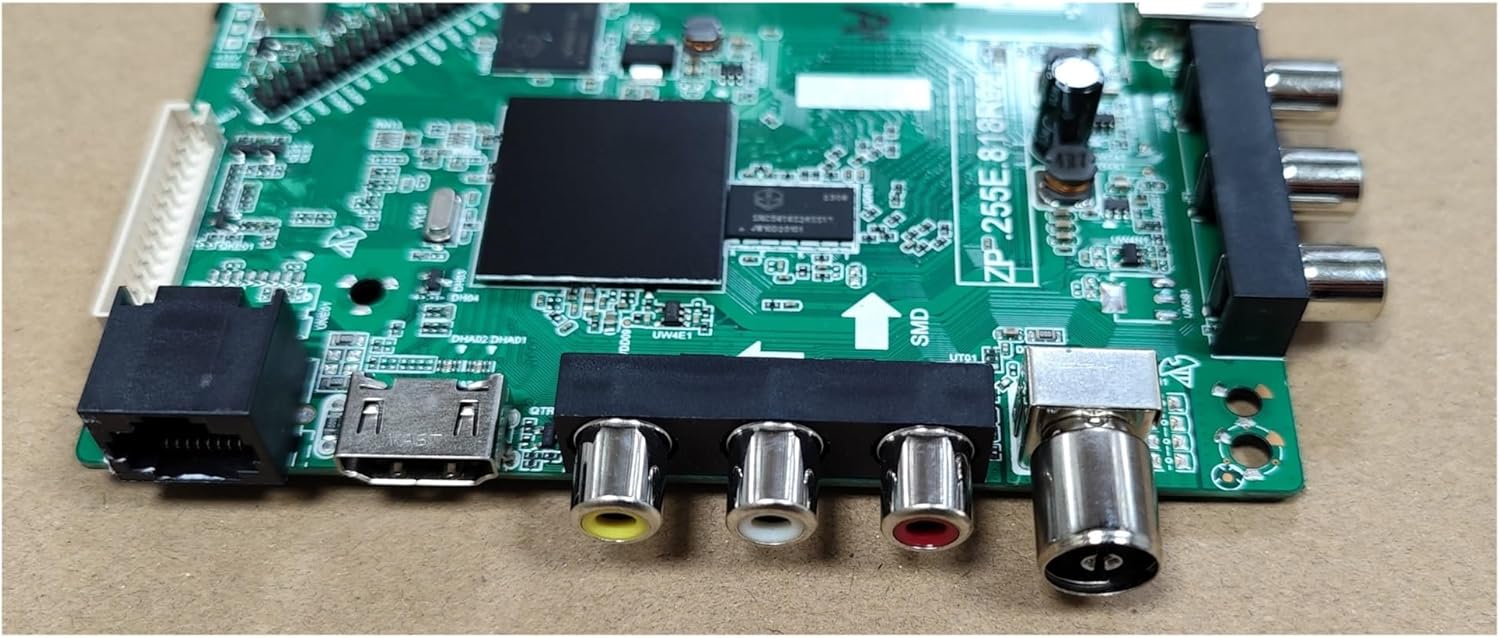
Figure 4.1: Detailed view of the ZP.255E.818R02 Motherboard's I/O ports. This image clearly shows the various connection options available for external devices.
5. Setup and Installation
The installation of a TV motherboard requires technical expertise. If you are not comfortable performing this procedure, please seek assistance from a professional television repair technician.
General Installation Steps (Professional Installation Recommended):
- Preparation: Ensure the TV is unplugged and discharged. Gather necessary tools (screwdrivers, anti-static equipment).
- Access the Motherboard: Carefully remove the back panel of the television to expose the internal components.
- Disconnect Cables: Document or photograph all cable connections to the old motherboard before disconnecting them. This includes power cables, ribbon cables to the display panel, and input/output cables.
- Remove Old Motherboard: Unscrew the old motherboard from its mounting points within the TV chassis.
- Install New Motherboard: Carefully place the JOTTDSYL ZP.255E.818R02 motherboard into position, aligning it with the screw holes and external ports. Secure it with screws.
- Reconnect Cables: Reconnect all cables to their corresponding ports on the new motherboard, referring to your documentation or photographs. Ensure all connections are firm and correctly seated.
- Initial Power-Up (Testing): Before reattaching the back panel, connect the TV to power and perform a brief test to ensure basic functionality (e.g., power on, display, sound).
- Final Assembly: If the test is successful, disconnect power, reattach the TV's back panel, and secure all screws.
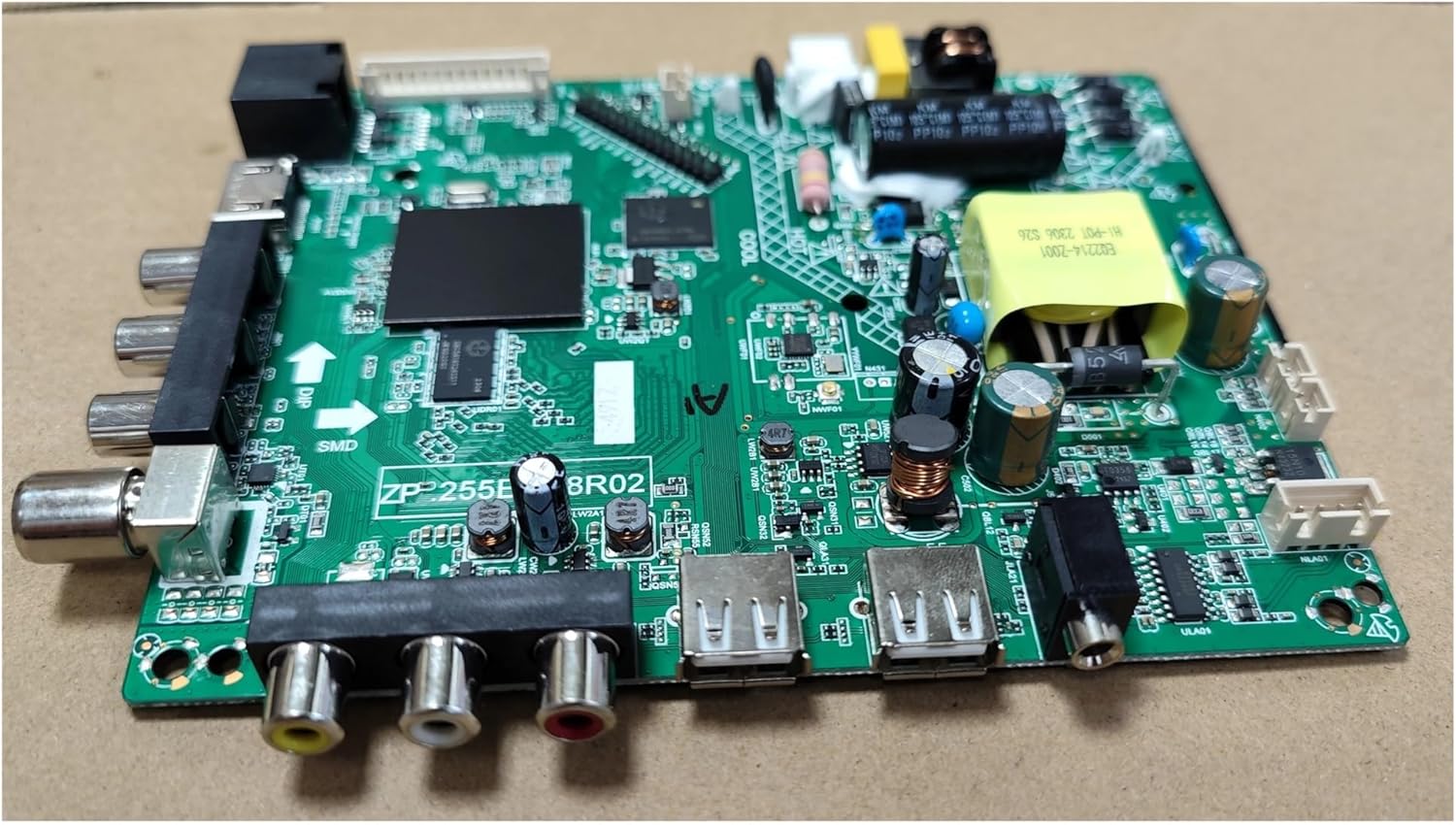
Figure 5.1: Overview of the ZP.255E.818R02 Motherboard's main components. This image helps in identifying key areas during installation and connection.
6. Operating Instructions
Once the JOTTDSYL ZP.255E.818R02 motherboard is correctly installed, the television should function as intended. The operation of the TV will be consistent with its original design, as the motherboard serves as the core control unit.
- Power On/Off: Use the TV's remote control or physical power button to turn the television on or off.
- Input Selection: Use the "Input" or "Source" button on your remote to select between connected devices (e.g., HDMI 1, AV, USB).
- Smart TV Features: Access your Smart TV's operating system, apps, and network features as you normally would. The motherboard supports the underlying processing for these functions.
- Software Updates: Periodically check for software updates through your TV's settings menu. Updates can improve performance and add new features.
7. Maintenance
The JOTTDSYL ZP.255E.818R02 motherboard is designed for long-term reliability and generally requires minimal maintenance. However, following these guidelines can help ensure its longevity:
- Keep Clean: Ensure the TV's internal environment remains free of dust and debris. Dust accumulation can lead to overheating and component failure. If necessary, carefully clean the interior with compressed air (ensure TV is unplugged).
- Ventilation: Ensure the TV's ventilation openings are not blocked to allow for proper airflow and heat dissipation.
- Avoid Liquids: Never expose the TV or its internal components to liquids.
- Stable Power: Use a surge protector to protect the TV from power fluctuations and surges.
8. Troubleshooting
If you encounter issues after installing the motherboard, consider the following troubleshooting steps:
- No Power:
- Check if the TV is properly plugged into a working outlet.
- Verify all internal power cables to the motherboard are securely connected.
- Ensure the power supply unit (PSU) within the TV is functioning correctly.
- No Picture/Sound:
- Confirm that all ribbon cables to the display panel and audio output cables are correctly seated.
- Check the selected input source on the TV.
- Test with different input devices and cables.
- Intermittent Issues:
- Ensure all connections, both internal and external, are firm and not loose.
- Check for any signs of overheating (unusual smells, excessive heat from vents).
- Smart Features Not Working:
- Verify network connectivity (Wi-Fi or Ethernet).
- Perform a factory reset of the TV (refer to your TV's original user manual for instructions).
If problems persist after attempting these steps, it is advisable to consult a professional technician or contact JOTTDSYL customer support.
9. Warranty and Support
Specific warranty information for the JOTTDSYL ZP.255E.818R02 motherboard is not provided in this document. Please refer to the product packaging, your purchase receipt, or the seller's terms and conditions for warranty details.
For technical support or further assistance, please contact your retailer or the manufacturer, JOTTDSYL, through their official support channels.