
POEMYSIR DS2-500N
POEMYSIR DS2-500N Digital Force Gauge Instruction Manual
Model: DS2-500N
Product Overview
The POEMYSIR DS2-500N is a high-precision digital force gauge designed for measuring push and pull forces. It features an LCD display, multiple measurement units, and data output capabilities.

Image 1: Front view of the DS2-500N Digital Force Gauge, showing the LCD screen and control buttons.
Key Features:
- High Precision and Resolution: Accuracy better than 0.2% F.S. ± 1 digit, with minimum readings of 0.001N.
- Peak Hold Function: Captures and displays the maximum force value recorded during a test.
- Comparison Function: Allows setting upper and lower force limits with visual screen flash warnings for out-of-range measurements.
- Unit Conversion: Supports quick conversion between N (Newtons), KGF (Kilogram-force), and lbf (Pound-force).
- Adjustable Sampling Speed: Selectable sampling rates up to 1000 times per second for various testing requirements.
- LCD Screen Flip Display: The LCD screen can rotate 180 degrees for optimal viewing angles.
- Long Standby Time: Equipped with a high-capacity lithium battery for extended operation.
- USB Output: Connects to a computer for data transfer and analysis.

Image 2: Visual summary of key features including measurement units, sampling rate, accuracy, battery, and USB output.
Components and Controls

Image 3: Diagram illustrating the main components and control buttons of the DS2-500N force gauge.
- Test Shaft (M6P1): Located at the top, used for attaching various accessories to measure thrust and tension.
- LCD Display: Shows measured data, units, and status indicators. Can be flipped 180 degrees.
- ON/OFF Button: Press to power on the device. All symbols appear on the LCD upon activation.
- ZERO Button: Used to reset the current reading to zero. In the off state, press and hold to set positive/negative display, test unit, and other parameters.
- SEND/ENTER Button: Turns on/off the backlight. In parameter setting mode, press to save parameters.
- PEAK Button: Switches between "PEAK" and "TRACK" modes. In the off state, press and hold to set upper/lower limit alarms, sampling rate, and other parameters.

Image 4: Close-up views of the screw test head, various replaceable fixtures, charging port, and standard test head.
The device includes a screw test head, and various fixtures can be attached to the test shaft for different measurement applications. The charging port also serves as a signal interface.
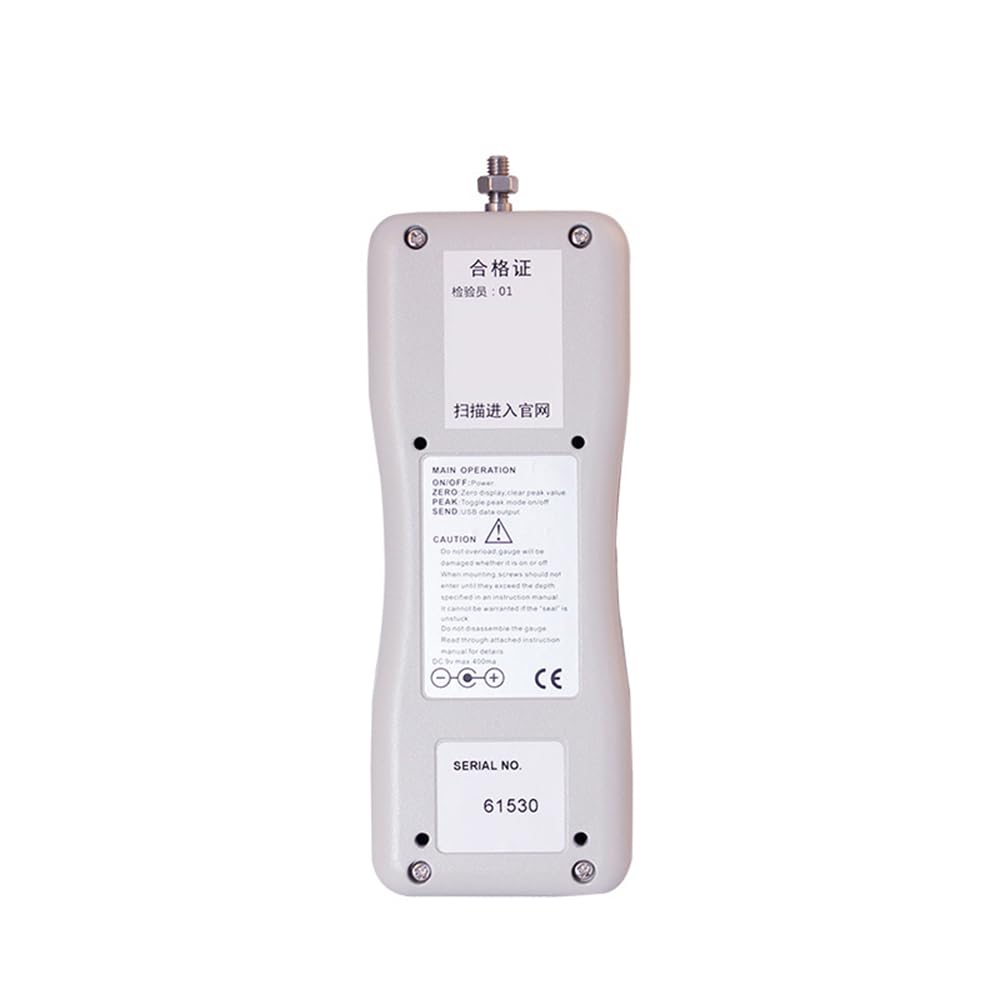
Image 5: Back view of the DS2-500N force gauge, showing the serial number and warning labels.
Setup
- Unpacking: Carefully remove the force gauge and all accessories from the portable case. Verify all standard accessories are present: force gauge unit, 6 accessories (various test heads/fixtures), AC adapter, and USB cable.
- Initial Charge: Before first use, connect the AC adapter to the charging port (also signal interface) on the device and plug it into a power outlet. Allow the device to charge fully. The low battery symbol will blink when charging is needed.
- Attaching Test Head: Select the appropriate test head or fixture for your measurement task. Screw it securely onto the test shaft (M6P1) at the top of the device.
- Power On: Press the ON/OFF button to power on the device. The LCD will display all symbols briefly.
- Zero Calibration: With no load applied to the test head, press the ZERO button to set the current reading to zero. This ensures accurate measurements.
Operating Instructions
Basic Measurement
- Ensure the device is powered on and zero-calibrated.
- Apply the force to be measured to the attached test head. The LCD will display the measured data instantly.
- Observe the reading on the LCD. If the screen flashes, it indicates an overload condition. Immediately remove the load to prevent damage.
Unit Conversion
The device supports N, KGF, and lbf units. To change the unit:
- While the device is off, press and hold the ZERO button.
- Power on the device while still holding the ZERO button.
- Follow the on-screen prompts to select the desired measurement unit.
Peak Hold Function
To capture the maximum force applied during a test:
- Press the PEAK button to switch to "PEAK" mode. The display will indicate "peak".
- Apply the force. The display will hold the highest value reached.
- Press the PEAK button again to return to "TRACK" mode for real-time readings.
Comparison Function (Upper/Lower Limit Alarms)
To set upper and lower force limits:
- While the device is off, press and hold the PEAK button.
- Power on the device while still holding the PEAK button.
- Use the buttons to navigate and set the desired upper and lower force limits.
- During measurement, if the force exceeds the set limits, the screen will flash as a visual warning.
Adjusting Sampling Speed
The sampling speed can be adjusted for different test requirements (e.g., high speed for sensitive reactions like tensile tests, or low speed for stable readings).
- Access the parameter settings menu (refer to the PEAK button instructions for entering parameter setting mode).
- Navigate to the sampling rate option and select the desired speed (up to 1000 times per second).
Data Output to Computer

Image 6: The force gauge, accessories, and a visual representation of data output to a computer interface.
The DS2-500N can connect to a computer via USB to output measurement data for analysis.
- Connect the force gauge to your computer using the provided USB cable. The USB port is integrated with the charging port.
- Install any necessary driver software (if not automatically recognized by your operating system).
- Use the dedicated software (if provided, or a generic serial data logger) to receive and log the digital display tension and pressure data.
Maintenance
- Cleaning: Wipe the device with a soft, dry cloth. Do not use abrasive cleaners or solvents.
- Storage: Store the force gauge in its portable case in a dry, cool environment when not in use.
- Battery Care: The device uses a built-in safety, high-capacity lithium battery. Recharge the battery when the low battery symbol blinks on the display. Avoid fully discharging the battery for extended periods.
- Overload Protection: The device has a safety overload warning at 150% of the rated capacity. The screen will flash to indicate overload. Exceeding the overload capacity can damage the load cell.
Troubleshooting
- Device does not power on:
Check if the battery is charged. Connect the AC adapter and attempt to power on again. Ensure the ON/OFF button is pressed firmly.
- Screen flashes during measurement:
This indicates an overload condition. The applied force exceeds 150% of the rated capacity. Immediately remove the load to prevent damage to the load cell.
- Inaccurate readings:
Ensure the device has been zero-calibrated before use. Check that the correct measurement unit is selected. Verify that the test head is securely attached and not obstructed.
- Low battery symbol blinks:
The battery level is low. Connect the device to the AC adapter for charging.
- Cannot connect to computer:
Ensure the USB cable is securely connected to both the device and the computer. Check if necessary drivers are installed. Try a different USB port on the computer.
Specifications
| Parameter | Value |
|---|---|
| Model | DS2-500N |
| Maximum Load Value | 500N (500gf) |
| Display | 4-bit LCD display with 180-degree flip capability |
| Safety Overload | 150% rated (screen flashing warning) |
| Accuracy | ± 0.1% F.S. (or 0.2% F.S. ± 1 digit) |
| Sampling Rate | Up to 1000 times per second (adjustable) |
| Power Supply | Built-in safety, high-capacity lithium battery; external AC adapter |
| Output Function | USB connect to computer for digital display tension and pressure data |
| Weight | Approximately 520g |
| Standard Accessories | 6 accessories, AC adapter, portable case |
| Item Model Number | 6765656556 |
Note on Maximum Load Value and Accuracy: The product title specifies "500N", while the description mentions a range of "2N to 1000N" for the series. This manual pertains to the DS2-500N model. Accuracy is stated as both "+ 0.1%F.S" and "better than level 0.2 (that is, 0.2%F.S plus or minus 1digit)". For practical purposes, refer to the more precise 0.1%F.S.
Ask a question about this manual
Ask about setup, troubleshooting, compatibility, parts, safety, or missing instructions. Manuals+ will review the question and use this page’s manual context to help answer it.