AP6212 QFN Two-in-One WF Module User Manual
Model: AP6212 | Brand: PANIETUDNG
1. Product Overview
The PANIETUDNG AP6212 is a high-reliability, precision, and stable performance QFN Two-in-One WF Module with Bluetooth-compatible chip. Designed for versatile applications, this electronic component ensures long-lasting performance and ease of integration into various systems.
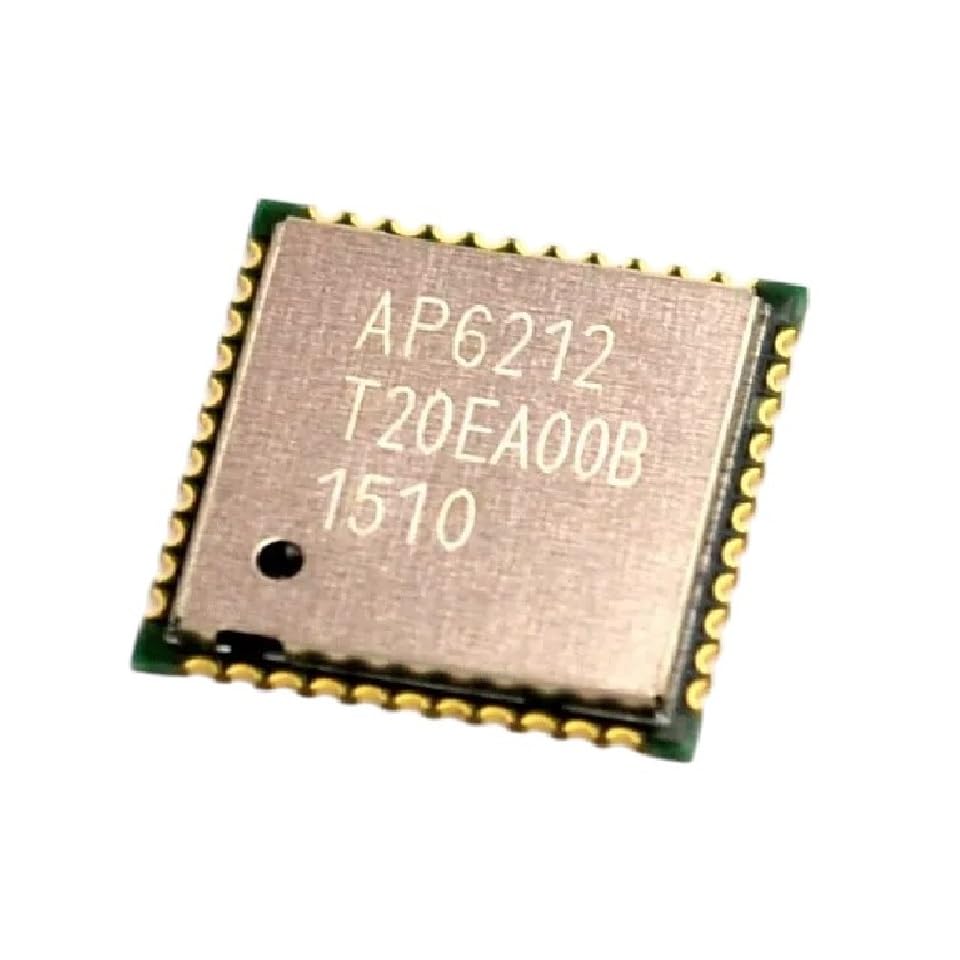
Figure 1: AP6212 QFN Two-in-One WF Module
Key features include:
- High-quality electronic components ensuring reliable and long-lasting performance.
- User-friendly design for easy installation and integration.
- Versatile applications across industrial, automotive, and household electronics.
2. Setup and Installation
Proper setup is crucial for the optimal performance of the AP6212 module. Follow these guidelines for installation:
- Preparation: Ensure your workspace is clean, static-free, and well-lit. Use appropriate ESD (Electrostatic Discharge) precautions, such as an anti-static wrist strap and mat, when handling the module.
- Mounting: The AP6212 is a QFN (Quad Flat No-leads) package. It requires surface-mount soldering. Refer to the module's datasheet for recommended footprint and soldering profiles. Ensure correct orientation of the module on the PCB.
- Power Supply: Connect the module to a stable and regulated power supply within the specified voltage range. Refer to the module's datasheet for exact voltage requirements. Incorrect voltage can damage the component.
- Antenna Connection: For Wi-Fi and Bluetooth functionality, connect a suitable antenna to the designated antenna port(s) on the module or PCB. Ensure the antenna is correctly matched for impedance.
- Data Interface: Connect the module to your host microcontroller or processor via the appropriate data interfaces (e.g., SDIO for Wi-Fi, UART/PCM for Bluetooth). Verify pin assignments and signal integrity.

Figure 2: Example of various electronic components for context.
3. Operating Instructions
Once the AP6212 module is physically installed and powered, software configuration and operation are required. This section provides general guidance.
- Driver Installation: Install the necessary drivers and firmware for the AP6212 module on your host system or microcontroller. These are typically provided by the chip manufacturer or module vendor.
- Wi-Fi Operation:
- Initialize the Wi-Fi interface through your software.
- Scan for available Wi-Fi networks.
- Connect to a desired network using its SSID and password.
- Verify network connectivity (e.g., by pinging a known IP address).
- Bluetooth Operation:
- Initialize the Bluetooth interface.
- Set the module to discoverable mode if acting as a peripheral, or scan for devices if acting as a central device.
- Pair with the target Bluetooth device.
- Establish a connection and exchange data as per your application's requirements.
- Power Management: Implement appropriate power management routines in your software to optimize energy consumption, especially in battery-powered applications. The module supports various low-power modes.
4. Maintenance and Care
The AP6212 module is a robust electronic component, but proper handling and care will ensure its longevity and reliable performance.
- Handling: Always handle the module by its edges. Avoid touching the pins or the top surface of the chip to prevent damage from static electricity or contaminants.
- Storage: Store unused modules in their original anti-static packaging in a dry, temperature-controlled environment. Avoid exposure to extreme temperatures or humidity.
- Cleaning: If cleaning is necessary, use a soft, lint-free cloth and isopropyl alcohol. Do not use abrasive cleaners or solvents. Ensure the module is completely dry before powering it on.
- Environmental Conditions: Operate the module within its specified temperature and humidity ranges. Refer to the datasheet for detailed environmental specifications.

Figure 3: Manufacturing environment for electronic components, highlighting precision and care.
5. Troubleshooting
If you encounter issues with your AP6212 module, consider the following troubleshooting steps:
| Problem | Possible Cause | Solution |
|---|---|---|
| Module not powering on. | Incorrect power supply voltage, reversed polarity, or faulty connection. | Verify power supply voltage and polarity. Check all power connections for continuity. |
| Wi-Fi/Bluetooth not detected. | Missing or incorrect drivers/firmware, antenna issue, or module not initialized. | Ensure correct drivers are installed. Check antenna connection. Verify software initialization sequence. |
| Poor Wi-Fi/Bluetooth range. | Suboptimal antenna placement, interference, or environmental factors. | Relocate antenna for better line-of-sight. Minimize interference from other electronic devices. |
| Module overheating. | Excessive current draw, insufficient heat dissipation, or operating outside specified temperature range. | Verify current draw. Ensure proper heat sinking if required. Check ambient temperature. |
If the problem persists after following these steps, please contact customer support for further assistance.
6. Specifications
The following table outlines the key specifications for the AP6212 QFN Two-in-One WF Module:
| Attribute | Detail |
|---|---|
| Model | AP6212 |
| Package Type | QFN (Quad Flat No-leads) |
| Functionality | Wi-Fi Module, Bluetooth-Compatible Chip |
| Manufacturer | PANIETUDNG |
| ASIN | B0F4WRWP2K |
| First Available Date | April 15, 2025 |
Note: For detailed electrical characteristics, pin assignments, and environmental ratings, please refer to the official AP6212 datasheet provided by the manufacturer.
7. Warranty and Support
PANIETUDNG stands behind the quality of its products. We are committed to providing reliable electronic components and exceptional customer support.
- Money-Back Guarantee: We offer a money-back guarantee, reflecting our confidence in the high quality and continuous pursuit of perfection in our products.
- Return Policy: This product is eligible for a refund or replacement within 30 days of purchase, in accordance with the return policy.
- Customer Support: Our knowledgeable team is available to answer any questions or concerns you may have regarding the AP6212 module. Please do not hesitate to contact us for assistance.
For support inquiries, please visit the PANIETUDNG seller page on Amazon or refer to the contact information provided with your purchase.

Figure 4: Thank you for your purchase.