
1. Introduction
This manual provides detailed instructions for the installation, operation, maintenance, and troubleshooting of the RYRMCVPVCT JK BMS Active Balance BMS, model BD6A24S8P. This Smart Battery Management System is designed for various battery chemistries including LiFePO4, Li-Ion, and LTO, supporting configurations from 4S to 24S with active balancing capabilities and Bluetooth connectivity.
The JK BMS ensures optimal performance and longevity of your battery pack by actively managing cell voltage differences and providing comprehensive protection features.
2. Safety Information
Please read all safety warnings and instructions carefully before installing or operating the BMS. Failure to follow these instructions may result in electric shock, fire, serious injury, or property damage.
- Always wear appropriate personal protective equipment (PPE), including insulated gloves and eye protection, when working with batteries.
- Ensure all power sources are disconnected before making any connections to the BMS or battery pack.
- Verify correct polarity for all connections. Incorrect wiring can cause severe damage to the BMS, battery, and connected equipment.
- Do not short-circuit battery terminals or BMS connections.
- Install the BMS in a well-ventilated area, away from flammable materials and moisture.
- This BMS is designed for specific battery chemistries and cell counts. Do not use it with incompatible battery types or configurations.
- Seek professional assistance if you are unsure about any installation or operation steps.
3. Product Features
The RYRMCVPVCT JK BMS BD6A24S8P offers advanced features for battery management:
- JK Active Balance: Actively balances voltage differences between battery cells, enhancing battery usage efficiency up to 99% and extending battery life.
- JK Own Development APP: Features a dedicated mobile application for comprehensive BMS settings and real-time battery status monitoring via Bluetooth communication.
- Full Functionality: Provides essential protections including over-charge, over-discharge, over-current, short circuit, and low-temperature charging cut-off.
- Unique Design for Safety: Emphasizes the importance of selecting and applying the correct protection board for battery longevity.
- Wide Compatibility: Supports a broad range of battery systems from 12V/4S to 72V/24S, with current ratings from 100A to 350A max, and active balance current of 0.6-2A.
4. Specifications
Key specifications for the JK BMS BD6A24S8P:
| Feature | Specification |
|---|---|
| Model | BD6A24S8P |
| Battery Type Compatibility | Li-ion/LiFePO4/LTO |
| Battery Strings | 8S-24S (Supports 4S-25S variants) |
| Balancing Current | 0.6A (Active Balance) |
| Charge/Discharge Current | 80A (Common Port) |
| Dimensions | 136 * 103 * 17.6 mm |
| Communication | Bluetooth (BT) |
| Protection Features | Overcharge, Over-discharge, Overcurrent, Short Circuit, Low Temperature Charging Cut-off |
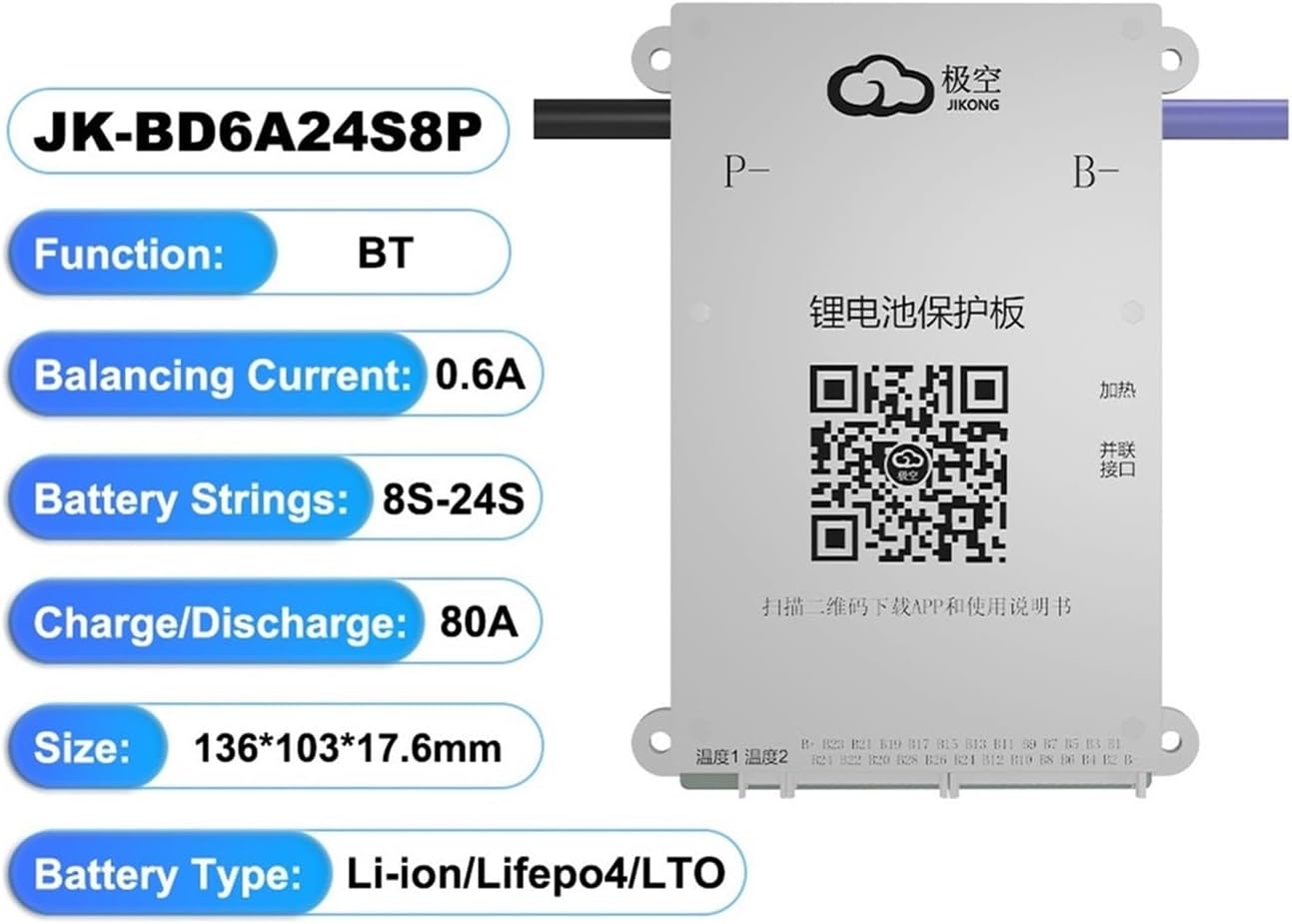
Figure 1: RYRMCVPVCT JK BMS BD6A24S8P showing key specifications and a QR code for app download.
5. Setup and Installation
Proper installation is crucial for the safe and effective operation of your BMS. Follow these steps carefully:
5.1 Pre-installation Checks
- Ensure all battery cells are balanced to within 0.05V before connecting the BMS.
- Verify that the BMS model (BD6A24S8P) matches your battery pack's cell count (8S-24S) and current requirements.
- Gather all necessary tools: multimeter, insulated wires, crimping tools, heat shrink tubing, and safety gear.
5.2 Wiring Connections
The JK BMS typically uses a common port for charge and discharge. Refer to the wiring diagram provided with your specific product packaging for precise connections. General steps include:
- Connect the main negative (B-) terminal of the BMS to the negative terminal of your battery pack.
- Connect the main positive (P+) terminal of the BMS to the positive terminal of your battery pack (if applicable, or directly to the load/charger positive).
- Connect the balance wires (B1, B2, ..., Bn) from the BMS to the corresponding positive terminals of each cell in your battery pack, starting from the first cell's positive (B1) up to the last cell's positive (Bn). Ensure the order is correct.
- Connect the main charge/discharge positive (P+) and negative (P-) terminals of the BMS to your charger and load.
- Double-check all connections for correctness and secure fit before applying power.
5.3 App Installation and Bluetooth Connection
The JK BMS features a dedicated app for monitoring and configuration:
- Scan the QR code on the BMS unit or in the product documentation to download the official JK BMS application. A common download link is http://qr17.cn/BApbC0.
- Install the app on your smartphone (Android or iOS).
- Enable Bluetooth on your smartphone.
- Open the JK BMS app and search for available devices. Select your BMS from the list to connect.
- Once connected, you can view real-time battery data and adjust settings.

Figure 2: Various JK Smart Active Balance BMS models, illustrating the range of compatibility.
6. Operating Instructions
Once installed and connected, the JK BMS operates automatically to protect and balance your battery pack. Use the mobile app for detailed monitoring.
6.1 Real-time Monitoring via App
The JK BMS app provides a comprehensive overview of your battery system:
- Cell Voltages: View individual cell voltages to monitor balance status.
- Total Voltage: Displays the overall battery pack voltage.
- Current: Shows real-time charge or discharge current.
- Temperature: Monitors battery temperature to prevent overheating or cold charging.
- State of Charge (SOC): Estimates the remaining capacity of your battery pack.
- Protection Status: Indicates if any protection functions (e.g., over-voltage, under-voltage) are active.
6.2 Active Balancing
The active balancing feature works continuously to equalize cell voltages. This process is automatic and does not require manual intervention. The app may show the balancing current or status.
6.3 BMS Settings (via App)
The app allows customization of certain BMS parameters. Exercise caution when changing settings, as incorrect values can compromise battery safety and performance. Consult the app's specific guide for detailed parameter adjustments.
7. Maintenance
The JK BMS is designed for low maintenance. However, periodic checks can help ensure its long-term reliability:
- Visual Inspection: Periodically inspect the BMS and all wiring for any signs of damage, corrosion, or loose connections.
- Cleanliness: Keep the BMS free from dust, dirt, and moisture. Use a dry, soft cloth for cleaning.
- Firmware Updates: Check the manufacturer's website or the JK BMS app for any available firmware updates. Follow the provided instructions carefully for any update procedures.
- Battery Health: Regularly monitor your battery pack's overall health and individual cell voltages via the app to detect any potential issues early.
8. Troubleshooting
If you encounter issues with your JK BMS, refer to the following common problems and solutions:
| Problem | Possible Cause | Solution |
|---|---|---|
| BMS not powering on/no app connection | Incorrect main power connections (B-, P+), loose balance wires, Bluetooth off on phone, app not installed correctly. | Verify all wiring connections, especially B- and balance leads. Ensure Bluetooth is enabled and the app is correctly installed. Restart phone and BMS. |
| Battery not charging/discharging | BMS protection activated (over-charge, over-discharge, overcurrent, temperature), incorrect P- or P+ connections. | Check app for active protection alarms. Address the cause (e.g., reduce load, allow cooling). Verify P- and P+ wiring. |
| Cells out of balance | Initial cell imbalance, faulty balance wire, very high current draw preventing effective balancing. | Ensure initial cell voltages were balanced. Check balance wire connections. Allow BMS time to balance, especially at lower currents. If severe, manually balance cells. |
| Inaccurate voltage/current readings | Loose connections, sensor issue, calibration required. | Check all wiring connections. If problem persists, contact support. |
If you cannot resolve the issue using the troubleshooting guide, please contact RYRMCVPVCT customer support for further assistance.
9. Warranty and Support
The RYRMCVPVCT JK BMS BD6A24S8P is backed by the manufacturer's warranty. Please refer to your purchase documentation or the seller's policy for specific warranty terms and conditions.
For technical support, warranty claims, or any product-related inquiries, please contact the seller or RYRMCVPVCT customer service through the platform where the product was purchased. Ensure you have your product model number (BD6A24S8P) and purchase details available when seeking support.