
1. Introduction
Thank you for choosing the GRACEALL 4-Zone Infrared Ceramic Hob. This appliance is designed for efficient and precise cooking with its advanced infrared heating technology. This manual provides essential information for the safe installation, operation, and maintenance of your new ceramic hob. Please read it thoroughly before use and keep it for future reference.
The GRACEALL 4-Zone Infrared Ceramic Hob features a sleek design, intuitive slide controls, and multiple safety functions to enhance your cooking experience. It is compatible with all types of flat-bottom cookware.

Image 1.1: The GRACEALL 4-Zone Infrared Ceramic Hob in use, demonstrating its four heating zones and touch controls.
2. Safety Information
Your safety and the safety of others are paramount. Please observe all safety warnings and instructions provided in this manual.
General Safety Precautions:
- Read all instructions before using the appliance.
- Do not touch hot surfaces. Use handles or knobs.
- To protect against electrical shock, do not immerse cord, plugs, or the appliance in water or other liquid.
- Close supervision is necessary when any appliance is used by or near children.
- Unplug from outlet when not in use and before cleaning. Allow to cool before putting on or taking off parts.
- Do not operate any appliance with a damaged cord or plug or after the appliance malfunctions or has been damaged in any manner.
- The use of accessory attachments not recommended by the appliance manufacturer may cause injuries.
- Do not use outdoors.
- Do not let cord hang over edge of table or counter, or touch hot surfaces.
- Do not place on or near a hot gas or electric burner, or in a heated oven.
- Always attach plug to appliance first, then plug cord into the wall outlet. To disconnect, turn any control to "off", then remove plug from wall outlet.
- Do not use appliance for other than intended use.
Specific Safety Features:
- Child Safety Lock: Prevents accidental operation by children.
- Residual Heat Indicators: Lights up to warn when the hob surface is still hot after use.
- Overheat Protection: Automatically shuts off the hob if it detects excessive temperatures.
- Automatic Shut-off: The hob will automatically turn off after a preset time if no operation is detected, or if a cooking zone is left on for an extended period.
3. What's Included
Carefully unpack your GRACEALL 4-Zone Infrared Ceramic Hob and check that all items are present and undamaged. If any items are missing or damaged, please contact your retailer.
- 1 × GRACEALL 4-Zone Slide Control Electric Ceramic Hob
- 1 × User Manual (this document)
- 4 × Plastic Feet (for freestanding use)
- 4 × Mounting Clips (for built-in installation)
- 1 × Foam Sealing Strip (for under-glass edge sealing)
4. Setup and Installation
This section provides instructions for installing your ceramic hob. Installation should only be performed by a qualified technician in accordance with local regulations.
Dimensions and Cut-out:
The hob is designed for built-in installation. Ensure your countertop has the correct cut-out dimensions.
- Product Dimensions (D x W x H): 20.75" x 23.11" x 2.28" (52.7 cm x 58.7 cm x 5.8 cm)
- Recommended Cut-out Dimensions: 56 cm × 49 cm (22.05" × 19.3")

Image 4.1: Hob dimensions, cut-out requirements, and electrical wiring diagram.
Electrical Connection:
The appliance requires a 230V hardwired electrical connection. The total wattage is 6700W. Consult a qualified electrician for proper installation to ensure compliance with local electrical codes.
- Voltage: 230 Volts (AC)
- Wattage: 6700 Watts
- Ensure the power supply is disconnected before making any electrical connections.
- Refer to the wiring diagram provided in Image 4.1 for correct connections.
Installation Steps:
- Prepare the countertop cut-out according to the specified dimensions.
- Apply the foam sealing strip around the edge of the hob's underside to prevent liquid ingress.
- Carefully lower the hob into the cut-out opening.
- Secure the hob from underneath the countertop using the provided mounting clips.
- For freestanding use, attach the plastic feet to the bottom of the hob.
- Connect the electrical wiring as per the diagram and local regulations.
- After installation, ensure the hob is stable and properly sealed.
5. Operating Instructions
This section explains how to use your GRACEALL Ceramic Hob effectively and safely.
Control Panel Overview:
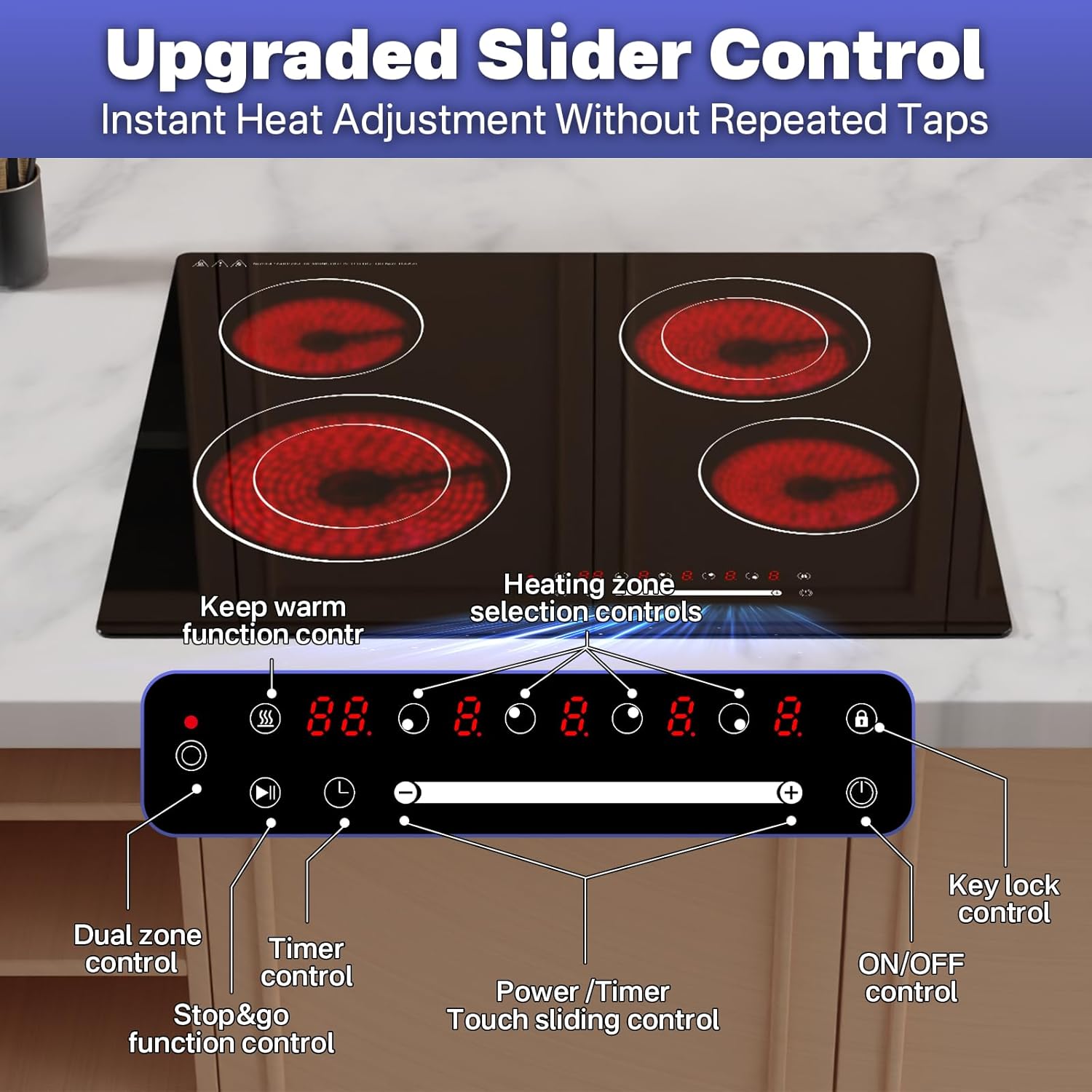
Image 5.1: The hob's control panel with labeled functions.
- ON/OFF Control: Powers the hob on or off.
- Heating Zone Selection Controls: Selects the desired cooking zone.
- Power / Timer Touch Sliding Control: Adjusts heat levels (1-9) or sets the timer by sliding your finger.
- Dual Zone Control: Activates the larger heating area for specific zones.
- Stop & Go Function Control (Pause): Pauses cooking and resumes with previous settings.
- Timer Control: Sets the cooking timer (1-99 minutes).
- Keep Warm Function Control: Maintains food at a warm temperature.
- Key Lock Control: Locks the control panel to prevent accidental changes.
Basic Operation:
- Power On: Touch the ON/OFF control. The display will show "00" or "--".
- Select a Cooking Zone: Touch the corresponding heating zone selection control. The display for that zone will flash.
- Adjust Heat Level: Slide your finger along the Power / Timer Touch Sliding Control to select a heat level from 1 to 9.
- Power Off: Touch the ON/OFF control again to turn off the hob. Individual zones can be turned off by selecting the zone and reducing the power level to "0".
Advanced Functions:
- 9 Heat Levels: Each burner offers 9 precise power levels for versatile cooking, from gentle simmering to rapid boiling.
- Dual-Zone Heating: Certain zones can be expanded to accommodate larger cookware. Activate this feature using the Dual Zone Control.
- Timer Function: After selecting a cooking zone and setting its power level, touch the Timer Control. Use the sliding control to set the desired cooking time (1-99 minutes). The hob will automatically turn off the selected zone when the timer expires.
- Pause (Stop & Go): Touch the Stop & Go function control to pause all active cooking zones. Touch it again to resume cooking with the previous settings.
- Keep Warm: Activate the Keep Warm function control to maintain food at a serving temperature.
- Child Lock: To activate, touch and hold the Key Lock Control. An indicator will light up. To deactivate, touch and hold the Key Lock Control again.
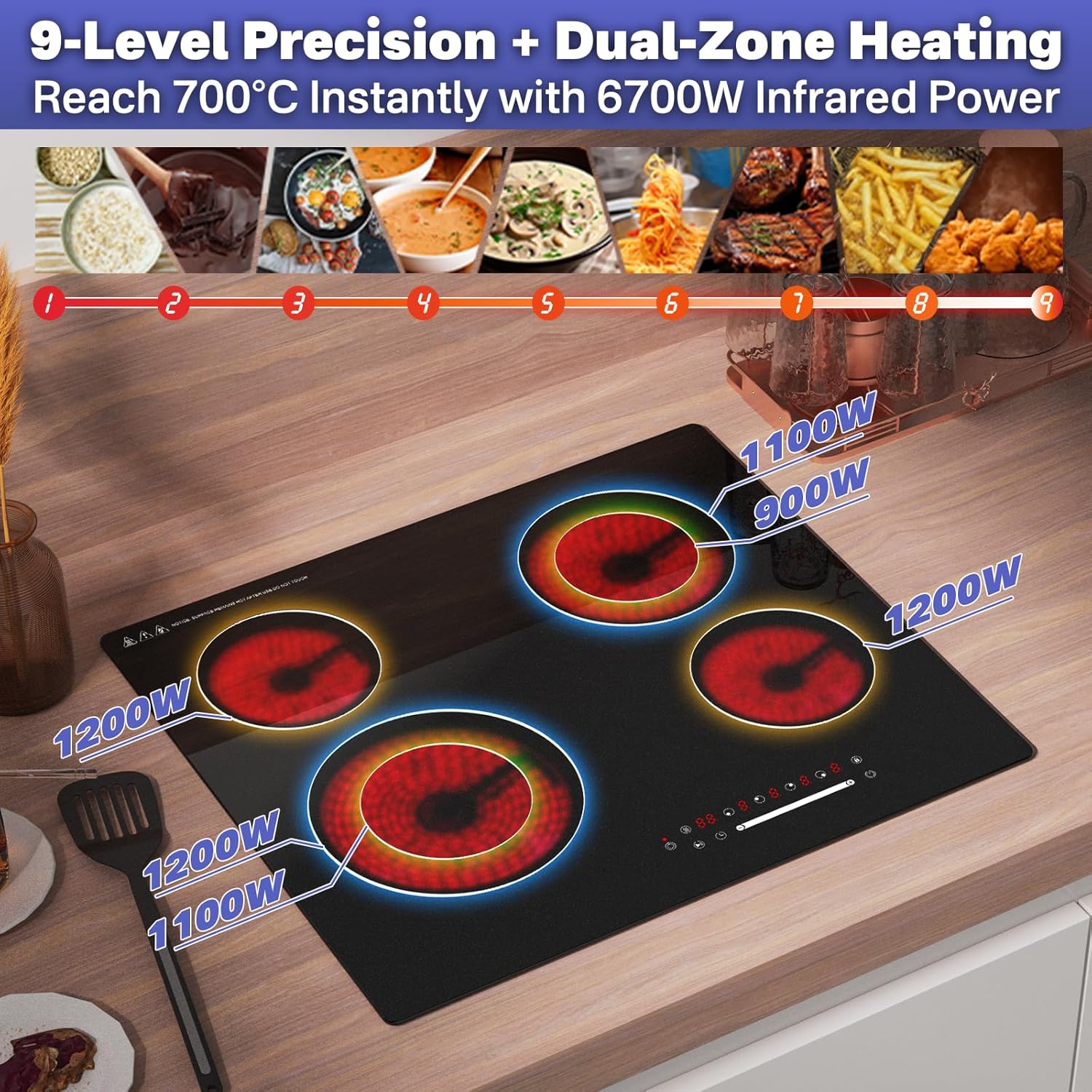
Image 5.2: Power distribution across the 9 heat levels and dual-zone heating capabilities.
Cookware Compatibility:
The GRACEALL Infrared Ceramic Hob is compatible with all types of flat-bottom cookware, including:
- Cast Iron
- Ceramic
- Stainless Steel
- Aluminum
- Glass
Ensure cookware has a flat base for optimal heat transfer. The hob accommodates cookware with a diameter between 10 cm and 25 cm.

Image 5.3: Examples of compatible cookware and default working times.
6. Maintenance and Cleaning
Proper maintenance ensures the longevity and optimal performance of your ceramic hob. Always ensure the hob is cool and unplugged before cleaning.
Cleaning the Ceramic Surface:
- Wipe the ceramic glass surface with a soft cloth and a mild detergent or a specialized ceramic hob cleaner.
- For stubborn stains or burnt-on food, use a ceramic hob scraper, holding it at a shallow angle.
- Rinse with a damp cloth and dry thoroughly to prevent water spots.
- Avoid abrasive cleaners, scouring pads, or harsh chemicals, as these can scratch or damage the surface.

Image 6.1: Cleaning the ceramic hob surface.
Integrated Cooling Fan:
The hob features an integrated cooling fan to ensure long lifespan. Ensure the ventilation openings are not blocked.
7. Troubleshooting
If you encounter issues with your GRACEALL Ceramic Hob, please refer to the following common troubleshooting steps. If the problem persists, contact customer support.
| Problem | Possible Cause | Solution |
|---|---|---|
| Hob does not turn on. | No power supply; Child lock activated. | Check circuit breaker; Deactivate child lock by touching and holding the lock icon. |
| Cooking zone not heating. | Incorrect power level selected; Cookware not suitable (though rare for infrared). | Increase power level; Ensure cookware has a flat base. |
| Hob turns off unexpectedly. | Overheat protection activated; Automatic shut-off engaged. | Allow hob to cool down; Check if a timer was set or if a zone was left on for too long. |
| Control panel unresponsive. | Child lock activated; Moisture on control panel. | Deactivate child lock; Wipe control panel dry with a clean cloth. |
| Display shows an error code. | Internal fault. | Turn off the hob, wait a few minutes, then turn it back on. If the error persists, contact customer support. |
8. Specifications
Detailed technical specifications for the GRACEALL 4-Zone Infrared Ceramic Hob.
- Brand: GRACEALL
- Model Number: EU46S1-2
- Heating Elements: 4 Ceramic Zones
- Heater Surface Material: Tempered Glass
- Material: Tempered Glass, Stainless Steel, Ceramic
- Product Dimensions (D x W x H): 20.75" x 23.11" x 2.28" (52.7 cm x 58.7 cm x 5.8 cm)
- Item Weight: 7.6 Kilograms
- Voltage: 230 Volts (AC)
- Wattage: 6700 Watts
- Special Features: Lock function, Pause function, Timer, Warmth Maintaining Function, Residual Heat Indicators, Overheat Protection, Automatic Shut-off.
9. Warranty and Support
For warranty information or technical support, please contact GRACEALL customer service or refer to the official GRACEALL website. Keep your purchase receipt as proof of purchase.
GRACEALL Official Store: Visit GRACEALL Store on Amazon