
Introduction
Thank you for choosing the Ken-Tech Atomic Retro Twin Bell Alarm Clock. This clock combines a classic vintage design with modern atomic timekeeping technology, ensuring accurate time and a powerful alarm. Its silent operation makes it ideal for bedrooms, while the loud twin bell alarm is designed for heavy sleepers. This manual provides detailed instructions for setup, operation, and maintenance to ensure optimal performance.
Safety Information
- Do not expose the clock to extreme temperatures, direct sunlight, or high humidity.
- Avoid dropping the clock or subjecting it to strong impacts.
- Use only the specified battery type (2 x AA batteries).
- Do not mix old and new batteries, or different types of batteries.
- Remove batteries if the clock will not be used for an extended period to prevent leakage.
- Keep batteries out of reach of children.
Package Contents
- 1 x Ken-Tech Atomic Retro Twin Bell Alarm Clock
- 1 x User Manual
Note: 2 x AA batteries are not included and must be purchased separately.
Product Overview
Familiarize yourself with the various parts and controls of your alarm clock:
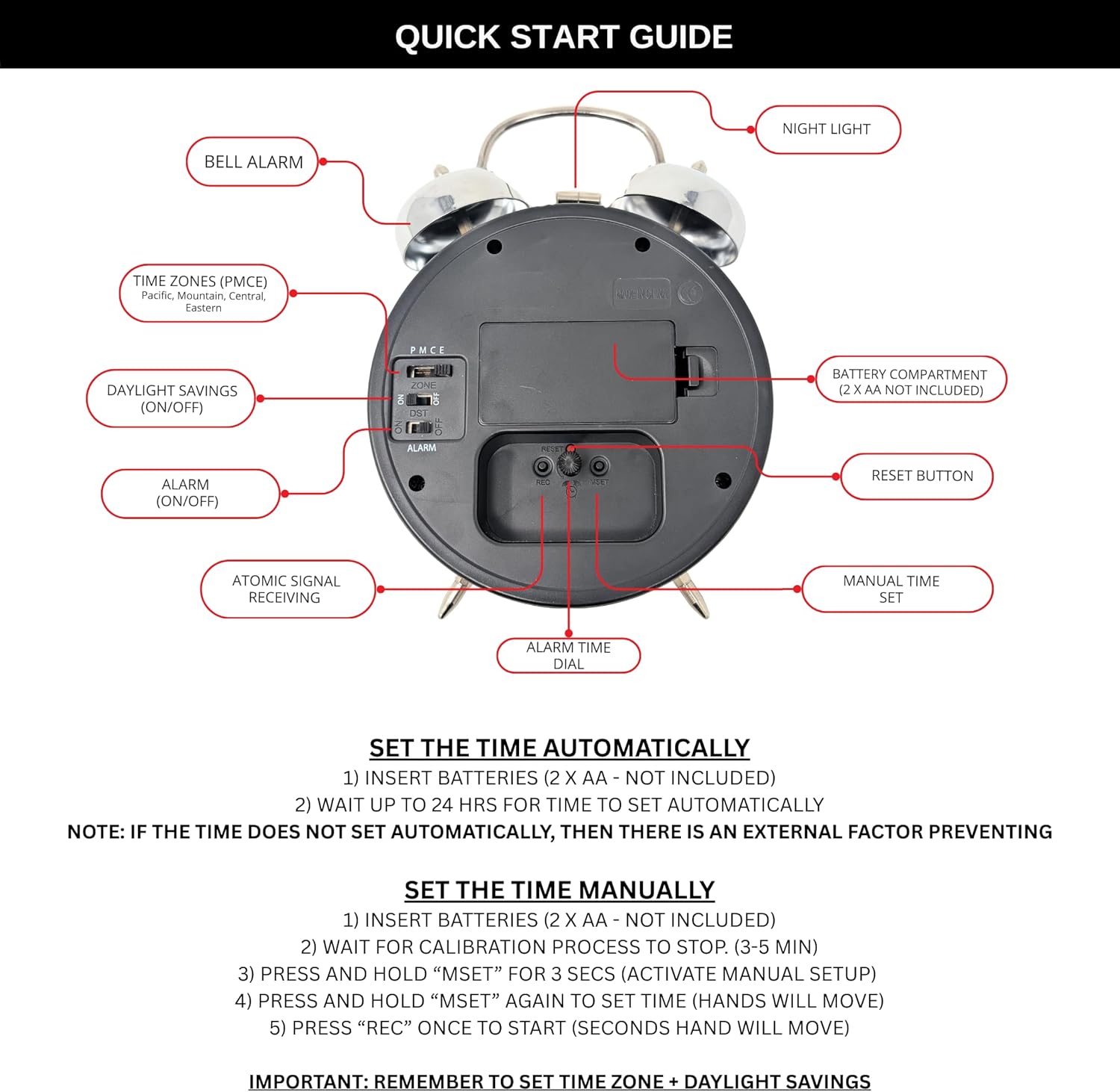
Figure 1: Rear View of Alarm Clock Controls
This image displays the back of the alarm clock, highlighting key controls such as the Bell Alarm, Night Light button, Time Zone selector (PMCE), Daylight Savings (ON/OFF) switch, Alarm (ON/OFF) switch, Atomic Signal Receiving indicator, Battery Compartment, Reset Button, Manual Time Set dial, and Alarm Time Dial.
- Bell Alarm: The twin bells on top produce a loud alarm sound.
- Night Light Button: Press to illuminate the clock face for nighttime viewing.
- Time Zones (PMCE): Selector for Pacific, Mountain, Central, Eastern time zones.
- Daylight Savings (ON/OFF): Switch to enable or disable Daylight Saving Time adjustment.
- Alarm (ON/OFF): Switch to activate or deactivate the alarm function.
- Atomic Signal Receiving: Indicator for atomic time synchronization.
- Battery Compartment: Holds 2 x AA batteries.
- Reset Button: Used for resetting the clock.
- Manual Time Set Dial: Used to manually adjust the time.
- Alarm Time Dial: Used to set the desired alarm time.
Setup
1. Battery Installation
- Open the battery compartment cover located on the back of the clock (refer to Figure 1).
- Insert two (2) new AA batteries, ensuring correct polarity (+/-).
- Close the battery compartment cover securely.
2. Automatic Time Synchronization (Atomic Clock Function)
The clock features a built-in receiver that automatically synchronizes with the WWVB radio broadcast from NIST Colorado, ensuring accurate time without manual adjustment.

Figure 2: Automatic Time Synchronization
This image illustrates the alarm clock receiving an atomic time signal from NIST Colorado, indicating its automatic time-setting capability.
- After inserting batteries, the clock will automatically begin searching for the WWVB signal.
- Allow up to 24 hours for the clock to receive and synchronize the time automatically. For best reception, place the clock near a window and away from electronic devices that may cause interference.
- Once synchronized, the time will be set accurately to the second.
Note: The auto-sync function may be affected by environmental factors such as structural interference or external electronic interference. If the time does not set automatically after 24 hours, consider manual setup.
3. Manual Time Setting
If automatic synchronization is not desired or unsuccessful, you can set the time manually:
- Insert batteries as described above.
- Wait for the initial calibration process to complete (approximately 3-5 minutes).
- Press and hold the "MSET" button (Manual Time Set Dial, refer to Figure 1) for 3 seconds to activate manual setup. The clock hands will begin to move.
- Continue to press and hold "MSET" to advance the time until the desired time is displayed.
- Once the correct time is set, press the "REC" button once to start the seconds hand.
4. Time Zone Selection
Use the Time Zone selector switch (PMCE) on the back of the clock (refer to Figure 1) to select your desired time zone:
- P: Pacific Standard Time
- M: Mountain Standard Time
- C: Central Standard Time
- E: Eastern Standard Time
5. Daylight Saving Time (DST)
Adjust the Daylight Savings (ON/OFF) switch on the back of the clock (refer to Figure 1) according to your region's DST observance. Set to "ON" for Daylight Saving Time, and "OFF" for Standard Time.
Operating Instructions
1. Setting the Alarm Time
- Locate the Alarm Time Dial on the back of the clock (refer to Figure 1).
- Rotate the dial to set the alarm hand to your desired wake-up time.
2. Activating/Deactivating the Alarm
- To activate the alarm, slide the Alarm (ON/OFF) switch to the "ON" position (refer to Figure 1).
- To deactivate the alarm, slide the Alarm (ON/OFF) switch to the "OFF" position.
3. Using the Backlight
The clock features an on-demand backlight for easy viewing in low-light conditions.

Figure 3: Activating the Backlight
This image shows a hand pressing the button on top of the alarm clock, which activates the backlight to illuminate the clock face in a dark environment.
Press the Night Light button located on the top of the clock (refer to Figure 1) to temporarily illuminate the clock face. Release the button to turn off the backlight.
4. Silent Operation
This alarm clock is designed with a silent sweep movement, ensuring no distracting ticking noise, which is ideal for bedrooms and quiet environments.
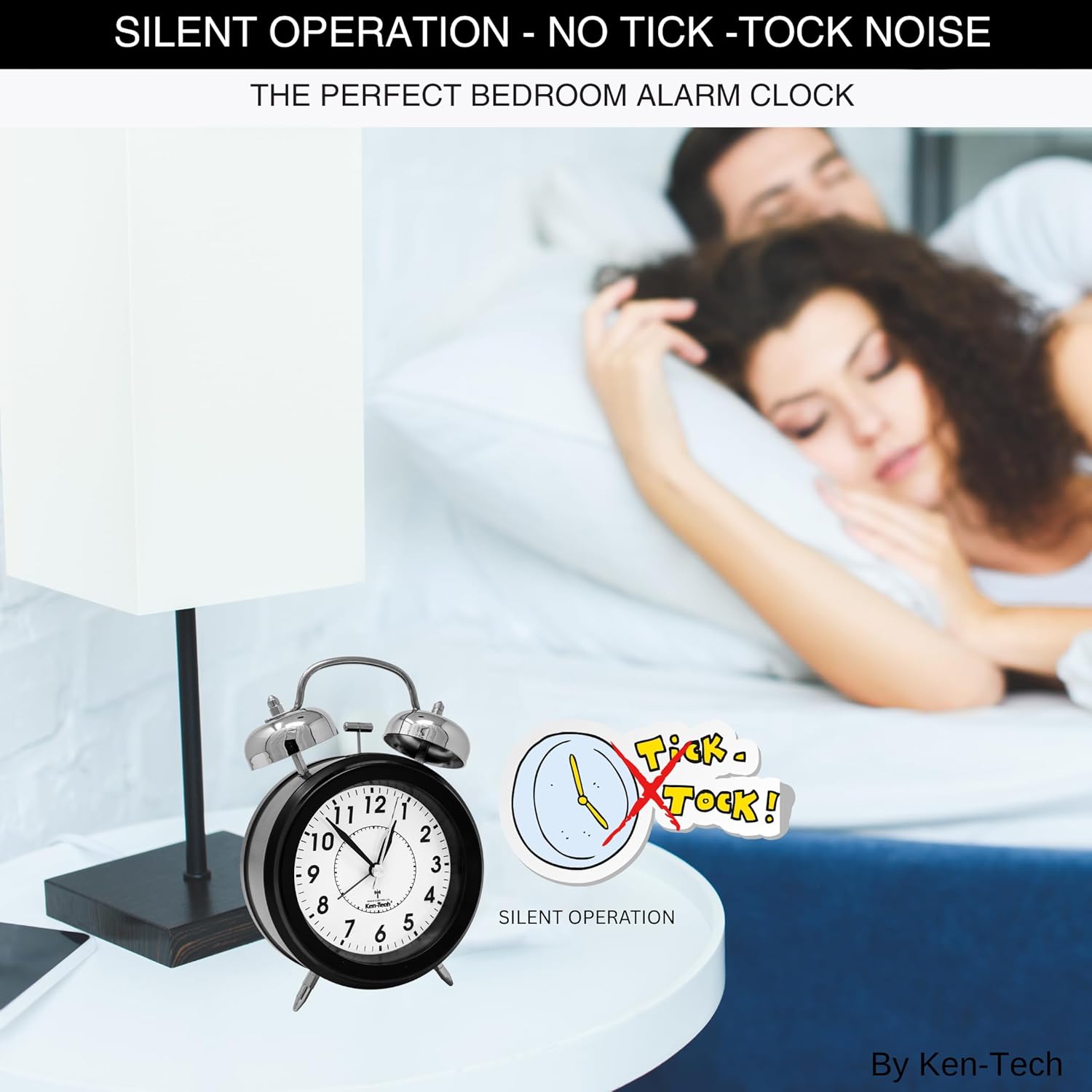
Figure 4: Silent Operation
This image depicts the alarm clock on a bedside table, accompanied by a graphic that visually represents the absence of a 'tick-tock' sound, emphasizing its silent operation.
5. Loud Alarm Feature
The twin bell design produces an extra loud alarm, reaching up to 100dB, making it suitable for heavy sleepers, children, the elderly, and those with hearing impairment.

Figure 5: Loud Alarm for Heavy Sleepers
This image illustrates the effectiveness of the loud alarm, showing a person reacting to the sound, with a decibel scale indicating a sound level of 110dB.

Figure 6: Loud Alarm for Hearing Impaired
This image emphasizes the alarm's suitability for individuals with hearing impairment, showing an elderly person listening intently, alongside a graphic indicating a loud 110dB alarm.
Maintenance
- Cleaning: Wipe the clock with a soft, dry cloth. Do not use abrasive cleaners or solvents.
- Battery Replacement: Replace batteries when the clock display dims or the alarm sound weakens. Always replace both AA batteries at the same time.
Troubleshooting
| Problem | Possible Cause | Solution |
|---|---|---|
| Clock does not power on. | Batteries are inserted incorrectly or are depleted. | Check battery polarity. Replace with new AA batteries. |
| Automatic time setting fails. | Poor signal reception; environmental interference. | Move the clock to a location with better signal reception (e.g., near a window). Allow up to 24 hours. If still unsuccessful, set time manually. |
| Alarm does not sound. | Alarm switch is OFF; alarm time is not set correctly; batteries are low. | Ensure the Alarm (ON/OFF) switch is in the "ON" position. Verify the alarm hand is set to the desired time. Replace batteries. |
| Clock loses time or runs inaccurately. | Weak atomic signal; low batteries. | Ensure good atomic signal reception. Replace batteries. |
Specifications
- Brand: Ken-Tech
- Model: KEN-TECH-T-4678
- Display Type: Analog
- Clock Form: Twin Bell
- Operation Mode: Atomic
- Power Source: 2 x AA Batteries (not included)
- Product Dimensions: 5"W x 7"H
- Item Weight: 12.8 ounces
- Special Features: Loud Alarm, Silent Operation, Automatic Time Setting, Backlight, Time Zone Selection, DST Adjustment
- Frame Material: Metal
- Indoor/Outdoor Usage: Indoor
Warranty and Support
For warranty information or technical support, please refer to the retailer's return policy or contact Ken-Tech customer service through the official Ken-Tech store on Amazon or their designated support channels. Please have your model number (KEN-TECH-T-4678) and purchase details available when contacting support.
Ken-Tech Store: Visit the Ken-Tech Store on Amazon