
Infinix Note 50s 5G+
Infinix Note 50s 5G+ User Manual
Model: Note 50s 5G+ | Brand: Infinix
1. Introduction
Welcome to the user manual for your new Infinix Note 50s 5G+. This smartphone is engineered for exceptional performance, robust durability, and an immersive user experience. It features a vibrant 6.78-inch FHD+ 144Hz AMOLED display, a powerful MediaTek Dimensity 7300 Ultimate processor, and a long-lasting 5500mAh battery with 45W fast charging. Designed to meet the demands of modern mobile usage, the Note 50s 5G+ also includes advanced camera capabilities, military-grade durability, and intelligent AI features.
This manual provides essential information on setting up, operating, maintaining, and troubleshooting your device to ensure you get the most out of its advanced features.

Figure 1: Infinix Note 50s 5G+ Overview
2. What's in the Box
Upon unboxing your Infinix Note 50s 5G+, please verify that all the following items are included:
- Infinix Note 50s 5G+ Smartphone
- Phone Case
- Power Adapter
- SIM Tray Ejector
- USB Cable

Figure 2: Included Accessories
3. Initial Setup
3.1 Inserting SIM Card and Powering On
- Locate the SIM tray on the side of your device.
- Insert the SIM tray ejector tool into the small hole next to the tray and gently push until the tray pops out.
- Place your Nano-SIM card(s) into the designated slots on the tray. Ensure the gold contacts are facing down.
- Carefully reinsert the SIM tray into the phone.
- Press and hold the Power button (located on the side) until the Infinix logo appears on the screen.
- Follow the on-screen instructions to complete the initial setup, including language selection, Wi-Fi connection, and Google account setup.
3.2 Charging the Device
Before first use, it is recommended to fully charge your device.
- Connect the USB cable to the phone's charging port.
- Connect the other end of the USB cable to the provided power adapter.
- Plug the power adapter into a wall outlet.
- The charging indicator will appear on the screen. The device supports 45W Wired FastCharge, allowing for rapid charging.

Figure 3: Charging the Device
4. Operating Your Device
4.1 Display and Navigation
The Infinix Note 50s 5G+ features a 6.78-inch FHD+ 144Hz AMOLED display with a 2160Hz touch sampling rate, providing a smooth and responsive user experience.
- Touch Gestures: Navigate the interface using standard touch gestures such as tap, swipe, pinch-to-zoom, and long press.
- Refresh Rate: The 144Hz refresh rate ensures fluid scrolling and animations. This can often be adjusted in display settings to optimize battery life.
- Eye Comfort: The display is TÜV certified for eye comfort, reducing blue light emission.
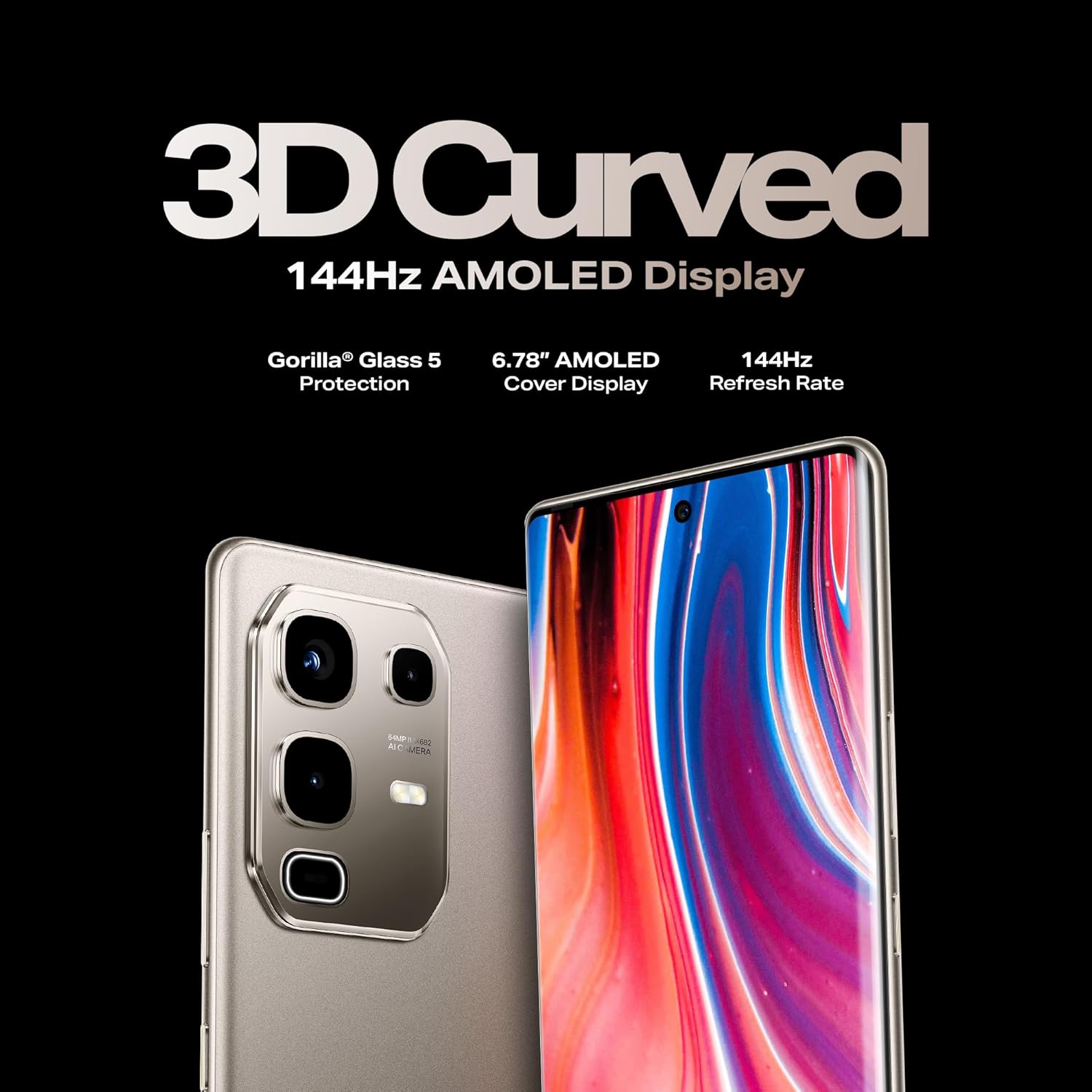
Figure 4: 3D Curved AMOLED Display
4.2 Audio Experience
Enjoy enhanced audio with JBL dual speakers and DTS audio technology.
- Dual Speakers: Provides a rich, stereo sound experience for media consumption and gaming.
- DTS Audio: Offers customizable sound profiles for an optimized listening experience.
Figure 5: JBL Dual Speakers
5. Camera Features
The Infinix Note 50s 5G+ is equipped with a versatile camera system to capture high-quality photos and videos.
- Rear Camera: 64MP Sony dual rear camera (IMX682 sensor) for improved clarity and pro-level portraits.
- Front Camera: 13MP selfie camera.
- AI Tools: Integrated AI features like AI Eraser enhance photography by intelligently removing unwanted objects from your photos.
- Active Halo Lighting: The unique gem-cut camera module features Active Halo Lighting, which illuminates for notifications, calls, charging, and photo countdowns.

Figure 6: 64MP Sony Dual Rear Camera
6. Performance and Gaming
Experience powerful performance and smooth gaming with the MediaTek Dimensity 7300 Ultimate processor.
- Processor: MediaTek Dimensity 7300 Ultimate ensures fast and efficient operation for demanding applications and multitasking.
- Gaming: Optimized with XArena, the device delivers ultra-smooth gaming at up to 90 FPS.
- Memory: Equipped with 8GB RAM and 256GB internal storage, providing ample space and smooth performance.

Figure 7: MediaTek Dimensity 7300 Ultimate
7. Durability
The Infinix Note 50s 5G+ is built to withstand various environmental challenges, ensuring long-term reliability.
- MIL-STD-810H Certified: This military-grade certification indicates resistance to drops, shocks, humidity, high temperatures, low temperatures, and altitude changes.
- IP64 Rating: Provides protection against dust ingress and splashes of water from any direction.
- Gorilla Glass 5: The display is protected by Corning Gorilla Glass 5, offering enhanced scratch and drop resistance.
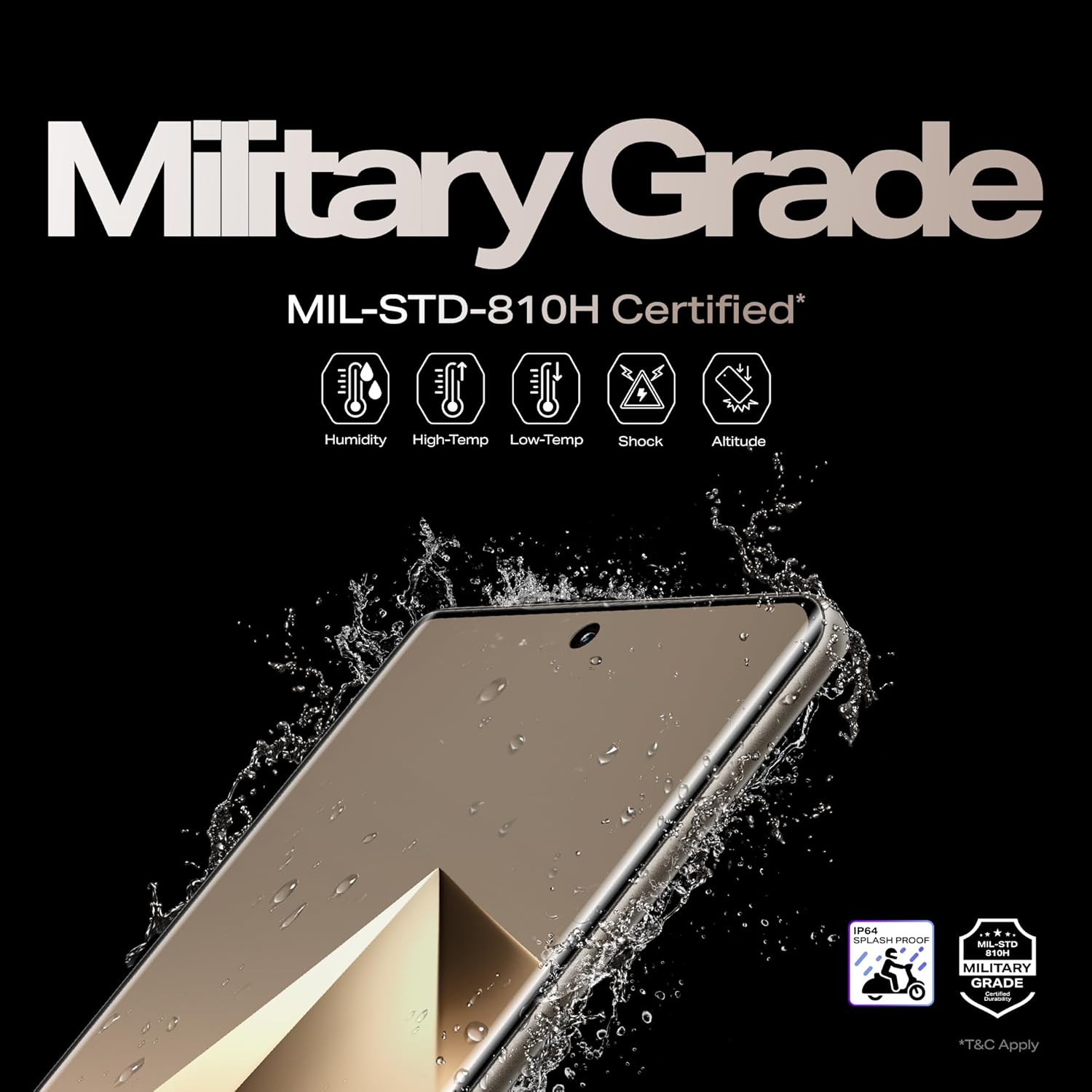
Figure 8: Military Grade Durability
8. AI Features
The device integrates advanced AI capabilities to enhance user experience and productivity.
- Folax - AI Voice Assistant: Provides hands-free control and information retrieval.
- AI Writing Assistant: Helps in drafting messages and content more efficiently.
- AI Eraser: For photo editing, as mentioned in the camera section.
- AI Wallpaper Generator: Creates unique wallpapers based on user preferences.
- Circle to Search: A feature for quick visual search directly from the screen.
- AIGC Portrait Mode: Enhances portrait photography using AI.

Figure 9: Infinix AI Features
9. Maintenance
Proper maintenance ensures the longevity and optimal performance of your Infinix Note 50s 5G+.
- Cleaning: Use a soft, lint-free cloth to clean the screen and body. Avoid abrasive materials or harsh chemicals.
- Software Updates: Regularly check for and install system updates (XOS 15) to ensure your device has the latest features, security patches, and performance improvements.
- Battery Care: Avoid extreme temperatures. While the device has a large battery, prolonged exposure to very hot or cold conditions can affect battery health.
- Storage Management: Periodically clear unnecessary files and apps to maintain optimal storage and performance.
- Protection: Utilize the provided phone case and screen protector (if applicable) to guard against physical damage.
10. Troubleshooting
This section addresses common issues you might encounter with your device.
| Problem | Possible Solution |
|---|---|
| Device not turning on | Ensure the battery is charged. Connect to the charger for at least 15 minutes, then try powering on again. If unresponsive, perform a forced restart by holding the Power button for 10-15 seconds. |
| Apps crashing or freezing | Close the problematic app and reopen it. Clear the app's cache and data in Settings > Apps. Ensure the app and your phone's software are up to date. |
| Poor battery life | Reduce screen brightness, disable unnecessary background apps, turn off Wi-Fi/Bluetooth/GPS when not in use. Check battery usage in Settings to identify power-hungry apps. |
| Network connectivity issues | Toggle Airplane Mode on and off. Restart the device. Check SIM card insertion. Reset network settings in Settings > System > Reset options. |
| Fingerprint sensor not working | Ensure your finger is clean and dry. Re-register your fingerprints in Settings > Security. Ensure the screen is clean and free of debris. |
11. Specifications
Key technical specifications for the Infinix Note 50s 5G+:
| Feature | Detail |
|---|---|
| Model Number | Note 50s 5G+ |
| Operating System | Android 15 (XOS 15) |
| Processor | MediaTek Dimensity 7300 Ultimate |
| Display | 6.78-inch FHD+ 144Hz 3D Curved AMOLED |
| RAM | 8GB |
| Internal Storage | 256GB |
| Rear Camera | 64MP Sony Dual Camera (IMX682) |
| Front Camera | 13MP |
| Battery Capacity | 5500mAh |
| Charging | 45W Wired FastCharge |
| Dimensions | 16.4 x 7.5 x 0.8 cm |
| Weight | 189 g |
| Durability | MIL-STD-810H Certified, IP64 Rated, Gorilla Glass 5 |
| Audio | JBL Dual Speakers, DTS Audio |
| Color | Titanium Grey |
12. Warranty and Support
Your Infinix Note 50s 5G+ comes with a standard manufacturer's warranty. Please refer to the warranty card included in your product packaging for specific terms and conditions, including warranty period and coverage details.
For technical support, service, or further inquiries, please visit the official Infinix support website or contact their customer service hotline. Keep your proof of purchase handy when seeking support.
Manufacturer: PADGET ELECTRONICS PRIVATE LIMITED