
MekiPow B0F4R9Q2TW
MekiPow Cordless Jobsite Fan User Manual
Model: B0F4R9Q2TW
1. Introduction
Thank you for choosing the MekiPow Cordless Jobsite Fan. This fan is designed for versatility, offering both battery-powered portability and AC power options. It features a brushless motor for efficient and quiet operation, variable speed control, and a durable design suitable for various environments, including job sites, camping, workshops, and home use. Please read this manual thoroughly before operation to ensure safe and optimal performance.
2. Important Safety Instructions
Always follow basic safety precautions when using electrical appliances to reduce the risk of fire, electric shock, and personal injury.
- Read all instructions before using this fan.
- Do not operate any fan with a damaged cord or plug. Discard the fan or return it to an authorized service facility for examination and/or repair.
- Do not run cord under carpeting. Do not cover cord with throw rugs, runners, or similar coverings. Do not route cord under furniture or appliances. Arrange cord away from traffic area and where it will not be tripped over.
- To disconnect the fan, turn controls to the OFF position, then remove the plug from the outlet.
- Do not insert or allow fingers or foreign objects to enter any ventilation or exhaust opening as this may cause an electric shock or fire, or damage the fan.
- Do not block air openings or operate with any openings blocked. Keep openings free of lint, hair, and the like.
- Do not use in wet or moist locations, such as bathrooms or laundry areas.
- This fan is designed for use with Milwaukee 18V batteries or the provided AC adapter. Using other power sources may cause damage or injury.
- Ensure the fan is placed on a stable, level surface to prevent tipping.
- Keep children and pets away from the fan during operation.
3. Package Contents
Upon opening the package, verify that all items listed below are present and undamaged:
- MekiPow Cordless Jobsite Fan (Tool Only)
- AC Power Adapter
- User Manual
Note: Milwaukee 18V battery is not included and must be purchased separately.
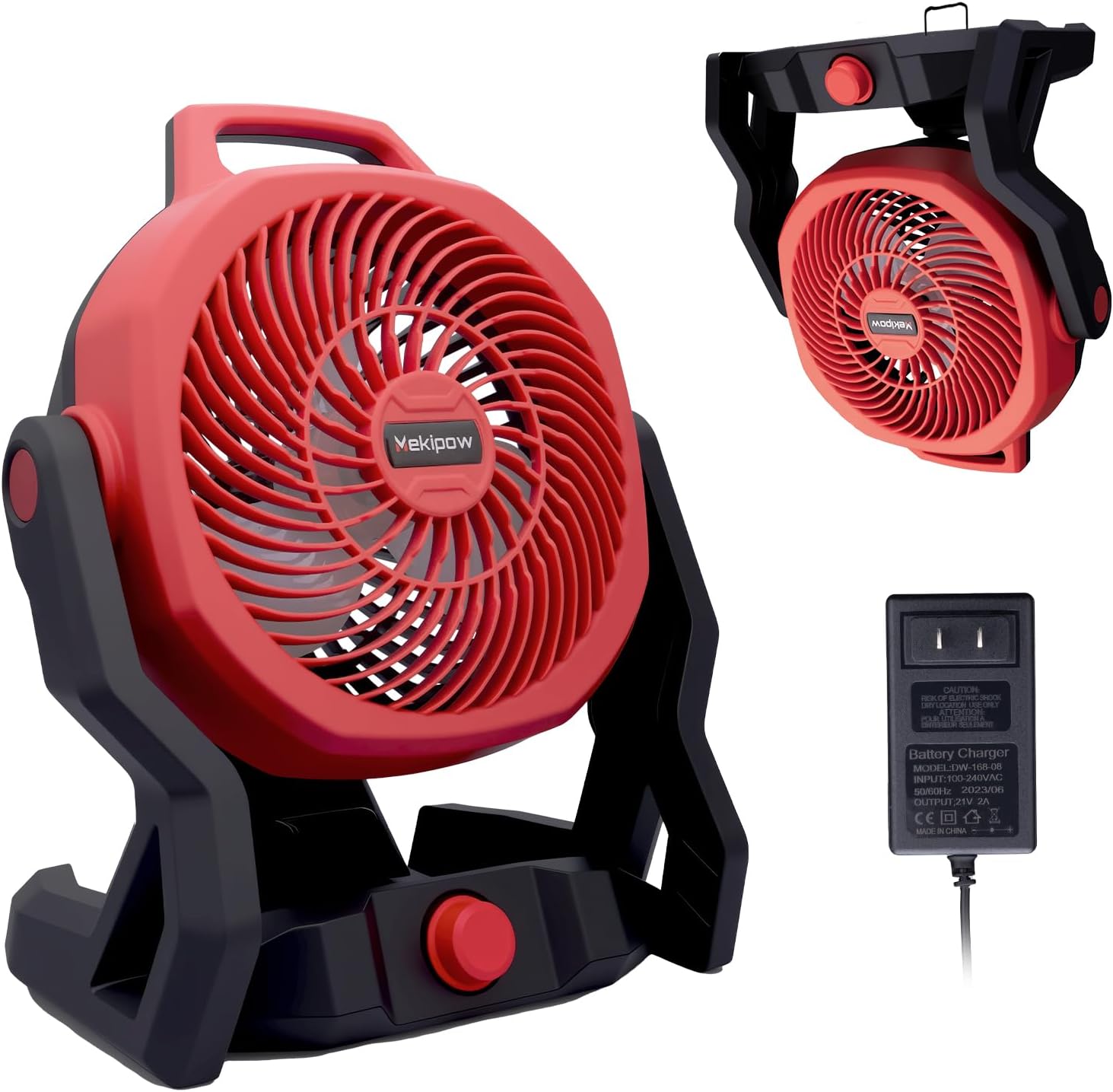
Image: The MekiPow Cordless Jobsite Fan shown with its included AC power adapter. The fan is red and black, designed for portability.
4. Product Overview
Familiarize yourself with the main components of your MekiPow Cordless Jobsite Fan:
- Fan Head: Contains the blades and protective grille.
- Handle: Integrated for easy carrying.
- Base/Stand: Provides stability and houses the battery interface and AC power port.
- Variable Speed Control Knob: Adjusts fan speed.
- Battery Interface: For connecting Milwaukee 18V batteries.
- AC Power Port: For connecting the AC adapter.
- Hidden Hanging Hook: Located on the handle for versatile placement.

Image: The fan is shown with a highlighted "Hidden Hook" feature, indicating its ability to be hung. The image also shows various Milwaukee 18V battery packs, illustrating compatibility.
5. Setup
Your MekiPow fan offers dual power options: battery or AC power.
5.1. Battery Installation (Milwaukee 18V)
- Ensure the fan's speed control knob is in the "OFF" position.
- Align a charged Milwaukee 18V battery with the battery interface on the fan's base.
- Slide the battery into the interface until it clicks securely into place.
- To remove the battery, press the release button on the battery pack and slide it out.
Video: A person unboxes the fan, removes the manual, the fan, and the AC adapter. They then demonstrate inserting a Milwaukee 18V battery into the fan's base, showing how it securely attaches.
5.2. AC Power Connection
- Ensure the fan's speed control knob is in the "OFF" position.
- Connect the AC adapter to the AC power port located on the fan's base.
- Plug the other end of the AC adapter into a standard electrical outlet.
- When using AC power, the battery can remain installed or be removed.

Image: The fan is depicted in a workshop setting, connected to an AC power outlet via its adapter, demonstrating its corded operation capability.
6. Operating Instructions
6.1. Power On/Off and Speed Control
- To turn the fan ON, rotate the variable speed control knob clockwise from the "OFF" position.
- Continue rotating the knob clockwise to increase the fan speed. The fan offers variable speed control up to 750 CFM.
- To decrease the fan speed, rotate the knob counter-clockwise.
- To turn the fan OFF, rotate the knob fully counter-clockwise until it clicks into the "OFF" position.
Video: A person demonstrates adjusting the wind speed control knob on the fan, showing how to turn it on and off and vary the fan's intensity.
6.2. Tilt Angle Adjustment
The fan head can be manually tilted up to 180 degrees to direct airflow precisely where needed.
- Grasp the fan head firmly.
- Gently tilt the fan head to your desired angle. The friction hinges will hold it in place.

Image: The fan is shown with an arrow indicating a 180-degree tilt angle, demonstrating its adjustable head for directing airflow.
6.3. Portability and Placement
The fan is designed for easy transport and versatile placement:
- Use the integrated handle for carrying the fan between locations.
- Utilize the hidden hanging hook to suspend the fan in various settings, such as tents, workshops, or job site structures.
- Place the fan on any stable, flat surface for directional cooling.

Image: A group of people are shown walking outdoors, with one person carrying the MekiPow fan by its integrated handle, highlighting its portability.
7. Maintenance
Regular maintenance ensures the longevity and efficient operation of your fan.
7.1. Cleaning
- Always unplug the fan from the power source (remove battery or AC adapter) before cleaning.
- Use a soft, damp cloth to wipe the exterior surfaces of the fan.
- To clean the fan blades and grilles, use a vacuum cleaner with a brush attachment or compressed air to remove dust and debris. Do not use water directly on the fan.
- Ensure the fan is completely dry before reconnecting to power.
7.2. Storage
When not in use, store the fan in a cool, dry place, away from direct sunlight and extreme temperatures. If storing for an extended period, remove the battery.
8. Troubleshooting
If you encounter issues with your fan, refer to the following common problems and solutions:
| Problem | Possible Cause | Solution |
|---|---|---|
| Fan does not turn on. | No power supply / Battery depleted / AC adapter not connected properly. | Ensure battery is charged and properly installed, or AC adapter is securely plugged into both the fan and a working outlet. |
| Weak airflow. | Low speed setting / Obstruction in front or back of fan / Dirty blades/grille. | Increase speed using the control knob. Remove any obstructions. Clean fan blades and grilles. |
| Unusual noise during operation. | Fan not on a stable surface / Debris inside the fan. | Place the fan on a flat, stable surface. Disconnect power and inspect for any foreign objects inside the grille. |
If the problem persists after attempting these solutions, please contact customer support.
9. Specifications
| Feature | Detail |
|---|---|
| Brand | MekiPow |
| Model | B0F4R9Q2TW |
| Power Source | Milwaukee 18V Battery (Tool Only) / AC Power |
| Airflow (Max) | 750 CFM |
| Motor Type | Brushless Motor |
| Tilt Angle | 180 degrees |
| Special Features | Adjustable Tilt, Portable, Quiet Operation, Waterproof (IP54 certified for dust) |
| Product Dimensions | 18.8 x 26.92 x 34.8 cm |
| Item Weight | 2.13 kg |
| Material | Copper (motor components) |

Image: An illustrative diagram highlighting the key benefits of the built-in brushless motor: low noise operation, 750 CFM wind speed, and extended service life.
10. Warranty and Customer Support
MekiPow is committed to providing high-quality products and customer satisfaction. For any issues or inquiries regarding your product, please refer to the following:
- Warranty Information: Specific warranty details may vary. Please retain your proof of purchase for any warranty claims.
- Customer Support: If you experience any issues with the product, please do not hesitate to reach out. We are here to help and will do our best to make things right!
- How to Contact Support:
- Click on "Returns & Orders" at the top right corner of your purchase platform.
- View order details.
- Click on the seller's name next to "Sold by."
- Select "Ask a question" and use the messaging assistant to send your message.
Ask a question about this manual
Ask about setup, troubleshooting, compatibility, parts, safety, or missing instructions. Manuals+ will review the question and use this page’s manual context to help answer it.