
1. Introduction
Thank you for choosing the JALOSOFO 31V Charger. This power adapter is specifically designed to provide reliable and efficient charging for your Trucozie T350 Stick Cordless Vacuum Cleaner. This manual contains important information regarding the safe and proper use, installation, and maintenance of your charger. Please read it thoroughly before use and retain it for future reference.

Image 1.1: The JALOSOFO 31V Charger, featuring the main adapter unit and attached power cord with a barrel connector.
2. Safety Information
To ensure safe operation and prevent damage, please observe the following safety precautions:
- Compatibility: This charger is exclusively compatible with the Trucozie T350 Stick Cordless Vacuum Cleaner. Do not use it with other devices unless explicitly stated by the manufacturer.
- Power Source: Connect the charger only to a standard wall outlet with the specified voltage range (100V-240V AC, 50/60Hz).
- Environmental Conditions: Avoid exposing the charger to water, moisture, extreme temperatures, or direct sunlight. Use indoors only.
- Cable Integrity: Do not bend, twist, or pull the power cord excessively. Inspect the cord and plug for any damage before each use. A damaged cord can lead to electric shock or fire.
- Ventilation: Ensure adequate ventilation around the charger during use. Do not cover it with cloths or place it in enclosed spaces.
- Disassembly: Do not attempt to open or repair the charger. Refer all servicing to qualified personnel.
- Safety Protections: The JALOSOFO charger is equipped with multiple safety features, including overcurrent protection, overvoltage protection, short circuit protection, and over-temperature protection. These features are designed to protect both the charger and your vacuum cleaner.
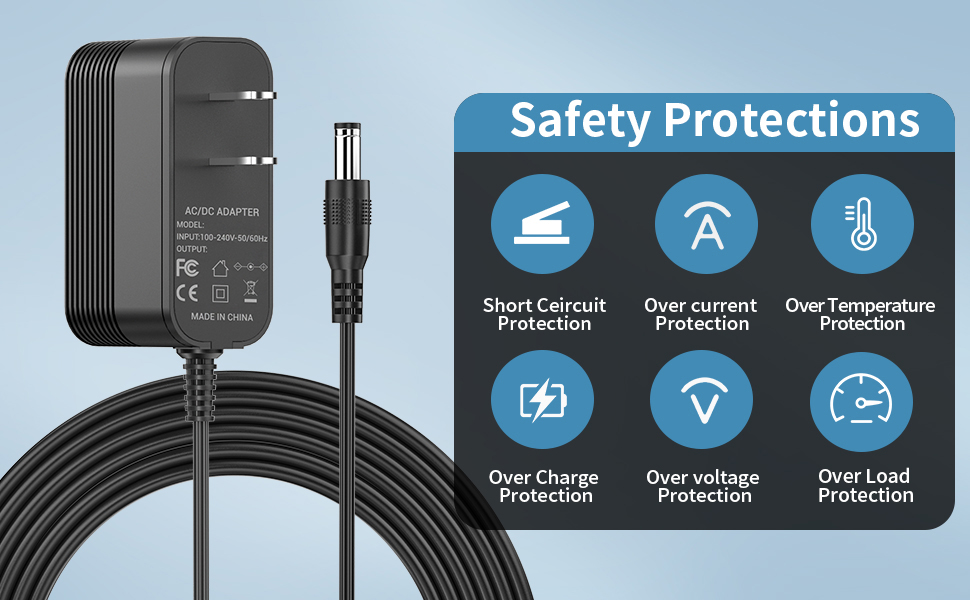
Image 2.1: Visual representation of the charger's built-in safety protections, including short circuit, overcurrent, over-temperature, overcharge, overvoltage, and overload protection.
3. Setup
Follow these steps to set up your JALOSOFO 31V Charger:
- Unpack: Carefully remove the charger from its packaging. Inspect it for any visible damage.
- Connect to Vacuum: Locate the charging port on your Trucozie T350 Stick Cordless Vacuum Cleaner. Insert the barrel connector of the JALOSOFO charger firmly into the vacuum's charging port.
- Connect to Power Outlet: Plug the charger's AC plug into a standard, easily accessible wall power outlet.

Image 3.1: The JALOSOFO charger shown connected to a Trucozie T350 cordless vacuum cleaner, illustrating proper setup for charging.
4. Operating Instructions
Once properly connected, the charger will begin supplying power to your Trucozie T350 vacuum cleaner.
- Charging Indicator: When the charger is plugged into a live power outlet, a green indicator light on the charger unit will illuminate and remain on. This indicates that the charger is receiving power and is ready to charge or is actively charging the vacuum.
- Charging Time: Refer to your Trucozie T350 vacuum cleaner's manual for specific charging times. Disconnect the charger once the vacuum's battery is fully charged to prolong battery life.

Image 4.1: The charger plugged into a wall outlet, showing the green indicator light that confirms power supply.
5. Maintenance
Proper maintenance ensures the longevity and safe operation of your charger.
- Cleaning: Disconnect the charger from the power outlet and the vacuum cleaner before cleaning. Wipe the exterior with a soft, dry cloth. Do not use liquid cleaners or abrasive materials.
- Storage: When not in use, store the charger in a cool, dry place, away from direct sunlight and moisture. Avoid wrapping the cable too tightly around the adapter.
- Cable Care: The charger features a durable line designed to withstand bending at various angles without breaking the copper wire. However, continuous sharp bends or excessive force should be avoided to prevent internal damage.

Image 5.1: Close-up of the charger's components, highlighting the robust construction of the plug, cable, and output connector.
6. Troubleshooting
If you encounter issues with your JALOSOFO 31V Charger, please refer to the following common solutions:
- Charger Not Powering On (No Green Light):
- Ensure the charger is firmly plugged into a working wall outlet. Test the outlet with another device.
- Check the power cord for any visible damage or kinks.
- Vacuum Not Charging:
- Verify that the barrel connector is securely inserted into the Trucozie T350 vacuum's charging port.
- Confirm that the green indicator light on the charger is illuminated.
- Ensure your Trucozie T350 vacuum cleaner is indeed compatible with a 31V charger. Refer to your vacuum's original manual for its specific charging requirements.
- The vacuum's battery may be fully charged or require servicing. Consult your vacuum's manual.
- Overheating: If the charger feels excessively hot to the touch, immediately disconnect it from the power outlet and the vacuum. Allow it to cool down in a well-ventilated area. Ensure it is not covered during use.
If these steps do not resolve the issue, please contact customer support.
7. Specifications
| Feature | Specification |
|---|---|
| Model | 31V Charger |
| Input Voltage | 100V-240V AC, 50/60Hz |
| Output Voltage | 31V DC |
| Output Amperage | 0.5A |
| Wattage | 15.5 Watts |
| Power Cord Length | 5.9 FT (1.8 M) |
| Certifications | CE, FCC, RoHS Listed |
| Compatible Devices | Trucozie T350 Stick Cordless Vacuum Cleaner |
| Package Dimensions | 3.9 x 2.76 x 1.85 inches |
| Item Weight | 3.2 ounces |

Image 7.1: Dimensional overview of the charger unit and its 5.9-foot power cord.
8. Warranty and Support
JALOSOFO is committed to providing high-quality products and customer satisfaction. If you have any questions, concerns, or require assistance with your 31V Charger, please do not hesitate to contact our customer service team.
- Customer Service: We offer 24-hour customer service to assist you. Please refer to your purchase documentation or the seller's contact information for details on how to reach us.
- Warranty: For information regarding the product warranty, please consult the terms provided at the time of purchase or contact customer support.