
ikaufen S150
ikaufen S150 GPS RC Drone User Manual
Model: S150
1. Introduction
Thank you for purchasing the ikaufen S150 GPS RC Drone. This manual provides essential information for the safe operation, setup, and maintenance of your drone. Please read it thoroughly before first use to ensure optimal performance and to prevent damage.
2. Safety Guidelines
- Flight Environment: Operate the drone in open areas, away from people, animals, buildings, and power lines. Avoid flying in strong winds or adverse weather conditions.
- Line of Sight: Always maintain visual line of sight with the drone during flight.
- Battery Safety: Use only the provided batteries and charging cables. Do not overcharge or puncture batteries. Discontinue use if batteries show signs of damage or swelling.
- Propeller Safety: Keep hands, face, and loose clothing away from rotating propellers. Ensure propellers are securely attached before flight.
- Age Recommendation: This product is intended for users aged 14 and above.
- Local Regulations: Be aware of and comply with all local laws and regulations regarding drone operation.
3. Package Contents
Verify that all items are present in the package:
- ikaufen S150 Drone
- Remote Control
- Flight Batteries (2 included)
- USB Charging Cable
- Spare Propellers
- Screwdriver
- User Manual (this document)

Image 3.1: Contents of the ikaufen S150 Drone package, showing the drone, remote control, spare propellers, charging cable, screwdriver, and a carrying case.
4. Product Overview
The ikaufen S150 is a foldable GPS RC drone equipped with a 4K HD camera, designed for ease of use and stable flight. Key features include 360° obstacle avoidance, optical flow positioning, and various intelligent flight modes.

Image 4.1: The ikaufen S150 Drone, highlighting its remote-controlled camera, approximately 15-minute flight endurance, 360-degree intelligent obstacle avoidance system, and efficient brushless motors.
4.1 Drone Dimensions

Image 4.2: The ikaufen S150 Drone's dimensions. Folded: 14cm x 9cm x 7.5cm. Unfolded: 28cm x 27cm x 7.5cm.
4.2 Remote Control Layout

Image 4.3: Remote Control Guide, illustrating the functions of each button and joystick. Key controls include Power switch, Lens up/down adjustment, Throttle control, One-click take-off/landing, Headless mode, Speed switching, Photography/Video recording, and Obstacle avoidance activation.
4.3 Brushless Motors
The S150 drone is equipped with brushless motors, providing powerful and stable flight performance with enhanced wind resistance (Level 7 wind resistance). These motors offer a longer service life of approximately 10,000 hours.

Image 4.4: Illustration of the drone's brushless power system, emphasizing its high power output (3200 rpm) and strong wind resistance (Level 7).
4.4 WiFi Image Transmission
The drone utilizes 2.4G WiFi for real-time image transmission to your smartphone, offering a clear and responsive FPV experience.

Image 4.5: The remote control with a smartphone displaying the live FPV feed, demonstrating the 2.4G WiFi image transmission capability.
4.5 Battery Module Design
The S150 features a modular battery design for easy installation and replacement. Each battery provides 3.7V and 2000mAh capacity, offering approximately 15 minutes of flight endurance.

Image 4.6: The drone's battery module, highlighting its specifications: 3.7V strong voltage, 2000mAh capacity, and approximately 15 minutes of endurance.
4.6 Key Features Overview

Image 4.7: Icons illustrating the drone's features, including HD dual camera, 360° obstacle avoidance, remote control electric condenser, brushless power, beauty filter, WiFi high-definition image transmission, one-click emergency stop, gesture recognition, mobile control, trajectory flight, optical flow positioning hovering, 360° roll, film production/sharing, accelerometer, multi-speed, and one-click takeoff and landing.
5. Setup
5.1 Drone Assembly
- Unfold the drone arms carefully until they lock into place.
- If necessary, attach the propellers according to the markings (A and B) on the propellers and motor shafts. Use the provided screwdriver to secure them.
5.2 Battery Installation and Charging
- Insert the fully charged flight battery into the drone's battery compartment until it clicks securely.
- To charge the battery, connect it to the USB charging cable and plug the cable into a USB power adapter (5V/2A recommended). The charging indicator will show the charging status.
5.3 Remote Control Setup
- Install 3 AA batteries (not included) into the remote control's battery compartment.
- Power on the remote control.
- Power on the drone. The drone and remote control will automatically pair. Indicators will confirm successful pairing.
5.4 App Installation and Connection
- Download the dedicated drone app from your smartphone's app store (refer to the quick start guide for app name).
- Turn on the drone and remote control.
- On your smartphone, connect to the drone's WiFi network (usually named 'S150-XXXXXX').
- Open the app to view the live FPV feed and access advanced flight features.
6. Operating Instructions
6.1 Pre-Flight Checks
- Ensure drone and remote control batteries are fully charged.
- Check that propellers are securely attached and undamaged.
- Verify that the flight area is clear of obstacles and people.
- Confirm successful pairing between drone and remote control, and app connection if using FPV.
6.2 Take-off and Landing
- One-Key Take-off: Press the one-key take-off button on the remote control. The drone will automatically ascend to a safe hovering height.
- Manual Take-off: Push both joysticks down and outwards to unlock the motors. Then, slowly push the left joystick (throttle) upwards to ascend.
- One-Key Landing: Press the one-key landing button. The drone will automatically descend and land.
- Manual Landing: Slowly pull the left joystick (throttle) downwards to descend. Once landed, push both joysticks down and inwards to lock the motors.
6.3 Basic Flight Controls
- Left Joystick (Throttle/Yaw): Up/Down controls altitude. Left/Right controls rotation (yaw).
- Right Joystick (Pitch/Roll): Up/Down controls forward/backward movement (pitch). Left/Right controls left/right movement (roll).
6.4 Special Flight Features
- 360° Obstacle Avoidance: The drone is equipped with a four-way perception obstacle avoidance system that automatically detects and navigates around obstacles.
- GPS Intelligent Positioning: Records flight position in real-time and enables one-key return to home in emergencies or when signal is lost.
- Optical Flow Positioning Hover: Uses a bottom camera to maintain stable hovering, especially useful indoors or in areas with weak GPS signal.
- Headless Mode: Eliminates the need to adjust the drone's position before flight, as its orientation is relative to the pilot.
- Trajectory Flight: Draw a path on the app screen, and the drone will follow it automatically.
- Gesture Selfies: Perform specific hand gestures to trigger photo or video recording.
- 360° Flip: Execute aerial acrobatics with a single button press.
- Voice Control: Control basic flight functions using voice commands via the app.
- Speed Switching: Adjust flight speed (3-speed modes) to suit your skill level and environment.
6.5 Camera Operation
- 4K HD Camera: The drone features a 4K HD camera for high-resolution photos and videos.
- FPV (First Person View): View the live camera feed on your smartphone via the app.
- Lens Adjustment: Use the remote control to adjust the camera lens angle (90° remote control lens).
- Photo/Video Recording: Use the dedicated buttons on the remote control or the app interface to capture photos and start/stop video recording.
7. Maintenance
- Cleaning: Use a soft, dry cloth to clean the drone and remote control. Avoid using water or solvents.
- Propeller Replacement: If propellers are damaged, replace them with new ones using the provided screwdriver. Ensure correct A/B propeller placement.
- Battery Care: Store batteries in a cool, dry place. Do not fully discharge batteries for extended periods. Charge them periodically if not in use.
- Storage: When not in use, fold the drone arms and store the drone and accessories in the provided carrying case to protect them from dust and damage.
8. Troubleshooting
- Drone not responding: Ensure batteries are charged, drone and remote are powered on, and successfully paired.
- Poor FPV feed: Check WiFi connection between smartphone and drone. Ensure no strong interference sources nearby.
- Drone drifts during flight: Perform gyroscope calibration as per app instructions. Adjust trim settings on the remote control if available.
- Propellers not spinning: Check for obstructions, ensure propellers are correctly installed, and motors are unlocked.
- Short flight time: Ensure batteries are fully charged. Flight time can be affected by aggressive flying, wind, and cold temperatures.
9. Specifications
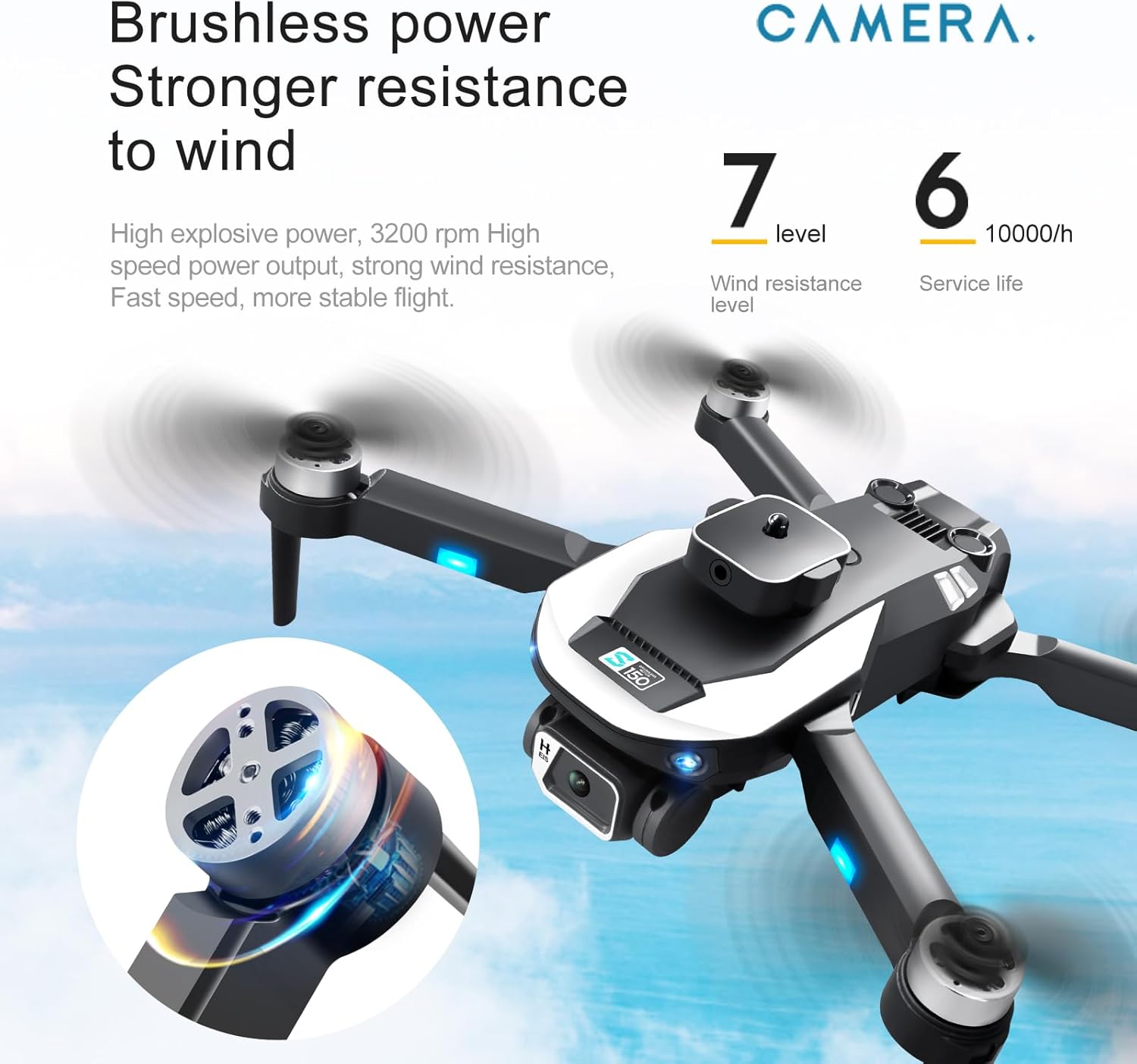
Image 9.1: Detailed product parameters for the ikaufen S150 Drone.
| Feature | Specification |
|---|---|
| Brand | ikaufen |
| Model Name | S150 |
| Color | Black |
| Product Dimensions (Folded) | 14cm L x 9cm W x 7.5cm H |
| Product Dimensions (Unfolded) | 28cm L x 27cm W x 7.5cm H |
| Item Weight | 540 Grams (1.19 pounds) |
| Video Capture Resolution | 4K |
| Connectivity Technology | Bluetooth, Wi-Fi |
| Wireless Communication Technology | Wi-Fi (2.4G signal) |
| Control Type | Remote Control, Mobile Phone Control |
| Special Feature | First Person View (FPV), 360° Obstacle Avoidance, Optical Flow Positioning |
| Skill Level | Beginner |
| Body Battery | 3.7V, 2000 Milliamp Hours (Lithium Ion) |
| Remote Control Battery | AA * 3 (not included) |
| Endurance | Approximately 15 minutes |
| Remote Control Distance | Approximately 150 meters |
| Optical Sensor Technology | Optical flow, CMOS |
| Material | Plastic |
10. Support
For further assistance, technical support, or inquiries regarding your ikaufen S150 Drone, please refer to the contact information provided with your purchase or visit the official ikaufen store on Amazon: ikaufen Amazon Store.
Protection plans are available for purchase separately to extend coverage for your device. Please check Amazon for details on 2-Year and 3-Year Protection Plans.