
LENOLL LX-50
LENOLL LX-50 Screen-Equipped TWS Earphones
User Manual
Introduction
Thank you for choosing the LENOLL LX-50 Screen-Equipped TWS Earphones. These earphones are designed to provide a superior audio experience with advanced features such as a touchable color screen, Bluetooth 5.4 connectivity, and powerful ANC/ENC dual noise reduction technology. This manual will guide you through the setup, operation, and maintenance of your new earphones.

Image: The LENOLL LX-50 TWS Earphones, black in color, resting in their charging case. The case features a prominent screen displaying battery levels and time, indicating its smart functionality.
What's in the Box
Please check the package contents to ensure all items are present:
- LENOLL LX-50 TWS Earphones (Left and Right)
- Charging Station (Charging Case)
- USB Charging Cable
- User Manual (This document)
- Eartips (Various sizes for optimal fit)
Setup
1. Charging the Earphones and Case
Before first use, fully charge the earphones and the charging case.
- Place the earphones into the charging case. Ensure they are properly seated.
- Connect the USB charging cable to the charging port on the case and to a compatible USB power source.
- The screen on the charging case will indicate the charging status. A full charge for the case takes approximately 1 hour.
- The earphones will charge automatically when placed in the case. The case provides up to 24 hours of additional battery life for the earphones.
- A quick 10-minute charge of the case can provide 1 hour of listening time for the earphones.
2. Bluetooth Pairing
The LX-50 earphones utilize Bluetooth 5.4 for a fast and stable connection with a transmission range of up to 15 meters.
- Open the charging case. The earphones will automatically enter pairing mode.
- On your device (smartphone, tablet, computer), enable Bluetooth.
- Search for "LX-50" in the list of available Bluetooth devices.
- Select "LX-50" to connect. Once connected, the earphones will provide an audio confirmation, and the screen on the case may show a connected indicator.
- For subsequent uses, the earphones will automatically connect to the last paired device when removed from the case, provided Bluetooth is enabled on the device.
Operating Instructions
1. Touchable Color Screen Operation
The LX-50 features an intuitive touchable color screen on the charging case, allowing for convenient control without needing your phone.
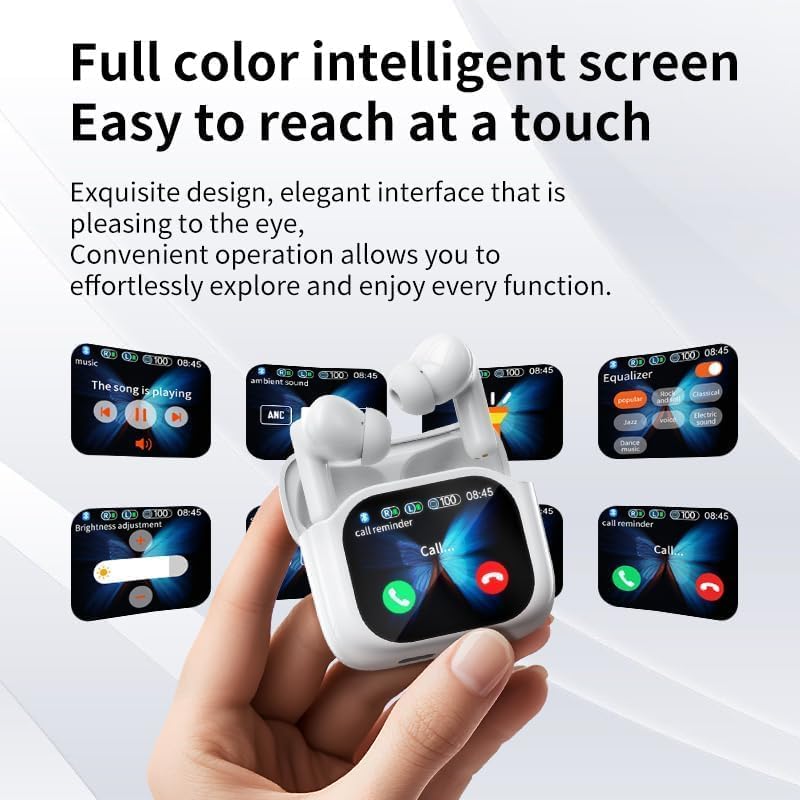
Image: A visual representation of the LX-50 charging case's full-color intelligent screen, demonstrating various accessible functions such as music playback controls, ambient sound settings, equalizer adjustments, brightness control, and incoming call management.
- Music Playback: Easily play/pause music, switch between songs (next/previous), and adjust volume directly from the screen.
- Noise Reduction Modes: Toggle between ANC (Active Noise Cancellation), ENC (Environmental Noise Cancellation), and Transparency modes.
- Battery Level: Check the current battery status of both earphones and the charging case.
- Settings: Access various settings such as brightness adjustment, equalizer presets, and personalized wallpaper options.
- Call Management: Answer or reject incoming calls directly from the screen.
2. Noise Cancellation Function
The LX-50 supports ANC/ENC dual noise reduction technology, providing a quiet listening environment.
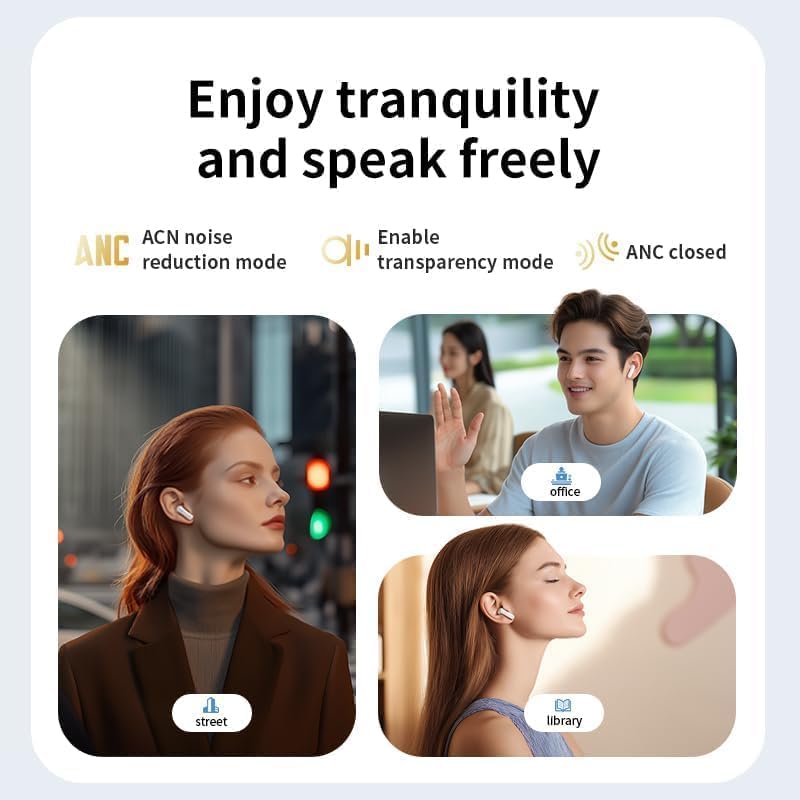
Image: Three scenarios illustrating the effectiveness of the LX-50's noise reduction features: a person on a busy street benefiting from ACN noise reduction mode, a person in an office using transparency mode to hear surroundings, and a person in a library with ANC closed for quiet.
- ANC (Active Noise Cancellation): Reduces low-frequency ambient noise, ideal for travel or noisy environments.
- ENC (Environmental Noise Cancellation): Focuses on reducing background noise during calls, ensuring clear voice transmission.
- Transparency Mode: Allows you to hear your surroundings without removing the earphones, useful for conversations or awareness.
Switch between these modes using the touch screen interface on the charging case.
3. Remote Control Photography
The LX-50 charging case can act as a remote shutter for your phone's camera.
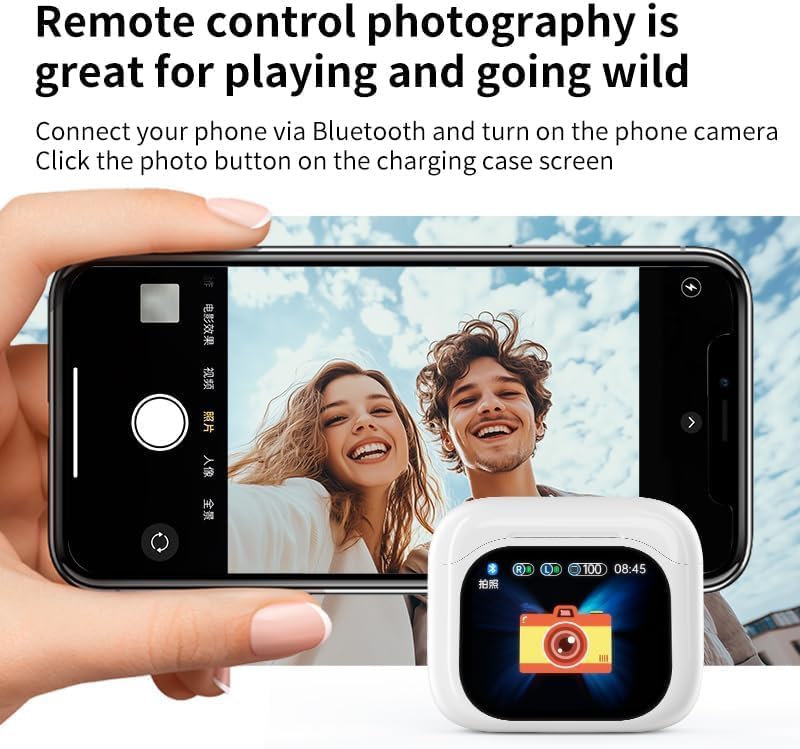
Image: A smartphone displaying its camera interface, with the LX-50 charging case positioned nearby. The case's screen shows a camera icon, indicating its function as a remote control for photography, allowing users to capture moments remotely.
- Ensure your phone is connected to the LX-50 via Bluetooth.
- Open your phone's camera application.
- On the LX-50 charging case screen, navigate to the camera control interface.
- Tap the photo button on the charging case screen to remotely trigger your phone's camera shutter.
Maintenance
Proper maintenance ensures the longevity and optimal performance of your LX-50 earphones.
- Cleaning: Regularly clean the earphones and charging case with a soft, dry, lint-free cloth. Do not use abrasive cleaners or solvents.
- Eartips: Remove eartips periodically and clean them with a damp cloth. Ensure they are completely dry before reattaching.
- Water Resistance: The earphones have a daily waterproof function, making them resistant to sweat and light rain. Do not submerge them in water or expose them to heavy rain. Dry them thoroughly if they get wet.
- Storage: When not in use, store the earphones in their charging case to protect them and keep them charged. Store in a cool, dry place away from extreme temperatures.
Troubleshooting
If you encounter any issues with your LX-50 earphones, please refer to the following common solutions:
| Problem | Possible Solution |
|---|---|
| Earphones not pairing/connecting. |
|
| No sound or low volume. |
|
| Charging case not charging. |
|
| Noise cancellation not effective. |
|
Specifications
| Model Name | LX-50 (LX POR) |
| Brand | LENOLL |
| Connectivity Technology | Wireless, Bluetooth |
| Bluetooth Version | 5.4 |
| Transmission Range | Up to 15 meters |
| Noise Reduction | ANC/ENC Dual Noise Reduction |
| Earphone Battery Life | 4-8 hours (per charge) |
| Carrying Case Battery Life | Up to 24 hours (additional charges) |
| Carrying Case Battery Capacity | 300 Milliamp Hours |
| Carrying Case Charging Time | 1 Hour (full charge) |
| Waterproof Performance | Daily waterproof function (sweat and rain resistant) |
| Audio Latency | 12 Milliseconds |
| Included Components | Earphones, Charging Station, USB Cable, User Manual, Eartips |
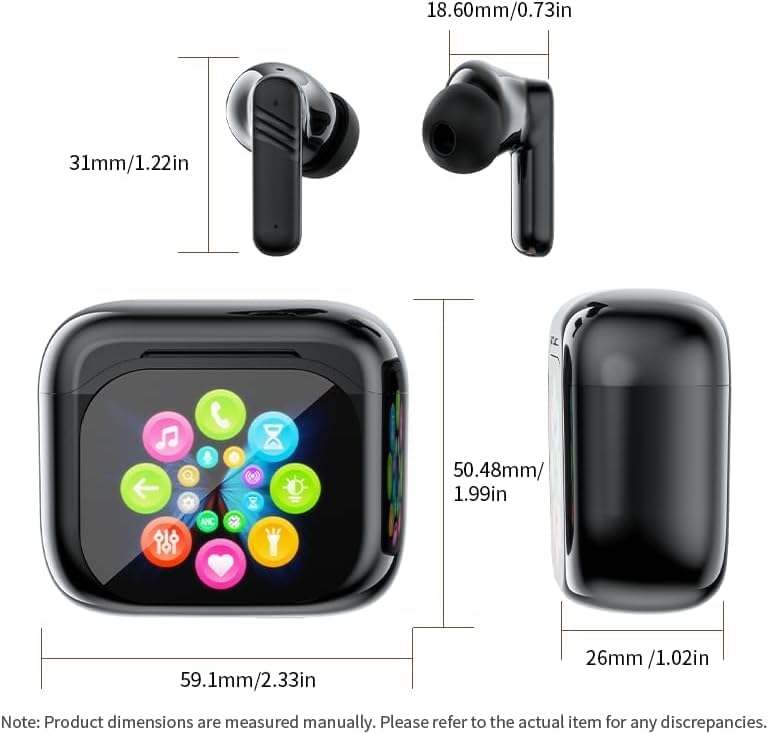
Image: Detailed dimensions of the LX-50 earphones and their charging case, provided in both millimeters and inches, illustrating the compact size of the product.
Warranty and Support
LENOLL products are manufactured to the highest quality standards. For warranty information, technical support, or customer service inquiries, please refer to the contact information provided on the product packaging or visit the official LENOLL website.
Please retain your proof of purchase for warranty claims.
Ask a question about this manual
Ask about setup, troubleshooting, compatibility, parts, safety, or missing instructions. Manuals+ will review the question and use this page’s manual context to help answer it.