1. Product Overview
The Generic DT-8321 is a professional hand-held temperature, humidity, and dew point meter designed for industrial applications. It accurately measures dew point temperature over a wide range, and its robust probe can be inserted directly into pressurized processes. The sensor is built to withstand condensation and recovers fully from exposure to moisture, making it suitable for direct process dew point measurement across various temperature and pressure conditions.
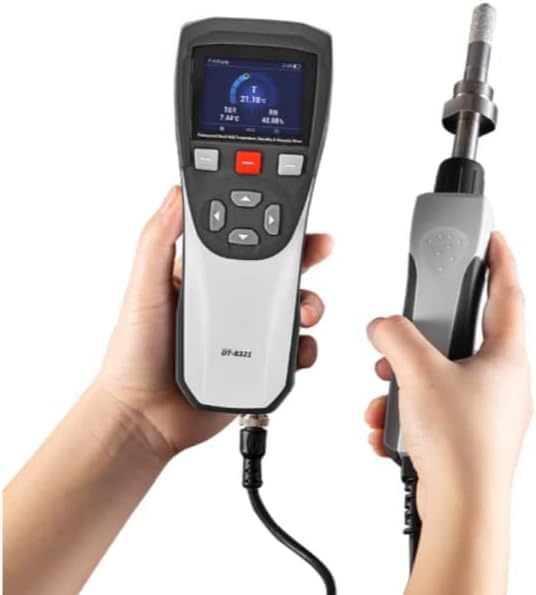
Figure 1: The DT-8321 Hand-Held Dewpoint Meter in operation, displaying readings on its screen.
This device is suitable for various industrial environments, including:

Figure 2: Examples of industrial applications for the DT-8321, including pipelines, HVAC systems, industrial manufacturing, and petrochemical facilities.
2. Key Features
- Designed for industrial spot-checking and field calibration.
- Accurate measurement ranges from -50 to 30 °C (-58 to 86 °F).
- High-quality sensor optimized for low humidity measurements.
- Low maintenance due to superior long-term stability.
- Sensor withstands condensation and recovers quickly.
- Fast response, enhanced by Sensor Purge option.
- Data logging capability with CSV file transfer to PC via USB.
- Compact, small, and lightweight design.
- Rechargeable lithium battery for extended use.
3. What's in the Box
Upon unpacking, please verify that all items are present and undamaged.
- DT-8321 Hand-Held Dewpoint Meter (x1)
- Rechargeable Lithium Battery (pre-installed or separate)
- USB Cable (for data transfer and charging)
- User Manual (this document)
4. Setup and Battery Installation
The DT-8321 meter is powered by a rechargeable lithium battery.
- Unpack the Device: Carefully remove the DT-8321 meter and all accessories from its packaging.
- Battery Installation/Check:
If the battery is not pre-installed, or if you need to replace it:
- Locate the battery compartment cover on the back of the device.
- Unscrew the retaining screw(s) and carefully remove the cover.
- Insert the rechargeable lithium battery, ensuring correct polarity.
- Replace the battery compartment cover and secure it with the screw(s).
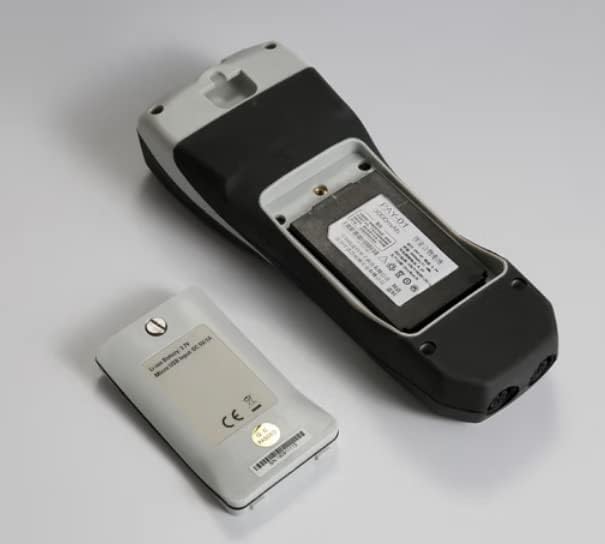
Figure 3: The DT-8321 with its battery compartment open, showing the rechargeable lithium battery.
- Initial Charging: Connect the device to a power source using the provided USB cable to fully charge the battery before first use. The charging indicator will show the charging status.
- Power On: Press and hold the power button (usually marked with a power symbol) to turn on the device. The display will illuminate.
5. Operating Instructions
The DT-8321 is designed for straightforward operation.
- Connecting the Probe: Ensure the measurement probe is securely connected to the meter's input port.
- Taking Measurements:
- Insert the probe into the environment or process where you wish to measure dew point, temperature, or humidity. The probe can be used in pressurized systems.
- Allow sufficient time for the readings to stabilize on the display. The fast response time of the sensor minimizes waiting periods.
- The display will show real-time values for dew point (Td), temperature (T), and relative humidity (RH).
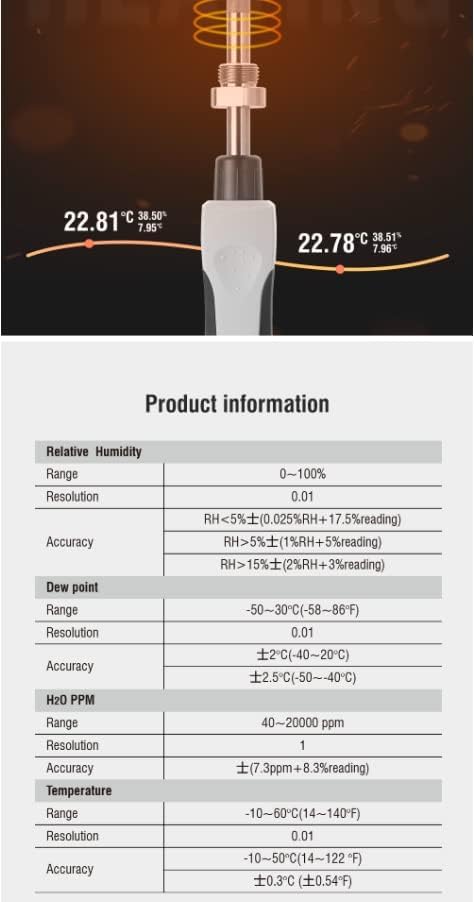
Figure 4: Close-up view of the DT-8321 sensor probe and the meter's display showing measurement readings.
- Data Logging:
- Refer to the on-screen menu or specific buttons for activating data logging.
- Measurements can be stored internally and later transferred to a PC via the USB interface as a CSV file for analysis.
- Sensor Purge Option: If available, utilize the Sensor Purge option to accelerate sensor recovery and response time, especially after exposure to high humidity or condensation. Consult the device's on-screen menu for this function.
6. Maintenance
Proper maintenance ensures the longevity and accuracy of your DT-8321 meter.
- Cleaning: Wipe the device and probe with a soft, damp cloth. Do not use abrasive cleaners or solvents. Ensure the probe is dry before storage or next use.
- Battery Charging: Recharge the lithium battery regularly, especially when the low battery indicator appears. Use only the provided USB cable and a compatible power adapter.
- Storage: Store the meter in a clean, dry environment within its specified operating temperature range when not in use. Protect the sensor probe from physical damage.
- Sensor Care: While the sensor is robust against condensation, prolonged exposure to harsh chemicals or extreme conditions should be avoided.
7. Troubleshooting
If you encounter issues with your DT-8321, refer to the following common problems and solutions.
- Device does not power on:
- Check if the battery is correctly installed and fully charged.
- Ensure the power button is pressed and held sufficiently.
- Inaccurate or fluctuating readings:
- Allow more time for the sensor to stabilize in the measurement environment.
- Ensure the sensor probe is clean and free from obstructions.
- Verify the probe is correctly inserted into the measurement area.
- Consider using the Sensor Purge option if the sensor has been exposed to extreme conditions.
- Cannot transfer data to PC:
- Ensure the USB cable is securely connected to both the meter and the PC.
- Check if the device is powered on and in data transfer mode (if applicable).
- Verify that necessary drivers (if any) are installed on your PC.
8. Specifications
Detailed technical specifications for the DT-8321 Hand-Held Dewpoint Meter.
General Specifications
| Parameter | Value |
|---|---|
| Model Number | DT-8321 |
| Brand | Generic |
| Manufacturer | CEM |
| Package Dimensions (HxWxD) | 7 x 3 x 2 inches (approx. 178 x 76 x 51 mm) |
| Item Weight | 2.2 pounds (approx. 1 kg) |
| Mounting Type | Tabletop |
| Power Source | Rechargeable Lithium Battery |
| Data Interface | USB (for CSV file transfer) |
Measurement Specifications
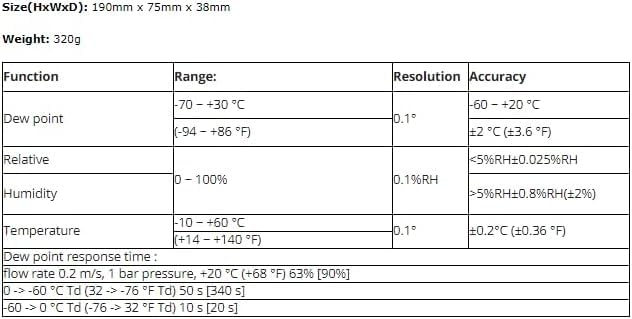
Figure 5: Table detailing Dew point, Relative Humidity, and Temperature measurement ranges, resolutions, and accuracies.
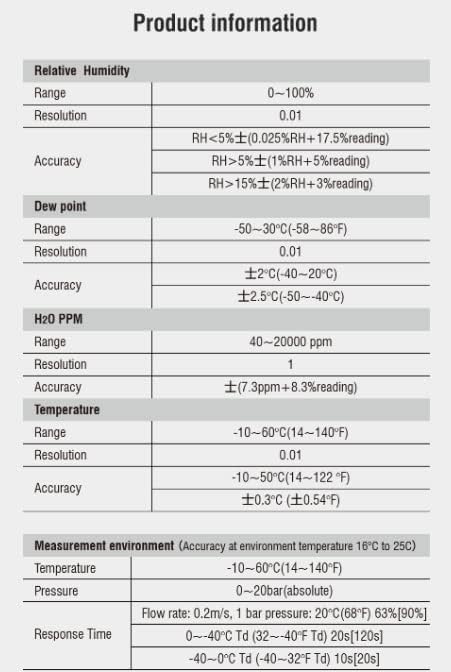
Figure 6: Additional product information table including Relative Humidity, Dew point, H2O PPM, Temperature, and Measurement environment specifications.
Note: The specifications provided are based on the manufacturer's data. Performance may vary slightly depending on environmental conditions and calibration status.
9. Warranty and Support
Specific warranty terms and conditions for the Generic DT-8321 Hand-Held Dewpoint Meter are typically provided at the point of purchase or within separate documentation included with the product. Please retain your proof of purchase for warranty claims.
For technical support, service, or further inquiries, please contact the retailer or manufacturer directly using the contact information provided with your purchase.


