
1. Introduction
This manual provides essential instructions for the safe and efficient use of the Lichuan LC10E EtherCAT Servo Motor Driver Controller. This high-performance driver is designed for precision control in various robotics and automation applications, supporting 100W, 200W, 400W, and 600W AC servo motors. Please read this manual thoroughly before installation and operation.
Key Features:
- High-performance EtherCAT Servo Motor Driver with multiple power options: 100W, 200W, 400W, and 600W.
- Precision control with torque ratings of 0.32, 0.637, 1.27, and 1.91 N.m, ideal for various robotic applications.
- Compatible with a wide range of AC servo motors, making it versatile for different projects and setups.
- Easy integration with existing robotic systems, ensuring seamless operation and enhanced performance.
- Durable and reliable design, built to withstand the demands of industrial and hobbyist robotics environments.

Figure 1.1: The Lichuan LC10E EtherCAT Servo Motor Driver Controller shown with a compatible AC servo motor. This image illustrates the primary components of the servo system.
2. Safety Instructions
Always adhere to the following safety guidelines to prevent injury, damage to the equipment, or malfunction.
- Electrical Safety: Ensure all power is disconnected before making any electrical connections or disconnections. Only qualified personnel should perform electrical wiring.
- Grounding: Properly ground the servo motor driver and motor to prevent electrical shock.
- Environment: Install the device in a clean, dry, and well-ventilated area, free from excessive dust, moisture, corrosive gases, and vibrations.
- Handling: Handle the components with care. Avoid dropping or subjecting them to strong impacts.
- Emergency Stop: Implement an accessible emergency stop mechanism in your system design.
- Motor Movement: Be aware that the servo motor can generate significant torque and move rapidly. Ensure no obstructions are in the motor's path during operation.
3. Package Contents
Upon opening the package, verify that all components are present and undamaged. If any items are missing or damaged, contact your supplier immediately.

Figure 3.1: Contents of the Lichuan LC10E EtherCAT Servo Motor Driver kit. The package typically includes the servo motor driver, AC servo motor, necessary cables, and documentation.
Typical Package Includes:
- Lichuan LC10E EtherCAT Servo Motor Driver
- AC Servo Motor (e.g., 400W Increment 17)
- Encoder Cable
- Power Cable
- Connector Set
- User Manual (this document)
4. Setup & Installation
Careful installation is crucial for optimal performance and safety. Follow these steps for proper setup.
4.1 Physical Installation
- Mounting the Driver: Securely mount the LC10E servo driver in a control cabinet using appropriate fasteners. Ensure adequate ventilation around the unit.
- Mounting the Motor: Attach the AC servo motor to its intended mechanical load. Ensure proper alignment and secure fastening to prevent vibrations and wear.
4.2 Electrical Connections
Refer to the wiring diagram below for detailed electrical connections. Ensure all connections are firm and correct before applying power.

Figure 4.1: Detailed wiring diagram for the Lichuan LC10E EtherCAT Servo Motor Driver. This diagram illustrates connections for power, encoder, servo motor, brake resistance, HMI, and PLC.
- Power Supply (L, N): Connect the single-phase 220VAC power supply to the L and N terminals.
- Servo Motor (U, V, W, PE): Connect the servo motor phases U, V, W, and the protective earth (PE) to the corresponding terminals on the driver.
- Encoder (CN1): Connect the encoder cable from the servo motor to the CN1 port on the driver. The diagram specifies Red, White, Black, and Green/Yellow wires.
- Brake Resistance (B1, B2, B3): Connect external brake resistance if required by your application.
- EtherCAT Port (IN, OUT): Connect to your EtherCAT master controller (e.g., PLC) via the IN and OUT ports for communication.
- HMI/PLC Communication (485, CN2, CN3): The driver supports communication with HMI and PLC via RS485 (485 port) and other control signals through CN2 and CN3.
Important Note: To prevent damage to the motor or drive caused by collisions during transportation, power on and test the machine before receiving the goods. After normal operation, install it onto the machine equipment.
5. Operation
This section outlines the basic operational procedures for the LC10E servo motor driver.
5.1 Powering On
- After completing all electrical connections and verifying safety, apply power to the servo motor driver.
- Observe the display on the driver (if available) for status indicators.
5.2 EtherCAT Communication
The LC10E driver communicates via the EtherCAT protocol. Ensure your EtherCAT master controller is properly configured to recognize and control the servo driver.
- Configure the EtherCAT master to scan for connected devices.
- Assign appropriate network addresses and parameters to the LC10E driver.
- Utilize the master controller's software to send motion commands and monitor the servo system's status.
5.3 Basic Control
Once communication is established, you can issue commands for:
- Position Control: Move the motor to a specific angular position.
- Velocity Control: Maintain a constant rotational speed.
- Torque Control: Apply a specific torque to the motor shaft.
Refer to the detailed programming guide for your EtherCAT master controller and the LC10E driver for advanced control parameters and programming examples.
6. Maintenance
Regular maintenance ensures the longevity and reliable operation of your servo system.
- Cleaning: Periodically clean the exterior of the servo driver and motor to remove dust and debris. Ensure ventilation openings are clear. Use a soft, dry cloth. Do not use liquid cleaners directly on the components.
- Connection Checks: Regularly inspect all electrical connections for tightness and signs of wear or corrosion. Re-tighten as necessary.
- Environmental Monitoring: Ensure the operating environment remains within specified temperature and humidity ranges.
- Motor Inspection: Check the motor shaft and bearings for any unusual noise, vibration, or excessive heat during operation.
Note: Internal components of the servo driver are not user-serviceable. Refer all internal repairs to qualified service personnel.
7. Troubleshooting
This section provides solutions to common issues you might encounter.
| Problem | Possible Cause | Solution |
|---|---|---|
| Motor does not move | No power supply; Incorrect wiring; Emergency stop active; Controller not sending commands. | Check power connections; Verify wiring against diagram; Release emergency stop; Check controller status and commands. |
| Motor vibrates or makes unusual noise | Loose mounting; Incorrect tuning parameters; Mechanical obstruction; Damaged motor/encoder. | Securely mount motor; Adjust servo tuning parameters; Remove obstructions; Inspect motor/encoder for damage. |
| EtherCAT communication error | Incorrect cable connection; Master controller configuration error; Driver not powered on. | Check EtherCAT cable connections; Verify master controller settings; Ensure driver is powered. |
| Overheat warning | Insufficient ventilation; Excessive load; High ambient temperature. | Ensure proper airflow; Reduce motor load; Improve cooling in the environment. |
If the problem persists after attempting these solutions, contact technical support.
8. Specifications
The following table details the technical specifications for the Lichuan LC10E EtherCAT Servo Motor Driver Controller (400W Increment 17 model).
| Feature | Detail |
|---|---|
| Model | LC10E (400W Increment 17) |
| Power Options | 100W, 200W, 400W, 600W (This manual focuses on 400W) |
| Input Voltage | Single-phase 220VAC |
| Communication Protocol | EtherCAT |
| Encoder Support | 17/23-bit incremental/absolute encoder |
| Torque Rating (400W) | 1.27 N.m |
| Dimensions (Package) | 1.18 x 0.79 x 0.39 inches |
| Item Weight | 1.76 ounces |
| Manufacturer | DMMRUTXB |
| ASIN | B0F4NGCV8D |
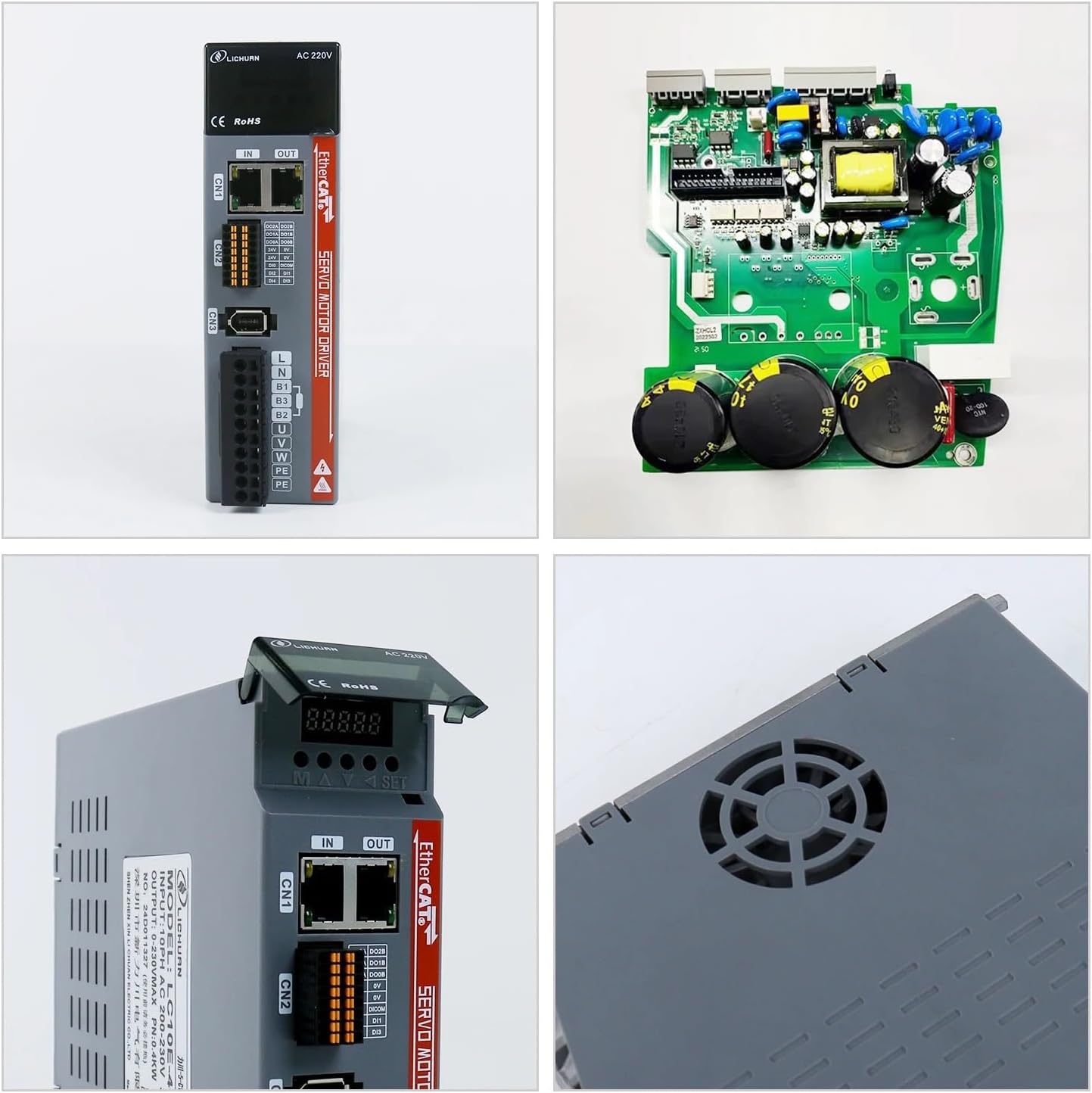
Figure 8.1: Various views of the Lichuan LC10E EtherCAT Servo Motor Driver, showing its front panel, internal circuitry, top view, and cooling fan. These images provide a closer look at the physical design.
9. Warranty and Support
Information regarding warranty coverage and technical support is typically provided with your purchase documentation or available on the manufacturer's official website. Please retain your proof of purchase for warranty claims.
For technical assistance, troubleshooting beyond this manual, or warranty inquiries, please contact the manufacturer or your authorized distributor.
10. Typical Applications
The Lichuan LC10E EtherCAT Servo Motor Driver is suitable for a wide range of precision motion control applications.

Figure 10.1: Illustrative diagram showcasing typical applications for the Lichuan LC10E servo system, including automated machines, laser machines, robots, packaging machines, 3D printers, CNC machines, engraving machines, and textile machines.