
Introduction
This manual provides essential information for the proper installation, operation, and maintenance of your ZHRCLY SUNTEC Oil Pump, model J7CAC 1001. Please read these instructions carefully before proceeding to ensure safe and efficient use of the product. This oil pump is designed as a general accessory for specific SUNTEC oil pump systems, including J7CAC 1001, J7CCC 1001, and J7CCE 1002 models.
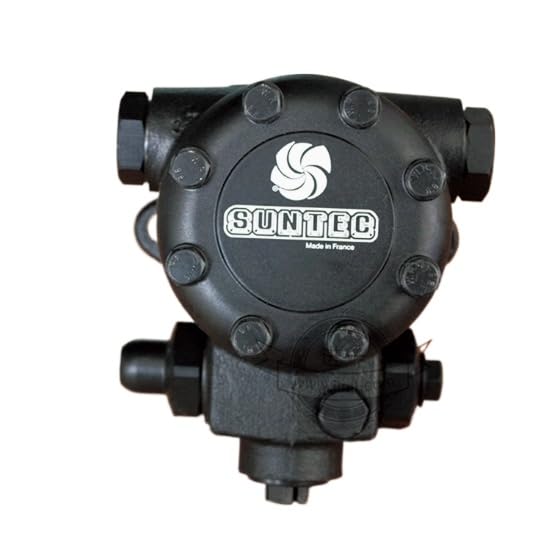
Image: ZHRCLY SUNTEC Oil Pump J7CAC 1001. This image displays the general appearance of the oil pump, highlighting its compact design and connection points.
Setup and Installation
Proper installation is crucial for the optimal performance and longevity of the oil pump. It is recommended that installation be performed by a qualified technician.
- Verify Model Compatibility: Before installation, ensure that the J7CAC 1001 model is compatible with your specific SUNTEC oil pump system (J7CAC 1001, J7CCC 1001, or J7CCE 1002). Refer to your system's documentation for compatibility requirements.
- Safety Precautions: Disconnect all power to the system before beginning installation. Wear appropriate personal protective equipment (PPE), including gloves and eye protection.
- Mounting: Securely mount the oil pump in the designated location within the system. Ensure all mounting bolts are tightened to the manufacturer's specifications.
- Connections: Connect the oil lines and electrical wiring according to the system's schematic. Double-check all connections for tightness and proper orientation to prevent leaks or electrical faults.
- Initial Priming (if applicable): Follow the system manufacturer's instructions for priming the oil pump, if required, to ensure proper oil flow before initial operation.
Operating Instructions
The ZHRCLY SUNTEC Oil Pump J7CAC 1001 functions as a critical component within a larger system, typically responsible for circulating oil. Its operation is generally controlled by the main system it is integrated into.
- System Integration: Once installed, the oil pump will operate in conjunction with the main system (e.g., a furnace, boiler, or industrial burner).
- Automatic Operation: In most applications, the oil pump's operation is automatic, engaging when the system requires oil circulation or pressure.
- Monitoring: Regularly monitor the system for any unusual noises, vibrations, or leaks that may indicate an issue with the oil pump or its connections.
- Oil Type: Ensure that the system uses the correct type of oil as specified by the equipment manufacturer. Using incorrect oil can damage the pump and the overall system.
Maintenance
Regular maintenance helps ensure the longevity and reliable performance of your oil pump.
- Routine Inspections: Periodically inspect the pump and its connections for signs of wear, corrosion, or leaks. Address any issues promptly.
- Filter Replacement: If your system includes an oil filter, follow the system manufacturer's recommendations for regular filter inspection and replacement. A clogged filter can reduce pump efficiency and lifespan.
- Cleaning: Keep the exterior of the pump clean and free from debris. Avoid using harsh chemicals that could damage the pump's materials.
- Professional Servicing: For complex maintenance or internal inspections, consult a qualified service technician.
Troubleshooting
This section provides solutions to common issues you might encounter. For problems not listed here, or if solutions do not resolve the issue, contact support.
| Problem | Possible Cause | Solution |
|---|---|---|
| Pump not operating | No power, electrical fault, seized pump | Check power supply and connections. Consult an electrician for electrical faults. If seized, professional inspection is required. |
| Oil leaks | Loose connections, damaged seals, cracked housing | Tighten connections. Inspect and replace damaged seals. If housing is cracked, the pump may need replacement. |
| Reduced oil flow/pressure | Clogged filter, air in system, worn pump components | Check and replace oil filter. Bleed air from the system. If components are worn, professional servicing or replacement is needed. |
| Unusual noise/vibration | Air in system, loose mounting, internal damage | Bleed air from the system. Check mounting bolts for tightness. If noise persists, professional inspection is recommended. |
Specifications
| Feature | Detail |
|---|---|
| Brand | ZHRCLY |
| Model Number | J7CAC 1001 |
| Manufacturer | Original factory |
| Item Weight | 20 pounds |
| Product Dimensions | 1 x 1 x 1 inches |
| Color | new |
| Included Components | NEW |
| ASIN | B0F4MRQ4M5 |
| Date First Available | April 12, 2025 |
Support
For technical assistance, inquiries about model compatibility, or if you require a model not listed, please contact the merchant directly through the platform where the product was purchased. Provide your product model number (J7CAC 1001) and a detailed description of your issue for efficient support.