
DANOPLUS PAR Meter
DANOPLUS PAR Meter Instruction Manual
Model: PAR Meter
Introduction
The DANOPLUS PAR Meter is a full-spectrum quantum meter designed to accurately measure Photosynthetically Active Radiation (PAR) for optimal plant and coral growth. Its IP68 waterproof sensor and telescopic pole make it ideal for use in various environments, including reef tanks, greenhouses, and plant factories.

Image: The DANOPLUS PAR Meter main unit, connected sensor, and the multi-section telescopic pole.
What's in the Box
- 1x PAR Meter Main Unit
- 1x IP68 Waterproof Quantum Sensor
- 1x 79" Sensor Cable
- 1x 37" Telescopic Extension Rod
- 2x AAA Batteries (included)
- 1x User Manual
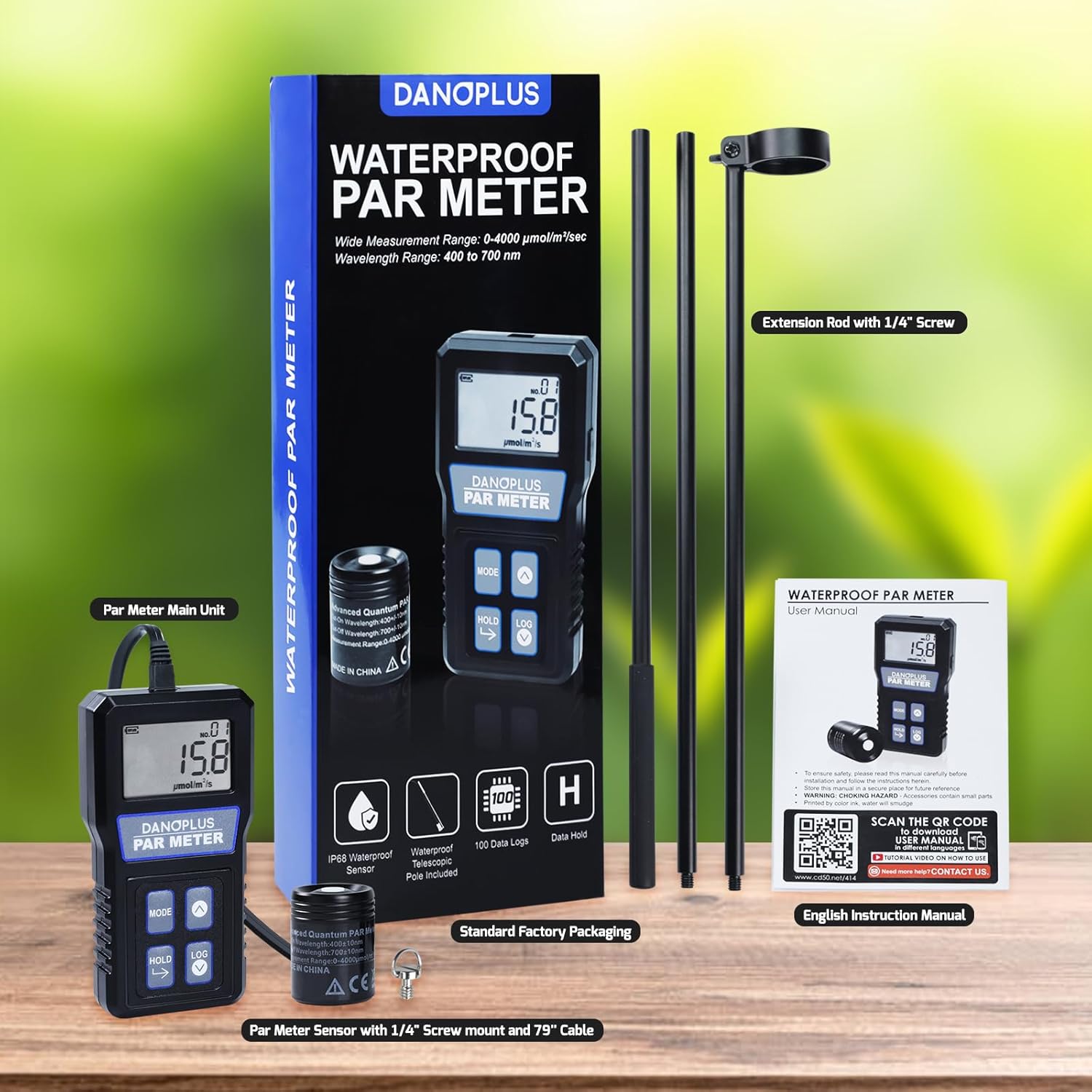
Image: All components included in the DANOPLUS PAR Meter package, laid out next to the product box.
Key Features
- IP68 Waterproof Sensor: Ensures accurate measurement of photosynthetic active radiation (PAR) for corals even in underwater environments.
- 37" Solid Telescopic Pole: Comes equipped with a 37-inch sturdy telescopic pole and a 79-inch sensor cable, allowing for easy submersion and positioning in reef tanks.
- High Precision PPFD Measurement: Provides highly accurate readings from 0 to 4000 µmol/m²/s, with a spectral range of 400–700 nm (±10 nm).
- Built-In Data Logger: Features manual data logging with storage for up to 100 PPFD values.
- Functions: Includes Calibration, HOLD, and Data Logging functions.

Image: Visual representation of the PAR Meter's features, including IP68 waterproof sensor, high accuracy, waterproof telescopic pole, 100 data logs, and data hold function.
Setup
1. Battery Installation
Locate the battery compartment on the back of the main unit. Insert 2 AAA batteries, ensuring correct polarity. Close the compartment securely.

Image: The back of the PAR Meter showing the battery compartment.
2. Sensor and Pole Assembly
- Connect the sensor cable to the main unit's port.
- Attach the sensor to the telescopic extension rod using the provided screw mount. Ensure it is securely fastened.
- Assemble the telescopic pole sections by screwing them together. The pole can be configured with two sections (61.3cm / 24.1") or three sections (92cm / 36.2") depending on your measurement needs.
- Adjust the sensor angle up to 180 degrees for optimal positioning during measurement.
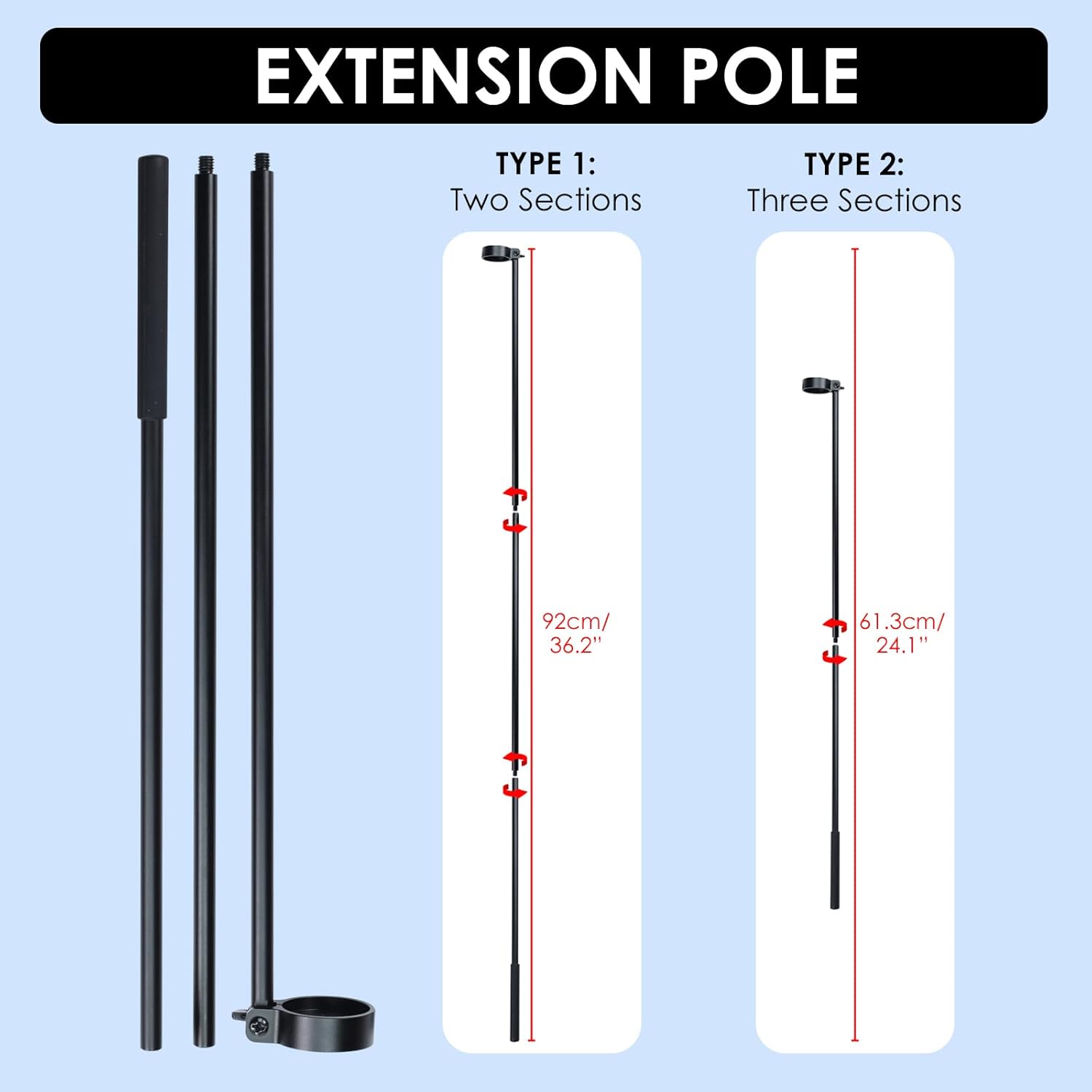
Image: Different configurations of the extension pole (two or three sections).

Image: The sensor can be adjusted up to 180 degrees for flexible positioning.
Video: Official product video demonstrating the setup and various functions of the DANOPLUS PAR Meter, including sensor installation and usage in a reef tank.
Operating Instructions
1. Power On/Off
Press the MODE button to turn the device on. Press and hold the MODE button to turn it off.
2. Real-time Measurement
Once powered on, the device will display real-time PPFD readings. Position the sensor at the desired location to measure light intensity. The reading will change dynamically as the sensor's position changes.

Image: The PAR Meter in use, with its sensor submerged in a reef tank to measure light levels for aquatic plants.
3. HOLD Function
To freeze the current measurement on the display, press the HOLD button. Press it again to resume real-time measurement.
4. Data Logging (Record Measurement)
The meter features a manual data logger that can store up to 100 PPFD values. To record a measurement, press the LOG button. The display will show a log number (e.g., "NO.01") indicating the saved entry.
5. Viewing Recorded Data
To view previously recorded data, press the LOG button repeatedly to cycle through the stored measurements. Use the UP and DOWN arrow buttons to navigate between log entries.
6. Calibration
The meter includes a calibration function to ensure accuracy. Refer to the detailed instructions in the included User Manual for specific calibration procedures.
For additional support and resources, you may visit the official product page or scan the QR code provided in the manual. An example link for general information is https://cd50.net/414/.
Maintenance
- Cleaning: Wipe the main unit with a soft, dry cloth. For the sensor, rinse with fresh water after use in saltwater or dirty environments.
- Storage: Store the device in a cool, dry place away from direct sunlight and extreme temperatures.
- Battery Replacement: Replace batteries when the low battery indicator appears on the display.
- Sensor Care: Avoid scratching the sensor surface. Ensure the sensor cable connection is clean and dry before connecting to the main unit.
Troubleshooting
| Problem | Possible Cause | Solution |
|---|---|---|
| Device does not power on. | Low or dead batteries; incorrect battery installation. | Replace batteries with new AAA batteries, ensuring correct polarity. |
| Inaccurate readings. | Sensor dirty; sensor not properly submerged/positioned; calibration needed. | Clean the sensor. Ensure proper positioning. Perform calibration as per manual. |
| Sensor not detected. | Loose sensor cable connection; damaged cable/sensor. | Check and secure the sensor cable connection. If problem persists, contact support. |
| Data logging not working. | Memory full; incorrect button press. | Ensure memory is not full (max 100 logs). Press LOG button firmly. |
Specifications
- PPFD Measurement Range: 0 to 4000 µmol/m²/s
- Spectral Range: 400–700 nm (±10 nm)
- Display Resolution: 0.1 µmol/m²/s (0-999); 1 µmol/m²/s (1000-4000)
- Data Logging Capacity: Up to 100 PPFD values
- Sensor Waterproof Rating: IP68
- Telescopic Pole Length: 37 inches (approx. 94 cm)
- Sensor Cable Length: 79 inches (approx. 200 cm)
- Power Source: 2 AAA batteries (included)
- Product Dimensions (Main Unit): 4.5 x 2.36 x 1 inches
- Weight: 5.28 ounces

Image: A summary of the technical specifications for the PAR Meter.
Warranty and Support
DANOPLUS products are designed for reliability and performance. For warranty information, technical support, or any inquiries regarding your PAR Meter, please contact the manufacturer directly or the seller from whom you purchased the product. Retain your proof of purchase for warranty claims.
Manufacturer: DANOPLUS
Related documentsPAR Meter

Ask a question about this manual
Ask about setup, troubleshooting, compatibility, parts, safety, or missing instructions. Manuals+ will review the question and use this page’s manual context to help answer it.