
1. Introduction
This manual provides detailed instructions for the proper use and maintenance of your SKIUDCT N19 Bluetooth Headset. Please read this manual thoroughly before using the product to ensure optimal performance and longevity.
The SKIUDCT N19 is a wireless single-ear Bluetooth headset designed for clear communication and audio playback, featuring Bluetooth 5.3 connectivity, dual ENC noise-canceling microphones, and an IP7 waterproof rating.

Image: Overview of the SKIUDCT N19 Bluetooth Headset highlighting its key features such as Bluetooth 5.3, ENC Noise Cancellation, 120H Playtime, IP7 Waterproof, Ergonomic Design, HiFi Sound, Type-C Fast Charge, and LED Display.
2. Package Contents
Verify that all items are present in the package:
- 1 x SKIUDCT N19 Bluetooth Earpiece
- 1 x Wireless Charging Case
- 1 x USB-C Charging Cable
- 3 x Pairs of Eartips (S/M/L)
- 1 x User Manual (this document)

Image: Visual representation of the items included in the product box: charging case, N19 wireless headset, three pairs of eartips, packing case, user manual, and USB charging cable.
3. Product Overview
3.1 Headset Components
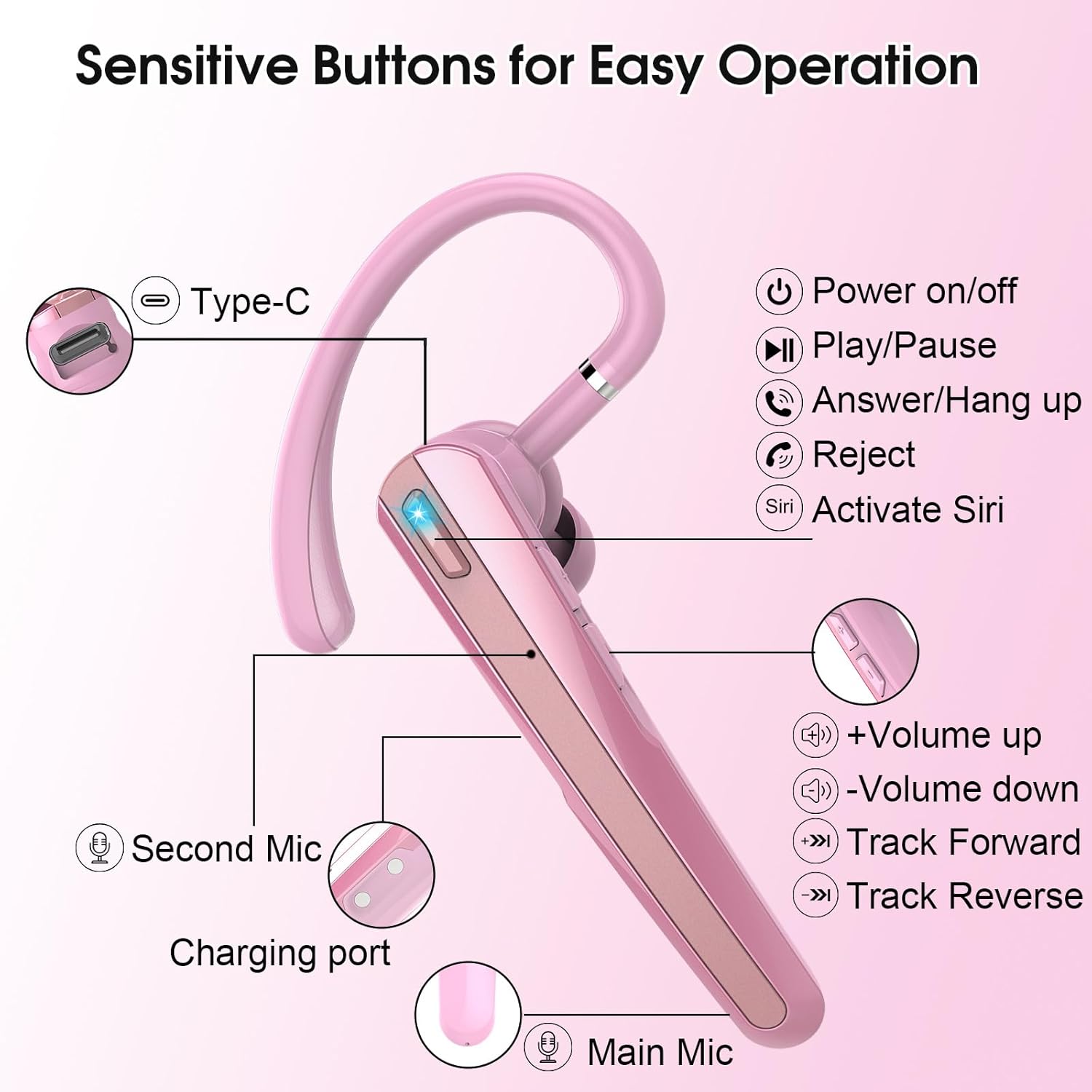
Image: Detailed diagram of the SKIUDCT N19 headset showing the Type-C port, Power on/off button, Play/Pause, Answer/Hang up, Reject, Activate Siri, Volume Up/Down, Track Forward/Reverse buttons, Second Mic, Charging port, and Main Mic.
- Power Button: Controls power on/off, play/pause, answer/hang up calls, reject calls, and activate voice assistant.
- Volume Buttons: Adjusts volume, skips tracks.
- Main Microphone: Primary microphone for vocal voice collection.
- Second Microphone: Assists in noise reduction.
- Charging Port: USB Type-C port for charging the headset.
- LED Indicator: Displays connection status and battery level.
3.2 Key Features
- Ultra-Clear Call Technology: Features a 13mm composite dynamic unit for balanced sound and a high-performance audio decoding chip compatible with AAC and SBC formats.
- Dual ENC and CVC 8.0 Noise Cancellation: Effectively reduces ambient noise for clearer calls.
- Bluetooth 5.3: Provides a faster, more stable connection with lower power consumption.
- LED Display Charging Case: Shows real-time battery status of the charging box.
- Long Battery Life: Up to 120 hours of standby time with the charging case.
- Ergonomic Design: 180° rotating ear hooks and 270° adjustable cantilever for comfortable fit, suitable for left or right ear. Includes three sizes of earplugs.
- IP7 Waterproof Rating: Resists sweat, rain, and other liquids.

Image: A visual explanation of the dual ENC noise-canceling microphones, showing how the main mic collects vocal voice and the second mic performs noise reduction, with a waveform comparison of sound before and after noise cancellation.
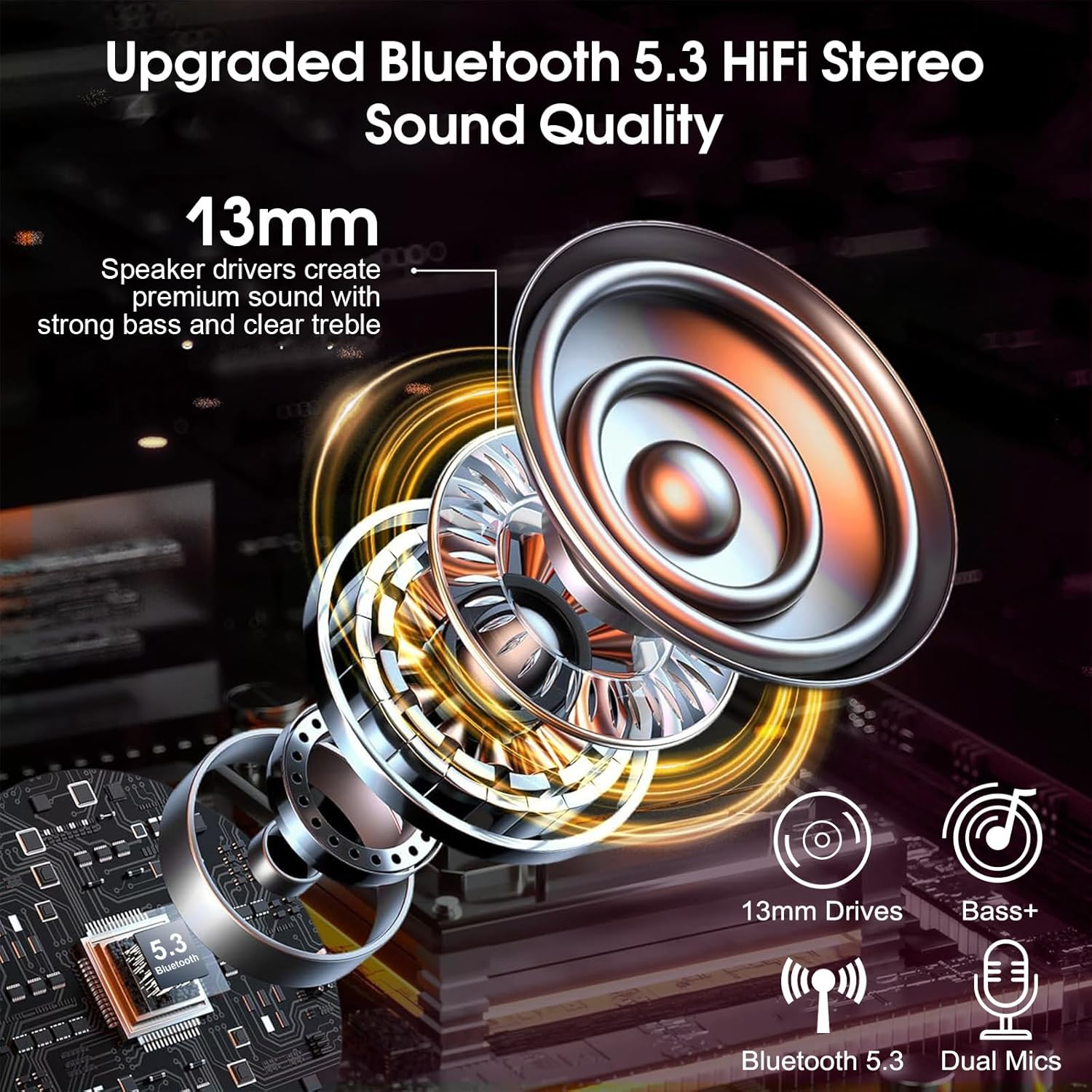
Image: An exploded view diagram illustrating the 13mm speaker drivers and internal components responsible for upgraded Bluetooth 5.3 HiFi stereo sound quality, emphasizing strong bass and clear treble.
4. Setup
4.1 Charging the Headset and Case
Before first use, fully charge the headset and charging case.
- Place the headset into the charging case.
- Connect the USB-C charging cable to the charging port on the case and a power source.
- The LED display on the charging case will show the current battery percentage. The headset will fully charge in approximately 1.5 hours.

Image: The SKIUDCT N19 headset inside its charging case, displaying a 100% charge on the LED screen, along with battery life indicators for the case and single headset, and charging time.

Image: A close-up view of the USB-C charging port on the headset, indicating its charging capability.
4.2 Bluetooth Pairing
- Ensure the headset is charged.
- Take the headset out of the charging case. It will automatically power on and enter pairing mode (the LED indicator will flash).
- On your device (smartphone, laptop, etc.), enable Bluetooth and search for available devices.
- Select "N19" from the list of devices.
- Once connected, the LED indicator on the headset will stop flashing, and a voice prompt will confirm the connection.

Image: A smartphone screen displaying the Bluetooth pairing process, showing "N19" as a discoverable device and indicating a successful connection for calls and media audio, with the headset and charging case in the background.
5. Operating Instructions
5.1 Multi-function Button Controls

Image: A detailed diagram illustrating the various functions of the multi-functional buttons on the SKIUDCT N19 headset, including power on/off, volume adjustment, track switching, answering/rejecting calls, and activating Siri.
- Power On: Press the Power button for 2 seconds.
- Power Off: Press the Power button for 5 seconds.
- Play/Pause: Tap the Power button twice.
- Answer Call: Tap the Power button once.
- Reject Call/Hang Up: Press the Power button for 2 seconds.
- Volume Up: Tap the '+' button once.
- Volume Down: Tap the '-' button once.
- Next Track: Press the '+' button for 2 seconds.
- Previous Track: Press the '-' button for 2 seconds.
- Activate Voice Assistant (Siri/Google Assistant): Tap the Power button three times.
6. Wearing Instructions
For optimal comfort and sound quality, adjust the headset to fit your ear properly.
- Insert the ear tip into your ear canal.
- Position the ear hook over the back of your ear.
- Adjust the ear hook (180° rotation) and cantilever (270° adjustment) for a secure and comfortable fit. The headset can be worn on either the left or right ear.
- Experiment with the three different sizes of ear tips (S/M/L) to find the best fit for your ear canals.

Image: A three-step visual guide demonstrating how to properly wear the wireless headset: inserting the ear tip, positioning the ear hook, and making final adjustments for comfort, including 360° and 180° rotation options.

Image: Illustration of the three different ear tip sizes (S, M, L) provided with the headset, emphasizing the ability to choose the best fit for individual ear canals for comfortable wear.

Image: Two individuals demonstrating that the headset can be comfortably worn on either the left or right ear.
7. Maintenance
7.1 Cleaning
- Regularly clean the ear tips and headset with a soft, dry, lint-free cloth.
- Do not use harsh chemicals or abrasive materials.
- Ensure the charging contacts are clean and dry before placing the headset in the charging case.
7.2 Waterproof Rating
The SKIUDCT N19 headset has an IP7 waterproof rating, meaning it can withstand immersion in water up to 1 meter for 30 minutes. It is resistant to sweat and rain, but it is not recommended for swimming or prolonged submersion.

Image: The SKIUDCT N19 headset partially submerged in water, visually confirming its IP7 waterproof capability.
7.3 Storage
When not in use, store the headset in its charging case to protect it from dust and damage, and to keep it charged.
8. Troubleshooting
| Problem | Possible Cause | Solution |
|---|---|---|
| Headset does not power on. | Low battery. | Charge the headset and charging case. |
| Cannot pair with device. | Bluetooth is off on device; headset not in pairing mode; too far from device. | Ensure Bluetooth is enabled on your device. Take headset out of case to enter pairing mode. Move headset closer to device (within 10 meters). |
| No sound or low volume. | Volume too low; headset not connected; incorrect audio output selected. | Adjust volume on headset and device. Re-pair the headset. Check audio output settings on your device. |
| Call quality is poor. | Weak signal; environmental noise; microphone obstruction. | Move to an area with better signal. Ensure microphone is not covered. |
| Charging case LED display is off. | Charging case battery is depleted. | Connect the charging case to a power source using the USB-C cable. |
9. Specifications
| Feature | Detail |
|---|---|
| Model Name | N19 |
| Connectivity Technology | Wireless (Bluetooth) |
| Bluetooth Version | 5.3 |
| Audio Driver Type | 13mm Dynamic Driver |
| Noise Control | Dual ENC & CVC 8.0 Noise Cancellation |
| Battery Life (with charging case) | Up to 120 Hours (standby) |
| Charging Time | Approx. 1.5 Hours |
| Charging Port | USB Type-C |
| Water Resistance Level | IP7 Waterproof |
| Frequency Range | 20Hz - 20,000Hz |
| Control Method | Push Button, Voice |
| Compatible Devices | Smartphones, Laptops, Desktops, Tablets, Smart Speakers, Cars (with Bluetooth support) |
| Item Weight | 3.84 ounces |
10. Safety Information
- Do not disassemble or modify the product.
- Keep the headset away from extreme temperatures, direct sunlight, and open flames.
- Avoid exposing the headset to strong magnetic fields.
- Do not use the headset at excessively high volumes for prolonged periods to prevent hearing damage.
- Dispose of the product and its battery responsibly according to local regulations.
11. Warranty and Support
For warranty information or technical support, please refer to the contact details provided with your purchase or visit the official SKIUDCT website. Keep your proof of purchase for warranty claims.