
Introduction
This manual provides detailed instructions for the proper setup, operation, and maintenance of your EACHSHOT YC Onion Cedar CB7 Professional Fluid Head. Designed for professional videography and photography, this fluid head features a 75mm coconut bowl, counterbalanced fluid motion, a maximum load capacity of 9KG, a flat design for versatile shooting angles, a switchable handle, and a dark vision bubble level for precise leveling in various conditions. Please read this manual thoroughly before using the product to ensure optimal performance and longevity.
Setup
1. Attaching to a Tripod
The Cedar CB7 fluid head is compatible with most 75mm bowl tripods. Place the fluid head onto the tripod's bowl and secure it firmly using the tripod's locking mechanism. Ensure the head is level before proceeding.
2. Installing the Quick Release Plate
The fluid head supports both Manfrotto quick release plates and the Cedar MQ45 quick release plate. To install, align the quick release plate with the mounting platform on the fluid head and slide it into place until it locks securely. Ensure your camera or camcorder is firmly attached to the quick release plate before mounting it onto the head.

Image: The Cedar CB7 fluid head showing the quick release plate mechanism and built-in tools for convenience.
3. Attaching and Adjusting the Handle
The handle can be attached to either the left or right side of the fluid head, depending on user preference. Insert the handle into the designated slot and tighten the locking knob. The handle's length can be adjusted up to 390mm for comfortable operation. Loosen the handle's locking mechanism, extend or retract to the desired length, and then re-tighten.

Image: Close-up view of the switchable handle mechanism on the Cedar CB7 fluid head, illustrating its adjustable length.
Operating Instructions
1. Dynamic Balance Adjustment
The Cedar CB7 features 10 gears of dynamic balance adjustment. This allows you to precisely counterbalance your equipment (up to 9kg) at any angle, preventing unwanted tilting and ensuring smooth movement. Rotate the dynamic balance knob to select the appropriate gear for your camera setup. Start with a lower setting and increase until the camera remains stable at various tilt angles.
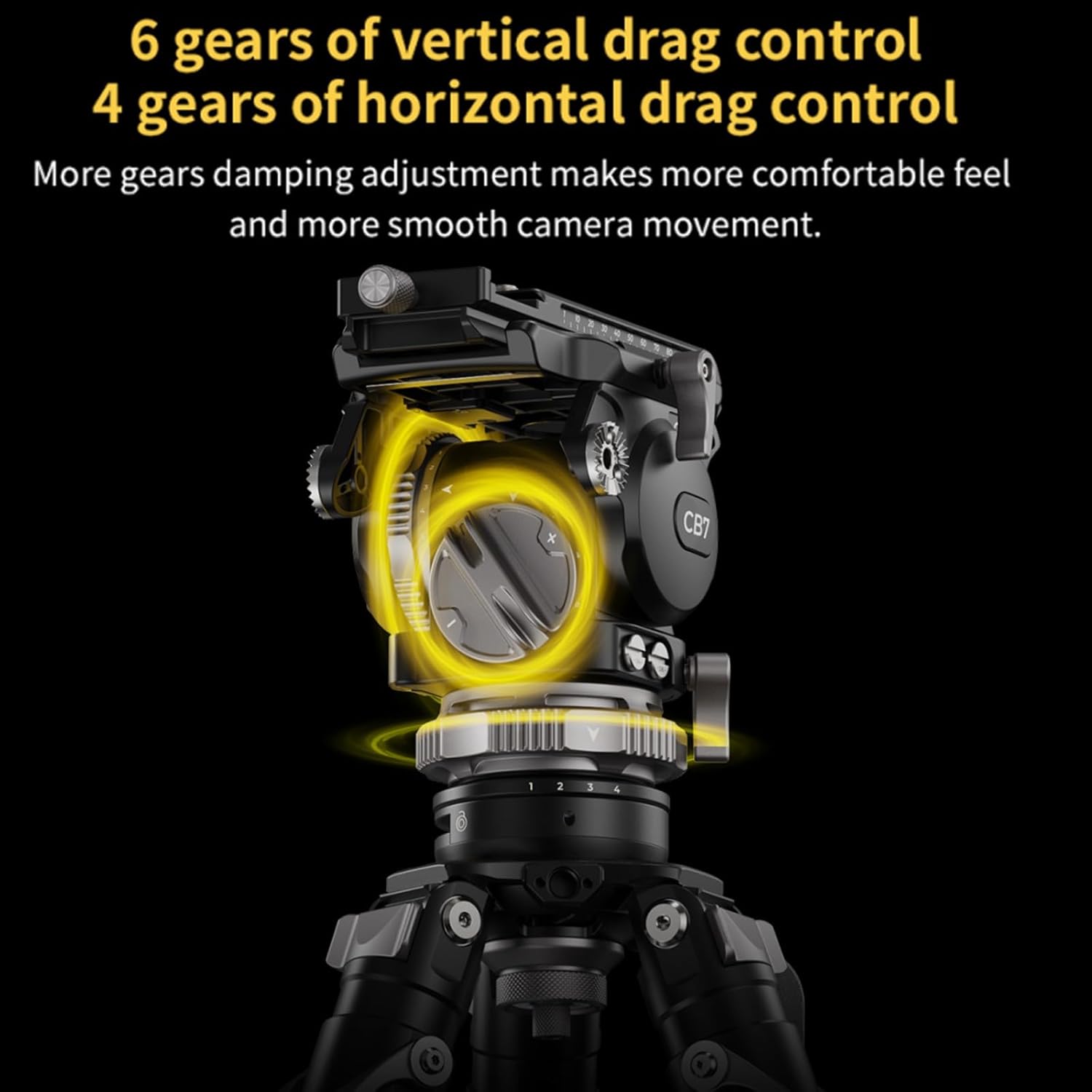
Image: The dynamic balance adjustment dial on the Cedar CB7 fluid head, indicating the 10 gears of adjustment.
2. Drag Control
The fluid head offers precise control over both vertical and horizontal drag. There are 6 gears for vertical drag control and 4 gears for horizontal drag control. Adjust these settings to achieve your desired level of resistance for panning and tilting movements, allowing for smoother and more controlled camera operation.

Image: Close-up of the vertical and horizontal drag control knobs on the Cedar CB7 fluid head, highlighting the adjustment gears.
3. Dark Vision Bubble Level
For accurate leveling in low-light conditions, the fluid head is equipped with a dark vision bubble level. Short press the button next to the bubble level to activate its backlight. Long press the button to turn it off. Use this feature to ensure your shots are perfectly level, even in challenging environments.

Image: The illuminated dark vision bubble level on the Cedar CB7 fluid head, demonstrating its visibility in dark conditions.
4. Flat Design for Unique Angles
The flat design of the fluid head allows for greater flexibility in achieving unique shooting angles. This design facilitates compatibility with various accessories and setups, expanding your creative possibilities.

Image: A camera mounted on the Cedar CB7 fluid head, showcasing its flat design and how it enables diverse shooting configurations.
Maintenance
To ensure the longevity and optimal performance of your Cedar CB7 fluid head, follow these maintenance guidelines:
- Cleaning: Regularly wipe down the fluid head with a soft, dry cloth to remove dust and debris. For stubborn dirt, use a slightly damp cloth and then dry thoroughly. Avoid using harsh chemicals or abrasive materials.
- Storage: When not in use, store the fluid head in a clean, dry environment, preferably in its original packaging or a protective case, to prevent damage from impacts or environmental factors.
- Inspection: Periodically check all knobs, levers, and screws to ensure they are securely tightened. Do not overtighten.
Troubleshooting
If you encounter issues with your Cedar CB7 fluid head, consider the following common solutions:
- Camera not stable: Ensure the quick release plate is properly locked and the dynamic balance adjustment is set correctly for your camera's weight.
- Movement is stiff or too loose: Adjust the vertical and horizontal drag control knobs to achieve the desired fluidity of motion.
- Bubble level not visible: Short press the button next to the bubble level to activate its backlight. Ensure batteries (if applicable) are functional.
- Handle feels loose: Tighten the handle's locking knob. If the length adjustment is loose, re-tighten its specific locking mechanism.
If problems persist, please contact EACHSHOT customer support for further assistance.
Specifications
| Model Name | CB7 |
| Brand | EACHSHOT |
| Manufacturer Part Number | EA702904 |
| Maximum Weight Recommendation | 9 Kilograms |
| Bowl Head Size | 75mm Coconut Bowl Head |
| Dynamic Balance Adjustment | 10 Gears |
| Vertical Drag Control | 6 Gears |
| Horizontal Drag Control | 4 Gears |
| Bubble Level | Dark Vision with Backlight |
| Handle Adjustment | Switchable (Left/Right), Length adjustable up to 390mm |
| Built-in Tools | 4mm L-wrench, flat-blade wrench, 3/8 screws, 1/4 screws |
| Compatible Devices | Camera, Camcorder |
Warranty and Support
For warranty information and customer support, please refer to the documentation included with your purchase or visit the official EACHSHOT website. If you require technical assistance or have questions regarding the operation of your Cedar CB7 fluid head, please contact EACHSHOT customer service directly.