
SNDWAY 611864734293
SNDWAY SW-525A Digital Sound Level Meter User Manual
Model: 611864734293
1. Introduction
The SNDWAY SW-525A is a versatile digital sound level meter designed for measuring sound intensity in various acoustic environments. It provides accurate decibel readings for both loud and soft, high-pitched, low-pitched, intermittent, or continuous sounds. This meter is suitable for monitoring noise levels in factories, offices, homes, traffic routes, and with appliances like air conditioners and refrigerators.
The device features a large LCD display for clear readings and can be wall-mounted for convenient placement. It also offers alarm functions to alert users when sound levels exceed or fall below predefined thresholds, and supports PC connectivity for data logging and analysis.
2. Safety Information
- Do not use the sound meter in environments with high temperature, high humidity, heavy dust, or chemical gases. Such conditions can damage the device and affect its accuracy.
- Ensure the power supply is DC 5V 1A Micro USB. Using a charger with voltage or current exceeding 5V 1A can burn the circuit board.
- Before operation, check the microphone sensor for any foreign matter blockage. A blocked sensor can lead to inaccurate readings or device malfunction.
- If the LCD display does not show numbers or shows garbled characters upon startup, restart the device. If the issue persists, the sensor may be faulty.
3. Product Overview
The SW-525A features a large 9.6-inch LCD display for easy readability. It is powered via a DC 5V 1A Micro USB socket, making it adaptable for various installation scenarios, including wall mounting.
3.1 Key Features
- Measuring range: 30 to 130dB.
- Accuracy: ±1.5dB (reference sound pressure level, 94dB @ 1KHz).
- Frequency response range: 31.5Hz to 8.5KHz.
- Large 9.6-inch LCD display with backlight.
- Adjustable alarm settings with visual and audible indicators.
- Data storage function (2 seconds/time, up to one year of records).
- PC communication via USB cable for data download, sampling, and chart printing.
- Wall-mountable design for flexible installation.
3.2 Components and Controls

Figure 1: SW-525A Sound Level Meter with labeled parts and control buttons.
The device features a prominent LCD display, a microphone sensor, an audio outlet, a USB outlet, and a calibration knob. The top panel includes several control buttons:
| Button Icon | Description | Function |
|---|---|---|
| Power ON/OFF | Power key | Short press for power off, long press for automatic startup when connected to power. |
| Down key | Reducing value while setting | Short press to reduce value, long press for continuous reduction. |
| Up key | Increasing value while setting | Short press to increase value, long press for continuous increase. |
| Alarm ON/OFF | Alarm key | Short press to toggle alarm ON/OFF, long press to enter alarm setting mode. |
4. Setup
4.1 Unpacking

Figure 2: SW-525A Sound Level Meter main unit.
Carefully remove the sound level meter and its accessories from the packaging. Verify that all components listed in the package contents (SW-525B Wall Mounted Sound Meter Level, USB Cable, Manual) are present.
4.2 Power Connection
The SW-525A requires a DC 5V 1A power supply. Connect the provided USB cable to the Micro USB outlet on the device and plug the other end into a compatible 5V 1A USB power adapter (not included). The device will automatically turn on when connected to power.
4.3 Wall Mounting
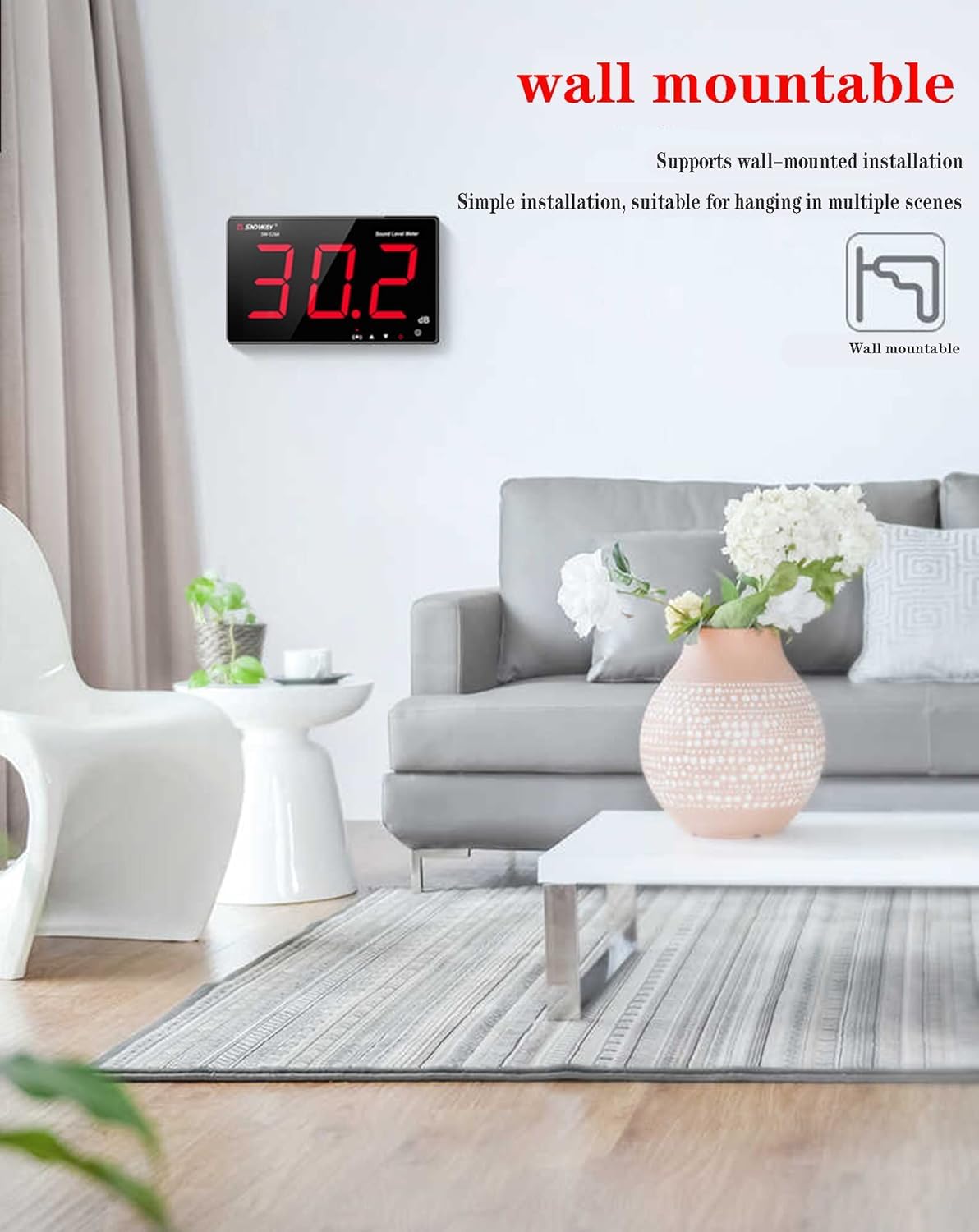
Figure 3: Wall-mounted installation of the sound level meter.
The SW-525A is designed for wall-mounted installation. Use the hanging hole on the back of the device to secure it to a wall. Ensure the mounting location allows for clear sound reception and visibility of the display. The device can also be free-standing on a table.
5. Operating Instructions
5.1 Basic Operation
- Power On: The product will automatically turn on when connected to the power supply.
- Power Off: Short press the "switch machine" button to shut down the device.
5.2 Alarm Settings

Figure 4: Over-standard alarm prompt indication.
- Toggle Alarm: Short press the "horn button" to turn the alarm ON or OFF. When the alarm is OFF, the red indicator light will be off. When ON, the red light will be on.
- Set Alarm Value: In the normal measurement state, long press the "horn key" to enter the alarm setting mode. Use the Up and Down keys to adjust the desired alarm value.
- Save/Cancel Setting: Short press the "horn key" to save the new alarm value. Alternatively, short press the "power key" to cancel the setting without saving.
- When an alarm condition occurs (sound level exceeds the set value), the indicator light flashes, accompanied by a buzzer alarm sound. Alarm time is adjustable from 6 to 120 seconds, and alarm sound has 1-3 levels.
5.3 Data Storage and Communication
The device automatically saves data every two seconds, allowing for up to one year of stored records. To access and analyze this data, connect the meter to a PC via the USB cable. This allows you to download records, collect samples, and print charts and date information.
5.4 External Speaker Connection

Figure 5: Connecting external speakers to the sound level meter.
The SW-525A supports connection to external speakers via its 3.5mm audio outlet. This feature can be used for enhanced audible alerts or to integrate the sound output with other audio systems.
5.5 Calibration
The device may require calibration upon initial use or after prolonged periods. Refer to the included user manual for detailed calibration procedures using the calibration knob and buttons. Proper calibration ensures accurate sound level measurements.
5.6 Applications
The SW-525A is suitable for a wide range of noise monitoring applications:

Figure 6: Noise monitoring in KTV and factory settings.

Figure 7: Noise monitoring in library and traffic environments.
- Industrial Settings: Monitor noise levels in factories and workshops to ensure compliance with safety regulations and protect worker hearing.
- Residential Areas: Track noise from traffic, construction, or neighbors to maintain a peaceful living environment.
- Public Spaces: Assess sound levels in libraries, schools, and offices to ensure comfortable and productive environments.
- Appliance Testing: Measure noise output from household appliances like air conditioners and refrigerators.
6. Maintenance
- Cleaning: Use a soft, dry cloth to clean the device. Do not use abrasive cleaners or solvents.
- Storage: Store the sound meter in a dry place, away from direct sunlight, extreme temperatures, and high humidity. Recommended storage conditions are -10 to 60°C (14 to 140°F) and 10 to 70% RH.
- Power Supply: Always use the specified DC 5V 1A power adapter. Disconnect the power supply when the device is not in use for extended periods.
7. Troubleshooting
- LCD Display Issues: If the LCD display shows no numbers or garbled characters, try restarting the device by unplugging and re-plugging the power cable.
- Inaccurate Readings: Ensure the microphone sensor is clean and unobstructed. Perform a calibration if readings appear consistently inaccurate.
- Device Not Powering On: Verify that the power supply is correctly connected and meets the DC 5V 1A specification. Check the USB cable for damage.
- Software Connectivity Issues: If the device cannot connect to the computer software, ensure the correct drivers are installed and the software version is up to date. Contact customer support if issues persist.
8. Specifications
| Parameter | Value |
|---|---|
| Measure Range | 30 to 130dB |
| Accuracy | ±1.5dB (reference sound pressure level, 94dB@1KHz) |
| Frequency Range | 31.5Hz to 8.5KHz |
| Frequency Weighting | A |
| Response Time | Fast |
| Microphone | 6MM Capacitance Microphone |
| Display | 3pcs - 3inch digitals display |
| Resolution | 0.1dB (<100dB), 1dB (>100dB) |
| Alarm Reminder | Yes, Sound + Display |
| Alarm Output | Yes |
| Storage Function | 2 secs/time, can be stored for a year |
| Communication | Connecting PC via USB cable |
| Power Supply | DC 5V 1A Micro USB Outlet |
| Operation Condition | 0 to 40°C (32 to 104°F), 10 to 80% RH |
| Storage Condition | -10 to 60°C (14 to 140°F), 10 to 70% RH |
| Dimension | 210x130x28mm (8.27x5.12x1.1 inches) |
| Weight | 450g (15.87 ounces) |
9. Warranty and Support
For any questions, technical assistance, or issues not covered in this manual, please contact the seller or manufacturer directly. If the product you purchased cannot be connected to the software, please contact the seller for software updates. Provide your product model number (611864734293) and a detailed description of the issue for efficient support.
Related Documents - 611864734293
 |
SNDWAY SW-525A-G Series Sound Level Meter User Manual This user manual provides comprehensive information on the operation, features, technical specifications, and maintenance of the SNDWAY SW-525A, SW-525B, SW-525C, SW-525D, and SW-525G wall-mounted sound level meters. |
 |
Hlukoměr digitální SNDWAY SW-523 - Uživatelská příručka Uživatelská příručka pro digitální hlukoměr SNDWAY SW-523, který měří hladinu hluku v rozsahu 30-130 dB. Obsahuje technické parametry, popis struktury produktu, pokyny k LCD displeji a návod k použití. |
 |
SNDWAY SW-524 Sound Level Meter User Manual - Features, Specifications, and Operation Comprehensive user manual for the SNDWAY SW-524 Sound Level Meter, detailing its features, specifications, operation instructions, troubleshooting, and maintenance. Learn how to measure sound levels accurately. |
 |
SNDWAY SW-24A/25A/26A/24B/25B/26B 激光测距仪 用户手册 - 操作指南与技术规格 获取SNDWAY SW-24A、SW-25A、SW-26A、SW-24B、SW-25B、SW-26B激光测距仪的详细用户手册。本指南包含产品操作、安全规程、测量功能、技术参数及维护保养信息,助您高效准确使用。 |
 |
SNDWAY Laser Distance Meter Series T User Manual Comprehensive user manual for the SNDWAY Series T laser distance meters (SW-T40, SW-T60, SW-T80, SW-T100), covering safety, operation, features, technical specifications, and care. |
 |
SNDWAY SW-M100A Laser Distance Meter User Manual and Specifications Comprehensive user manual for the SNDWAY SW-M100A laser distance meter, covering features, operation, specifications, maintenance, and package contents. Learn how to measure distance, area, volume, and more. |
Ask a question about this manual
Ask about setup, troubleshooting, compatibility, parts, safety, or missing instructions. Manuals+ will review the question and use this page’s manual context to help answer it.