
Introduction
This manual provides comprehensive instructions for the installation, operation, and maintenance of your SelectBlinds Casual Cordless Light Filtering Cellular Shades. Please read this guide thoroughly before beginning installation or use to ensure proper function and longevity of your product.
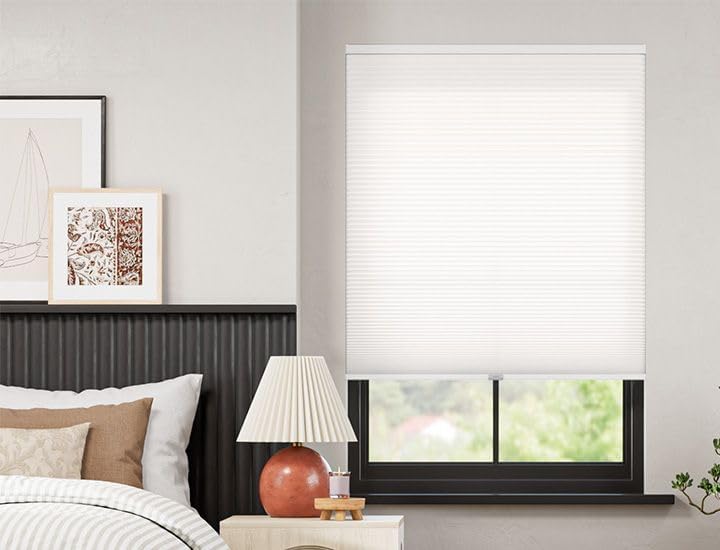
Image: A SelectBlinds Casual Cordless Light Filtering Cellular Shade in Essential White, installed in a bedroom window, providing soft light and privacy.
These cellular shades are designed to gently diffuse natural light while maintaining privacy, making them suitable for various rooms including living rooms, bedrooms, and offices. Their honeycomb structure also contributes to energy efficiency by providing insulation.
Safety Information
- Cordless Design: This product features a cordless lift system, enhancing safety for homes with children and pets by eliminating hazardous cords.
- Secure Installation: Ensure all mounting hardware is securely fastened to prevent the shade from falling. Refer to the installation section for detailed steps.
- Operating Environment: These shades are designed for indoor use only. Avoid exposure to excessive moisture or extreme temperatures.
Package Contents
Verify that all components are present before beginning installation:
- Cellular Shade (1)
- Mounting Brackets (2 or more, depending on shade width)
- Mounting Screws
- User Manual (this document)
Setup and Installation (Inside Mount)
These shades are designed for an inside mount, fitting within your window frame. A minimum window depth of 7/8 inch is required for all lift styles, and a flush inside mount depth of 2 inches is needed for a seamless appearance.
Tools Required:
- Measuring Tape
- Pencil
- Drill with appropriate drill bit
- Screwdriver (Phillips head recommended)
Installation Steps:
- Measure and Mark: Measure the width of your window frame at the top, middle, and bottom. Use the smallest measurement for ordering. Mark the desired locations for your mounting brackets inside the window frame. Ensure marks are level and spaced evenly.
- Install Brackets: Predrill pilot holes at your marked locations. Secure the mounting brackets using the provided screws. Ensure brackets are firmly attached and aligned.
- Attach Shade: Align the headrail of the cellular shade with the installed mounting brackets. Gently push the shade into the brackets until it clicks securely into place.
- Test Operation: Carefully raise and lower the shade to ensure it operates smoothly and is securely mounted.

Image: Diagram illustrating how to measure for inside mount shades, showing width, height, and depth requirements.
Operating Instructions
Your SelectBlinds cellular shade features a cordless lift system for easy and safe operation.
To Raise the Shade:
- Grasp the bottom rail of the shade with both hands.
- Gently push the shade upwards to the desired height. The shade will hold its position automatically.
To Lower the Shade:
- Grasp the bottom rail of the shade with both hands.
- Gently pull the shade downwards to the desired height. The shade will hold its position automatically.

Image: A person demonstrating the cordless operation by gently pushing the bottom rail of the shade upwards.
Maintenance
Regular cleaning will help maintain the appearance and functionality of your cellular shades.
- Dusting: Use a feather duster, soft cloth, or vacuum cleaner with a brush attachment to gently remove dust from the shade fabric.
- Spot Cleaning: For minor spots, use a damp cloth with mild soap and warm water. Blot the stained area gently; do not rub vigorously. Allow the shade to air dry completely before raising it.
- Avoid Harsh Chemicals: Do not use abrasive cleaners, solvents, or strong detergents, as these can damage the fabric and color.
Troubleshooting
| Problem | Possible Cause | Solution |
|---|---|---|
| Shade does not stay up or down. | Cordless mechanism needs adjustment or is damaged. | Gently pull the shade all the way down, then push it all the way up. Repeat this motion a few times to reset the mechanism. If the issue persists, contact customer support. |
| Shade is crooked. | Uneven installation or fabric shift. | Ensure mounting brackets are level. If the fabric appears shifted, gently guide it back into alignment. |
| Difficulty raising or lowering the shade. | Obstruction or stiff mechanism. | Check for any obstructions in the window frame. Ensure you are grasping the bottom rail evenly. If the mechanism feels stiff, try operating it slowly a few times. |
Specifications
- Model Number: 1509_001
- Brand: SELECT BLINDS
- Material: Polyester
- Color: Essential White
- Opacity: Light Filtering
- Product Dimensions (as reviewed): 72"L x 36"W
- Item Weight: 2.26 pounds
- Mounting Type: Inside Mount
- Control Type: Cordless
- Operation Mode: Manual
- Special Features: Light Filtering, UV Protection
- Included Components: Mounting Hardware, User Manual
- Recommended Use: Indoor, Window

Image: A close-up view of the Essential White cellular shade fabric, highlighting its texture and color.

Image: A diagram illustrating the honeycomb cellular structure, which provides insulation for energy efficiency.
Warranty Information
Specific warranty details for your SelectBlinds Casual Cordless Light Filtering Cellular Shades are typically provided with your purchase documentation or can be found on the official SelectBlinds website. Please retain your proof of purchase for warranty claims.
Support
For further assistance, technical support, or to inquire about replacement parts, please visit the official SelectBlinds website or contact their customer service department. Contact information can usually be found on the product packaging or the brand's website.
You can visit the SelectBlinds store on Amazon for more products: SelectBlinds Store


