
Product Overview
The Bushnell Golf Phantom 3 Slope GPS Handheld is a compact and intuitive device designed to enhance your golf game by providing precise distance measurements and course information. It features advanced slope compensation technology, a responsive touchscreen, and comes pre-loaded with a vast database of worldwide golf courses.

Image: The Bushnell Golf Phantom 3 Slope GPS Handheld, shown with its included belt clip, golf towel, and power bundle accessories.
Key Features:
- Slope Compensation: Provides compensated distances for uphill and downhill shots, offering accurate play recommendations.
- Touchscreen with Intuitive UI: Easy navigation and interaction with auto course/hole recognition, auto score prompt, and auto course updates.
- Pre-loaded Courses: Comes with over 38,000 worldwide golf courses.
- Front, Center, and Back Distances: Large, easy-to-read display for key distances.
- GreenView with Movable Pin Placement: Allows for precise distance to the flag by cycling through pin locations.
- Hazard/Layup Information: Provides up to 6 hazard/layup distances per hole.
- BITE Magnetic Cart Mount: Integrated magnet for convenient attachment to golf carts.
- Long Battery Life: Offers extended use, typically supporting 3+ rounds on a single charge.
- Bushnell Golf App Integration: Connects to the app for additional benefits, data, and device updates.
Product Video:
Video: An official overview of the Bushnell Golf Phantom 3 Slope GPS, highlighting its key features and benefits for golfers.
Setup and Initial Use
The Phantom 3 Slope GPS comes pre-loaded with over 38,000 worldwide golf courses, ready for immediate use. For optimal performance and access to the latest course data, it is recommended to connect your device to the Bushnell Golf App.
- Charging the Device: Before first use, fully charge the Phantom 3 using the provided charging cable. The device features a long-lasting rechargeable battery.
- Power On/Off: Press and hold the power button to turn the device on or off.
- Course Recognition: The device automatically recognizes the course and hole you are playing, minimizing manual input.
- App Connection: Download the Bushnell Golf App on your smartphone. Follow the in-app instructions to pair your Phantom 3 for course updates and additional features.
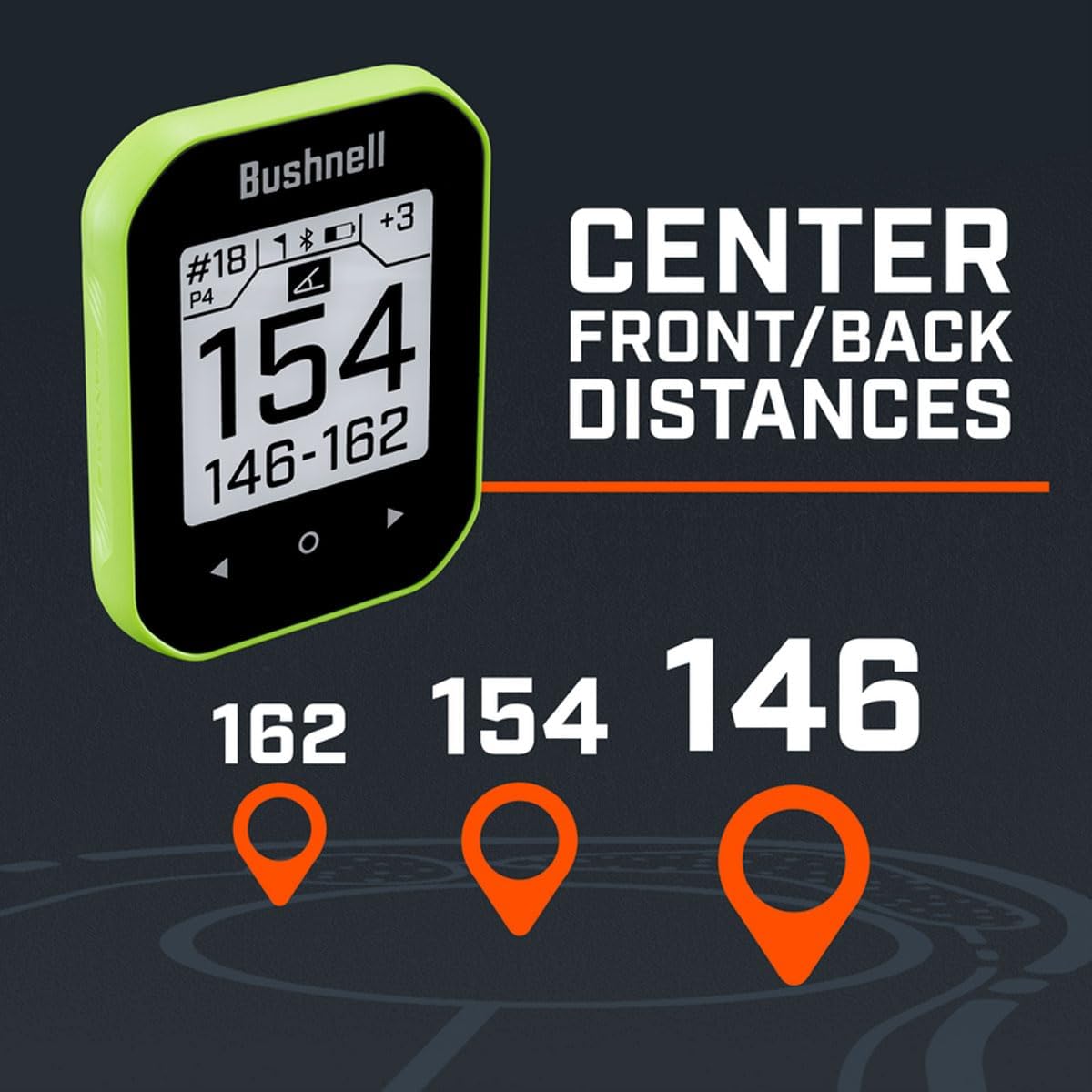
Image: The Phantom 3 displaying clear front, center, and back distances to the green, a core feature for quick yardage checks.
Operating Instructions
The Phantom 3 Slope GPS is designed for ease of use on the golf course. Its intuitive touchscreen interface allows for quick access to all essential functions.
Distance Measurement:
- Front, Center, Back: The main screen displays large, easy-to-read distances to the front, center, and back of the green.
- Slope Compensation: The device automatically calculates and displays slope-compensated distances, providing a more accurate "plays like" distance.
GreenView and Pin Placement:
Utilize the GreenView feature to get a visual representation of the green and adjust the pin location for more precise distances.
- From the main distance screen, tap the screen or use the navigation buttons to access GreenView.
- On the GreenView screen, you can drag the pin icon to its current location on the green to get an updated, precise distance.
Hazard and Layup Information:
Access detailed information on up to six hazards or layup points per hole.

Image: The Phantom 3 screen showing a list of hazards and their respective distances, aiding in strategic shot planning.
- Navigate to the hazard screen to view distances to various obstacles like bunkers (LBnk, RBnk), water (Wter), or layup points (100L, 125L).
Shot Distance Calculator:
Measure the distance of your shots with the integrated shot distance calculator.
- Start the shot distance measurement from your starting point.
- Walk to where your ball landed, and the device will display the distance traveled.
- Use the easy reset toggle to clear the measurement for your next shot.
BITE Magnetic Mount:
Securely attach your Phantom 3 to any metal surface on a golf cart for quick and easy access.

Image: An illustration demonstrating the BITE magnetic mount feature, showing the device securely attached to the frame of a golf cart.

Image: The Phantom 3 attached to a golf bag via its integrated carabiner clip, offering an alternative carrying option.
Maintenance
- Cleaning: Wipe the device with a soft, damp cloth. Avoid abrasive cleaners or solvents.
- Battery Care: The device uses a Lithium Ion battery. For optimal battery life, avoid extreme temperatures and store the device with a partial charge if not used for extended periods. The battery provides approximately 18 hours of use on a full charge.
- Storage: Store the Phantom 3 in a cool, dry place when not in use.
Troubleshooting
- Device Not Powering On: Ensure the battery is fully charged. Connect to a power source and allow it to charge for at least 30 minutes before attempting to power on again.
- Inaccurate Distances: Verify that the device has a clear view of the sky for GPS signal acquisition. Ensure the course data is up-to-date via the Bushnell Golf App.
- Slow Performance/Unresponsive Touchscreen: Try restarting the device. If issues persist, connect to the Bushnell Golf App to check for and install any available firmware updates.
- Magnetic Mount Not Holding Securely: Ensure the metal surface on the golf cart is clean and free of debris. The magnet is strong, but a dirty surface can reduce adhesion.
- Course Not Found: Ensure you are outdoors with a clear view of the sky. If the course is new or recently updated, connect to the Bushnell Golf App to download the latest course maps.
Specifications
| Feature | Detail |
|---|---|
| Item Weight | 2.75 ounces |
| Product Dimensions | 0.7 x 2.36 x 2.99 inches |
| Item Model Number | Bushnell 362402 Power Bundle |
| Batteries | 1 Lithium Ion batteries required (included) |
| Display Size | 2.2 Inches |
| Battery Life | 18 Hours |
| Voice Command | Buttons, Touchscreen |
| Special Feature | Bluetooth, Touchscreen |
| Connectivity Technology | Bluetooth |
| Map Type | Worldwide (38,000+ courses pre-loaded) |
| Sport | Golf |
Warranty Information
The Bushnell Golf Phantom 3 Slope GPS Handheld comes with a 1 Year Limited Warranty from the manufacturer, Certified Brands. Please retain your proof of purchase for warranty claims.
For detailed warranty terms and conditions, please refer to the official product documentation or contact the manufacturer directly.
Support and Contact
For further assistance, product registration, or to download the latest course updates and firmware, please utilize the Bushnell Golf App or visit the official Certified Brands website.
- Bushnell Golf App: Available for download on iOS and Android devices. Provides access to product benefits, information, data, and device updates.
- Manufacturer Website: Visit the Certified Brands Store on Amazon for product information and support resources.