
Panasonic CW-XN185BGT
Panasonic 1.5 Ton 5 Star Inverter Window AC User Manual
Model: CW-XN185BGT
Introduction
This user manual provides essential information for the safe and efficient operation, installation, and maintenance of your Panasonic 1.5 Ton 5 Star Inverter Window AC. Please read this manual thoroughly before using the appliance and retain it for future reference.
Safety Information
Always follow basic safety precautions when using electrical appliances to reduce the risk of fire, electric shock, and injury to persons.
- Ensure the AC is properly grounded.
- Do not operate the AC with wet hands.
- Do not insert fingers or objects into the air inlet/outlet.
- Keep flammable materials away from the unit.
- Disconnect power before cleaning or servicing.
- Installation must be performed by qualified personnel.
Product Overview
The Panasonic 1.5 Ton 5 Star Inverter Window AC is designed for efficient cooling in medium-sized rooms. It features an inverter compressor for energy savings, a copper condenser for durability, and a PM 0.1 filter for improved air quality.
Main Components
- Window AC Unit
- Remote Controller
- AAA Remote Batteries (2)
- User Manual (this document)
Unit Features
- Inverter Compressor: Adjusts power based on heat load for energy efficiency.
- Copper Condenser Coil: Ensures better cooling performance and requires low maintenance.
- PM 0.1 Filter: Captures particles as small as 0.1 micrometers for cleaner air.
- Eco Mode: Optimizes energy consumption while maintaining comfort.
- Powerful Mode: Provides rapid cooling when needed.
- Stabilizer-Free Operation: Designed to operate within 145V to 280V without an external stabilizer.

Figure 1: Front view of the Panasonic 1.5 Ton 5 Star Inverter Window AC, showing the control panel and air vents.

Figure 2: Front view of the AC unit with the top air vent opened, revealing the internal grille structure.

Figure 3: Side view of the Panasonic Window AC, highlighting its compact design and side ventilation grilles.

Figure 4: Diagram illustrating the dimensions of the Panasonic Window AC: 66 cm (Depth), 78.3 cm (Width), and 43 cm (Height).

Figure 5: Rear view of the Panasonic Window AC, showing the condenser coil and protective grille.
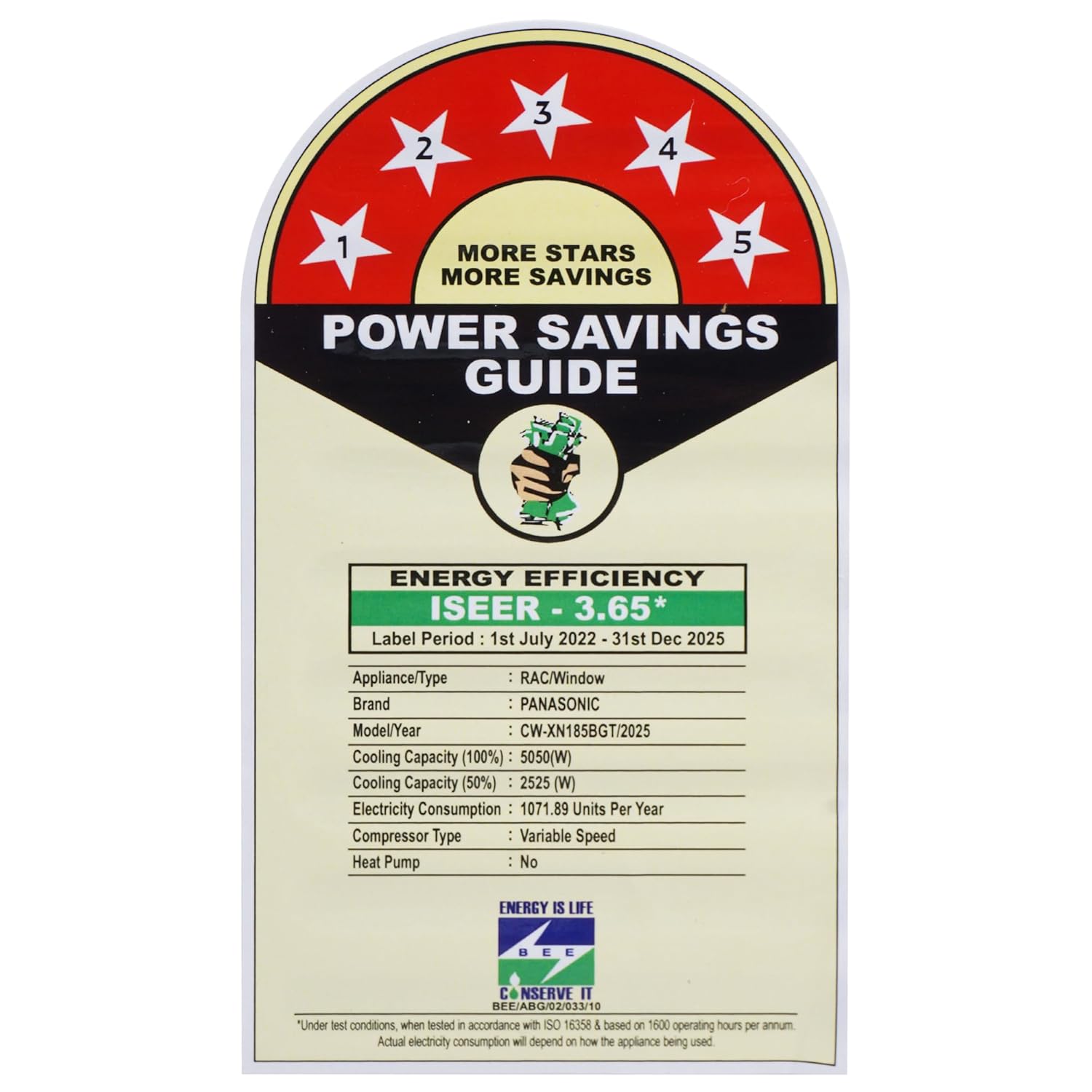
Figure 6: The Power Savings Guide label, indicating the 5-star energy rating and ISEER value of 3.65 for the Panasonic CW-XN185BGT AC.
Setup and Installation
This section provides general guidelines for installation. For detailed instructions, it is highly recommended to consult a qualified technician. Improper installation can lead to electric shock, fire, or serious injury.
Site Selection
- Choose a window opening that can support the unit's weight (40 kg).
- Ensure there is sufficient space around the unit for proper airflow and maintenance.
- Avoid locations exposed to direct sunlight or heat sources.
- The location should allow for proper drainage of condensate water.
Electrical Requirements
- The unit requires a 230 Volts power supply.
- Ensure the electrical circuit is dedicated and has the correct amperage rating for the AC (1560 Watts).
- A proper grounding connection is essential for safety.
Installation Steps (Overview)
- Prepare the window opening, ensuring it is clean and free of obstructions.
- Carefully lift and slide the AC unit into the window opening.
- Secure the unit using appropriate mounting brackets and screws to prevent it from falling.
- Seal any gaps around the unit to prevent air leakage and improve efficiency.
- Connect the power cord to a suitable electrical outlet.
- Install the remote control batteries (2 AAA batteries).
Operating Instructions
Familiarize yourself with the control panel on the unit and the remote controller for optimal use.
Remote Controller Functions
- Power Button: Turns the unit ON or OFF.
- Mode Button: Cycles through operating modes (Cool, Fan, Dry, Auto).
- Temperature Up/Down Buttons: Adjusts the desired temperature setting.
- Fan Speed Button: Selects fan speed (Low, Medium, High, Auto).
- Eco Mode Button: Activates energy-saving mode.
- Powerful Mode Button: Activates rapid cooling.
- Timer Button: Sets ON/OFF timers.
- Swing Button: Controls the horizontal and vertical air swing.
Operating Modes
- Cool Mode: Provides cooling to reach the set temperature.
- Fan Mode: Circulates air without cooling.
- Dry Mode: Reduces humidity in the room.
- Auto Mode: Automatically selects the appropriate mode based on room temperature.
Temperature Settings
The recommended operating temperature range for optimal comfort and energy efficiency is between 24°C and 28°C. The unit can operate effectively in ambient temperatures ranging from 16°C to 52°C.
Maintenance
Regular maintenance ensures the longevity and efficient operation of your AC unit. Always disconnect power before performing any maintenance.
Air Filter Cleaning
- The PM 0.1 filter should be cleaned every two weeks or more frequently depending on usage and air quality.
- Open the front panel and carefully remove the air filters.
- Wash the filters with lukewarm water and a mild detergent.
- Rinse thoroughly and allow them to dry completely in a shaded area before reinserting.
- Do not expose filters to direct sunlight or heat.
Unit Exterior Cleaning
- Wipe the exterior of the unit with a soft, damp cloth.
- Do not use harsh chemicals, abrasives, or solvents.
Seasonal Maintenance
- Before long periods of non-use (e.g., winter), run the unit in fan-only mode for a few hours to dry out internal components.
- Clean the filters and exterior thoroughly.
- Cover the unit to protect it from dust and debris.
Troubleshooting
Before contacting customer service, please refer to the following table for common issues and their solutions.
| Problem | Possible Cause | Solution |
|---|---|---|
| AC does not turn on. | No power supply; power cord unplugged; circuit breaker tripped; remote control batteries dead. | Check power connection; plug in power cord; reset circuit breaker; replace remote control batteries. |
| Insufficient cooling. | Dirty air filter; blocked air intake/outlet; room too large; doors/windows open; temperature setting too high. | Clean air filter; clear obstructions; ensure room size is appropriate; close doors/windows; lower temperature setting. |
| Unusual noise. | Loose parts; unit not level; foreign object inside. | Check for loose parts; ensure unit is level; contact service if noise persists. |
| Water leakage. | Blocked drain hose; unit not tilted correctly for drainage. | Check and clear drain hose; ensure proper tilt during installation. |
Specifications
| Feature | Detail |
|---|---|
| Brand | Panasonic |
| Model | CW-XN185BGT |
| Capacity | 1.5 Tons |
| Energy Rating | 5 Star |
| Annual Energy Consumption | 1086.32 kWh |
| ISEER Value | 3.60 |
| Compressor Type | Inverter |
| Condenser Coil | Copper |
| Filter Type | PM 0.1 Filter |
| Noise Level | 53 dB |
| Operating Voltage | 230 Volts |
| Wattage | 1560 Watts |
| Refrigerant Gas | R32 (Environmental Friendly) |
| Dimensions (LxWxH) | 66 x 78.3 x 43 Centimeters |
| Item Weight | 40 kg |
| Included Components | 1 Window AC Unit, 1 Remote Controller, 2 AAA Remote Battery, User Manual |
Warranty and Support
Warranty Information
Your Panasonic 1.5 Ton 5 Star Inverter Window AC comes with a comprehensive warranty:
- 1 year Comprehensive Warranty on the entire unit.
- 5 years Warranty on the Compressor.
Please retain your purchase receipt for warranty claims. The warranty covers manufacturing defects and does not cover damage due to improper installation, misuse, or unauthorized repairs.
Customer Support
For any technical assistance, service requests, or warranty inquiries, please contact Panasonic customer support. Refer to the contact information provided with your product packaging or visit the official Panasonic India website for the most up-to-date contact details.
Manufacturer: Panasonic Life Solutions India Private Limited
Address: 12th Floor, Ambience Tower I, Ambience Island NH-8, Gurgaon, Haryana-122002, India
Tel: +91-0124-487-1300
Related Documents - CW-XN185BGT
 |
Panasonic CW-SUL Series Room Air Conditioner Operating Instructions Official operating instructions for Panasonic CW-SUL120BA, CW-SUL180BA, and CW-SUL240BA room air conditioners. Learn about safety, installation, operation, and maintenance. |
 |
Friedrich Breeze™ Outdoor Inverter Heat Pump Condenser Installation and Operation Manual Installation and operation manual for Friedrich Breeze™ Outdoor Inverter Heat Pump Condensers. Covers safety, installation, operation, maintenance, and troubleshooting for models WFPU17Z243C-1, WFPU18Z363C-1, WFPU18Z483C-1, WFPU17Z603C-1. |
 |
Panasonic Air Conditioner Operating Instructions This document provides operating instructions for Panasonic Window Air Conditioners, including safety precautions, features, operational guidance, installation, maintenance, and troubleshooting. |
 |
Panasonic 空調器操作說明書 CW-HZ120AA/HU120AA Panasonic CW-HZ120AA 和 CW-HU120AA 空調器的詳細操作說明書,包含安全注意事項、安裝指南、操作方法、維護保養和故障排除。 |
 |
Panasonic Room Air Conditioner CW-HZ/HU Series Operating Instructions Official operating instructions for Panasonic Room Air Conditioner models CW-HZ180AA, CW-HU180AA, CW-HZ240AA, and CW-HU240AA. Covers installation, operation, safety, maintenance, and troubleshooting. |
 |
S&A CW-5000/5200 Industrial Chiller User Manual User manual for S&A CW-5000 and CW-5200 series industrial chillers by GUANGZHOU TEYU ELECTROMECHANICAL CO., LTD., covering installation, operation, specifications, and troubleshooting. |
Ask a question about this manual
Ask about setup, troubleshooting, compatibility, parts, safety, or missing instructions. Manuals+ will review the question and use this page’s manual context to help answer it.