1. Introduction
Thank you for choosing the Earbuds Pro Language Translator Earbuds. These innovative open-ear wireless Bluetooth earbuds are designed to provide high-quality audio and real-time language translation capabilities. Featuring a full-color touch screen on the charging case, TF card support for local music playback, and advanced audio technologies, these earbuds offer a versatile and immersive listening experience. This manual provides detailed instructions on setup, operation, maintenance, and troubleshooting to help you get the most out of your device.

Figure 1.1: Earbuds Pro Language Translator Earbuds (Blue model shown with charging case and other color variants).
2. Setup
2.1. What's in the Box
- Earbuds Pro Language Translator Earbuds (Left and Right)
- Charging Case
- USB Charging Cable
- User Manual (this document)
2.2. Charging the Earbuds and Case
Before first use, fully charge the earbuds and the charging case.
- Connect the USB charging cable to the charging port on the case and to a compatible USB power source.
- The indicator lights on the case will show charging status.
- Place the earbuds into the charging case. Ensure they are properly seated to initiate charging.

Figure 2.1: Charging Information. A full charge for the case and earbuds takes approximately 1 hour. The earbuds provide about 8 hours of single endurance, and the charging case extends total usage to about 30 hours.
2.3. Bluetooth Pairing
To connect your Earbuds Pro to a device:
- Ensure the earbuds are charged and inside the charging case.
- Open the charging case. The earbuds will automatically enter pairing mode.
- On your device (smartphone, tablet, etc.), enable Bluetooth and search for new devices.
- Select "Earbuds Pro" (or similar name) from the list of available devices.
- Once connected, the earbuds will indicate successful pairing.
2.4. Wearing the Earbuds
These open-ear earbuds are designed to rest comfortably without entering the ear canal, allowing you to stay aware of your surroundings.
- Gently place each earbud over your ear, ensuring the speaker portion is positioned near your ear canal.
- Adjust the ear hook for a secure and comfortable fit.
3. Operating Instructions
3.1. Power On/Off
- Power On: Open the charging case, and the earbuds will automatically power on.
- Power Off: Place the earbuds back into the charging case and close the lid. They will automatically power off and begin charging.
3.2. Touch Screen Interface (Charging Case)
The charging case features a full-color touch screen for direct control and access to various functions without needing your phone.
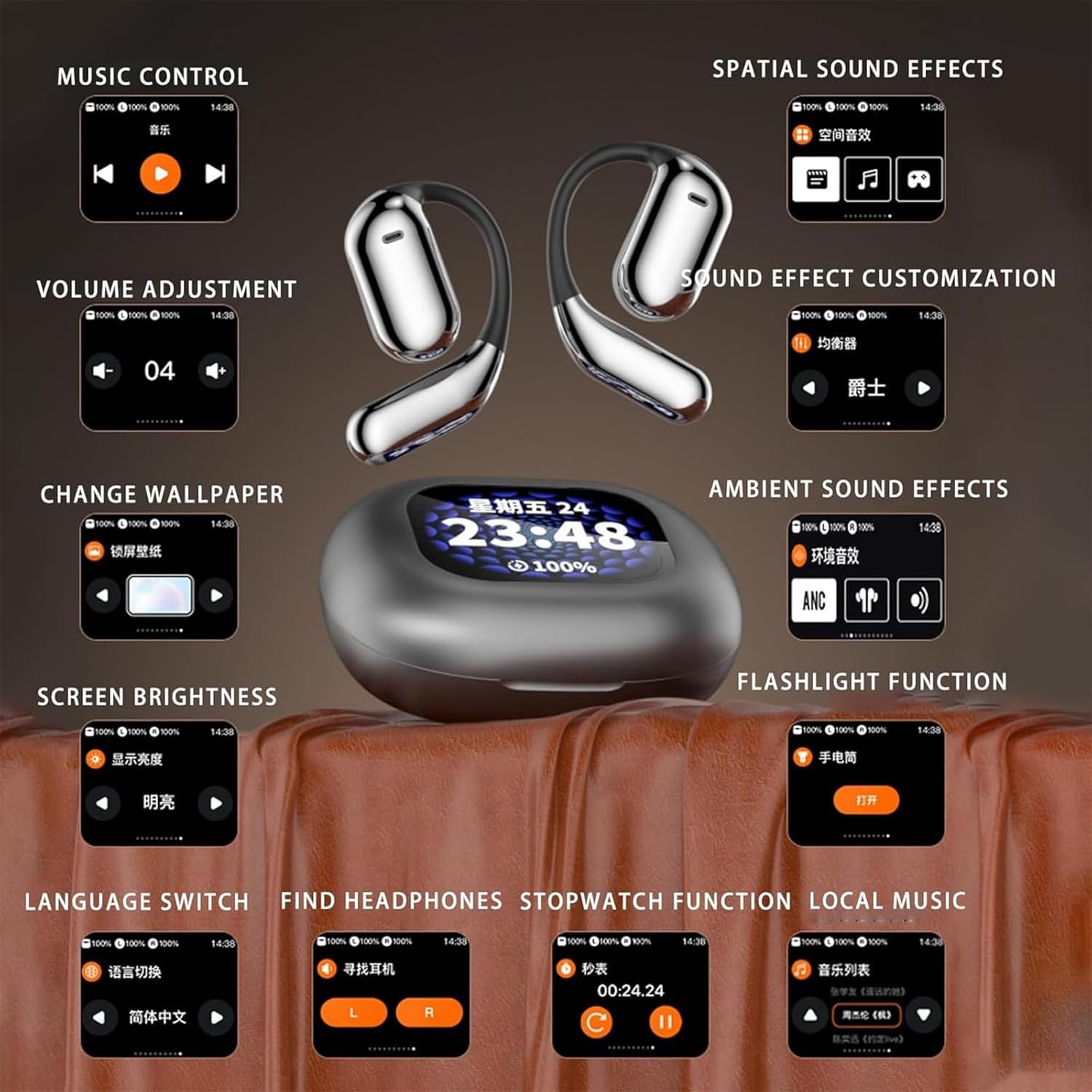
Figure 3.1: Touch Screen Interface Functions.
- Music Control: Play, pause, skip tracks directly from the screen.
- Volume Adjustment: Adjust playback volume.
- Change Wallpaper: Customize the screen background.
- Screen Brightness: Adjust the display brightness.
- Language Switch: Change the interface language.
- Find Headphones: Locate misplaced earbuds (requires them to be powered on and within range).
- Stopwatch Function: Use the built-in stopwatch.
- Local Music: Access and play music stored on a TF card.
- Spatial Sound Effects: Enable or disable spatial audio.
- Sound Effect Customization: Adjust equalizer settings or select preset sound profiles.
- Ambient Sound Effects: Control ambient sound pass-through or noise reduction (ANC).
- Flashlight Function: Activate a small flashlight on the case.
3.3. Music Playback
3.3.1. Bluetooth Streaming
Once paired with your device, music will stream wirelessly to the earbuds. Use your device's media controls or the touch screen on the charging case for playback.
3.3.2. TF Card Playback (Local Music)
The Earbuds Pro supports direct music playback from a TF (MicroSD) card inserted into the charging case.

Figure 3.2: TF Card Music Playback.
- Step 1: When the earbuds remain connected outside the compartment, tap the play/pause button and the loop icon below it to switch back and forth between phone music and SD music modes.
- Step 2: When switching to SD music mode, tap the directory icon on the right side of the loop key to view the song file directory in real-time.
- Step 3: Choose any music you like from the displayed list.
Note: The SD card function does not support hot swapping. Inserting and unplugging the SD card midway requires a restart to recognize it. When starting local music, both earbuds need to be removed from the smart case.
3.4. Language Translation
The Earbuds Pro are designed for real-time language translation. This feature typically requires a dedicated translation application on your paired smartphone.
- Download and install the recommended translation app (refer to product packaging or manufacturer's website for app details).
- Follow the app's instructions to initiate translation sessions. The earbuds will act as your audio input and output for translated conversations.
3.5. Call Management
When connected to a smartphone, you can manage calls using the earbuds.
- Answer/End Call: Tap the touch control area on either earbud once.
- Reject Call: Press and hold the touch control area for 2 seconds.
4. Maintenance
4.1. Cleaning
- Use a soft, dry, lint-free cloth to clean the earbuds and charging case.
- Do not use abrasive cleaners, alcohol, or chemical solvents.
- Keep the charging contacts on both the earbuds and the case clean and dry.
4.2. Storage
- When not in use, store the earbuds in their charging case to protect them and keep them charged.
- Store in a cool, dry place away from direct sunlight and extreme temperatures.
4.3. Battery Care
- To prolong battery life, avoid fully discharging the earbuds and case frequently.
- Charge the device regularly, even if not in frequent use.
5. Troubleshooting
| Problem | Possible Cause | Solution |
|---|---|---|
| Earbuds not pairing | Low battery; Out of range; Not in pairing mode; Bluetooth disabled on device. | Charge earbuds; Move closer to device; Ensure case is open for pairing; Enable Bluetooth on device; Forget device and re-pair. |
| No sound from earbuds | Volume too low; Not connected; Incorrect audio output selected on device. | Increase volume; Check Bluetooth connection; Select Earbuds Pro as audio output. |
| Charging case not charging | Faulty cable/adapter; Dirty charging port. | Try a different USB cable and power adapter; Clean charging port gently. |
| TF card music not playing | SD card not inserted correctly; Earbuds not removed from case; Card not recognized after hot-swap. | Ensure SD card is fully inserted; Remove both earbuds from case; Restart the device if card was hot-swapped. |
6. Specifications
- Model Number: HSJN
- ASIN: B0F4KTMDWH
- Bluetooth Version: 5.4
- Battery Life (Earbuds): Approximately 8 hours (single endurance)
- Total Battery Life (with Charging Case): Approximately 30-40 hours (based on 800mAh case capacity)
- Charging Time: Approximately 1 hour (for full charge of case and earbuds)
- Driver Size: φ16.2mm Ultra Large Drive Unit
- Diaphragm: Composite Titanium Nanodiaphragm
- Audio Technology: AAC Acoustic Cavity, Broadband Crystal Oscillator Molecular Diaphragm
- Features: Full-color Touch Screen, Active Noise Reduction (ANC), TF Card Output, Real-time Language Translation (app-dependent)
- Manufacturer: YDFC0031
- Date First Available: July 30, 2025
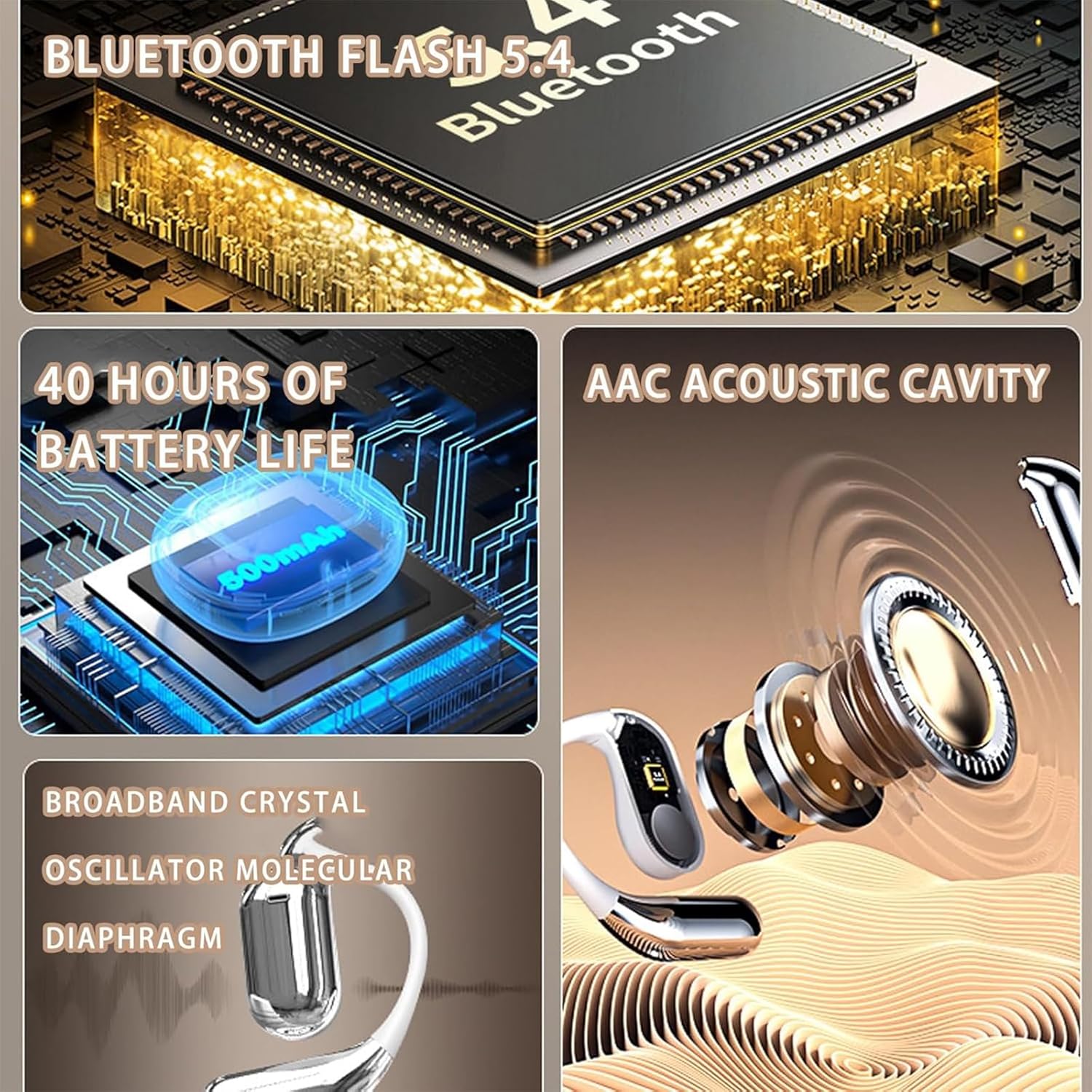
Figure 6.1: Key Technical Specifications.

Figure 6.2: Internal Component Diagram, showing the 16.2mm ultra large drive unit.
7. Warranty and Support
For warranty information and customer support, please refer to the warranty card included with your product or visit the manufacturer's official website. Keep your proof of purchase for any warranty claims.
If you encounter issues not covered in this manual, please contact customer support through the details provided on the product packaging or manufacturer's website.


