
1. Product Overview
The JOYO DC-15B is a versatile 15W digital combo amplifier designed for both guitar and bass, featuring built-in effects, a drum machine, and Bluetooth connectivity. This bundle includes the CM-04 15ft premium noise-free instrument cable, providing a complete solution for practice, recording, and live performance.

Image 1.1: The JOYO DC-15B amplifier shown with a bass guitar, highlighting its use as a practice amplifier for both bass and guitar with Bluetooth 5.0 connectivity.
Key Features:
- 15W Digital Combo Amp: Provides ample power for practice and small performances.
- 8 Amp Voicings: Offers a range of tones from clean to heavy overdrive.
- 4 Modulation Effects: Includes chorus, delay, phaser, and tremolo for sound shaping.
- Built-in Drum Machine: Features 10 rhythmic patterns with adjustable speed and volume for timing practice.
- Bluetooth Connectivity: Allows wireless audio streaming for backing tracks.
- CM-04 Noise-Free Cable: A 15ft (4.5m) instrument cable with gold-plated connectors for clear signal transmission.
- Portable Design: Compact wooden cabinet with a 5-inch custom speaker.
- Silent Practice: Headphone output for private monitoring.
- USB-C Live Streaming: For direct recording and streaming capabilities.

Image 1.2: The JOYO CM-04 instrument cable, illustrating its compatibility with electric guitars, acoustic guitars, bass guitars, keyboards, amplifiers, electronic drums, and mixers.
2. Setup Instructions
2.1 Unpacking and Initial Inspection
Carefully remove all components from the packaging. Inspect the amplifier and cable for any signs of damage. Ensure all listed items are present.
2.2 Powering the Amplifier
- Connect the provided power adapter to the DC IN port on the amplifier.
- Plug the power adapter into a suitable electrical outlet.
- Press the power switch to turn on the amplifier. The power indicator light will illuminate.
2.3 Connecting Your Instrument
- Ensure the amplifier's volume is set to minimum.
- Connect one end of the CM-04 instrument cable to your guitar or bass.
- Connect the other end of the CM-04 instrument cable to the 1/4" instrument input jack on the amplifier.

Image 2.1: Detailed view of the JOYO CM-04 instrument cable's nickel-plated, rust-proof, and wear-resistant plugs, featuring a detachable design and anti-slip texture for durability and ease of use.
2.4 Bluetooth Pairing
- Turn on the amplifier.
- Activate Bluetooth on your audio device (smartphone, tablet, etc.).
- Search for available devices and select "JOYO DC-15B".
- Once paired, you can stream audio wirelessly through the amplifier.
3. Operating Instructions
3.1 Amplifier Controls

Image 3.1: The control panel of the JOYO DC-15B amplifier, showing knobs for 9 amp tones, drum machine speed and volume, and multiple effects.
- Volume: Adjusts the overall output level of the amplifier.
- Amp Tones: A rotary knob to select from 8 different amplifier voicings (e.g., Clean, Drive, Higain, Heavy, O.D., Sub, Bright, Normal). Turn the knob to cycle through the tones.
- Effects: A rotary knob to select and adjust 4 modulation effects (Chorus, Flanger, Phaser, Tremolo) and a Reverb/Space effect. Turn to select, press to activate/deactivate.
- Drum Machine:
- Style (Tap/Rotate): Rotate to select one of 10 drum patterns. Press to set tempo (tap tempo).
- Speed/Volume: Adjusts the tempo and volume of the selected drum pattern.
3.2 Auxiliary Input and Headphone Output
- AUX-in: Connect an external audio source (e.g., MP3 player) to the 3.5mm AUX-in jack to play along with backing tracks.
- Headphone Output: Connect headphones to the 3.5mm headphone jack for silent practice. The main speaker will be muted when headphones are connected.

Image 3.2: The JOYO DC-15B amplifier demonstrating its 3.5mm headphone jack for private listening and USB-C port for live streaming and high-quality music recording via OTG.
3.3 USB-C for Recording and Live Streaming
The USB-C port allows for direct connection to a computer or mobile device for high-quality audio recording and live streaming. Use a compatible USB-C cable (not included) and ensure your device supports OTG (On-The-Go) functionality for direct connection.
3.4 Footswitch Control (Optional)
The DC-15B supports an optional external footswitch (sold separately) for enhanced performance control, such as engaging a looper function or switching effects. Refer to the footswitch's manual for specific connection and operation details.

Image 3.3: A foot engaging an optional JOYO footswitch, demonstrating its use for enhanced performance control with the DC-15B amplifier.
4. Maintenance
4.1 Cleaning
- Disconnect the amplifier from power before cleaning.
- Use a soft, dry cloth to wipe the exterior of the amplifier.
- Do not use liquid cleaners, abrasive materials, or solvents, as these can damage the finish and internal components.
4.2 Storage
- Store the amplifier in a cool, dry place away from direct sunlight and extreme temperatures.
- Avoid storing in areas with high humidity.
4.3 Cable Care
- Avoid sharp bends or kinks in the CM-04 cable.
- When coiling the cable, do so loosely to prevent internal wire damage.
- Keep connectors clean and free of debris.
4.4 Battery Charging (if applicable)
If your DC-15B model includes a rechargeable battery, ensure it is charged regularly to maintain optimal performance. Use only the provided power adapter for charging. Avoid overcharging or completely draining the battery frequently to prolong its lifespan.
5. Troubleshooting
5.1 No Sound from Amplifier
- Ensure the amplifier is powered on and the power indicator is lit.
- Check that the instrument cable is securely connected to both your instrument and the amplifier.
- Verify that the amplifier's volume knob is turned up.
- If headphones are connected, disconnect them to enable the main speaker.
- Test with a different instrument cable or instrument to rule out faulty equipment.
5.2 Bluetooth Connection Issues
- Ensure the amplifier is within range of your Bluetooth device.
- Turn off and on the amplifier's Bluetooth function, then try pairing again.
- Forget the device on your audio source and re-pair.
- Ensure no other devices are currently connected to the amplifier via Bluetooth.
5.3 Unwanted Noise or Hum
- Ensure all cables, especially the instrument cable, are fully inserted and not damaged.
- Try plugging the amplifier into a different power outlet.
- Keep the amplifier away from other electronic devices that may cause interference.
- If using single-coil pickups, some hum is normal; try adjusting your playing position.
6. Specifications
| Feature | Specification |
|---|---|
| Amp Power | 15W RMS |
| Speaker | 5-inch custom driver |
| Amp Models | 8 (Clean to Overdrive) |
| Modulation Effects | 4 (Chorus, Flanger, Phaser, Tremolo) |
| Other Effects | Reverb/Space |
| Drum Rhythms | 10 patterns |
| Inputs | 1/4" Instrument Input, AUX-in (3.5mm) |
| Outputs | Headphone Output (3.5mm) |
| Connectivity | Bluetooth, USB-C (for recording/streaming) |
| Cable Length (CM-04) | 15ft (4.5m) |
| Cable Connectors | Gold-plated, noise-shielded design |
| Dimensions (Approx.) | 9.25 inches (W) x 7.28 inches (H) x 8.85 inches (D) |
| Battery Capacity (if applicable) | 4400mAh (up to 4 hours playtime) |
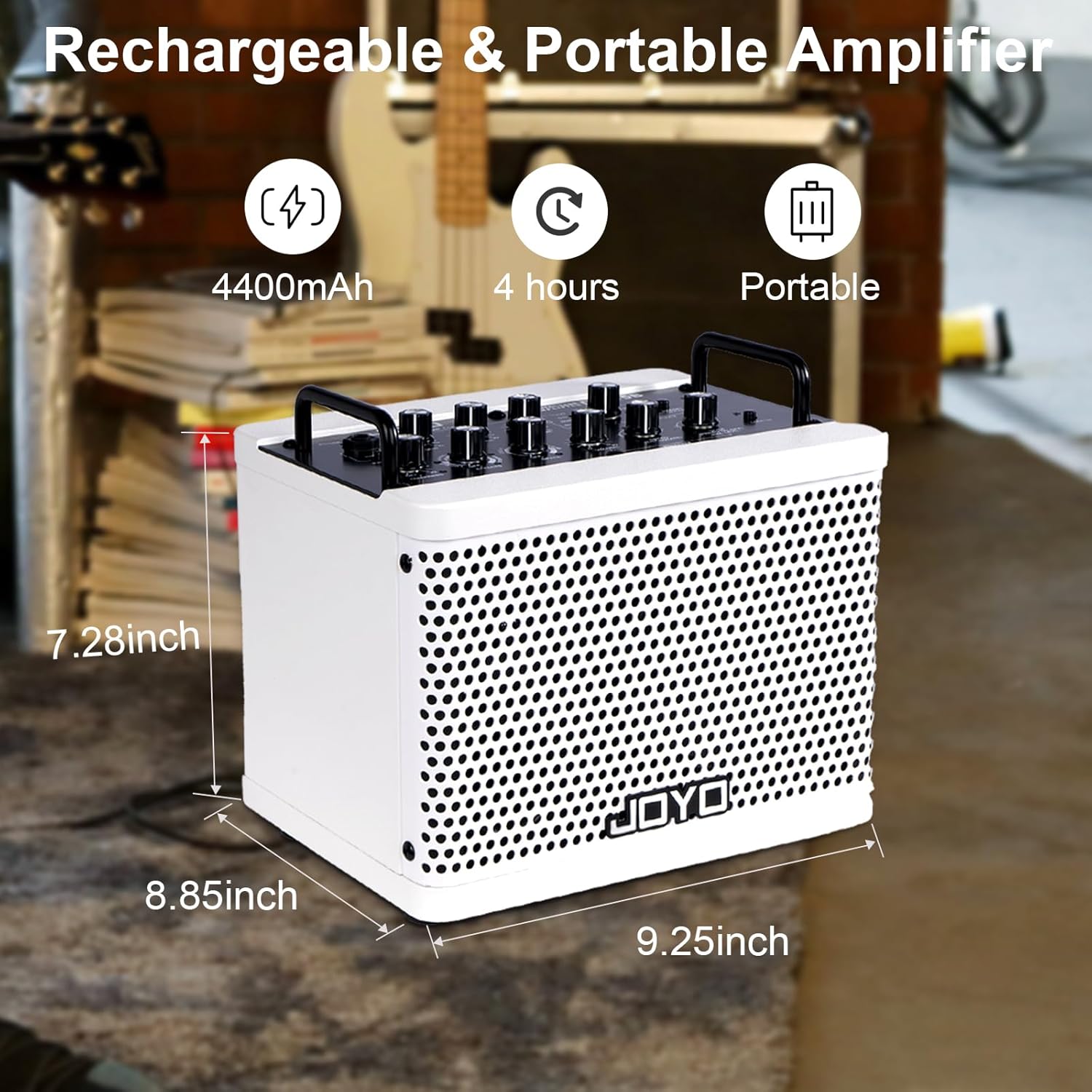
Image 6.1: The JOYO DC-15B amplifier displaying its approximate dimensions (9.25" W x 7.28" H x 8.85" D) and indicating its rechargeable 4400mAh battery provides up to 4 hours of portable use.
7. Warranty Information
JOYO products are manufactured to high-quality standards. This product is covered by a limited warranty against defects in materials and workmanship. The specific terms and duration of the warranty may vary by region and retailer. Please retain your proof of purchase for warranty claims. For detailed warranty information, refer to the documentation provided with your purchase or contact JOYO customer support.
8. Support
For further assistance, technical support, or inquiries regarding your JOYO DC-15B amplifier, please visit the official JOYO website or contact their customer service department. Contact information can typically be found on the product packaging or the brand's official online presence.
Online Resources: JOYO Official Store on Amazon


