
1. Introduction
The Perlegear Sonicbeam Speaker Stands are designed to elevate your speakers to an optimal listening height while providing customizable RGB ambient lighting. These stands feature a robust aluminum construction, integrated cable management, and compatibility with various speaker models, including Sonos Era 300, Era 100, and One SL.
2. Package Contents
Please verify that all components are present before beginning assembly:
- Speaker Stand Pillars (2)
- Base Plates (2)
- Speaker Trays (2) - Includes 1 custom tray for Sonos Era 300 and 1 universal flat tray
- Mounting Hardware Kit
- Remote Control for RGB Lighting
- Power Adapters (2)
- Rubber Feet (for hard floors)
- Carpet Spikes (for carpeted floors)
- User Manual
3. Setup and Assembly
Follow these steps to assemble and set up your Perlegear Sonicbeam Speaker Stands:
- Attach Base to Pillar: Securely attach each base plate to the bottom of a speaker stand pillar using the provided screws and tools. Ensure the base is stable.
- Install Speaker Tray:
- For Sonos Era 300: Use the custom-fit tray. Align the speaker with the tray and secure it if necessary according to the speaker's instructions.
- For Sonos Era 100, One SL, or other universal speakers: Use the flat universal tray. Place your speaker securely on the tray.

Image: Speaker stand with a custom tray designed for Sonos Era 300 speakers.

Image: Speaker stand featuring a universal flat tray, suitable for various speaker models.
- Cable Management: Route the speaker's power cable and any audio cables through the internal cable channel within the stand pillar. This keeps wires organized and out of sight. Ensure cables are not pinched.

Image: Diagram illustrating the internal cable channels for discreet wire management.
- Positioning and Stability:
- For hard floors: Attach the rubber feet to the bottom of the base plate to prevent scratches and ensure stability.
- For carpeted floors: Attach the carpet spikes to the bottom of the base plate for a secure grip.

Image: Close-up of the speaker stand base, highlighting its stability and 22 lbs load capacity.
- Connect Power: Plug the stand's power adapter into a wall outlet.
Setup Video Guide
Video: A detailed guide demonstrating the assembly and setup process for the Perlegear Sonicbeam Speaker Stand.
4. Operating the RGB Lighting
The Perlegear Sonicbeam Speaker Stands feature integrated RGB lighting with multiple modes and control options.
Lighting Modes
- Pure Color: Displays a single, consistent color.
- Rhythm Pulse: Lighting changes with a subtle, pulsing motion.
- Music Sync: Lighting reacts to the rhythm and dynamics of your music.
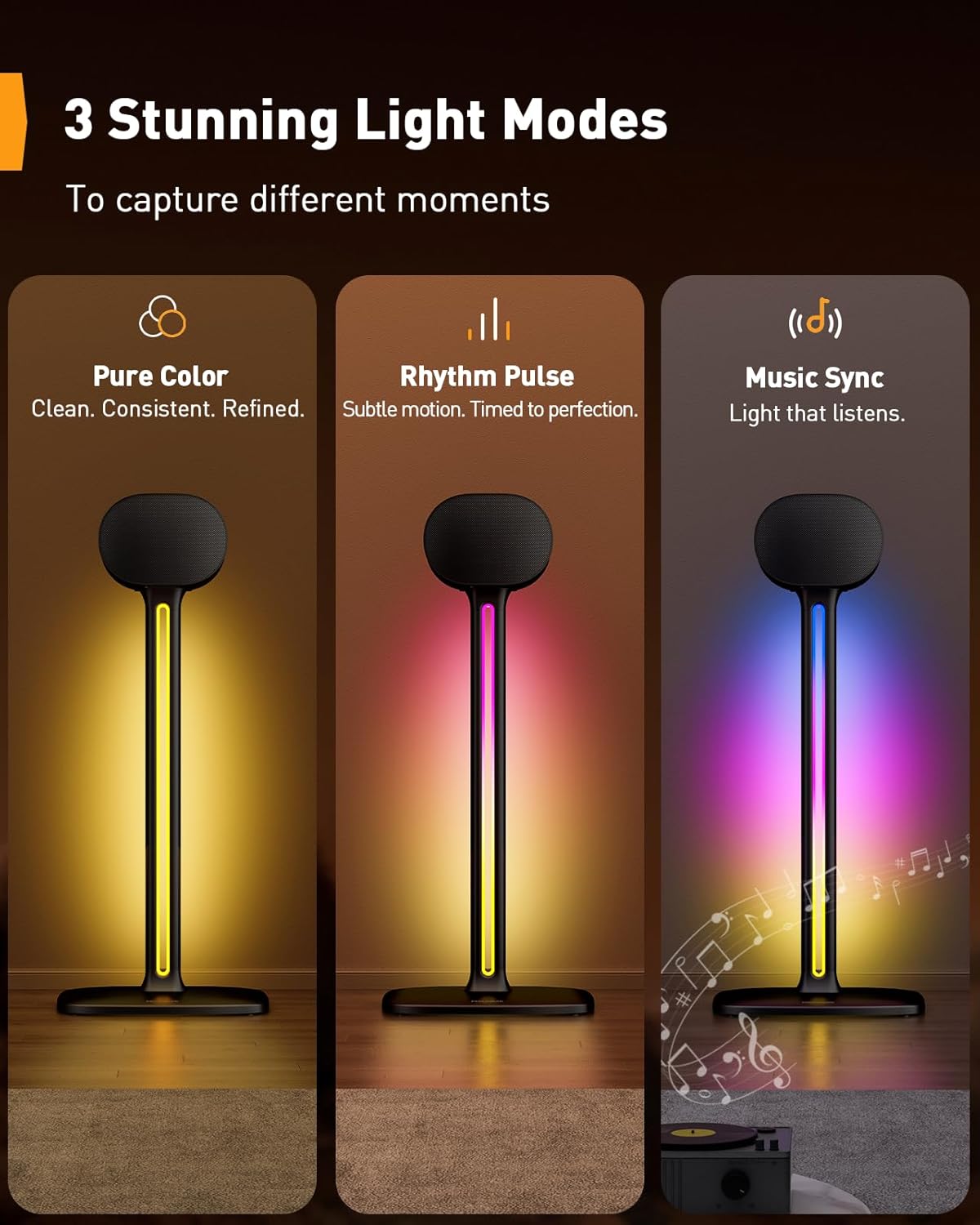
Image: Visual representation of the three distinct RGB lighting modes available.
Control Options
You can control the RGB lighting using either the included remote control or a dedicated smartphone application.
- Remote Control: Use the provided remote to power on/off, change colors, adjust brightness, select modes, and set a timer.
- Smartphone App: Download the official Perlegear app (refer to packaging for QR code or app store search). The app offers advanced control over color, speed, brightness, and timing functions.

Image: Screenshot of the smartphone application interface for controlling the RGB lighting features.
Operation Video Guide
Video: Demonstration of the Perlegear Sonicbeam Speaker Stand's RGB lighting features and various modes.
5. Maintenance
To ensure the longevity and optimal performance of your speaker stands, follow these maintenance guidelines:
- Cleaning: Wipe the stands with a soft, dry cloth to remove dust. For stubborn marks, use a slightly damp cloth and mild detergent, then dry thoroughly. Avoid abrasive cleaners or solvents.
- Stability Check: Periodically check all screws and connections to ensure they remain tight. Re-tighten if necessary to maintain stability.
- Cable Inspection: Regularly inspect the power cables and speaker wires for any signs of wear or damage. Replace damaged cables immediately.
6. Troubleshooting
If you encounter issues with your Perlegear Sonicbeam Speaker Stands, refer to the following common problems and solutions:
- RGB Lights Not Working:
- Ensure the power adapter is securely plugged into both the stand and a working wall outlet.
- Check if the remote control's battery needs replacement.
- Verify that the stand is powered on via the remote or app.
- Intermittent Light Connection / Bad Connection:
- Unplug and re-plug all power connections firmly.
- Ensure there are no kinks or damage to the power cable.
- If using the app, ensure your device's Bluetooth is enabled and the app is properly connected to the stands.
- Stand Instability:
- Confirm all assembly screws are tightened.
- Ensure the correct feet (rubber for hard floors, spikes for carpet) are installed and properly seated.
- Verify the speaker is centered and balanced on the tray.
7. Specifications
| Feature | Detail |
|---|---|
| Brand | Perlegear |
| Material | Aluminum |
| Color | Black |
| Finish Type | Smooth |
| Load Capacity | 22 pounds (10 kg) per stand |
| Unit Count | 2 Count (Pair) |
| UPC | 840478822496 |
| ASIN | B0F4KKSG8M |
| GTIN | 840478822496 |

Image: Speaker stand illustrating key dimensions for placement and ergonomic height.
8. Warranty and Support
Perlegear is committed to customer satisfaction. If you have any questions or concerns regarding your product, please contact us. We serve every customer with the most sincere attitude.
For warranty claims or technical assistance, please refer to the contact information provided on the product packaging or visit the official Perlegear website.


