
EvoFox One S - Clamp
EvoFox One S Controller Clamp Instruction Manual
Model: One S - Clamp
Introduction
Thank you for choosing the EvoFox One S Controller Clamp. This accessory is designed to securely attach your smartphone to your EvoFox One S controller, enhancing your mobile gaming experience. This manual provides essential information on how to set up, operate, and maintain your clamp. Please read these instructions carefully before use.
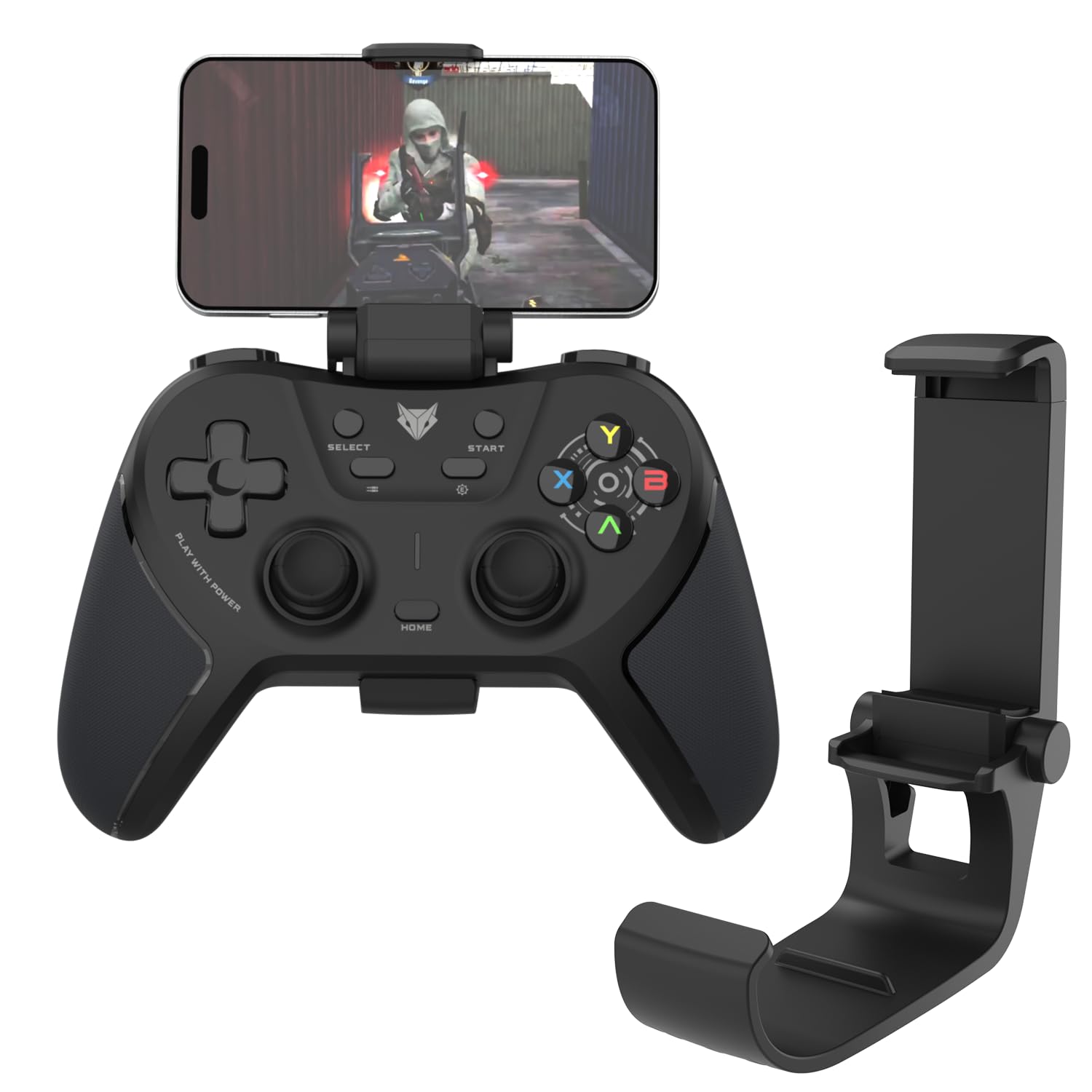
Image: The EvoFox One S Controller Clamp, shown in its folded state, ready for attachment.
Setup Instructions
Follow these steps to attach the clamp to your controller and secure your smartphone.
- Attaching to the Controller: Gently align the clamp's base with the top center of your EvoFox One S controller. The clamp is designed to snap securely into place without requiring tools. Ensure it is firmly seated. This clamp is compatible with the EvoFox One S Controller and upcoming EvoFox Universal Series controllers.
- Inserting Your Smartphone: Extend the upper arm of the clamp. Carefully place your smartphone between the rubberized grips of the clamp. The extendable design accommodates various phone sizes. Ensure your phone is centered and held securely by the premium rubber gasket to prevent scratches and provide stability.

Image: An EvoFox One S controller with the clamp attached, holding a smartphone in landscape orientation.
Operating the Clamp
The EvoFox One S Controller Clamp is designed for ease of use during mobile gaming sessions.
- Adjustable Viewing Angle: The clamp features a 160° adjustable hinge, allowing you to set your smartphone to the optimal viewing angle for comfortable gameplay. Adjust the angle by gently tilting your phone forward or backward while it is secured in the clamp.
- Portability: The clamp is lightweight (approximately 34g) and foldable. When not in use, remove your phone and fold the clamp for easy storage and transport in a pocket or bag.

Image: A person holding an EvoFox One S controller with the clamp and smartphone attached, demonstrating comfortable handheld gaming.
Maintenance
To ensure the longevity and optimal performance of your EvoFox One S Controller Clamp, follow these simple maintenance guidelines:
- Cleaning: Wipe the clamp with a soft, dry, or slightly damp cloth. Avoid using harsh chemicals or abrasive cleaners, as these can damage the ABS plastic and rubber components.
- Storage: Store the clamp in a cool, dry place away from direct sunlight and extreme temperatures when not in use.
- Inspection: Periodically check the rubber gaskets for any signs of wear or damage. Ensure the hinge mechanism operates smoothly.
Troubleshooting
If you encounter any issues with your EvoFox One S Controller Clamp, refer to the following common solutions:
| Problem | Possible Cause | Solution |
|---|---|---|
| Clamp does not attach securely to the controller. | Incorrect alignment or incompatible controller model. | Ensure the clamp is aligned correctly with the EvoFox One S controller. This clamp is specifically designed for the EvoFox One S and upcoming EvoFox Universal Series controllers. |
| Smartphone is not held securely or slips. | Phone not centered, clamp not fully extended, or rubber gaskets worn. | Ensure the smartphone is centered between the rubberized grips. Fully extend the clamp to accommodate the phone's width. Inspect rubber gaskets for damage; contact support if worn. |
| Adjustable angle is stiff or loose. | Dust accumulation or normal wear. | Clean the hinge area. If the issue persists, it may be due to normal wear; the hinge is designed for a specific tension. |
Specifications
- Model: One S - Clamp
- Material: ABS Plastic
- Weight: Approximately 34 grams
- Dimensions (LxWxH): 8.5 x 4.3 x 4.2 cm (folded)
- Adjustable Angle: Up to 160 degrees
- Compatibility: EvoFox One S Controller and upcoming EvoFox Universal Series controllers
- Features: Extendable grip, premium rubber gasket, foldable design
- Country of Origin: China
- Manufacturer: Allied Electronics & Magnetics Private Limited
Warranty and Support
For warranty information and customer support, please refer to the official EvoFox website or contact your retailer. Keep your purchase receipt for warranty claims.
Manufacturer Contact:
Allied Electronics & Magnetics Private Limited
C-64/4, Okhla Phase - 2, New Delhi - 110020
For further assistance, you may visit the EvoFox Store on Amazon.
Ask a question about this manual
Ask about setup, troubleshooting, compatibility, parts, safety, or missing instructions. Manuals+ will review the question and use this page’s manual context to help answer it.